


The best Laravel packages save you weeks of work, but choosing them got harder: popular packages now have several major versions, some changed their Composer names, and a few need PHP 8.4. So I installed 15 packages into one fresh Laravel 13 app, ran a real example for each, and noted what broke.
This post replaces our 2018 list, Top 10 Packages for Extending Laravel. Some of its picks are no longer needed: Laravel Mix gave way to Vite, email verification is built in through the MustVerifyEmail contract, and the built-in make:view command replaces Artisan View. Debugbar, IDE Helper, Backup, Socialite and Spatie’s permission package made the list again.
We will use Laravel 13 (version 13.39 at the time of writing) with PHP 8.4. Laravel 13 also runs on PHP 8.3, but two packages here need 8.4.
Table of Contents
Prerequisites
- PHP 8.4 and Composer 2. On PHP 8.3, Composer installs older majors of the activity log (4.x) and the query builder (6.x), whose APIs differ from the code below.
- The
gd,exif,fileinfoandzipPHP extensions. - Basic knowledge of Laravel routes, Eloquent models and migrations.
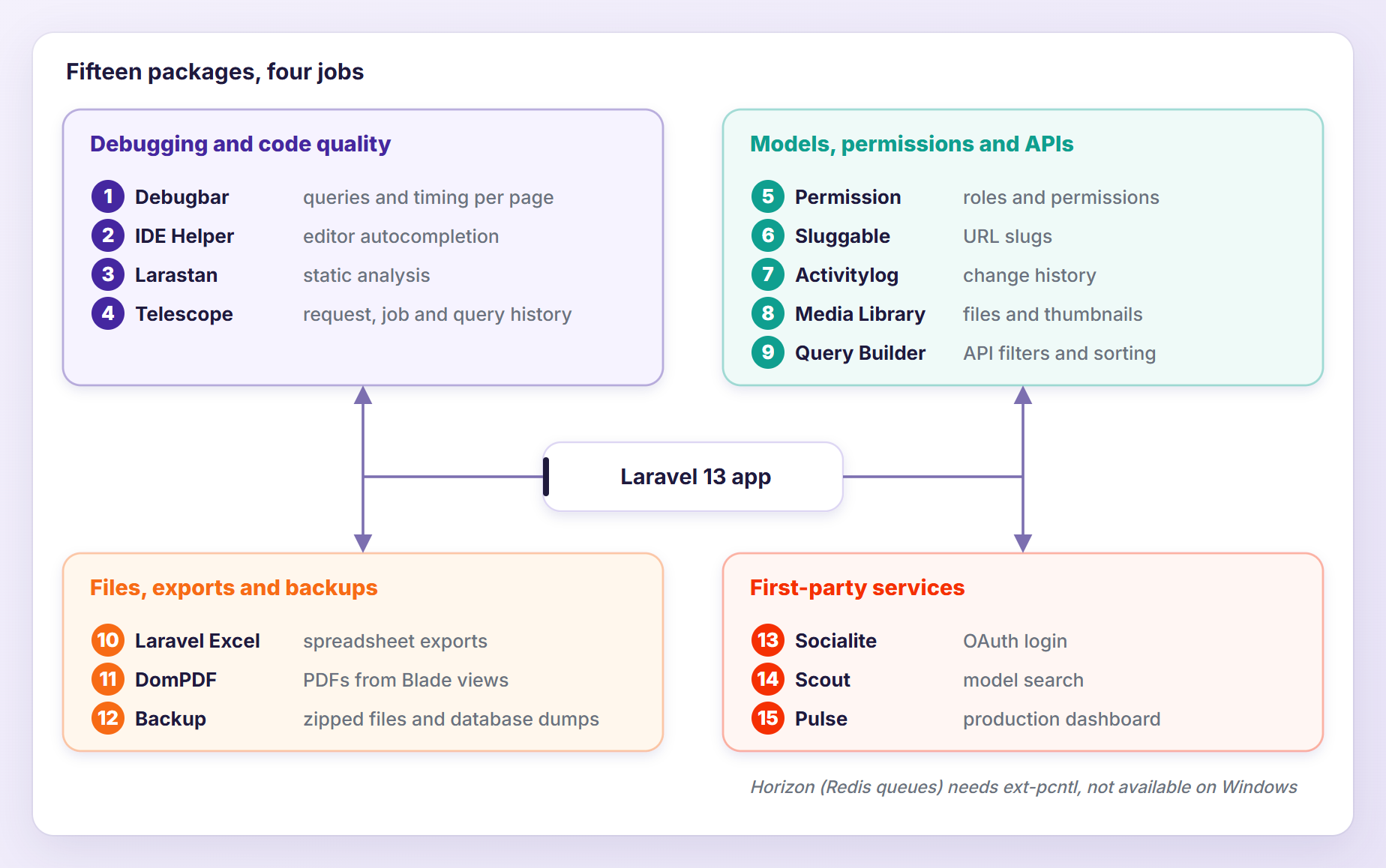
The Best Laravel Packages at a Glance
| # | Package | What it does | Version tested | License |
|---|---|---|---|---|
| 1 | fruitcake/laravel-debugbar | Debug toolbar with queries, views and timing | 4.4.4 | MIT |
| 2 | barryvdh/laravel-ide-helper | Autocompletion for facades and models | 3.7.0 | MIT |
| 3 | larastan/larastan | Static analysis that understands Laravel | 3.13.2 | MIT |
| 4 | laravel/telescope | Records requests, queries, jobs and exceptions | 5.26.0 | MIT |
| 5 | spatie/laravel-permission | Roles and permissions stored in the database | 8.3.2 | MIT |
| 6 | spatie/laravel-sluggable | Unique URL slugs generated from a field | 4.0.4 | MIT |
| 7 | spatie/laravel-activitylog | History of who changed which model | 5.1.3 | MIT |
| 8 | spatie/laravel-medialibrary | Files and image conversions attached to models | 11.23.10 | MIT |
| 9 | spatie/laravel-query-builder | API filtering and sorting from the query string | 7.3.6 | MIT |
| 10 | maatwebsite/excel | Excel and CSV exports and imports | 4.0.6 | MIT |
| 11 | barryvdh/laravel-dompdf | PDF files rendered from Blade views | 3.1.2 | MIT |
| 12 | spatie/laravel-backup | Zipped backups of files and databases | 10.3.3 | MIT |
| 13 | laravel/socialite | Login with GitHub, Google and other providers | 5.31.0 | MIT |
| 14 | laravel/scout | Search for Eloquent models | 11.9.0 | MIT |
| 15 | laravel/pulse | Performance dashboard for production | 1.8.1 | MIT |
Before installing, I checked Packagist: the newest release of all 15 declares Laravel 13 support. The table lists the versions I tested on Laravel 13.39, and several packages have shipped newer releases since.
Setting Up the Demo Store
All examples share one small online store. Create it first:
composer create-project laravel/laravel package-store
cd package-store
laravel new package-store works too, and the app uses SQLite out of the box. Generate a Product model with a migration and a factory:
php artisan make:model Product -mf
In the new migration in database/migrations, replace the Schema::create() call:
Schema::create('products', function (Blueprint $table) {
    $table->id();
    $table->string('name');
    $table->string('slug')->unique();
    $table->string('category');
    $table->decimal('price', 8, 2);
    $table->unsignedInteger('stock')->default(0);
    $table->timestamps();
});
Here is the finished app/Models/Product.php. Four packages add a piece to it, and their sections explain each one:
<?php

namespace App\Models;

use Database\Factories\ProductFactory;
use Illuminate\Database\Eloquent\Attributes\Fillable;
use Illuminate\Database\Eloquent\Factories\HasFactory;
use Illuminate\Database\Eloquent\Model;
use Laravel\Scout\Searchable;
use Spatie\Activitylog\Models\Concerns\LogsActivity;
use Spatie\Activitylog\Support\LogOptions;
use Spatie\Image\Enums\Fit;
use Spatie\MediaLibrary\HasMedia;
use Spatie\MediaLibrary\InteractsWithMedia;
use Spatie\MediaLibrary\MediaCollections\Models\Media;
use Spatie\Sluggable\Attributes\Sluggable;

#[Fillable(['name', 'category', 'price', 'stock'])]
#[Sluggable(from: 'name', to: 'slug')]
class Product extends Model implements HasMedia
{
    /** @use HasFactory<ProductFactory> */
    use HasFactory, InteractsWithMedia, LogsActivity, Searchable;

    /**
     * Get the attributes that should be cast.
     *
     * @return array<string, string>
     */
    protected function casts(): array
    {
        return [
            'price' => 'decimal:2',
            'stock' => 'integer',
        ];
    }

    /**
     * Log changes to the name, price and stock columns.
     */
    public function getActivitylogOptions(): LogOptions
    {
        return LogOptions::defaults()
            ->logOnly(['name', 'price', 'stock'])
            ->logOnlyDirty();
    }

    /**
     * Product photos, with a square 300 x 300 thumbnail.
     */
    public function registerMediaCollections(): void
    {
        $this->addMediaCollection('photos');
    }

    public function registerMediaConversions(?Media $media = null): void
    {
        $this->addMediaConversion('thumb')
            ->nonQueued()
            ->fit(Fit::Crop, 300, 300);
    }

    /**
     * The fields Scout searches.
     *
     * @return array<string, mixed>
     */
    public function toSearchableArray(): array
    {
        return [
            'name' => $this->name,
            'category' => $this->category,
        ];
    }
}
Create database/seeders/StoreSeeder.php with five products and two users. The roles come from the permission package (section 5):
<?php

namespace Database\Seeders;

use App\Models\Product;
use App\Models\User;
use Illuminate\Database\Seeder;
use Spatie\Permission\Models\Permission;
use Spatie\Permission\Models\Role;

class StoreSeeder extends Seeder
{
    /**
     * Seed a small store with products, roles and two users.
     */
    public function run(): void
    {
        foreach ([
            ['name' => 'Mechanical Keyboard', 'category' => 'peripherals', 'price' => 89.00, 'stock' => 14],
            ['name' => 'Wireless Mouse', 'category' => 'peripherals', 'price' => 29.50, 'stock' => 0],
            ['name' => '27-inch Monitor', 'category' => 'displays', 'price' => 249.00, 'stock' => 4],
            ['name' => 'USB-C Hub', 'category' => 'accessories', 'price' => 39.75, 'stock' => 22],
            ['name' => 'Laptop Stand', 'category' => 'accessories', 'price' => 45.00, 'stock' => 2],
        ] as $product) {
            Product::create($product);
        }

        Permission::create(['name' => 'export products']);

        Role::create(['name' => 'admin']);
        Role::create(['name' => 'manager'])->givePermissionTo('export products');

        User::factory()->create(['name' => 'Ava Admin', 'email' => 'ava@example.com'])->assignRole('admin');
        User::factory()->create(['name' => 'Max Manager', 'email' => 'max@example.com'])->assignRole('manager');
    }
}
Replace the contents of database/seeders/DatabaseSeeder.php. This drops the use WithoutModelEvents; line, which would switch off several packages while seeding (see Troubleshooting):
<?php

namespace Database\Seeders;

use Illuminate\Database\Seeder;

class DatabaseSeeder extends Seeder
{
    /**
     * Seed the application's database.
     */
    public function run(): void
    {
        $this->call(StoreSeeder::class);
    }
}
Install the packages you want with the commands at the start of each section, then run php artisan migrate --seed.
Debugging and Code Quality
1. Laravel Debugbar
Debugbar adds a toolbar to every page in local development, with the request’s queries, views, timeline and memory use. It is the quickest way to catch an N+1 query. Its README now uses the name fruitcake/laravel-debugbar, although the old barryvdh/laravel-debugbar name still receives the same releases:
composer require fruitcake/laravel-debugbar --dev
It switches itself on when APP_DEBUG is true and the environment is not production or testing. To give it a page, create app/Http/Controllers/ProductController.php:
<?php

namespace App\Http\Controllers;

use App\Models\Product;
use Illuminate\View\View;

class ProductController extends Controller
{
    public function index(): View
    {
        $products = Product::with('media')->orderBy('name')->get();

        return view('products.index', ['products' => $products]);
    }

    public function show(Product $product): View
    {
        return view('products.show', ['product' => $product]);
    }
}
Add both routes to routes/web.php:
use App\Http\Controllers\ProductController;

Route::get('/products', [ProductController::class, 'index'])->name('products.index');
Route::get('/products/{product:slug}', [ProductController::class, 'show'])->name('products.show');
And create resources/views/products/index.blade.php:
<!DOCTYPE html>
<html lang="en">
<head>
    <meta charset="utf-8">
    <title>Products | Demo Store</title>
    <style>
        body { margin: 0; font-family: system-ui, sans-serif; background: #f8fafc; color: #0f172a; }
        header { padding: 1rem 2rem; background: #fff; border-bottom: 1px solid #e2e8f0; }
        main { max-width: 60rem; margin: 2rem auto; padding: 0 1rem; display: grid; grid-template-columns: repeat(auto-fill, minmax(10rem, 1fr)); gap: 1rem; }
        article { background: #fff; border: 1px solid #e2e8f0; border-radius: .75rem; overflow: hidden; }
        article img { display: block; width: 100%; aspect-ratio: 1; object-fit: cover; background: #e2e8f0; }
        article div { padding: .75rem; }
        article a { color: inherit; text-decoration: none; font-weight: 600; }
        .price { margin: .25rem 0 0; color: #dc2626; }
    </style>
</head>
<body>
    <header><strong>Demo Store</strong></header>

    <main>
        @foreach ($products as $product)
            <article>
                <img src="{{ $product->getFirstMediaUrl('photos', 'thumb') }}" alt="{{ $product->name }}">
                <div>
                    <a href="{{ route('products.show', $product) }}">{{ $product->name }}</a>
                    <p class="price">${{ $product->price }}</p>
                </div>
            </article>
        @endforeach
    </main>
</body>
</html>
My first index() had no with('media'), and the Queries tab showed the cost: one query for the products, then one media query per card:
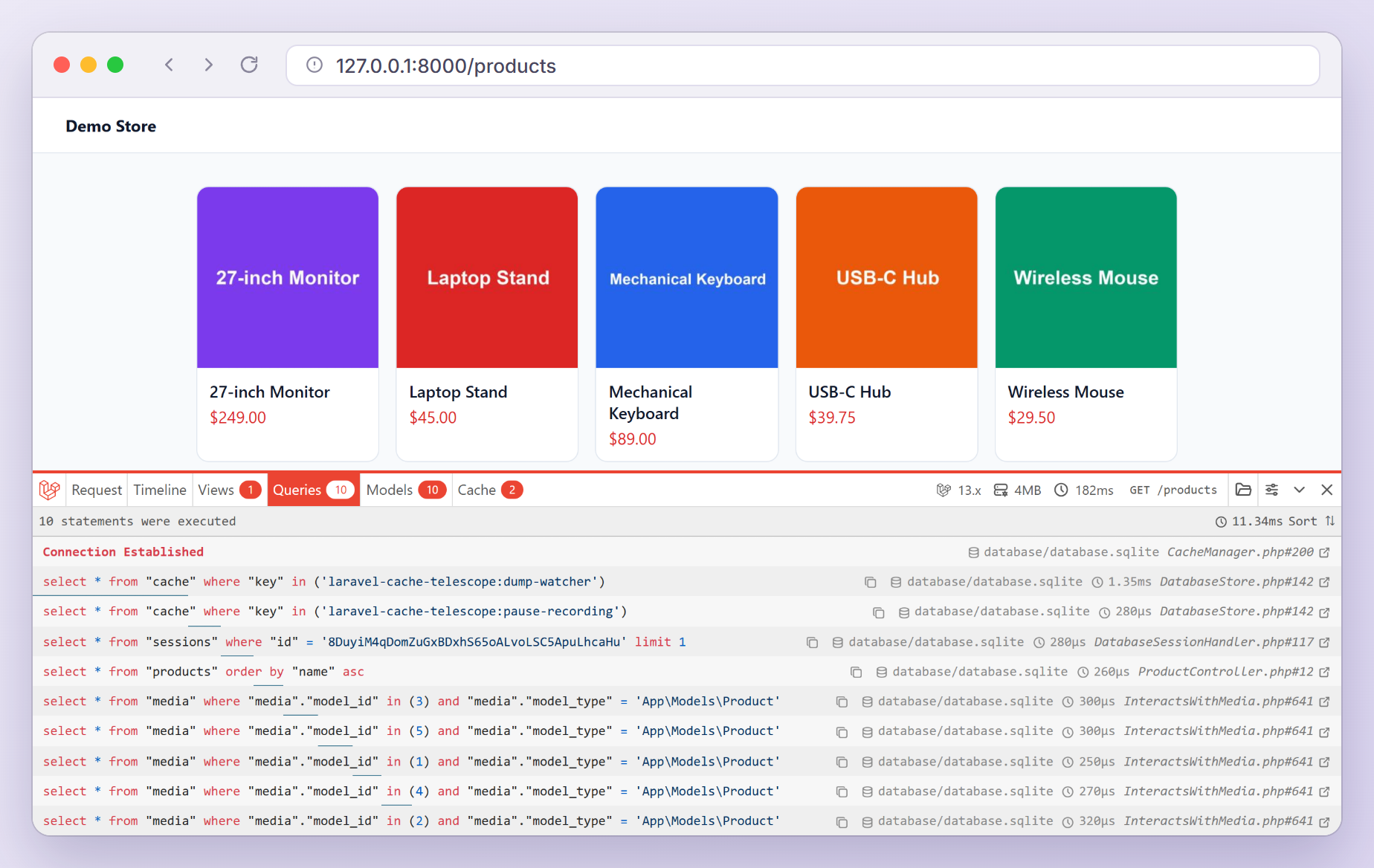
With with('media'), the five media queries became one where "media"."model_id" in (1, 2, 3, 4, 5) query, and the request dropped from 10 statements to 6 (the rest are session and cache queries).
When not to use it: never on a public site. The README warns that it leaks data from stored requests by design, so keep it in require-dev.
2. Laravel IDE Helper
Facades, model columns and Eloquent’s magic where methods are invisible to editors, so autocompletion fails on them. IDE Helper writes PHPDoc files that describe them:
composer require barryvdh/laravel-ide-helper --dev
php artisan ide-helper:generate
php artisan ide-helper:models --nowrite
The first command wrote _ide_helper.php, about 1 MB of facade docblocks. The second reads each model’s table, so it needs a working database connection, and --nowrite saves the result in _ide_helper_models.php instead of editing your models. Part of what it generated for Product, including the relationships the Spatie traits add:
 * @property string $slug
 * @property numeric $price
 * @property-read \Illuminate\Database\Eloquent\Collection<int, \Spatie\Activitylog\Models\Activity> $activitiesAsSubject
 * @property-read \Spatie\MediaLibrary\MediaCollections\Models\Collections\MediaCollection<int, \Spatie\MediaLibrary\MediaCollections\Models\Media> $media
 * @method static \Illuminate\Database\Eloquent\Builder<static>|Product whereSlug($value)
When not to use it: the files are snapshots that go stale after each migration until you regenerate them (the README shows how to run the commands from Composer’s post-update-cmd). If your editor already has a Laravel plugin that resolves facades and models, you can skip it.
3. Larastan
Larastan is PHPStan with a Laravel extension: it finds bugs without running your code, and it reads your migrations to learn each model’s columns:
composer require larastan/larastan --dev
Create phpstan.neon in the project root:
includes:
    - vendor/larastan/larastan/extension.neon

parameters:
    paths:
        - app/
    level: 5
To test it, I added a query with a misspelled column ($product->categroy) to ProductController::show() and ran the analysis:
vendor/bin/phpstan analyse
 ------ ---------------------------------------------------------------------------------------
  Line   Http\Controllers\ProductController.php
 ------ ---------------------------------------------------------------------------------------
  19     Access to an undefined property App\Models\Product::$categroy.
 ------ ---------------------------------------------------------------------------------------

 [ERROR] Found 1 error
After the fix it printed [OK] No errors. My first run also flagged nonQueued() called after fit(), because the media library forwards fit() through a magic method and PHPStan loses the return type. Calling nonQueued() first, as in the model above, avoids it.
When not to use it: level 5 can bury an old codebase in errors on day one. Start lower, or record existing errors with --generate-baseline and hold new code to the standard.
4. Laravel Telescope
Telescope records requests, queries, model events, mail, exceptions and more in a dashboard at /telescope. Unlike Debugbar, it also captures queued jobs, scheduled tasks and Artisan commands, which never render a page:
composer require laravel/telescope
php artisan telescope:install
php artisan migrate
telescope:install publishes the config, a migration and app/Providers/TelescopeServiceProvider.php, which it registers in bootstrap/providers.php. Outside the local environment, the viewTelescope gate in that provider controls access.
The rows add up quickly: three page views created 25 entries, 13 of them queries. Schedule the prune command in routes/console.php (with use Illuminate\Support\Facades\Schedule; at the top):
Schedule::command('telescope:prune')->daily();
It deletes entries older than 24 hours by default. With --hours=0 it cleared everything, including entries for my Artisan commands:
30 entries pruned.
When not to use it: on a busy production server every recorded request costs database writes, so filter what it records or keep it local (the Telescope documentation covers a local-only install).
Models, Permissions and APIs
5. Spatie Laravel Permission
Gates and policies suit rules that live in code. When admins should manage roles from a dashboard, store them in the database with spatie/laravel-permission. Version 8 supports Laravel 12 and 13:
composer require spatie/laravel-permission
php artisan vendor:publish --provider="Spatie\Permission\PermissionServiceProvider"
php artisan migrate
The publish command copies config/permission.php and the migration for the role and permission tables. Add the HasRoles trait to app/Models/User.php:
use Spatie\Permission\Traits\HasRoles;

// ...

    use HasFactory, HasRoles, Notifiable;
The package ships route middleware but registers no aliases for it, so add them to the withMiddleware() call in bootstrap/app.php:
use Spatie\Permission\Middleware\PermissionMiddleware;
use Spatie\Permission\Middleware\RoleMiddleware;

// ...

    ->withMiddleware(function (Middleware $middleware): void {
        $middleware->alias([
            'role' => RoleMiddleware::class,
            'permission' => PermissionMiddleware::class,
        ]);
    })
The store seeder gave the manager role the export products permission. In Tinker:
use App\Models\User;

$max = User::firstWhere('email', 'max@example.com');

$max->getRoleNames()->all();
// ['manager']

$max->can('export products');
// true

User::firstWhere('email', 'ava@example.com')->can('export products');
// false
Ava is an admin, but a role only grants the permissions you attach to it. Because permissions are registered on Laravel’s gate, can() works, and section 10 protects a route with the permission: middleware.
When not to use it: a single is_admin flag or a few fixed rules are simpler as a policy.
6. Spatie Laravel Sluggable
A URL like /products/usb-c-hub reads better than /products/4. spatie/laravel-sluggable fills a slug column when a model is created or updated and keeps it unique. Version 4 added a #[Sluggable] attribute, so the common case needs no trait or options method:
composer require spatie/laravel-sluggable
Nothing to publish or migrate: the slug column and this attribute are all it needs:
#[Sluggable(from: 'name', to: 'slug')]
class Product extends Model implements HasMedia
In Tinker, a second “USB-C Hub” gets a suffix, and a rename regenerates the slug:
use App\Models\Product;

$hub = Product::create(['name' => 'USB-C Hub', 'category' => 'accessories', 'price' => 54.00, 'stock' => 8]);

$hub->slug;
// 'usb-c-hub-1'

$hub->update(['name' => 'USB-C Hub Pro']);

$hub->slug;
// 'usb-c-hub-pro'
The products.show route from section 1 binds {product:slug}, so Laravel looks products up by slug instead of ID:
Route::get('/products/{product:slug}', [ProductController::class, 'show'])->name('products.show');
Give it a minimal resources/views/products/show.blade.php:
<!DOCTYPE html>
<html lang="en">
<head>
    <meta charset="utf-8">
    <title>{{ $product->name }} | Demo Store</title>
</head>
<body>
    <h1>{{ $product->name }}</h1>
    <p>${{ $product->price }}, {{ $product->stock }} in stock</p>
</body>
</html>
When not to use it as is: regenerating the slug on rename breaks links people already shared. For public pages, look at the self-healing URLs in v4, which redirect old slugs to the current one.
7. Spatie Laravel Activitylog
Sooner or later a store owner asks who changed a price. spatie/laravel-activitylog records model events together with the attributes that changed. Version 5 needs PHP 8.4 and moved several classes, so older tutorials won’t work as written:
composer require spatie/laravel-activitylog
php artisan vendor:publish --provider="Spatie\Activitylog\ActivitylogServiceProvider" --tag="activitylog-migrations"
php artisan migrate
The model uses the LogsActivity trait, which now lives in Spatie\Activitylog\Models\Concerns. Its getActivitylogOptions() method limits logging to three columns, and only to those that changed:
use Spatie\Activitylog\Models\Concerns\LogsActivity;
use Spatie\Activitylog\Support\LogOptions;

// ...

public function getActivitylogOptions(): LogOptions
{
    return LogOptions::defaults()
        ->logOnly(['name', 'price', 'stock'])
        ->logOnlyDirty();
}
Lower the keyboard’s price in Tinker and read the latest entry:
$keyboard = Product::firstWhere('slug', 'mechanical-keyboard');

$keyboard->update(['price' => 79.00]);

$activity = $keyboard->activitiesAsSubject()->latest('id')->first();

$activity->description;
// 'updated'

$activity->attribute_changes->toArray();
// ['attributes' => ['price' => '79.00'], 'old' => ['price' => '89.00']]
Version 4 code reads $activity->changes and $product->activities. Version 5 stores changes in a new attribute_changes column and renamed the relationship to activitiesAsSubject().
When not to use it: every logged event is a database row, so leave noisy models out and schedule php artisan activitylog:clean, which deletes entries older than 365 days by default.
8. Spatie Laravel Media Library
Attaching photos to a model means tracking which file belongs to which record, building thumbnails and cleaning up on delete. The media library handles all of it:
composer require spatie/laravel-medialibrary
php artisan vendor:publish --provider="Spatie\MediaLibrary\MediaLibraryServiceProvider" --tag="medialibrary-migrations"
php artisan migrate
php artisan storage:link
Files go to the public disk by default, hence storage:link. The model implements HasMedia, uses InteractsWithMedia and defines a photos collection with a thumb conversion:
public function registerMediaConversions(?Media $media = null): void
{
    $this->addMediaConversion('thumb')
        ->nonQueued()
        ->fit(Fit::Crop, 300, 300);
}
With a photo saved as storage/app/private/keyboard.jpg, attach it in Tinker:
$keyboard->addMedia(storage_path('app/private/keyboard.jpg'))->toMediaCollection('photos');

$keyboard->getFirstMediaUrl('photos', 'thumb');
// 'http://localhost:8000/storage/1/conversions/keyboard-thumb.jpg'
Three things surprised me. addMedia() moved the original file away (chain preservingOriginal() to copy it instead). Conversions are queued by default, so they wait for a queue worker unless you call nonQueued(). And width(300)->height(300) gave me a 450 x 300 image, while fit(Fit::Crop, 300, 300) produced the square I wanted.
When not to use it: a single avatar per user doesn’t need a media table, and plain file uploads are simpler.
9. Spatie Laravel Query Builder
API clients want URLs like ?filter[category]=accessories&sort=-price. Parsing them by hand is tedious and risky, since column names come from user input. The query builder applies only what you allow:
composer require spatie/laravel-query-builder
A fresh Laravel 13 app has no API routes, so run php artisan install:api first (it creates routes/api.php and installs Sanctum). Then create app/Http/Controllers/Api/ProductController.php:
<?php

namespace App\Http\Controllers\Api;

use App\Http\Controllers\Controller;
use App\Models\Product;
use Illuminate\Database\Eloquent\Collection;
use Spatie\QueryBuilder\AllowedFilter;
use Spatie\QueryBuilder\QueryBuilder;

class ProductController extends Controller
{
    /**
     * List products, for example /api/products?filter[category]=accessories&sort=-price
     *
     * @return Collection<int, Product>
     */
    public function index(): Collection
    {
        return QueryBuilder::for(Product::class)
            ->allowedFilters(AllowedFilter::exact('category'), 'name')
            ->allowedSorts('price', 'name')
            ->get(['id', 'name', 'slug', 'category', 'price']);
    }
}
AllowedFilter::exact() matches whole values, while the plain 'name' filter matches part of a name. Register the route at the bottom of routes/api.php:
use App\Http\Controllers\Api\ProductController;

Route::get('/products', [ProductController::class, 'index']);
With php artisan serve running, request the accessories, most expensive first (-g stops curl from treating the brackets as a pattern):
curl -g "http://localhost:8000/api/products?filter[category]=accessories&sort=-price"
The formatted response:
[
    {"id": 6, "name": "USB-C Hub Pro", "slug": "usb-c-hub-pro", "category": "accessories", "price": "54.00"},
    {"id": 5, "name": "Laptop Stand", "slug": "laptop-stand", "category": "accessories", "price": "45.00"},
    {"id": 4, "name": "USB-C Hub", "slug": "usb-c-hub", "category": "accessories", "price": "39.75"}
]
A filter you did not allow, such as filter[stock]=0, gets an HTTP 400 response:
Requested filter(s) `stock` are not allowed. Allowed filter(s) are `category, name`.
Version 7 takes variadic arguments instead of arrays and dropped the '*' wildcard.
When not to use it: an endpoint with one fixed query reads better as plain Eloquent, and text search belongs in Scout.
Files, Exports and Backups
10. Laravel Excel
Laravel Excel wraps PhpSpreadsheet and turns a query into an .xlsx or CSV download, reading large queries in chunks. Version 4 requires Laravel 12 or newer and PHP 8.3 or newer:
composer require maatwebsite/excel
Create app/Exports/ProductsExport.php:
<?php

namespace App\Exports;

use App\Models\Product;
use Illuminate\Database\Eloquent\Builder;
use Maatwebsite\Excel\Concerns\FromQuery;
use Maatwebsite\Excel\Concerns\WithHeadings;
use Maatwebsite\Excel\Concerns\WithMapping;

class ProductsExport implements FromQuery, WithHeadings, WithMapping
{
    public function query(): Builder
    {
        return Product::query()->orderBy('name');
    }

    public function headings(): array
    {
        return ['Name', 'Category', 'Price', 'Stock'];
    }

    /**
     * @param  Product  $product
     */
    public function map(mixed $product): array
    {
        return [$product->name, $product->category, $product->price, $product->stock];
    }
}
Then add a download route to routes/web.php, protected by section 5’s permission:
use App\Exports\ProductsExport;
use Maatwebsite\Excel\Facades\Excel;

Route::get('/admin/products/export', function () {
    return Excel::download(new ProductsExport, 'products.xlsx');
})->middleware(['auth', 'permission:export products']);
The test at the end stores this export on a fake disk and reads it back: headings first, then “27-inch Monitor”, the first product by name.
Upgrading from 3.1? Version 4 moved to PhpSpreadsheet 5 and native return types. A 3.1-style public function array() without : array stopped PHP with “Declaration of OldStyleExport::array() must be compatible with Maatwebsite\Excel\Concerns\FromArray::array(): array”.
When not to use it: a three-column CSV doesn’t need PhpSpreadsheet, and fputcsv() in a streamed response does the job.
11. Laravel DomPDF
Invoices, price lists and reports often need to be PDFs. barryvdh/laravel-dompdf renders a Blade view with dompdf, a pure PHP library, so there is no browser to install on the server:
composer require barryvdh/laravel-dompdf
Create resources/views/pdf/price-list.blade.php. dompdf ships with the DejaVu fonts for decent Unicode coverage, so the view uses DejaVu Sans:
<!DOCTYPE html>
<html lang="en">
<head>
    <meta charset="utf-8">
    <style>
        body { font-family: DejaVu Sans, sans-serif; font-size: 12px; }
        table { width: 100%; border-collapse: collapse; }
        th, td { padding: 6px; border-bottom: 1px solid #ddd; text-align: left; }
    </style>
</head>
<body>
    <h1>Price List</h1>

    <table>
        <tr><th>Product</th><th>Category</th><th>Price</th></tr>
        @foreach ($products as $product)
            <tr><td>{{ $product->name }}</td><td>{{ $product->category }}</td><td>${{ $product->price }}</td></tr>
        @endforeach
    </table>
</body>
</html>
Add the route to routes/web.php above the products.show route. Routes match in order, so {product:slug} would otherwise catch “price-list”:
use App\Models\Product;
use Barryvdh\DomPDF\Facade\Pdf;

Route::get('/products/price-list', function () {
    $products = Product::orderBy('category')->orderBy('name')->get();

    return Pdf::loadView('pdf.price-list', ['products' => $products])
        ->setOption('isFontSubsettingEnabled', true)
        ->download('price-list.pdf');
})->name('products.price-list');
The isFontSubsettingEnabled option matters. Without it, dompdf embedded the whole font and my five-row price list weighed 878,166 bytes. With it, the file was 17,698 bytes.
When not to use it: dompdf handles most of CSS 2.1, but its README says it does not support flexbox or grid. For modern CSS, spatie/laravel-pdf renders through Chromium-based drivers instead (untested here).
12. Spatie Laravel Backup
spatie/laravel-backup zips your files with a database dump and copies the archive to any filesystem disk. It also cleans up old backups and can alert you when they look unhealthy:
composer require spatie/laravel-backup
php artisan vendor:publish --provider="Spatie\Backup\BackupServiceProvider" --tag=backup-config
Schedule it in routes/console.php, using the documentation’s times:
Schedule::command('backup:clean')->daily()->at('01:00');
Schedule::command('backup:run')->daily()->at('01:30');
A files-only backup worked at once:
php artisan backup:run --only-files
Starting backup...
Determining files to backup...
Zipping 162 files and directories...
Created zip containing 162 files and directories. Size is 478.57 KB
Copying zip to disk named local...
Successfully copied zip to disk named local.
Backup completed!
The full php artisan backup:run failed on my Windows machine. Database dumps use the database’s command-line tool (mysqldump, pg_dump or sqlite3), and I had no sqlite3.exe:
Backup failed because: The dump process failed with a non-successful exit code.
...
'"sqlite3"' is not recognized as an internal or external command,
operable program or batch file.
Install the client tools, or set dump_binary_path in the connection’s dump options in config/database.php. The default zip also holds the whole project except vendor and node_modules, so mine included .env and the SQLite database. Keep backups on a private disk.
When not to use it alone: the default destination is the local disk, and a backup on the same server dies with it. Add an off-site disk to backup.destination.disks. Version 10.4 needs PHP 8.4 (I tested 10.3.3).
First-Party Packages Worth Knowing
13. Laravel Socialite
Socialite handles the OAuth flow for GitHub, Google, Facebook, LinkedIn, X and other providers, and hands you the user’s details:
composer require laravel/socialite
Add the provider to config/services.php, with the credentials of your GitHub OAuth app in .env as GITHUB_CLIENT_ID and GITHUB_CLIENT_SECRET:
'github' => [
    'client_id' => env('GITHUB_CLIENT_ID'),
    'client_secret' => env('GITHUB_CLIENT_SECRET'),
    'redirect' => env('GITHUB_REDIRECT_URI', '/auth/github/callback'),
],
Socialite turns a redirect that starts with / into a full URL. Next, store the GitHub ID on the user:
php artisan make:migration add_github_id_to_users_table
Schema::table('users', function (Blueprint $table) {
    $table->string('github_id')->nullable()->unique();
});
Add 'github_id' to the #[Fillable] attribute on the User model, then add the two routes to routes/web.php:
use App\Models\User;
use Illuminate\Support\Facades\Auth;
use Illuminate\Support\Str;
use Laravel\Socialite\Socialite;

Route::get('/auth/github/redirect', function () {
    return Socialite::driver('github')->redirect();
});

Route::get('/auth/github/callback', function () {
    $githubUser = Socialite::driver('github')->user();

    $user = User::firstOrCreate(
        ['github_id' => $githubUser->getId()],
        ['name' => $githubUser->getName(), 'email' => $githubUser->getEmail(), 'password' => Str::password()],
    );

    Auth::login($user);

    return redirect('/products');
});
New GitHub users get a random password because the default users table requires one. Testing needs no real credentials: Socialite::fake() returns a fake GitHub user, as the test file shows.
When not to use it: Socialite signs people in with other services’ accounts. To issue tokens for your own API, use Sanctum or Passport.
14. Laravel Scout
Scout adds a search() method to your models. Its database engine searches MySQL or PostgreSQL directly, and drivers for Algolia, Meilisearch and Typesense sync your models to an external index when the catalog grows:
composer require laravel/scout
php artisan vendor:publish --provider="Laravel\Scout\ScoutServiceProvider"
The model uses the Searchable trait, and toSearchableArray() picks the searchable fields:
public function toSearchableArray(): array
{
    return [
        'name' => $this->name,
        'category' => $this->category,
    ];
}
On MySQL or PostgreSQL, set SCOUT_DRIVER=database in .env. My SQLite demo kept the published config’s default, the collection engine, which loads the records and filters them in PHP. In Tinker:
Product::search('hub')->get()->pluck('name')->all();
// ['USB-C Hub Pro', 'USB-C Hub']

Product::search('display')->get()->pluck('name')->all();
// ['27-inch Monitor']
The second search found the monitor through its “displays” category, which is one of the searchable fields.
When not to use it: the documentation reserves the collection engine for prototypes, small datasets and tests, and a single where('name', 'like', ...) doesn’t need Scout at all.
15. Laravel Pulse
Pulse is a performance dashboard for production: slow requests, queries and jobs, exceptions, cache usage, queues, servers and your most active users. Where Telescope records individual events, Pulse aggregates metrics and offers sampling for busy apps:
composer require laravel/pulse
php artisan vendor:publish --provider="Laravel\Pulse\PulseServiceProvider"
php artisan migrate
Composer also installs Livewire 4, which renders the dashboard at /pulse. Outside local, the viewPulse gate decides who may open it. Define it in the boot() method of app/Providers/AppServiceProvider.php (importing App\Models\User and Illuminate\Support\Facades\Gate):
Gate::define('viewPulse', function (User $user) {
    return $user->hasRole('admin');
});
The test checks that Ava (admin) gets a 200 and Max (manager) a 403.
When not to use it: the Pulse documentation says its storage needs MySQL, MariaDB or PostgreSQL. The migration ran on my SQLite demo, but plan for a supported database.
Note: For Redis queues, Laravel Horizon adds a queue dashboard and code-driven worker settings. It needs the pcntl and posix extensions, which PHP for Windows lacks, so it would not install here (see Troubleshooting).
Testing Several Packages Together
A feature test that touches each package shows quickly when an upgrade breaks one. Generate it:
php artisan make:test StorePackagesTest
Replace the contents of tests/Feature/StorePackagesTest.php:
<?php

namespace Tests\Feature;

use App\Exports\ProductsExport;
use App\Models\Product;
use App\Models\User;
use Database\Seeders\StoreSeeder;
use Illuminate\Foundation\Testing\RefreshDatabase;
use Illuminate\Http\UploadedFile;
use Illuminate\Support\Facades\Storage;
use Laravel\Socialite\Socialite;
use Laravel\Socialite\Two\User as GithubUser;
use Maatwebsite\Excel\Facades\Excel;
use PhpOffice\PhpSpreadsheet\IOFactory;
use Tests\TestCase;

class StorePackagesTest extends TestCase
{
    use RefreshDatabase;

    protected function setUp(): void
    {
        parent::setUp();

        $this->seed(StoreSeeder::class);
    }

    public function test_only_users_with_the_permission_can_export_products(): void
    {
        $manager = User::firstWhere('email', 'max@example.com');

        $this->actingAs($manager)
            ->get('/admin/products/export')
            ->assertOk()
            ->assertDownload('products.xlsx');

        $this->actingAs(User::factory()->create())
            ->get('/admin/products/export')
            ->assertForbidden();
    }

    public function test_the_export_can_be_stored_on_a_disk(): void
    {
        Storage::fake('local');

        Excel::store(new ProductsExport, 'exports/products.xlsx', 'local');

        $rows = IOFactory::load(Storage::disk('local')->path('exports/products.xlsx'))
            ->getActiveSheet()
            ->toArray();

        $this->assertSame(['Name', 'Category', 'Price', 'Stock'], $rows[0]);
        $this->assertSame('27-inch Monitor', $rows[1][0]);
    }

    public function test_slugs_stay_unique_and_price_changes_are_logged(): void
    {
        $hub = Product::create(['name' => 'USB-C Hub', 'category' => 'accessories', 'price' => 54, 'stock' => 8]);

        $this->assertSame('usb-c-hub-1', $hub->slug);

        $keyboard = Product::firstWhere('slug', 'mechanical-keyboard');
        $keyboard->update(['price' => 79]);

        $activity = $keyboard->activitiesAsSubject()->latest('id')->first();

        $this->assertSame('updated', $activity->description);
        $this->assertSame(['price' => '89.00'], $activity->attribute_changes['old']);
    }

    public function test_product_photos_get_a_square_thumbnail(): void
    {
        Storage::fake('public');

        $media = Product::firstWhere('slug', 'laptop-stand')
            ->addMedia(UploadedFile::fake()->image('stand.jpg', 1200, 800))
            ->toMediaCollection('photos');

        $thumb = Storage::disk('public')->path($media->getPathRelativeToRoot('thumb'));

        $this->assertSame([300, 300], array_slice(getimagesize($thumb), 0, 2));
    }

    public function test_the_api_filters_and_sorts_products(): void
    {
        $this->getJson('/api/products?filter[category]=accessories&sort=-price')
            ->assertOk()
            ->assertJsonCount(2)
            ->assertJsonPath('0.name', 'Laptop Stand');

        $this->getJson('/api/products?filter[stock]=0')->assertStatus(400);
    }

    public function test_the_price_list_is_a_pdf_download(): void
    {
        $response = $this->get('/products/price-list');

        $response->assertOk()->assertDownload('price-list.pdf');

        $this->assertStringStartsWith('%PDF-', $response->getContent());
    }

    public function test_scout_finds_products_by_name(): void
    {
        $this->assertSame(['USB-C Hub'], Product::search('hub')->get()->pluck('name')->all());
    }

    public function test_github_login_creates_and_signs_in_a_user(): void
    {
        Socialite::fake('github', GithubUser::fake([
            'id' => '4815162342',
            'name' => 'Lena Fischer',
            'email' => 'lena@example.com',
        ]));

        $this->get('/auth/github/callback')->assertRedirect('/products');

        $this->assertAuthenticated();
        $this->assertDatabaseHas('users', ['email' => 'lena@example.com', 'github_id' => '4815162342']);
    }

    public function test_only_admins_can_open_the_pulse_dashboard(): void
    {
        $this->actingAs(User::firstWhere('email', 'ava@example.com'))->get('/pulse')->assertOk();

        $this->actingAs(User::firstWhere('email', 'max@example.com'))->get('/pulse')->assertForbidden();
    }
}
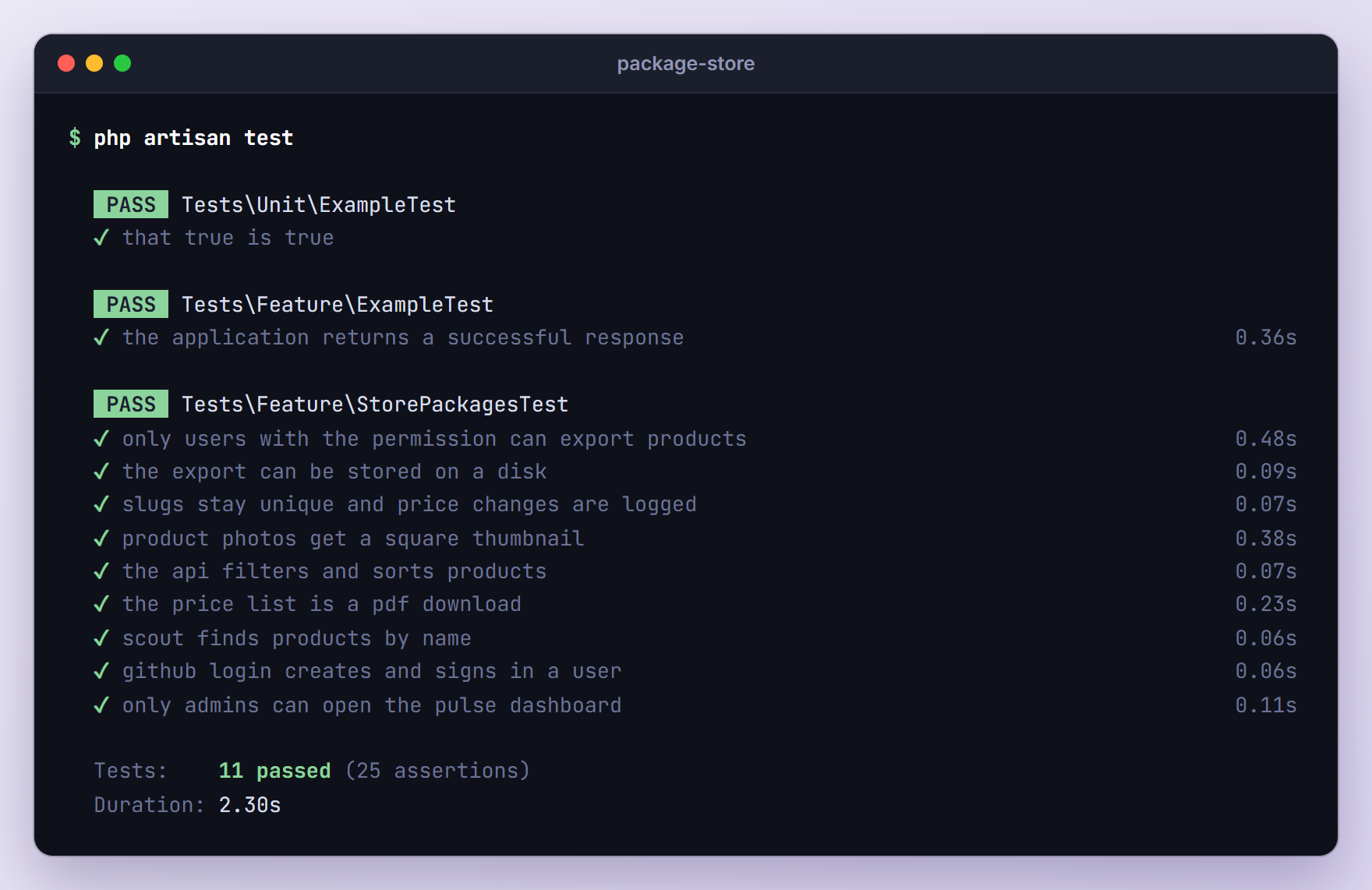
Each test starts from the seeded store in the in-memory SQLite database that phpunit.xml configures. Storage::fake() keeps files off your real disks, and Socialite::fake() replaces GitHub. Run the suite:
php artisan test
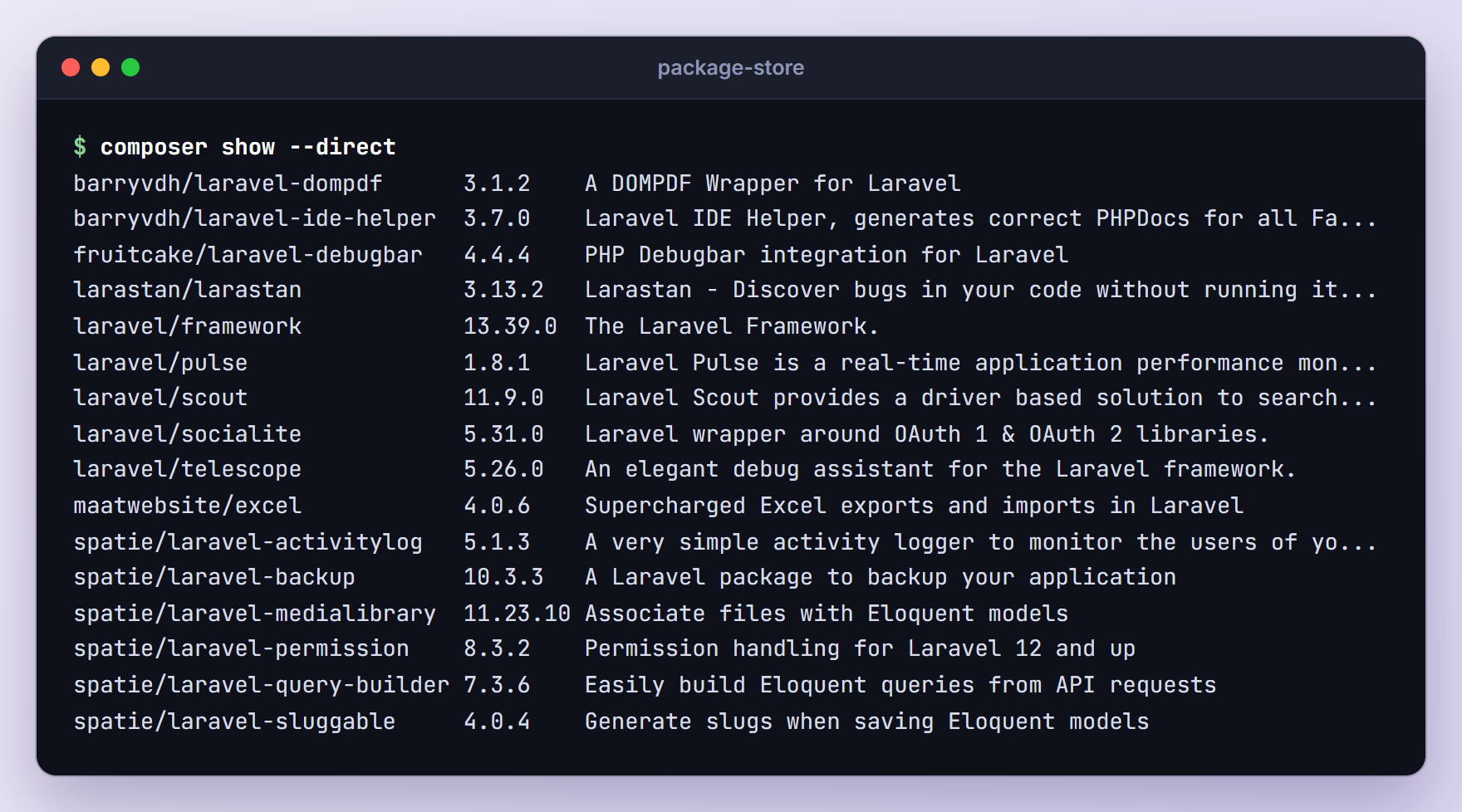
And the installed versions, from composer show --direct (trimmed):
Troubleshooting
Your Requirements Could Not Be Resolved to an Installable Set of Packages
Two packages want incompatible versions of a third. A real case: adding Pest 5 to a fresh Laravel 13 app (with --dry-run, so nothing changes):
composer require pestphp/pest:^5.0 --dev --dry-run
  Problem 1
    - Root composer.json requires pestphp/pest ^5.0 -> satisfiable by pestphp/pest[v5.3.3].
    - pestphp/pest v5.3.3 requires phpunit/phpunit ^13.4.3 -> found phpunit/phpunit[13.4.3] but it conflicts with your root composer.json require (^12.5.12).
Read it from the bottom: your own composer.json pins PHPUnit 12. Adding phpunit/phpunit:^13.4 to the command still failed, because PHPUnit’s dependencies were locked. Composer’s hint was the fix: -W (--with-all-dependencies) lets it update those too. This dry run planned 17 installs and 19 updates, so drop --dry-run to apply it:
composer require pestphp/pest:^5.0 phpunit/phpunit:^13.4 --dev -W --dry-run
To see what blocks a version, use composer why-not from the Composer CLI. It even works for PHP: in my demo, composer why-not php 8.3.0 listed the activity log 5.1.3, the query builder 7.3.6 and spatie/image 3.9.9, plus Symfony 8.1 components.
Class “Laravel\Pail\PailServiceProvider” Not Found
Laravel caches discovered package providers in bootstrap/cache/packages.php, and Composer’s post-autoload-dump script rebuilds that file. To simulate a careless deploy, I ran composer install --no-dev --no-scripts on a copy of the app. The dev packages went away, the cache stayed, and every Artisan command died:
In Application.php line 969:

  Class "Laravel\Pail\PailServiceProvider" not found
Even php artisan package:discover and php artisan optimize:clear failed, because Artisan could not boot. composer dump-autoload --no-dev fixed it: Laravel’s Composer script deletes packages.php, services.php and config.php in bootstrap/cache before rediscovering packages. Never commit those files, and use optimize:clear when Artisan still boots.
Table “telescope_entries” Already Exists
Running php artisan vendor:publish --tag=telescope-migrations a second time copied the migration again under a new date, and the next php artisan migrate failed:
SQLSTATE[HY000]: General error: 1 table "telescope_entries" already exists (Connection: sqlite, ...)
Laravel renames published migrations with the current date, so it misses the existing file. Delete the newer duplicate and migrate again. Spatie’s packages look for an existing migration first: publishing the permission package twice printed already exists SKIPPED for its config and migration.
NOT NULL Constraint Failed: products.slug When Seeding
Laravel 13’s DatabaseSeeder ships with use WithoutModelEvents;, which mutes Eloquent events while seeding. The sluggable package, the activity log and Scout all rely on those events, so my first seeding run failed:
SQLSTATE[23000]: Integrity constraint violation: 19 NOT NULL constraint failed: products.slug (Connection: sqlite, ...)
Remove the trait, as we did in the setup.
laravel/horizon Requires ext-pcntl Which Is Missing
On Windows, composer require laravel/horizon stops before installing anything:
Cannot use laravel/horizon's latest version v5.50.0 as it requires ext-pcntl * which is missing from your platform.
Cannot use laravel/horizon v5.50.0 as it requires ext-posix * which is missing from your platform.
Develop with the regular php artisan queue:work worker and install Horizon on your Linux or macOS server.
Frequently Asked Questions
What Are the Most Popular Laravel Packages?
By Packagist installs, the most popular packages on this list are Laravel Excel (about 183 million), IDE Helper (151 million), Debugbar (149 million under its old name), Socialite (136 million) and Spatie’s permission package (132 million). Downloads prove a package is battle-tested, not that it fits your versions.
How Do I Check if a Package Supports Laravel 13?
Open the package on Packagist and read the requirements of the newest release. Look for illuminate/support or laravel/framework constraints that include ^13, and check the PHP constraint too. Then run composer require with --dry-run, which resolves everything without touching your project.
Should I Use Laravel Debugbar or Telescope?
Use both, for different jobs. Debugbar answers “what did this page just do?” right in the browser, which makes N+1 queries obvious. Telescope keeps a searchable history of requests, jobs, mail, exceptions and commands, including those without a page. For production monitoring, use Pulse.
Are Spatie Packages Free?
Yes. All six Spatie packages here are MIT licensed, like the other nine, and none needs a license key or an account to install. Spatie calls it “postcardware”: if one ends up in production, they appreciate a postcard from your hometown.
Wrapping Up
These 15 packages cover the jobs most Laravel apps meet sooner or later, from debugging and permissions to exports, backups, search and monitoring. All of them installed cleanly on Laravel 13.39, and the combined test checks them after every composer update.
Before adding a package, check its Packagist page for Laravel 13 and PHP support, and keep debugging tools in require-dev.
Learn more about Laravel:
