


Sending everyone to the same dashboard after they sign in works until your app has more than one kind of user. In this tutorial we build a Laravel redirect after login that sends admins to /admin and customers to /account, returns people to the page they were trying to open, and also covers registration, two-factor and passkey logins, email verification and logout.
We covered this for Laravel 5.6 in Redirect after login or register in Laravel: Adding a custom method, which set a $redirectTo property or a redirectTo() method on LoginController and RegisterController. A new Laravel 13 app has neither controller. The starter kits hand login and registration to Laravel Fortify, so the hooks are now a config option, a set of response classes and two middleware settings in bootstrap/app.php.
We will use Laravel 13 (version 13.39 at the time of writing), Fortify 1.41 and the Livewire starter kit, on PHP 8.4. Everything here works on PHP 8.3 or newer. It is the same kit and Fortify setup as in Laravel 13: Login With Email or Username in One Field.
Table of Contents
What You Will Build
- Admin and customer roles with their own
/adminand/accountareas - Role-based redirects after password, two-factor and passkey logins, registration and email verification
- Intended URLs that keep working, plus custom logout, guest and signed-in user redirects
- A version without Fortify, and feature tests for every redirect
Prerequisites
- PHP 8.3 or newer and Composer 2
- Node.js and npm for the kit’s Vite build
- Basic Laravel knowledge: routes, migrations and Blade
Creating the Livewire Starter Kit App
Create the app from the Livewire starter kit:
composer create-project laravel/livewire-starter-kit store --stability=dev
The --stability=dev flag matters: the latest tagged release on Packagist (v1.0.1) requires Laravel 12, while the kit’s main branch requires Laravel 13. With the Laravel installer, laravel new store --livewire --phpunit does the same (the tests below are PHPUnit classes).
When the kit asks which authentication features to enable, keep all five defaults, because most of them come with their own redirect. The setup script has already created the SQLite database and run the migrations, so build the frontend and start the server:
cd store
npm install && npm run build
php artisan serve
How the Laravel Redirect After Login Works Now
The kit’s login page, resources/views/pages/auth/login.blade.php, is a plain Blade form, not a Livewire component. It posts to Fortify’s login.store route, the registration and two-factor forms post to Fortify too, and Fortify’s controllers decide where the user goes next.
After a successful login, AuthenticatedSessionController asks the service container for the Laravel\Fortify\Contracts\LoginResponse interface. Fortify’s default implementation returns this:
return $request->wantsJson()
    ? response()->json(['two_factor' => false])
    : redirect()->intended(Fortify::redirects('login'));
redirect()->intended() sends the user to the URL saved in the session when a middleware sent them to the login page. Without one, it uses the fallback: Fortify::redirects('login') returns config('fortify.redirects.login') when that is set, and otherwise the home option from config/fortify.php, which the kit sets to /dashboard.
Each flow resolves its own contract:
| Flow | Contract the controller resolves | Default destination |
|---|---|---|
| Password login | Laravel\Fortify\Contracts\LoginResponse | Intended URL, else home |
| Two-factor challenge | Laravel\Fortify\Contracts\TwoFactorLoginResponse | Intended URL, else home |
| Passkey login | Laravel\Passkeys\Contracts\PasskeyLoginResponse | Intended URL, else home, sent as JSON |
| Registration | Laravel\Fortify\Contracts\RegisterResponse | Intended URL, else home |
| Email verification link | Laravel\Fortify\Contracts\VerifyEmailResponse | Intended URL, else home plus ?verified=1 |
| Logout | Laravel\Fortify\Contracts\LogoutResponse | / |
| Password reset | Laravel\Fortify\Contracts\PasswordResetResponse | The login page, with a status message |
Changing the Default Destination
If every user should land on the same page, changing home in config/fortify.php is all you need:
'home' => '/account',
For a different fixed page per flow, Fortify also reads a redirects array. The kit’s config file leaves it out, but Fortify’s own config defines the keys login, logout, register, email-verification, password-reset and password-confirmation. Add the ones you need below home:
'home' => '/dashboard',

'redirects' => [
    'register' => '/account',
    'logout' => '/login',
],
In my lab, this sent new users to /account, returning users to /dashboard and logged-out users to the login page. Both options take fixed paths, though, so role-based targets need our own response classes, and users need a role.
Adding Roles to Users
Adding the Role Column
Generate a migration:
php artisan make:migration add_role_to_users_table
Open the new file in database/migrations (your timestamp will differ) and replace its contents:
<?php

use Illuminate\Database\Migrations\Migration;
use Illuminate\Database\Schema\Blueprint;
use Illuminate\Support\Facades\Schema;

return new class extends Migration
{
    /**
     * Run the migrations.
     */
    public function up(): void
    {
        Schema::table('users', function (Blueprint $table) {
            $table->string('role')->default('customer')->after('email');
        });
    }

    /**
     * Reverse the migrations.
     */
    public function down(): void
    {
        Schema::table('users', function (Blueprint $table) {
            $table->dropColumn('role');
        });
    }
};
The column default turns existing users into customers. Run the migration:
php artisan migrate
   INFO  Running migrations.

  2026_11_08_171708_add_role_to_users_table ......................................... 10.25ms DONE
Creating a Role Enum
Generate the enum:
php artisan make:enum Enums/Role --string
The Enums/ prefix puts the file in app/Enums; without it, make:enum only picks that folder once it exists. Replace the contents of app/Enums/Role.php:
<?php

namespace App\Enums;

enum Role: string
{
    case Admin = 'admin';
    case Customer = 'customer';

    /**
     * The page a user with this role lands on after logging in.
     */
    public function homeUrl(): string
    {
        return match ($this) {
            self::Admin => route('admin.dashboard', absolute: false),
            self::Customer => route('account', absolute: false),
        };
    }
}
homeUrl() is the one place that maps a role to its landing page. The match has no default arm, so a new role without a landing page throws an UnhandledMatchError instead of quietly sending people to the wrong place. absolute: false returns a path such as /admin.
Updating the User Model
Open app/Models/User.php, add use App\Enums\Role;, add @property Role $role to the docblock above the class, and add a default value, a cast and a helper:
/**
 * The model's default values for attributes.
 *
 * @var array<string, mixed>
 */
protected $attributes = [
    'role' => Role::Customer->value,
];

/**
 * Get the attributes that should be cast.
 *
 * @return array<string, string>
 */
protected function casts(): array
{
    return [
        'email_verified_at' => 'datetime',
        'password' => 'hashed',
        'role' => Role::class,
    ];
}

/**
 * Determine if the user is an administrator.
 */
public function isAdmin(): bool
{
    return $this->role === Role::Admin;
}
The default attribute value is not redundant. User::create() in the kit’s CreateNewUser action does not read column defaults back from the database, so a freshly registered user has no role until the model is reloaded. Without $attributes, the registration redirect we build below fails with “Call to a member function homeUrl() on null”. Keep role out of the #[Fillable] attribute, so no form can make someone an admin.
Seeding an Admin
In database/factories/UserFactory.php, import the enum and add a factory state:
/**
 * Indicate that the user is an administrator.
 */
public function admin(): static
{
    return $this->state(fn (array $attributes) => [
        'role' => Role::Admin,
    ]);
}
Then create an admin in run() in database/seeders/DatabaseSeeder.php, below the kit’s test user:
User::factory()->admin()->create([
    'name' => 'Admin User',
    'email' => 'admin@example.com',
]);
Run php artisan db:seed. Factory users get the password password.
Creating the Admin and Account Pages
A gate decides who counts as an admin. In app/Providers/AppServiceProvider.php, import App\Models\User and Illuminate\Support\Facades\Gate, and add the gate to boot():
public function boot(): void
{
    $this->configureDefaults();

    Gate::define('access-admin', fn (User $user): bool => $user->isAdmin());
}
Now replace routes/web.php:
<?php

use Illuminate\Support\Facades\Route;

Route::view('/', 'welcome')->name('home');

Route::middleware(['auth', 'verified'])->group(function () {
    Route::view('dashboard', 'dashboard')->name('dashboard');

    Route::view('account', 'account.index')->name('account');
    Route::view('account/orders', 'account.orders')->name('account.orders');
});

Route::middleware(['auth', 'verified', 'can:access-admin'])
    ->prefix('admin')
    ->name('admin.')
    ->group(function () {
        Route::view('/', 'admin.dashboard')->name('dashboard');
    });

require __DIR__.'/settings.php';
Both areas need a logged-in, verified user, and can:access-admin answers customers with a 403 page. /account/orders stands in for the page a shipping email links to; we will use it to test intended URLs.
Create resources/views/admin/dashboard.blade.php with the kit’s app layout:
<x-layouts::app :title="__('Admin dashboard')">
    <div class="flex max-w-2xl flex-col gap-6">
        <div>
            <flux:heading size="xl" level="1">{{ __('Admin dashboard') }}</flux:heading>
            <flux:subheading>{{ __('Manage orders, products and customers.') }}</flux:subheading>
        </div>

        <flux:callout icon="shield-check" color="green">
            <flux:callout.heading>{{ __('Welcome back, :name', ['name' => auth()->user()->name]) }}</flux:callout.heading>
            <flux:callout.text>{{ __('You are signed in as an administrator, so the login form sent you to /admin.') }}</flux:callout.text>
        </flux:callout>
    </div>
</x-layouts::app>
resources/views/account/index.blade.php and account/orders.blade.php follow the same pattern with their own headings. To reach the pages from the sidebar, add two items below the Dashboard item in resources/views/layouts/app/sidebar.blade.php:
<flux:sidebar.item icon="shopping-bag" :href="route('account')" :current="request()->routeIs('account*')" wire:navigate>
    {{ __('My account') }}
</flux:sidebar.item>

@can('access-admin')
    <flux:sidebar.item icon="shield-check" :href="route('admin.dashboard')" :current="request()->routeIs('admin.*')" wire:navigate>
        {{ __('Admin') }}
    </flux:sidebar.item>
@endcan
Run npm run build again so Tailwind picks up the classes in the new views.
Redirecting by Role After Login and Registration
Fortify resolves one contract per flow, so four small classes will share one decision, which we keep in a trait.
Sharing the Redirect Logic in a Trait
Create app/Http/Responses/Concerns/RedirectsByRole.php:
<?php

namespace App\Http\Responses\Concerns;

use Illuminate\Http\RedirectResponse;
use Illuminate\Http\Request;
use Illuminate\Support\Str;

trait RedirectsByRole
{
    /**
     * Send the user to the page they tried to open, or to their role's home page.
     */
    protected function redirectByRole(Request $request): RedirectResponse
    {
        $user = $request->user();

        // Do not send users back to an admin page they are not allowed to open.
        if ($user->cannot('access-admin') && $this->intendedUrlIsAdminArea($request)) {
            $request->session()->forget('url.intended');
        }

        return redirect()->intended($user->role->homeUrl());
    }

    /**
     * Determine if the URL saved before the login points into the admin area.
     */
    protected function intendedUrlIsAdminArea(Request $request): bool
    {
        $path = (string) parse_url((string) $request->session()->get('url.intended'), PHP_URL_PATH);

        return Str::is(['/admin', '/admin/*'], $path);
    }
}
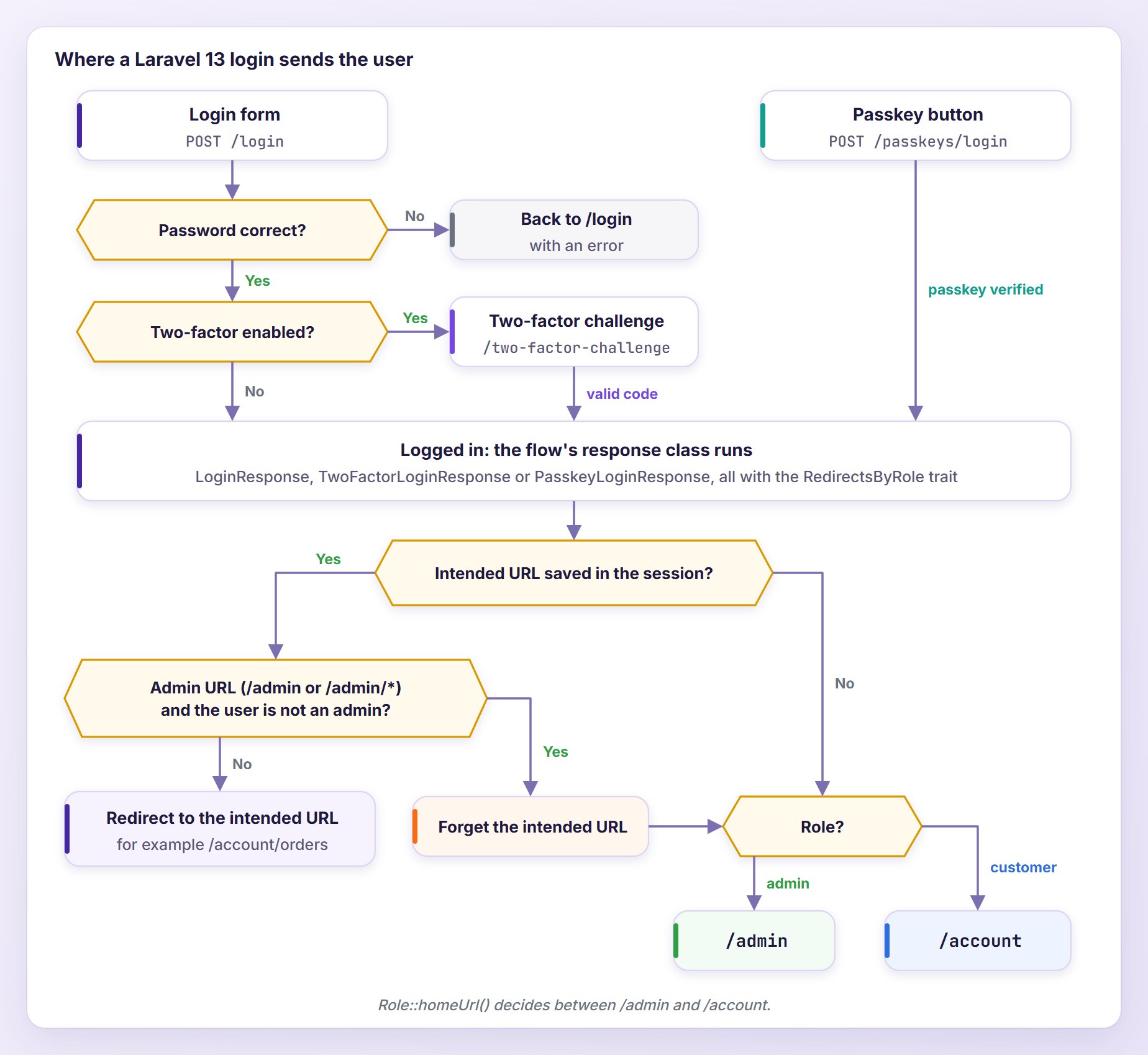
redirect()->intended($user->role->homeUrl()) keeps Fortify’s priorities: the saved URL first, the role’s landing page when there is none. Before that, the trait drops a saved URL under /admin for anyone who fails the access-admin gate, so a customer who followed an admin link does not log in straight into a 403 page. Asking the gate rather than the role keeps this check in line with the routes.
Creating the Login, Two-Factor and Registration Responses
Create app/Http/Responses/LoginResponse.php:
<?php

namespace App\Http\Responses;

use App\Http\Responses\Concerns\RedirectsByRole;
use Illuminate\Http\JsonResponse;
use Illuminate\Http\Request;
use Laravel\Fortify\Contracts\LoginResponse as LoginResponseContract;
use Symfony\Component\HttpFoundation\Response;

class LoginResponse implements LoginResponseContract
{
    use RedirectsByRole;

    /**
     * Create an HTTP response that represents the object.
     *
     * @param  Request  $request
     * @return Response
     */
    public function toResponse($request)
    {
        return $request->wantsJson()
            ? new JsonResponse(['two_factor' => false])
            : $this->redirectByRole($request);
    }
}
The class keeps Fortify’s JSON answer for clients that ask for JSON and replaces only the browser redirect. Users with two-factor authentication never reach it: Fortify stops them at the challenge page, which resolves its own contract. Create app/Http/Responses/TwoFactorLoginResponse.php:
<?php

namespace App\Http\Responses;

use App\Http\Responses\Concerns\RedirectsByRole;
use Illuminate\Http\JsonResponse;
use Illuminate\Http\Request;
use Laravel\Fortify\Contracts\TwoFactorLoginResponse as TwoFactorLoginResponseContract;
use Symfony\Component\HttpFoundation\Response;

class TwoFactorLoginResponse implements TwoFactorLoginResponseContract
{
    use RedirectsByRole;

    /**
     * Create an HTTP response that represents the object.
     *
     * @param  Request  $request
     * @return Response
     */
    public function toResponse($request)
    {
        return $request->wantsJson()
            ? new JsonResponse('', 204)
            : $this->redirectByRole($request);
    }
}
Registration is the same story. Create app/Http/Responses/RegisterResponse.php:
<?php

namespace App\Http\Responses;

use App\Http\Responses\Concerns\RedirectsByRole;
use Illuminate\Http\JsonResponse;
use Illuminate\Http\Request;
use Laravel\Fortify\Contracts\RegisterResponse as RegisterResponseContract;
use Symfony\Component\HttpFoundation\Response;

class RegisterResponse implements RegisterResponseContract
{
    use RedirectsByRole;

    /**
     * Create an HTTP response that represents the object.
     *
     * @param  Request  $request
     * @return Response
     */
    public function toResponse($request)
    {
        return $request->wantsJson()
            ? new JsonResponse('', 201)
            : $this->redirectByRole($request);
    }
}
The 204 and 201 status codes match Fortify’s own classes.
Covering Passkey Logins
The Sign in with a passkey button posts to /passkeys/login with JavaScript. That route comes from the laravel/passkeys package, and the button’s component, resources/views/components/passkey-verify.blade.php, then calls Livewire.navigate(response.redirect || '/dashboard'). Our class therefore answers with a redirect key. Create app/Http/Responses/PasskeyLoginResponse.php:
<?php

namespace App\Http\Responses;

use App\Http\Responses\Concerns\RedirectsByRole;
use Illuminate\Http\JsonResponse;
use Illuminate\Http\Request;
use Laravel\Passkeys\Contracts\PasskeyLoginResponse as PasskeyLoginResponseContract;
use Symfony\Component\HttpFoundation\Response;

class PasskeyLoginResponse implements PasskeyLoginResponseContract
{
    use RedirectsByRole;

    /**
     * Create an HTTP response that represents the object.
     *
     * @param  Request  $request
     * @return Response
     */
    public function toResponse($request)
    {
        $redirect = $this->redirectByRole($request);

        return $request->wantsJson()
            ? new JsonResponse(['redirect' => $redirect->getTargetUrl()])
            : $redirect;
    }
}
getTargetUrl() reuses the redirect we built, so the intended URL and the admin check apply to passkey logins too.
Binding the Responses in FortifyServiceProvider
Open app/Providers/FortifyServiceProvider.php, add these imports and bind the four classes in register():
use App\Http\Responses\LoginResponse;
use App\Http\Responses\PasskeyLoginResponse;
use App\Http\Responses\RegisterResponse;
use App\Http\Responses\TwoFactorLoginResponse;
use Laravel\Fortify\Contracts\LoginResponse as LoginResponseContract;
use Laravel\Fortify\Contracts\RegisterResponse as RegisterResponseContract;
use Laravel\Fortify\Contracts\TwoFactorLoginResponse as TwoFactorLoginResponseContract;
use Laravel\Passkeys\Contracts\PasskeyLoginResponse as PasskeyLoginResponseContract;

// ...

public function register(): void
{
    $this->app->singleton(LoginResponseContract::class, LoginResponse::class);
    $this->app->singleton(TwoFactorLoginResponseContract::class, TwoFactorLoginResponse::class);
    $this->app->singleton(PasskeyLoginResponseContract::class, PasskeyLoginResponse::class);
    $this->app->singleton(RegisterResponseContract::class, RegisterResponse::class);
}
Laravel registers package providers, Fortify’s included, before the ones in bootstrap/providers.php, so these bindings replace Fortify’s defaults. The Fortify docs bind response classes in this same method, and the Contract aliases only avoid a name clash.
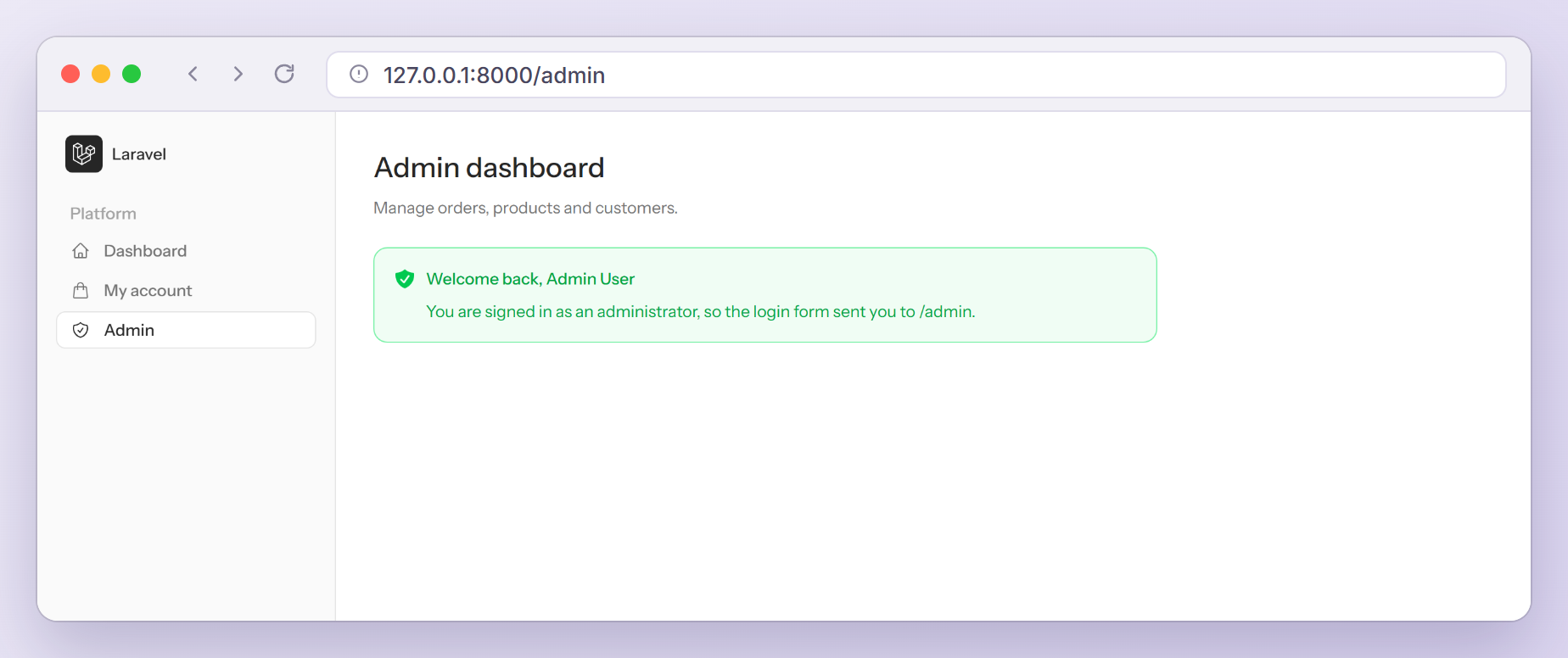
Log in as admin@example.com and you land on the admin dashboard:
Keeping the Intended URL Working
The intended URL is how Laravel remembers where a guest was going. When the auth middleware turns a guest away, the exception handler redirects with redirect()->guest(), which saves the requested URL in the session as url.intended. The verified and password.confirm middleware save it the same way. redirect()->intended() reads and removes it, so it is used once.
That covers the classic case: a customer clicks the order link in a shipping email, lands on the login page and, after logging in, goes straight to /account/orders instead of /account. The role only decides when nothing is saved:
One detail: redirect()->guest() saves the full URL only for GET requests. For a POST it saves the previous page instead, and a request that expects JSON gets a 401 response without any redirect.
Redirects After Logout, Email Verification and Password Reset
Sending Users to the Login Page After Logout
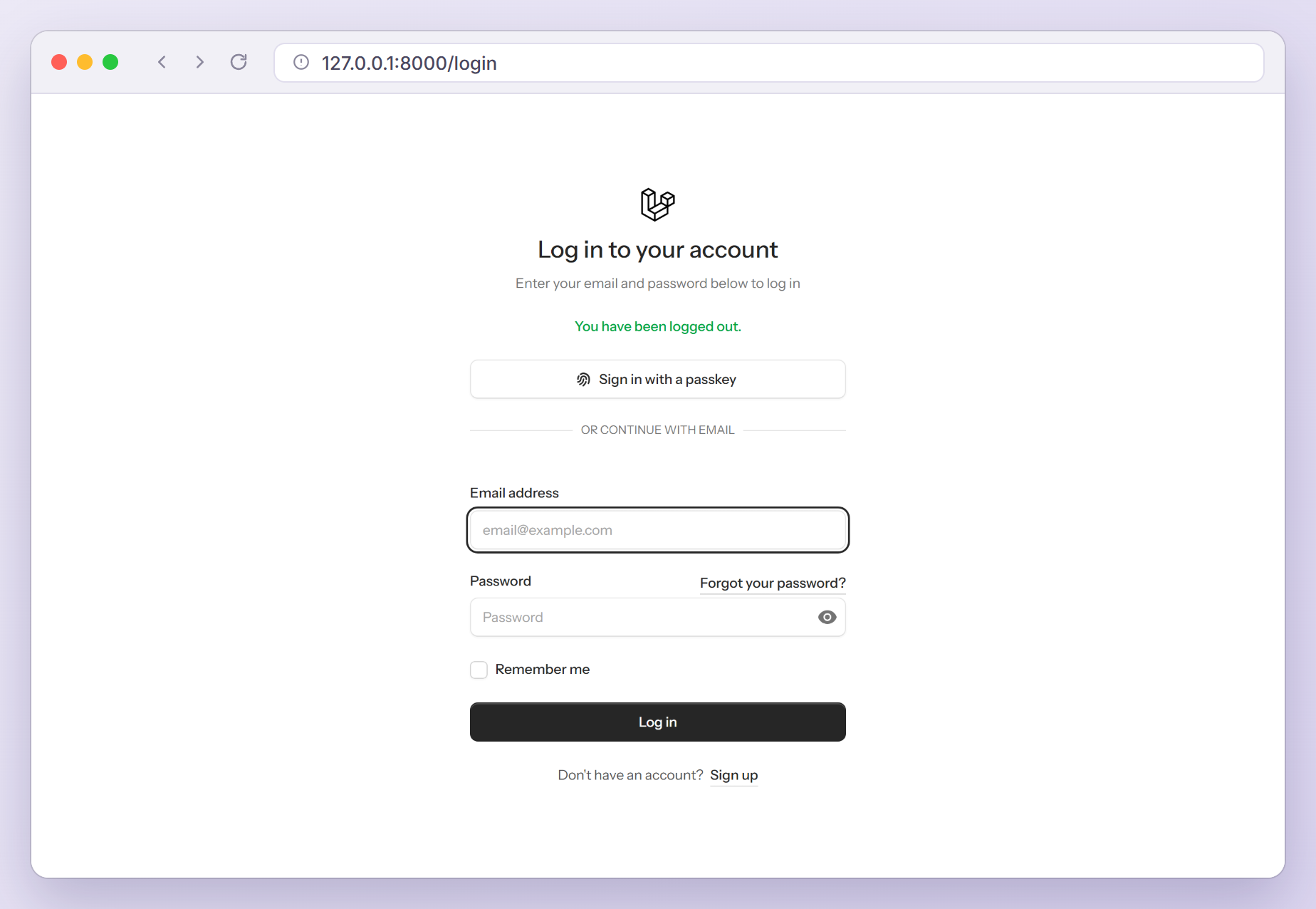
The Log out item in the sidebar posts to Fortify’s logout route, which logs the user out, invalidates the session and resolves LogoutResponse. The default sends people to /. In a store, the login page with a short confirmation is friendlier, and the kit’s login view already displays session('status'). Create app/Http/Responses/LogoutResponse.php:
<?php

namespace App\Http\Responses;

use Illuminate\Http\JsonResponse;
use Illuminate\Http\Request;
use Laravel\Fortify\Contracts\LogoutResponse as LogoutResponseContract;
use Symfony\Component\HttpFoundation\Response;

class LogoutResponse implements LogoutResponseContract
{
    /**
     * Create an HTTP response that represents the object.
     *
     * @param  Request  $request
     * @return Response
     */
    public function toResponse($request)
    {
        return $request->wantsJson()
            ? new JsonResponse('', 204)
            : redirect()->route('login')->with('status', __('You have been logged out.'));
    }
}
Import App\Http\Responses\LogoutResponse and Laravel\Fortify\Contracts\LogoutResponse as LogoutResponseContract in the provider, and add one line to register():
$this->app->singleton(LogoutResponseContract::class, LogoutResponse::class);
The message survives because Fortify invalidates the old session before our response flashes it.
Note: The Delete account button in the profile settings logs the user out through the kit’s own App\Livewire\Actions\Logout action, which redirects to / and never touches LogoutResponse. Edit that class if deleted accounts should land somewhere else.
Redirecting After Email Verification
VerifyEmailResponse runs when a user clicks the link in the verification email. Usually an intended URL is waiting: registration sends a new customer to /account, where the verified middleware saves that URL before showing the verification notice. But many people open the email on their phone, where that session does not exist, and the default then sends them to /dashboard?verified=1. Create app/Http/Responses/VerifyEmailResponse.php with the same role logic:
<?php

namespace App\Http\Responses;

use App\Http\Responses\Concerns\RedirectsByRole;
use Illuminate\Http\JsonResponse;
use Illuminate\Http\Request;
use Laravel\Fortify\Contracts\VerifyEmailResponse as VerifyEmailResponseContract;
use Symfony\Component\HttpFoundation\Response;

class VerifyEmailResponse implements VerifyEmailResponseContract
{
    use RedirectsByRole;

    /**
     * Create an HTTP response that represents the object.
     *
     * @param  Request  $request
     * @return Response
     */
    public function toResponse($request)
    {
        return $request->wantsJson()
            ? new JsonResponse('', 204)
            : $this->redirectByRole($request);
    }
}
Bind it like the others, with the two matching imports:
$this->app->singleton(VerifyEmailResponseContract::class, VerifyEmailResponse::class);
Fortify adds ?verified=1 to its fallback so a frontend can show a message. The Livewire kit never reads it, so I left it out.
After a Password Reset
Fortify does not log users in after a password reset. PasswordResetResponse sends them to the login page with the status “Your password has been reset.”, and our role redirect runs when they log in. To send them somewhere else, set 'password-reset' in the redirects array, or bind your own PasswordResetResponse class, whose constructor receives the status string.
Redirecting Guests and Signed-In Users
Two middleware redirect people before any login happens. auth sends guests to the login page, and guest, which Fortify puts on its login, registration, password reset and two-factor challenge routes, sends signed-in users away. Both targets are set in bootstrap/app.php (the file already imports Illuminate\Http\Request):
->withMiddleware(function (Middleware $middleware): void {
    $middleware->redirectGuestsTo(fn (Request $request) => route('login'));
    $middleware->redirectUsersTo(fn (Request $request) => $request->user()->role->homeUrl());
})
The first line spells out the framework default, so you know where to change it if your login route has another name. The second fixes a real gap: by default, the guest middleware sends signed-in users to the route named dashboard (or home), so an admin who opens /login in a new tab lands on /dashboard. Both methods also accept a plain string, as the authentication docs show.
Redirecting After Login Without Fortify
Apps built from laravel/laravel with their own login form use the same two building blocks: Auth::attempt() and redirect()->intended(). In a plain Laravel 13.39 app with the same role column, Role enum, User model changes and access-admin gate, the controller looks like this (generate it with php artisan make:controller Auth/LoginController):
<?php

namespace App\Http\Controllers\Auth;

use App\Http\Controllers\Controller;
use Illuminate\Http\RedirectResponse;
use Illuminate\Http\Request;
use Illuminate\Support\Facades\Auth;
use Illuminate\Validation\ValidationException;
use Illuminate\View\View;

class LoginController extends Controller
{
    /**
     * Show the login form.
     */
    public function create(): View
    {
        return view('auth.login');
    }

    /**
     * Log the user in and send them where they belong.
     */
    public function store(Request $request): RedirectResponse
    {
        $credentials = $request->validate([
            'email' => ['required', 'email'],
            'password' => ['required'],
        ]);

        if (! Auth::attempt($credentials, $request->boolean('remember'))) {
            throw ValidationException::withMessages([
                'email' => __('auth.failed'),
            ]);
        }

        $request->session()->regenerate();

        $home = $request->user()->isAdmin()
            ? route('admin.dashboard')
            : route('account');

        return redirect()->intended($home);
    }

    /**
     * Log the user out.
     */
    public function destroy(Request $request): RedirectResponse
    {
        Auth::logout();

        $request->session()->invalidate();
        $request->session()->regenerateToken();

        return redirect()->route('login');
    }
}
And the whole routes/web.php of that app:
<?php

use App\Http\Controllers\Auth\LoginController;
use Illuminate\Support\Facades\Route;

Route::get('/', function () {
    return view('welcome');
});

Route::middleware('guest')->group(function () {
    Route::get('login', [LoginController::class, 'create'])->name('login');
    Route::post('login', [LoginController::class, 'store'])->name('login.store');
});

Route::middleware('auth')->group(function () {
    Route::post('logout', [LoginController::class, 'destroy'])->name('logout');

    Route::view('account', 'account')->name('account');
    Route::view('account/orders', 'account')->name('account.orders');

    Route::view('admin', 'admin')->middleware('can:access-admin')->name('admin.dashboard');
});
The login view, resources/views/auth/login.blade.php, is a plain form that posts email, password and a remember checkbox to route('login.store') with @csrf. In the controller, regenerate() gives the session a new ID to prevent session fixation, and intended() again puts the saved URL ahead of the role page. Name the route login, because that is where the auth middleware sends guests by default; the redirectUsersTo() line from the previous section works unchanged. Six feature tests against this controller pass in my lab, covering both roles, the intended URL, a wrong password, logout and a signed-in user opening /login.
Testing the Redirects
Generate a test class:
php artisan make:test Auth/RedirectAfterLoginTest
Replace the contents of tests/Feature/Auth/RedirectAfterLoginTest.php:
<?php

namespace Tests\Feature\Auth;

use App\Models\User;
use Illuminate\Foundation\Testing\RefreshDatabase;
use Illuminate\Support\Facades\URL;
use Laravel\Fortify\Contracts\TwoFactorAuthenticationProvider;
use Laravel\Fortify\Features;
use Laravel\Passkeys\Actions\VerifyPasskey;
use Laravel\Passkeys\Passkey;
use PragmaRX\Google2FA\Google2FA;
use Tests\TestCase;

class RedirectAfterLoginTest extends TestCase
{
    use RefreshDatabase;

    public function test_admins_are_redirected_to_the_admin_dashboard(): void
    {
        $admin = User::factory()->admin()->create();

        $this->post(route('login.store'), [
            'email' => $admin->email,
            'password' => 'password',
        ])->assertRedirect(route('admin.dashboard'));

        $this->get(route('admin.dashboard'))->assertOk();
    }

    public function test_customers_are_redirected_to_their_account(): void
    {
        $customer = User::factory()->create();

        $this->post(route('login.store'), [
            'email' => $customer->email,
            'password' => 'password',
        ])->assertRedirect(route('account'));

        $this->get(route('admin.dashboard'))->assertForbidden();
    }

    public function test_new_users_are_redirected_to_their_account_after_registering(): void
    {
        $this->skipUnlessFortifyHas(Features::registration());

        $this->post(route('register.store'), [
            'name' => 'Jane Doe',
            'email' => 'jane@example.com',
            'password' => 'password',
            'password_confirmation' => 'password',
        ])->assertRedirect(route('account'));
    }

    public function test_users_return_to_the_page_they_tried_to_open(): void
    {
        $customer = User::factory()->create();

        $this->get(route('account.orders'))->assertRedirect(route('login'));

        $this->post(route('login.store'), [
            'email' => $customer->email,
            'password' => 'password',
        ])->assertRedirect(route('account.orders'));
    }

    public function test_customers_are_not_sent_back_to_an_admin_page(): void
    {
        $customer = User::factory()->create();

        $this->get(route('admin.dashboard'))->assertRedirect(route('login'));

        $this->post(route('login.store'), [
            'email' => $customer->email,
            'password' => 'password',
        ])->assertRedirect(route('account'));
    }

    public function test_two_factor_logins_are_redirected_by_role(): void
    {
        $this->skipUnlessFortifyHas(Features::twoFactorAuthentication());

        $secret = app(TwoFactorAuthenticationProvider::class)->generateSecretKey();

        $admin = User::factory()->admin()->create([
            'two_factor_secret' => encrypt($secret),
            'two_factor_confirmed_at' => now(),
        ]);

        $this->post(route('login.store'), [
            'email' => $admin->email,
            'password' => 'password',
        ])->assertRedirect(route('two-factor.login'));

        $this->post(route('two-factor.login.store'), [
            'code' => app(Google2FA::class)->getCurrentOtp($secret),
        ])->assertRedirect(route('admin.dashboard'));
    }

    public function test_passkey_logins_are_redirected_by_role(): void
    {
        $this->skipUnlessFortifyHas(Features::passkeys());

        $admin = User::factory()->admin()->create();

        // There is no authenticator in a test, so skip the WebAuthn signature check.
        $passkey = (new Passkey)->setRelation('user', $admin);
        $this->mock(VerifyPasskey::class)->shouldReceive('__invoke')->andReturn($passkey);

        $this->getJson(route('passkey.login-options'))->assertOk();

        $this->postJson(route('passkey.login'), ['credential' => $this->fakeCredential()])
            ->assertOk()
            ->assertJson(['redirect' => route('admin.dashboard')]);

        $this->assertAuthenticatedAs($admin);
    }

    public function test_verifying_an_email_address_redirects_by_role(): void
    {
        $this->skipUnlessFortifyHas(Features::emailVerification());

        $customer = User::factory()->unverified()->create();

        $verificationUrl = URL::temporarySignedRoute('verification.verify', now()->addMinutes(60), [
            'id' => $customer->id,
            'hash' => sha1($customer->email),
        ]);

        $this->actingAs($customer)->get($verificationUrl)->assertRedirect(route('account'));
    }

    public function test_users_are_redirected_to_the_login_page_after_logging_out(): void
    {
        $this->actingAs(User::factory()->create())
            ->post(route('logout'))
            ->assertRedirect(route('login'))
            ->assertSessionHas('status', 'You have been logged out.');

        $this->assertGuest();
    }

    public function test_guests_are_redirected_to_the_login_page(): void
    {
        $this->get(route('account'))->assertRedirect(route('login'));
        $this->get(route('admin.dashboard'))->assertRedirect(route('login'));
    }

    public function test_signed_in_users_are_redirected_away_from_guest_pages(): void
    {
        $this->actingAs(User::factory()->admin()->create())
            ->get(route('login'))
            ->assertRedirect(route('admin.dashboard'));

        $this->actingAs(User::factory()->create())
            ->get(route('register'))
            ->assertRedirect(route('account'));
    }

    /**
     * Build a well-formed WebAuthn assertion. Nothing checks its signature,
     * because the test mocks VerifyPasskey.
     *
     * @return array<string, mixed>
     */
    private function fakeCredential(): array
    {
        $encode = fn (string $value): string => rtrim(strtr(base64_encode($value), '+/', '-_'), '=');

        return [
            'id' => $encode('credential-1'),
            'rawId' => $encode('credential-1'),
            'type' => 'public-key',
            'response' => [
                'clientDataJSON' => $encode((string) json_encode([
                    'type' => 'webauthn.get',
                    'challenge' => $encode(random_bytes(32)),
                    'origin' => config('app.url'),
                ])),
                'authenticatorData' => $encode(random_bytes(32).chr(0x05).pack('N', 1)),
                'signature' => $encode('signature'),
                'userHandle' => null,
            ],
        ];
    }
}
A few things to notice:
- The intended URL tests first request a protected page as a guest, which saves
url.intendedjust like a browser visit. - The two-factor test sends a real code from
pragmarx/google2fa, the library Fortify itself uses. - The passkey test mocks
VerifyPasskey, the action that checks the WebAuthn signature, because a test has no authenticator. Everything else runs for real, andfakeCredential()only has to pass the request’s shape validation. skipUnlessFortifyHas()comes from the kit’s tests/TestCase.php.
Five assertions in the kit’s own tests now fail, because they expect the old targets. Change them to route('account', absolute: false) in the login test of tests/Feature/Auth/AuthenticationTest.php, in RegistrationTest.php and in both redirect assertions of EmailVerificationTest.php (without ?verified=1), and to route('login') in the logout test.
Run the new tests:
php artisan test tests/Feature/Auth/RedirectAfterLoginTest.php
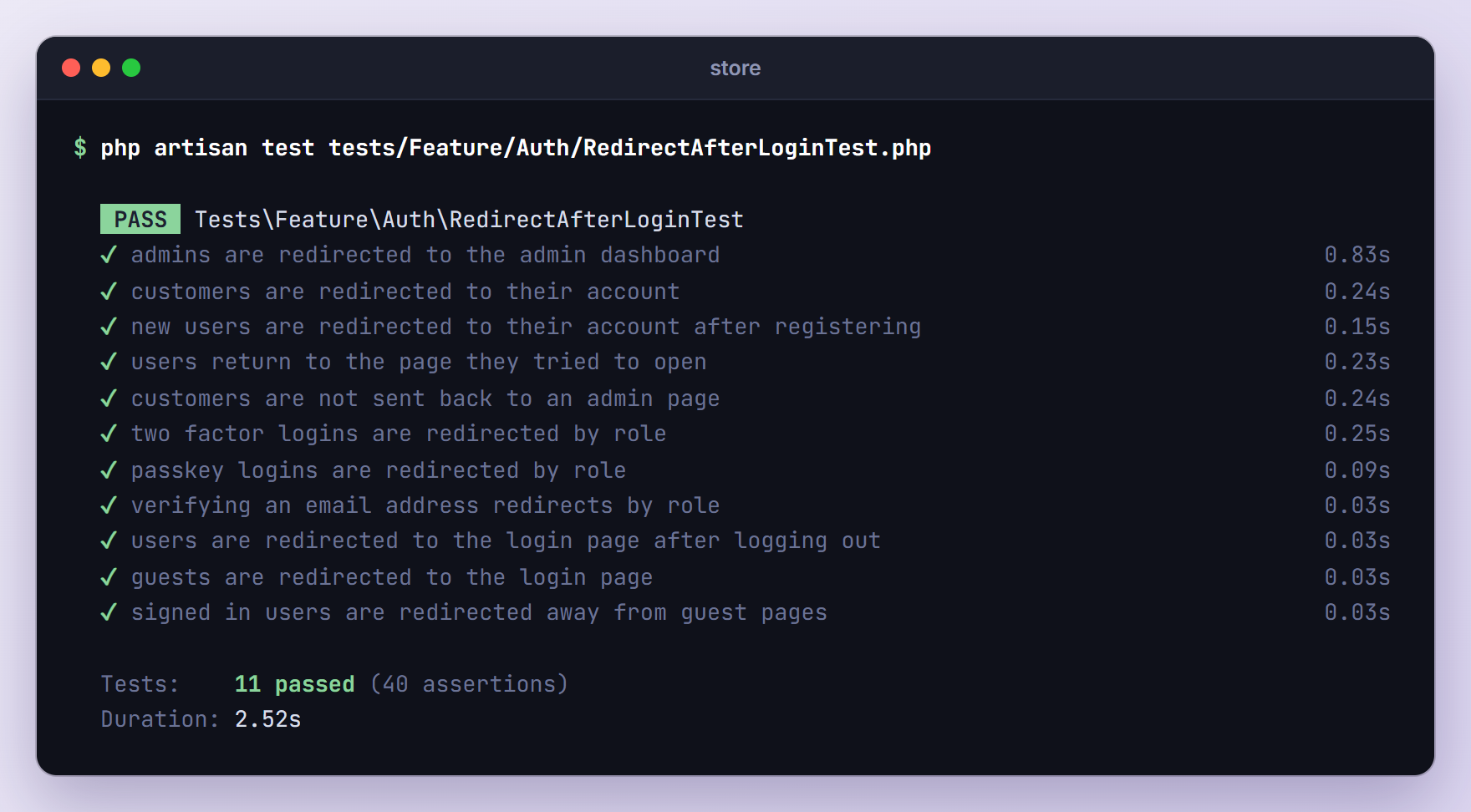
The full php artisan test run reports 45 passed tests (123 assertions), and the kit’s composer test script, which adds Pint and Larastan, passes too.
Troubleshooting
ERR_TOO_MANY_REDIRECTS Between /login and the Dashboard
A loop means two middleware keep sending the user to each other. Three setups produced one in my lab:
- A role middleware that redirects users who fail its check to
route('login'). They are still logged in, so theguestmiddleware sends them straight back. Return a 403, ascan:access-admindoes. - A dashboard behind
auth:adminwhile Fortify logs users in on thewebguard. Use one guard with roles, or set Fortify’sguardoption to the guard your routes check. redirectUsersTo()pointing at a page behind theguestmiddleware, such as/loginitself.
Users Always Land on /dashboard, or Never on the Page They Opened
Check the intended URL first. A user whose session expired on /dashboard, or who bookmarked it, has /dashboard saved, and intended() correctly prefers it over the role page. To send them to their own area instead, turn the kit’s dashboard route into a role switch in routes/web.php (import Illuminate\Http\Request):
Route::get('dashboard', fn (Request $request) => redirect($request->user()->role->homeUrl()))
    ->name('dashboard');
Every route('dashboard') link in the kit and the passkey button’s fallback then lead to the right area. Update DashboardTest, which expects a 200 from that route.
When users never return to the page they opened, look for a response that calls redirect($home) instead of redirect()->intended($home), or a custom middleware that turns guests away with redirect()->route('login'), which saves nothing. Use redirect()->guest(route('login')) there, or the auth middleware.
Two-Factor or Passkey Users Still Land on /dashboard
The Livewire kit does use Fortify’s response classes, but each flow resolves its own. With only LoginResponse bound, password logins in my lab went to /admin while two-factor and passkey logins of the same admin still went to /dashboard. Bind all four classes, and keep the redirect key in the passkey JSON, or the button falls back to /dashboard.
419 Page Expired on the Login Form
Laravel 13’s PreventRequestForgery middleware accepts a form post when the browser’s Sec-Fetch-Site header marks it as same-origin, and checks the CSRF token only when that header is missing. Browsers send it on HTTPS and on localhost, which is why, in my tests, a stale login form just worked on http://127.0.0.1:8000 but returned 419 on the plain HTTP domain http://shop.test.
A form goes stale on logout, which invalidates the session and regenerates the token, so a login page opened earlier (in another tab or through the Back button) carries a dead token. To show a fresh form with a message instead of the 419 page, add a respond() callback inside withExceptions() in bootstrap/app.php, with use Symfony\Component\HttpFoundation\Response; at the top of the file:
// A login form opened before a logout has a stale CSRF token: show the form again.
$exceptions->respond(function (Response $response, Throwable $e, Request $request) {
    if ($response->getStatusCode() === 419 && $request->routeIs('login.store')) {
        return redirect()->route('login')
            ->withInput($request->only('email'))
            ->with('status', __('Your session expired. Please log in again.'));
    }

    return $response;
});
The custom error pages tutorial covers respond() in more detail. If every login fails, the session cookie is not being stored. A SESSION_DOMAIN that does not match the address bar, or SESSION_SECURE_COOKIE=true on a plain HTTP domain, gives a 419 on each attempt; on HTTPS or localhost, a wrong SESSION_DOMAIN instead logs you in and bounces you straight back to the form.
Upgrading From Laravel 5.x to 10
Every piece of the old Laravel redirect after login setup has a new home:
| Laravel 5.x to 10 | Laravel 13 starter kit |
|---|---|
protected $redirectTo = '/home'; on LoginController | 'home' (or 'redirects' => ['login' => ...]) in config/fortify.php |
redirectTo() or authenticated() on LoginController | Your LoginResponse class, bound in FortifyServiceProvider |
$redirectTo or redirectTo() on RegisterController | 'redirects' => ['register' => ...] or your RegisterResponse |
RouteServiceProvider::HOME | Gone; Fortify’s home plus redirectUsersTo() |
The redirect in RedirectIfAuthenticated | $middleware->redirectUsersTo() in bootstrap/app.php |
redirectTo() in app/Http/Middleware/Authenticate.php | $middleware->redirectGuestsTo() in bootstrap/app.php |
The old scaffolding with these controllers lives on in the legacy laravel/ui package (php artisan ui bootstrap --auth), whose 4.x releases support Laravel 9 to 13, so an upgraded app can keep its $redirectTo properties. It may also still contain RouteServiceProvider and the old middleware files, because the Laravel 11 upgrade guide advises against migrating to the new structure. New apps should start from a starter kit and the classes above.
Frequently Asked Questions
Where Did RouteServiceProvider::HOME Go in Laravel 13?
New applications have had no app/Providers/RouteServiceProvider.php since Laravel 11, so there is no HOME constant to change. With a starter kit, the post-login destination is Fortify’s home option in config/fortify.php, and signed-in users who open a guest page go wherever redirectUsersTo() says (by default, the route named dashboard or home). An app upgraded from Laravel 10 can keep its old provider and constant.
Can I Send New Users to an Onboarding Page?
Yes. Fortify resolves RegisterResponse only after a registration, so return a redirect to your onboarding route from that class instead of calling redirectByRole(). Returning users keep going through LoginResponse. If the onboarding page sits behind the verified middleware, new users see the email verification notice first, and the intended URL brings them back to onboarding after they verify.
Does This Work With the React, Vue and Svelte Starter Kits?
The PHP side does: all starter kits use Fortify, so the response classes, bindings and middleware settings are the same. I checked the Vue kit’s source, where the login page posts to Fortify’s login.store route and the passkey component reads the same redirect key, falling back to /dashboard. I only ran the Livewire version, though, so run the tests in your own kit.
Wrapping Up
Laravel 13 spreads the old $redirectTo over a few small pieces: the home option for the default, one Fortify response class per flow for role-based targets, the intended URL for people already heading somewhere, and redirectUsersTo() and redirectGuestsTo() for the middleware. With these pieces, the Laravel redirect after login in our store sends admins to /admin and customers to /account after every kind of login, registration and email verification, with intended URLs intact and tests for each path.
A third role needs a new enum case, its own routes and gate, and one more arm in homeUrl(); the response classes stay as they are.
Learn more about Laravel:
