


Some people remember the email address they signed up with, others only the short name they picked. In this tutorial we build a Laravel login with username or email in one field on top of the official Livewire starter kit, so jane@example.com and jane_doe open the same account with the same password.
We covered this in 2018 for Laravel 5.6 in Laravel Auth: Login With Email Or Username In One Field. That version ran php artisan make:auth and overrode the username() method of the LoginController with a findUsername() helper. A Laravel 13 starter kit has no LoginController: the React, Svelte, Vue and Livewire kits all use Laravel Fortify for authentication (unless you pick the WorkOS variant). The idea is the same, the hooks are new.
We will use Laravel 13 (version 13.38 at the time of writing), Fortify 1.41 and the Livewire 4 starter kit with Flux UI, on PHP 8.4. Everything here works on PHP 8.3 or newer. We will also fix two things that quietly break when you rename Fortify’s login field: password confirmation and the account label in the two-factor QR code.
Table of Contents
What You Will Build
- A unique
usernamecolumn, with a backfill for users who already exist - A registration form that asks for a username
- One “Email or username” field on the login page, backed by
Fortify::authenticateUsing() - Password confirmation, two-factor login and rate limiting that keep working
- A username field on the profile page, plus feature tests for all of it
Prerequisites
- PHP 8.3 or newer and Composer 2
- Node.js and npm, because the starter kit builds its assets with Vite
- Basic Laravel knowledge: migrations, validation and Blade
Creating the Livewire Starter Kit App
Create the app from the Livewire starter kit with Composer:
composer create-project laravel/livewire-starter-kit store-login --stability=dev
The --stability=dev flag is required. The only tagged releases of laravel/livewire-starter-kit on Packagist (v1.0.x) target Laravel 12, so we allow development stability, and Composer installs the kit’s main branch, which requires Laravel 13.
If you have the Laravel installer, this does the same job:
laravel new store-login --livewire --phpunit
--phpunit matters here: the installer defaults to Pest, and the tests below use the PHPUnit classes the kit ships with. The installer still asks about Laravel Boost, the database and npm.
Either way, the kit asks “Which authentication features would you like to enable?” All five (email verification, registration, two-factor authentication, passkeys and password confirmation) are selected by default. Keep them; this tutorial relies on registration and two-factor authentication.
The setup script has already created the SQLite database and run the migrations, so build the frontend and start the server:
cd store-login
npm install && npm run build
php artisan serve
Note: The React, Svelte and Vue kits share this backend: the same config/fortify.php, FortifyServiceProvider, CreateNewUser action and ProfileValidationRules trait, so every backend change below, apart from the Livewire profile component, applies to them unchanged. Only the pages differ: resources/js/pages/auth/login.tsx and register.tsx in React, Login.vue and Register.vue in Vue, Login.svelte and Register.svelte in Svelte. Their profile form goes through ProfileController and ProfileUpdateRequest instead of a Livewire component.
How Fortify Handles a Login
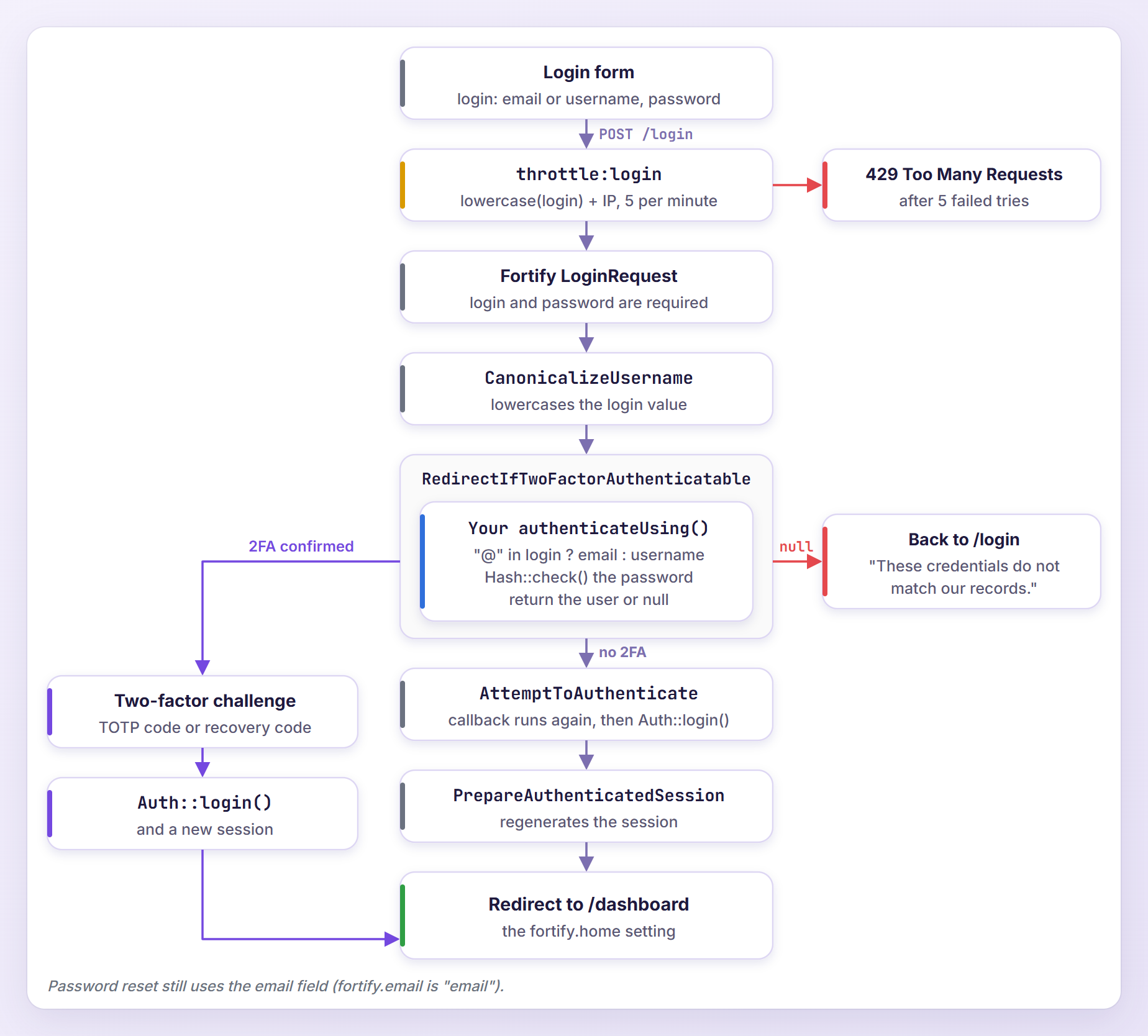
Fortify registers POST /login (named login.store) and validates it with its own LoginRequest: a password plus one field whose name comes from the username option in config/fortify.php, which the kit sets to email.
The request then runs through a pipeline. CanonicalizeUsername lowercases the submitted value (because lowercase_usernames is true), RedirectIfTwoFactorAuthenticatable checks the credentials and sends 2FA users to the challenge page, AttemptToAuthenticate logs the user in, and PrepareAuthenticatedSession regenerates the session. By default the credential check queries the column named by the username option, so one field that may match either of two columns needs Fortify::authenticateUsing().
Adding a Unique Username Column
Creating the Migration
Generate a migration:
php artisan make:migration add_username_to_users_table
Open the new file in database/migrations (your timestamp will differ) and replace its contents:
<?php

use Illuminate\Database\Migrations\Migration;
use Illuminate\Database\Schema\Blueprint;
use Illuminate\Support\Facades\DB;
use Illuminate\Support\Facades\Schema;
use Illuminate\Support\Str;

return new class extends Migration
{
    /**
     * Run the migrations.
     */
    public function up(): void
    {
        Schema::table('users', function (Blueprint $table) {
            $table->string('username', 30)->nullable()->unique()->after('name');
        });

        // Backfill: give every existing user a username such as "jane_doe_7".
        DB::table('users')->whereNull('username')->lazyById()->each(function (object $user) {
            $base = Str::of($user->email)
                ->before('@')
                ->lower()
                ->replaceMatches('/[^a-z0-9_-]/', '_')
                ->limit(20, '');

            DB::table('users')
                ->where('id', $user->id)
                ->update(['username' => $base.'_'.$user->id]);
        });
    }

    /**
     * Reverse the migrations.
     */
    public function down(): void
    {
        Schema::table('users', function (Blueprint $table) {
            $table->dropUnique(['username']);
            $table->dropColumn('username');
        });
    }
};
A few decisions are baked in here:
- The column is nullable, so the migration can run on a table that already has rows before the backfill fills them in, and accounts created outside the registration form (a seeder, an import) do not break. SQLite, MySQL and PostgreSQL all allow several NULLs in a unique column, so the index still blocks duplicate usernames.
- The length of 30 matches the
max:30rule we add next.after('name')only affects MySQL and MariaDB. - The backfill takes the part of the email before the
@, lowercases it, turns anything other than letters, digits, dashes and underscores into underscores, cuts it to 20 characters and appends_plus the user’s ID, which keeps every generated name unique. lazyById()walks the table by ID, so it is safe while we update the very rows we filter on. Offset-based chunking can skip rows in that situation.DB::table()instead of theUsermodel keeps the migration working if the model changes later.
Run it:
php artisan migrate
   INFO  Running migrations.

  2026_10_25_070204_add_username_to_users_table ..................................... 53.08ms DONE
In my lab, the existing users test@example.com, jane.doe@example.com and mark+orders@example.com became test_1, jane_doe_2 and mark_orders_4. They can pick something nicer on the profile page. In a brand-new app with no users, you could add the column to the kit’s create_users_table migration instead, as the 2018 tutorial did.
Updating the User Model, Factory and Seeder
The kit declares mass assignable attributes with a PHP attribute instead of a $fillable property. Open app/Models/User.php, add @property string|null $username to the docblock above the class (Larastan reads it), and add username to the attribute:
#[Fillable(['name', 'username', 'email', 'password'])]
In database/factories/UserFactory.php, give factory users a username:
'name' => fake()->name(),
'username' => str_replace('.', '_', fake()->unique()->userName()),
'email' => fake()->unique()->safeEmail(),
Faker returns usernames like john.smith, and our rules will not allow dots. Also add 'username' => 'testuser' to the test user in database/seeders/DatabaseSeeder.php so php artisan db:seed keeps working.
Requiring a Username at Registration
Adding the Validation Rules
The kit keeps its profile rules in one trait, app/Concerns/ProfileValidationRules.php, used by both registration and the profile page. Add a username entry to profileRules() and a usernameRules() method below nameRules():
protected function profileRules(?int $userId = null): array
{
    return [
        'name' => $this->nameRules(),
        'username' => $this->usernameRules($userId),
        'email' => $this->emailRules($userId),
    ];
}

/**
 * Get the validation rules used to validate usernames.
 *
 * @return array<int, ValidationRule|array<mixed>|string>
 */
protected function usernameRules(?int $userId = null): array
{
    return [
        'required',
        'string',
        'min:3',
        'max:30',
        'alpha_dash:ascii',
        $userId === null
            ? Rule::unique(User::class)
            : Rule::unique(User::class)->ignore($userId),
    ];
}
The alpha_dash rule with the ascii option allows only ASCII letters, digits, dashes and underscores. That matters for login: a username can never contain @, so any login value with an @ must be an email address. When we pass a user ID, the unique rule ignores that user’s own row.
Saving the Username in CreateNewUser
Open app/Actions/Fortify/CreateNewUser.php, import Illuminate\Support\Str and update create():
public function create(array $input): User
{
    $input['username'] = Str::lower($input['username'] ?? '');
    $input['email'] = Str::lower($input['email'] ?? '');

    Validator::make($input, [
        ...$this->profileRules(),
        'password' => $this->passwordRules(),
    ])->validate();

    return User::create([
        'name' => $input['name'],
        'username' => $input['username'],
        'email' => $input['email'],
        'password' => $input['password'],
    ]);
}
We lowercase before validating so the unique rule compares lowercase values. Otherwise a case-sensitive database such as PostgreSQL or SQLite would accept Jane_Doe next to jane_doe, and the new account could never log in by username, because the login value is lowercased before the lookup.
The email line looks redundant, but it is not. Fortify’s RegisteredUserController lowercases only the field named by the username option. That is email today, and we are about to change it to login.
Adding the Field to the Register Page
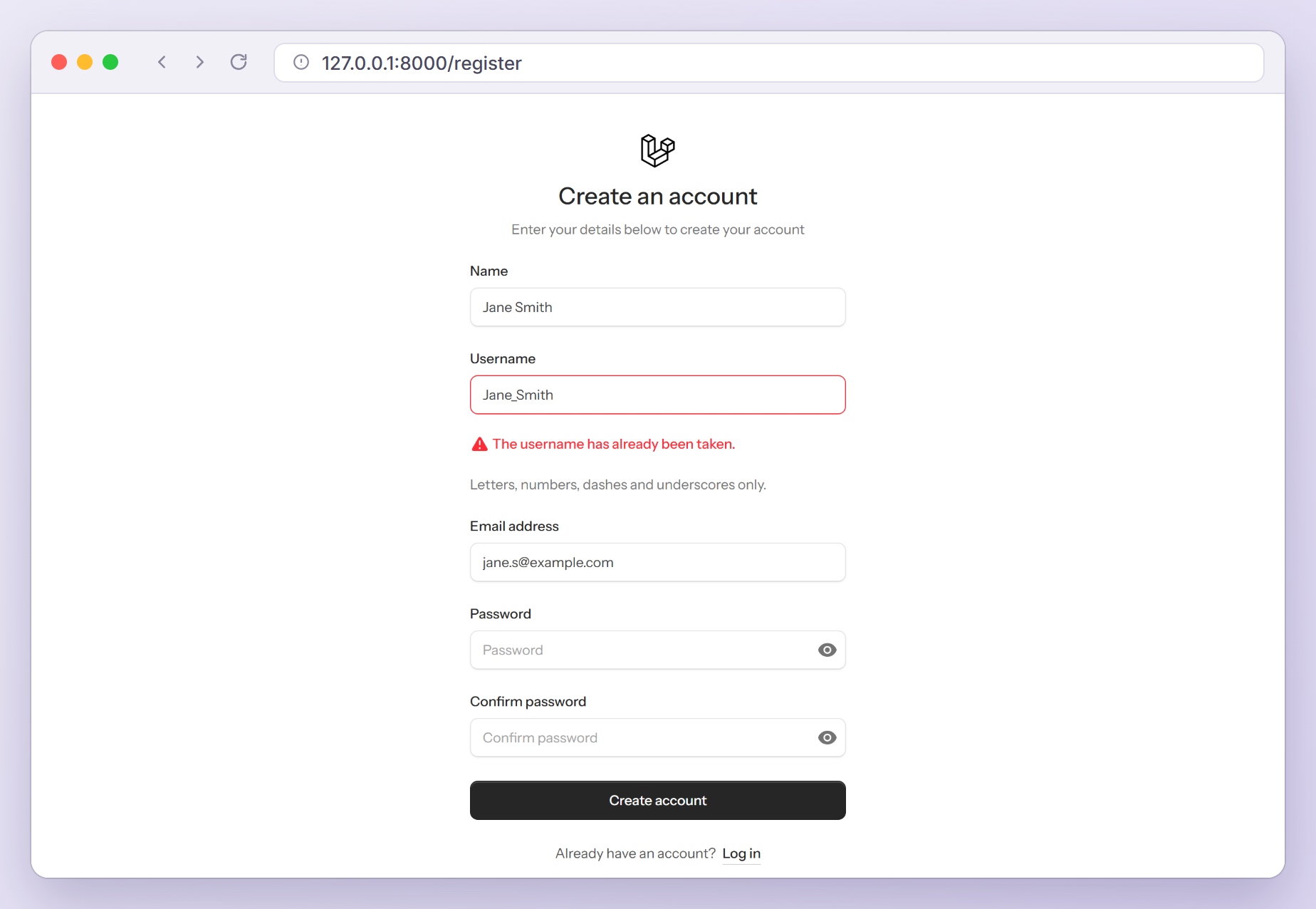
In resources/views/pages/auth/register.blade.php, add this input between the name and email fields:
<!-- Username -->
<flux:input
    name="username"
    :label="__('Username')"
    :value="old('username')"
    type="text"
    required
    autocomplete="username"
    placeholder="jane_doe"
    :description:trailing="__('Letters, numbers, dashes and underscores only.')"
/>
Flux shows the label, the hint from description:trailing and any validation error for username on its own.
Building the Laravel Login With Username or Email
Pointing Fortify at the New Field
In config/fortify.php, change the username option and leave email alone:
'username' => 'login',

'email' => 'email',
Fortify uses this option as the field LoginRequest validates, the value CanonicalizeUsername lowercases, the key for the “These credentials do not match our records.” error and the value the kit’s rate limiter counts. Since our callback does the lookup, login only has to match the form field, not a column. The password reset forms still post email, so that option stays, and lowercase_usernames stays true.
Updating the Login Form
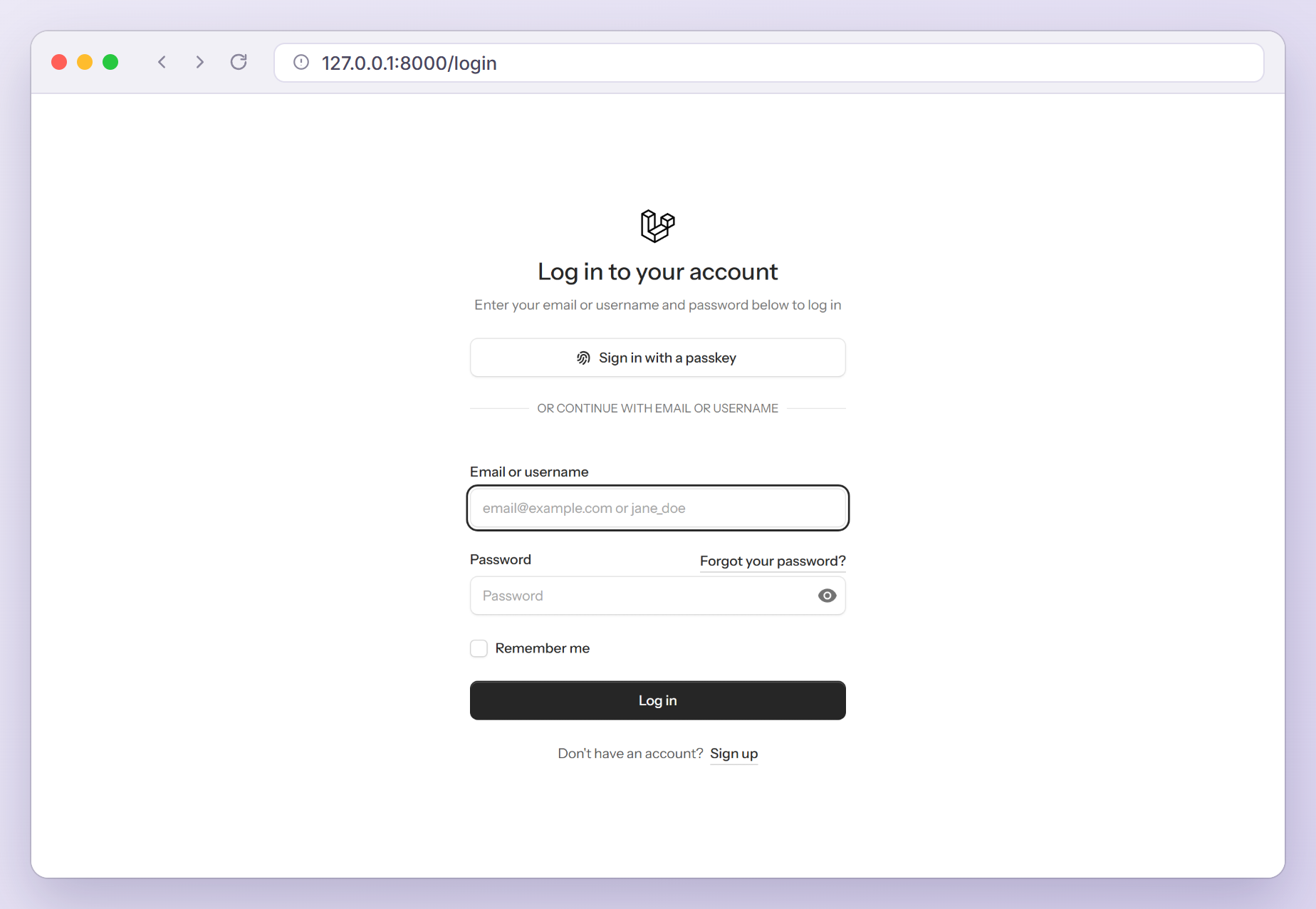
In resources/views/pages/auth/login.blade.php, update the header description and the passkey separator, then replace the email input with the combined field:
<x-auth-header :title="__('Log in to your account')" :description="__('Enter your email or username and password below to log in')" />

<!-- Session Status -->
<x-auth-session-status class="text-center" :status="session('status')" />

<x-passkey-verify :separator="__('Or continue with email or username')" />

<form method="POST" action="{{ route('login.store') }}" class="flex flex-col gap-6">
    @csrf

    <!-- Email or Username -->
    <flux:input
        name="login"
        :label="__('Email or username')"
        :value="old('login')"
        type="text"
        required
        autofocus
        autocomplete="username"
        placeholder="email@example.com or jane_doe"
    />
The type is text because type="email" would make the browser reject a username before the form is sent. autocomplete="username" is the right token for a login identifier, and old('login') refills the field after a failed attempt. The passkey button is unaffected, since passkeys identify the user by their credential.
Finding the User by Email or Username
Open app/Providers/FortifyServiceProvider.php and add two imports: use App\Models\User; and use Illuminate\Support\Facades\Hash; (Request, Str and Fortify are already there). Then call a new method from boot() and add it to the class:
public function boot(): void
{
    $this->configureActions();
    $this->configureAuthentication();
    $this->configureViews();
    $this->configureRateLimiting();
}

/**
 * Let users log in with their email address or their username.
 */
private function configureAuthentication(): void
{
    Fortify::authenticateUsing(function (Request $request): ?User {
        $login = Str::lower((string) $request->input(Fortify::username()));

        $field = str_contains($login, '@') ? 'email' : 'username';

        $user = User::where($field, $login)->first();

        if ($user && Hash::check((string) $request->input('password'), $user->password)) {
            return $user;
        }

        return null;
    });
}
Here is what the callback does:
- It reads the field through
Fortify::username(), so the code and the config cannot disagree. - It lowercases the value.
CanonicalizeUsernamealready did, but this keeps the callback correct iflowercase_usernamesis ever turned off. - It picks the column with
str_contains($login, '@'). The 2018 tutorial usedfilter_var()withFILTER_VALIDATE_EMAIL, but that rejects addresses Laravel’semailrule accepts, such asjane@localhost, so those users could never log in. Usernames cannot contain@, so the simple check is exact. - It checks the password with
Hash::check()and returns the user ornull. Fortify does the rest: it logs the user in, or sends them back with “These credentials do not match our records.” under theloginfield.
Warning: With the two-factor feature on (the kit’s default), Fortify runs this callback twice for a user without 2FA: in RedirectIfTwoFactorAuthenticatable and again in AttemptToAuthenticate. Keep it free of side effects, and never call Auth::login() inside it.
Keeping Password Confirmation Working
The kit asks for the password again before it opens Settings > Security. Fortify’s default confirmation check builds its credentials from the username option, so it now looks for a login column that does not exist. On SQLite the confirmation fails with “The provided password was incorrect.” even for the right password; on PostgreSQL it throws column "login" does not exist. Add this at the end of configureAuthentication():
// "login" is a form field, not a column, so confirm passwords directly.
Fortify::confirmPasswordsUsing(
    fn (User $user, ?string $password): bool => Hash::check((string) $password, $user->password)
);
The callback receives the logged-in user and the submitted password, which is all a confirmation needs. The kit’s own test for this screen only checks that it renders, so its tests do not catch this problem.
Fixing the Two-Factor QR Code Label
Fortify’s TwoFactorAuthenticatable trait labels the authenticator app entry with $this->{Fortify::username()}, which is now the missing login attribute. Scanning still works, but the account name in the URL is empty (otpauth://totp/Laravel:?secret=...). Override the method in app/Models/User.php, after importing Laravel\Fortify\Contracts\TwoFactorAuthenticationProvider and Laravel\Fortify\Fortify:
/**
 * Get the two factor authentication QR code URL.
 *
 * Fortify labels the authenticator app entry with the "username" field,
 * which is the "login" form field here, so use the email address instead.
 */
public function twoFactorQrCodeUrl(): string
{
    return app(TwoFactorAuthenticationProvider::class)->qrCodeUrl(
        config('app.name'),
        $this->email,
        Fortify::currentEncrypter()->decrypt($this->two_factor_secret)
    );
}
The URL now reads otpauth://totp/Laravel:jane.smith%40example.com?secret=..., and the kit’s setup modal uses it through twoFactorQrCodeSvg().
Checking the Login Rate Limiter
Nothing to change here. The kit’s provider already builds the login limiter key from Fortify::username():
RateLimiter::for('login', function (Request $request) {
    $throttleKey = Str::transliterate(Str::lower($request->input(Fortify::username())).'|'.$request->ip());

    return Limit::perMinute(5)->by($throttleKey);
});
Fortify applies it to POST /login as throttle:login, so it now allows five attempts per minute for each login value and IP address, and the sixth gets a 429 Too Many Requests page, which you can restyle with custom error pages. An email and a username are different values with separate counters, even for the same account.
Letting Users Change Their Username
The profile page is a single-file Livewire component, pages::settings.profile, whose file in resources/views/pages/settings starts with Livewire 4’s high-voltage emoji prefix. Import Str, add a username property, fill it in mount() and lowercase both values before validating:
use Illuminate\Support\Str;

// ...

    public string $name = '';
    public string $username = '';
    public string $email = '';

    public function mount(): void
    {
        $this->name = Auth::user()->name;
        $this->username = Auth::user()->username ?? '';
        $this->email = Auth::user()->email;
    }

    public function updateProfileInformation(): void
    {
        $user = Auth::user();

        $this->username = Str::lower($this->username);
        $this->email = Str::lower($this->email);

        $validated = $this->validate($this->profileRules($user->id));

        // ... the rest of the method is unchanged
Then add the input below the name field:
<flux:input wire:model="username" :label="__('Username')" type="text" required autocomplete="username" />
profileRules($user->id) makes the unique rule skip the user’s own row. Lowercasing the email also closes a gap in the stock kit: its profile page saved emails as typed, and on SQLite or PostgreSQL a user who saved Jane@Example.com could no longer log in.
Testing the Email or Username Login
Updating the Existing Tests
In tests/Feature/Auth/AuthenticationTest.php and tests/Feature/Auth/TwoFactorChallengeTest.php, rename the email key in the login requests to login (the value can stay $user->email). In the invalid password test, also replace assertSessionHasErrorsIn('email'): its first argument is an error bag name, so it only checks that some error exists. Check the field instead:
$response = $this->post(route('login.store'), [
    'login' => $user->email,
    'password' => 'wrong-password',
]);

$response->assertSessionHasErrors('login');
Adding New Tests
Create a test class for the new behavior:
php artisan make:test Auth/EmailOrUsernameLoginTest
Replace the contents of tests/Feature/Auth/EmailOrUsernameLoginTest.php with:
<?php

namespace Tests\Feature\Auth;

use App\Models\User;
use Illuminate\Foundation\Testing\RefreshDatabase;
use Laravel\Fortify\Contracts\TwoFactorAuthenticationProvider;
use Laravel\Fortify\Features;
use PragmaRX\Google2FA\Google2FA;
use Tests\TestCase;

class EmailOrUsernameLoginTest extends TestCase
{
    use RefreshDatabase;

    public function test_users_can_log_in_with_their_email(): void
    {
        $user = User::factory()->create(['email' => 'jane@example.com']);

        $this->post(route('login.store'), [
            'login' => 'jane@example.com',
            'password' => 'password',
        ])->assertRedirect(route('dashboard', absolute: false));

        $this->assertAuthenticatedAs($user);
    }

    public function test_users_can_log_in_with_their_username(): void
    {
        $user = User::factory()->create(['username' => 'jane_doe']);

        $this->post(route('login.store'), [
            'login' => 'jane_doe',
            'password' => 'password',
        ])->assertRedirect(route('dashboard', absolute: false));

        $this->assertAuthenticatedAs($user);
    }

    public function test_any_address_that_passes_the_email_rule_can_log_in(): void
    {
        $user = User::factory()->create(['email' => 'jane@localhost']);

        $this->post(route('login.store'), [
            'login' => 'jane@localhost',
            'password' => 'password',
        ])->assertRedirect(route('dashboard', absolute: false));

        $this->assertAuthenticatedAs($user);
    }

    public function test_the_login_value_is_case_insensitive(): void
    {
        $user = User::factory()->create(['username' => 'jane_doe']);

        $this->post(route('login.store'), [
            'login' => 'Jane_Doe',
            'password' => 'password',
        ])->assertRedirect(route('dashboard', absolute: false));

        $this->assertAuthenticatedAs($user);
    }

    public function test_a_wrong_password_shows_an_error_on_the_login_field(): void
    {
        User::factory()->create(['username' => 'jane_doe']);

        $this->post(route('login.store'), [
            'login' => 'jane_doe',
            'password' => 'wrong-password',
        ])->assertSessionHasErrors([
            'login' => 'These credentials do not match our records.',
        ]);

        $this->assertGuest();
    }

    public function test_an_unknown_username_can_not_log_in(): void
    {
        $this->post(route('login.store'), [
            'login' => 'nobody',
            'password' => 'password',
        ])->assertSessionHasErrors('login');

        $this->assertGuest();
    }

    public function test_two_factor_users_must_pass_the_challenge_after_a_username_login(): void
    {
        $this->skipUnlessFortifyHas(Features::twoFactorAuthentication());

        $secret = app(TwoFactorAuthenticationProvider::class)->generateSecretKey();

        $user = User::factory()->create([
            'username' => 'jane_doe',
            'two_factor_secret' => encrypt($secret),
            'two_factor_confirmed_at' => now(),
        ]);

        $this->post(route('login.store'), [
            'login' => 'jane_doe',
            'password' => 'password',
        ])->assertRedirect(route('two-factor.login'));

        $this->assertGuest();

        $this->post(route('two-factor.login.store'), [
            'code' => app(Google2FA::class)->getCurrentOtp($secret),
        ])->assertRedirect(route('dashboard', absolute: false));

        $this->assertAuthenticatedAs($user);
    }

    public function test_login_attempts_are_rate_limited_per_login_value(): void
    {
        User::factory()->create(['username' => 'jane_doe']);

        foreach (range(1, 5) as $attempt) {
            $this->post(route('login.store'), [
                'login' => 'jane_doe',
                'password' => 'wrong-password',
            ])->assertSessionHasErrors('login');
        }

        $this->post(route('login.store'), [
            'login' => 'jane_doe',
            'password' => 'wrong-password',
        ])->assertTooManyRequests();

        $this->post(route('login.store'), [
            'login' => 'someone_else',
            'password' => 'wrong-password',
        ])->assertSessionHasErrors('login');
    }
}
The two-factor test logs in with a username, checks that the user is still a guest at the challenge, then sends a real TOTP code from pragmarx/google2fa, the library Fortify itself uses. The rate limit test shows that the limiter counts per login value: jane_doe is blocked after five failures while someone_else from the same IP can still try. skipUnlessFortifyHas() comes from the kit’s tests/TestCase.php.
Registration needs the same care. In tests/Feature/Auth/RegistrationTest.php (add use App\Models\User; at the top), the existing test now posts a mixed-case username and email and checks that both are stored in lowercase, and a new test proves the unique check ignores case:
public function test_new_users_can_register(): void
{
    $response = $this->post(route('register.store'), [
        'name' => 'John Doe',
        'username' => 'John_Doe',
        'email' => 'Test@Example.com',
        'password' => 'password',
        'password_confirmation' => 'password',
    ]);

    $response->assertSessionHasNoErrors()
        ->assertRedirect(route('dashboard', absolute: false));

    $this->assertAuthenticated();

    $this->assertDatabaseHas('users', [
        'username' => 'john_doe',
        'email' => 'test@example.com',
    ]);
}

public function test_username_must_be_unique(): void
{
    User::factory()->create(['username' => 'john_doe']);

    $this->post(route('register.store'), [
        'name' => 'John Doe',
        'username' => 'John_Doe',
        'email' => 'test@example.com',
        'password' => 'password',
        'password_confirmation' => 'password',
    ])->assertSessionHasErrors([
        'username' => 'The username has already been taken.',
    ]);

    $this->assertGuest();
}
The same class also checks that the username is required and that john@doe is rejected. In tests/Feature/Auth/PasswordConfirmationTest.php, add a test that confirms the right password, and a twin that expects “The provided password was incorrect.” for a wrong one:
public function test_password_can_be_confirmed(): void
{
    $user = User::factory()->create();

    $this->actingAs($user)
        ->post(route('password.confirm.store'), ['password' => 'password'])
        ->assertSessionHasNoErrors()
        ->assertSessionHas('auth.password_confirmed_at');
}
I also added profile tests with Livewire::test('pages::settings.profile') (a taken username fails, your own passes, a user without a username must pick one) and a test that twoFactorQrCodeUrl() contains jane%40example.com.
Running the Tests
Run the authentication tests:
php artisan test tests/Feature/Auth
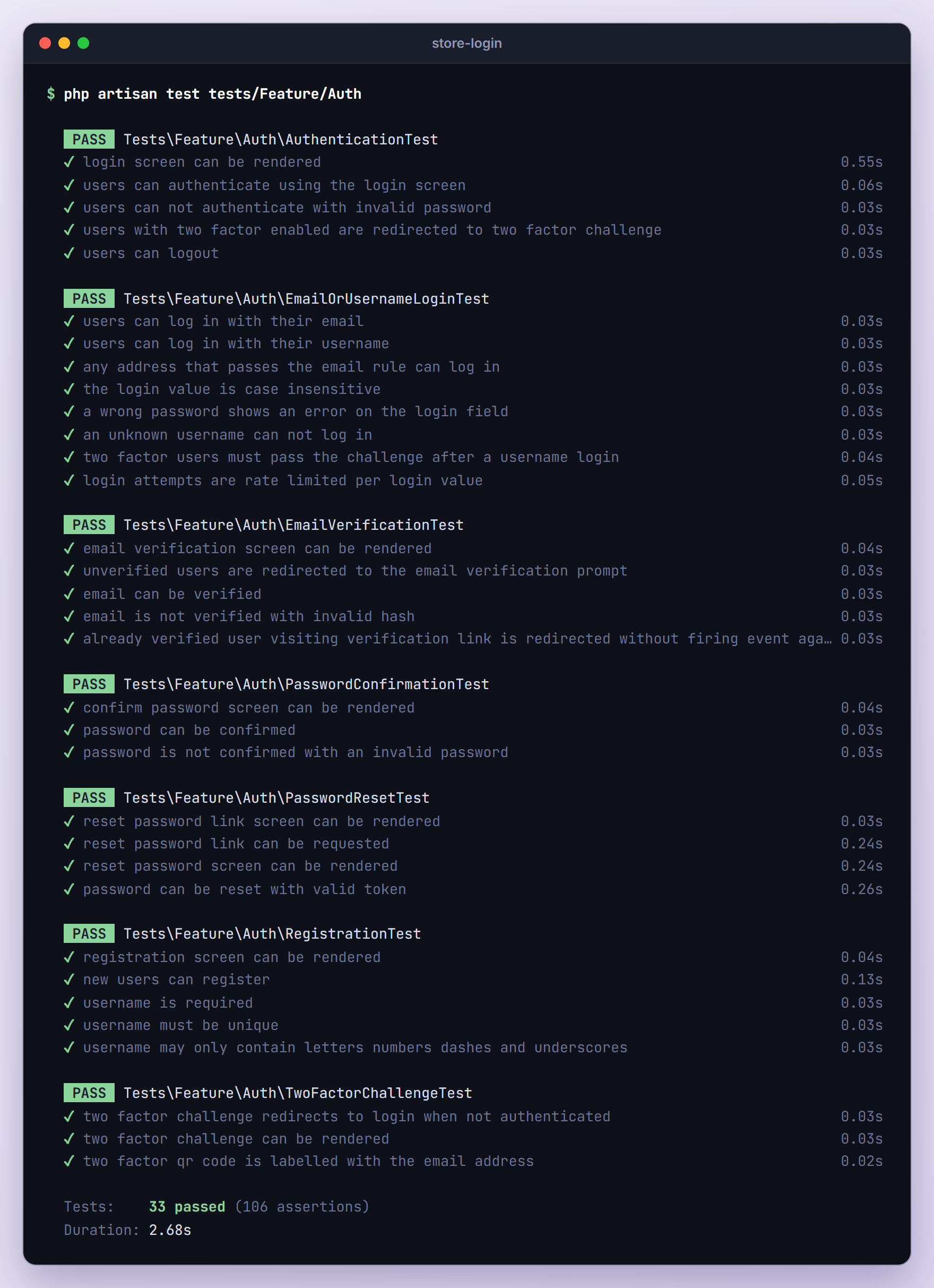
The full php artisan test run reports 50 passed tests (156 assertions), and the kit’s composer test script, which adds Pint and Larastan, passes as well. I also ran the suite against PostgreSQL, where string comparisons are case-sensitive, with the same result.
Troubleshooting
“These credentials do not match our records.” When Logging In by Username
Usually the callback reads the wrong field. The Fortify docs example looks up User::where('email', $request->email), and once the field is called login, $request->email is always null, so every attempt fails, even with a correct email. Read $request->input(Fortify::username()) instead. Forgetting to register the callback at all fails too, because Fortify then searches a login column (on SQLite with this same message). If only some users are affected, check for stored values with capitals (see the case sensitivity fix below).
The Login Form Reloads Without Any Error
LoginRequest validates the field named in config/fortify.php. If the config still says email while the form posts login, validation fails with “The email field is required.”, stored under a key the form never displays (the reverse mix-up hides “The login field is required.” the same way). Make the input’s name and the username option match.
Failed Logins From One Person Lock Out the Whole Office
The rate limiting example in the starter kit docs keys the limiter with $request->email.$request->ip(). After the rename, $request->email is null and the key is the IP alone. In my test, five failed attempts for other accounts from one IP got a correct login rejected with 429. Keep the kit’s Fortify::username() version.
Existing Users Without a Username
They can still log in with their email, because the callback only queries the username column when the value has no @. The migration backfills existing rows, and anyone created later without a username (a seeder, an import) has to choose one the next time they save the profile page, where the field is required.
Logins Work on MySQL but Fail on PostgreSQL or SQLite
MySQL compares strings with the column’s collation, and Laravel creates MySQL tables with utf8mb4_unicode_ci by default (see config/database.php), which ignores case. PostgreSQL and SQLite compare case-sensitively, so a stored John_Doe never matches the lowercased login value. Lowercase rows saved before these changes once:
php artisan tinker --execute="DB::table('users')->update(['email' => DB::raw('lower(email)'), 'username' => DB::raw('lower(username)')])"
If two rows differ only by case, the unique index rejects this update, and you need to merge those accounts first.
The Two-Factor Challenge Is Skipped
The kit enables 2FA with 'confirm' => true, so Fortify only challenges users whose two_factor_confirmed_at is set. Someone who scanned the QR code but never entered a code to finish setup logs straight in. The dangerous cause is a callback that calls Auth::login($user) itself: in my test, that user landed on the challenge page already logged in, and /dashboard returned 200 without a code. Return the user and let Fortify log them in.
Upgrading From the Laravel 5.6 Version
If you followed the 2018 tutorial, every piece has a new home:
| Laravel 5.6 tutorial | Laravel 13 starter kit |
|---|---|
php artisan make:auth | laravel new --livewire or composer create-project laravel/livewire-starter-kit |
LoginController::username() and findUsername() | 'username' => 'login' plus Fortify::authenticateUsing() |
filter_var() with FILTER_VALIDATE_EMAIL | str_contains($login, '@') with alpha_dash usernames |
RegisterController::validator() and create() | ProfileValidationRules trait and CreateNewUser action |
resources/views/auth/login.blade.php | resources/views/pages/auth/login.blade.php |
ThrottlesLogins trait | RateLimiter::for('login') in FortifyServiceProvider |
Laravel 6 moved the old scaffolding into the laravel/ui package, whose latest release (4.6.3) lists Laravel 13 support, so an older app still running on its LoginController can keep the 2018 code. New apps should start from a starter kit. If you customized where users land after logging in (the old approach), the home option in config/fortify.php now sets the default.
Frequently Asked Questions
Can Users Reset Their Password With Their Username?
Not out of the box, and you rarely need it. Fortify’s forgot password flow reads the field named by the email option in config/fortify.php and asks the password broker to find the user by that value. The reset link goes to an email address anyway, so asking for the address keeps the flow simple and does not reveal which email belongs to a username. That is why we left 'email' => 'email' alone.
Is a Laravel Login With Username or Email Less Secure?
Not in any meaningful way. The error message stays generic, so it never says whether the username or the password was wrong, and the rate limiter, password rules and two-factor challenge all still apply. Usernames are often public, and the registration form already reveals taken usernames and emails through the unique rule. Keep the callback free of side effects and encourage users to turn on 2FA.
Why Not Search Both Columns With orWhere?
User::where('email', $login)->orWhere('username', $login) would work, since an alpha_dash username can never equal an email address. Checking one column is easier to reason about: each login value maps to exactly one column and one unique index. If you ever relax the username rules to allow @, the orWhere version could match two different users, so pick a rule and keep it.
Wrapping Up
We added a unique, lowercase username column with a backfill, asked for it at registration and on the profile page, and built a Laravel login with username or email in one field with Fortify::authenticateUsing(). Renaming Fortify’s username option reaches further than the login form, so we also replaced the password confirmation check, fixed the two-factor QR code label and confirmed that the rate limiter counts the new field.
The PHP side carries over to the React, Vue and Svelte kits unchanged. If your app also has an API, the Laravel 13 Sanctum tutorial shows how to issue tokens to the same users.
Learn more about Laravel:
