


Every Laravel app collects small bits of logic that are needed everywhere: turning cents into “$19.99”, estimating reading time, or highlighting the current menu item. Laravel custom helper functions keep that logic in one place: you write a function once, Composer loads it on every request, and you call it anywhere, just like Laravel’s own route() or now().
We will build four helpers for a small blog (money(), reading_time(), active_link() and a cached setting()), use them in routes, a controller, Blade views, an Artisan command and tests, compare the alternatives, and fix the errors you are most likely to hit.
We will use Laravel 13 (version 13.38 at the time of writing) with PHP 8.4. Everything here works on PHP 8.3 or newer. If you followed our Laravel 5 helpers tutorial, the core idea is the same, but service providers now live in bootstrap/providers.php, the skeleton no longer has an aliases array, and some of the old example helpers are now built into the framework.
Table of Contents
Prerequisites
- PHP 8.3 or newer with the
intlextension (Laravel’sNumberclass uses it to format money) - Composer 2
- Basic knowledge of Laravel routes, controllers and Blade
When Is a Helper Function the Right Tool?
A global helper is a good fit when the logic is small, has no dependencies of its own, and is needed in many places, especially in Blade views. Formatting values and thin wrappers around framework features are the classic examples.
It is the wrong tool for business logic: a price calculation that calls a tax API belongs in a class you can inject and fake in tests. Logic that belongs to a type is easier to discover as a macro on Str or Collection, and pure view syntax reads better as a Blade directive. We will try both later.
Also check what Laravel already ships. I planned an initials() helper until I found Str::initials(), and the old post’s human_file_size() is now Number::fileSize():
php artisan tinker --execute="echo Number::fileSize(1536000, precision: 1), PHP_EOL, Str::initials('Hamza Ali', capitalize: true), PHP_EOL, Str::plural('post', 3, prependCount: true);"
1.5 MB
HA
3 posts
The helpers documentation is worth a skim before you add your own.
Step 1: Create a New Laravel 13 Project
composer create-project laravel/laravel helpers-demo
cd helpers-demo
You can also use the Laravel installer with laravel new helpers-demo. The default SQLite database is all we need.
Step 2: Create the Helpers File
Laravel has no fixed home for helpers. I use app/Support/helpers.php: the framework uses the same “Support” name for its own utilities, and related helper classes can live next to it later. A plain app/helpers.php works too. Either way, keep the name lowercase, because a capitalized Helper.php in a PSR-4 folder looks like a class.
Create app/Support/helpers.php with our first helper:
<?php

use Illuminate\Support\Number;

if (! function_exists('money')) {
    /**
     * Format an amount stored in cents, for example 1999 as "$19.99".
     */
    function money(int $cents, ?string $currency = null): string
    {
        return Number::currency($cents / 100, in: $currency ?? Number::defaultCurrency());
    }
}
A few things to notice:
- The file has no namespace, so
money()becomes a global function. - The
function_exists()guard prevents a fatal error if the name is already taken, but then your function is silently skipped, so choose names carefully (see Troubleshooting). - Prices are stored as integer cents to avoid floating point rounding.
Number::currency()formats them, andNumber::defaultCurrency()isUSDunless you callNumber::useCurrency('EUR'). The helper assumes two decimal places.
Step 3: Autoload the Helpers With Composer
PHP can autoload classes but not functions, so Composer has a files list for exactly this case. Open composer.json and add a files key inside autoload:
"autoload": {
    "psr-4": {
        "App\\": "app/",
        "Database\\Factories\\": "database/factories/",
        "Database\\Seeders\\": "database/seeders/"
    },
    "files": [
        "app/Support/helpers.php"
    ]
},
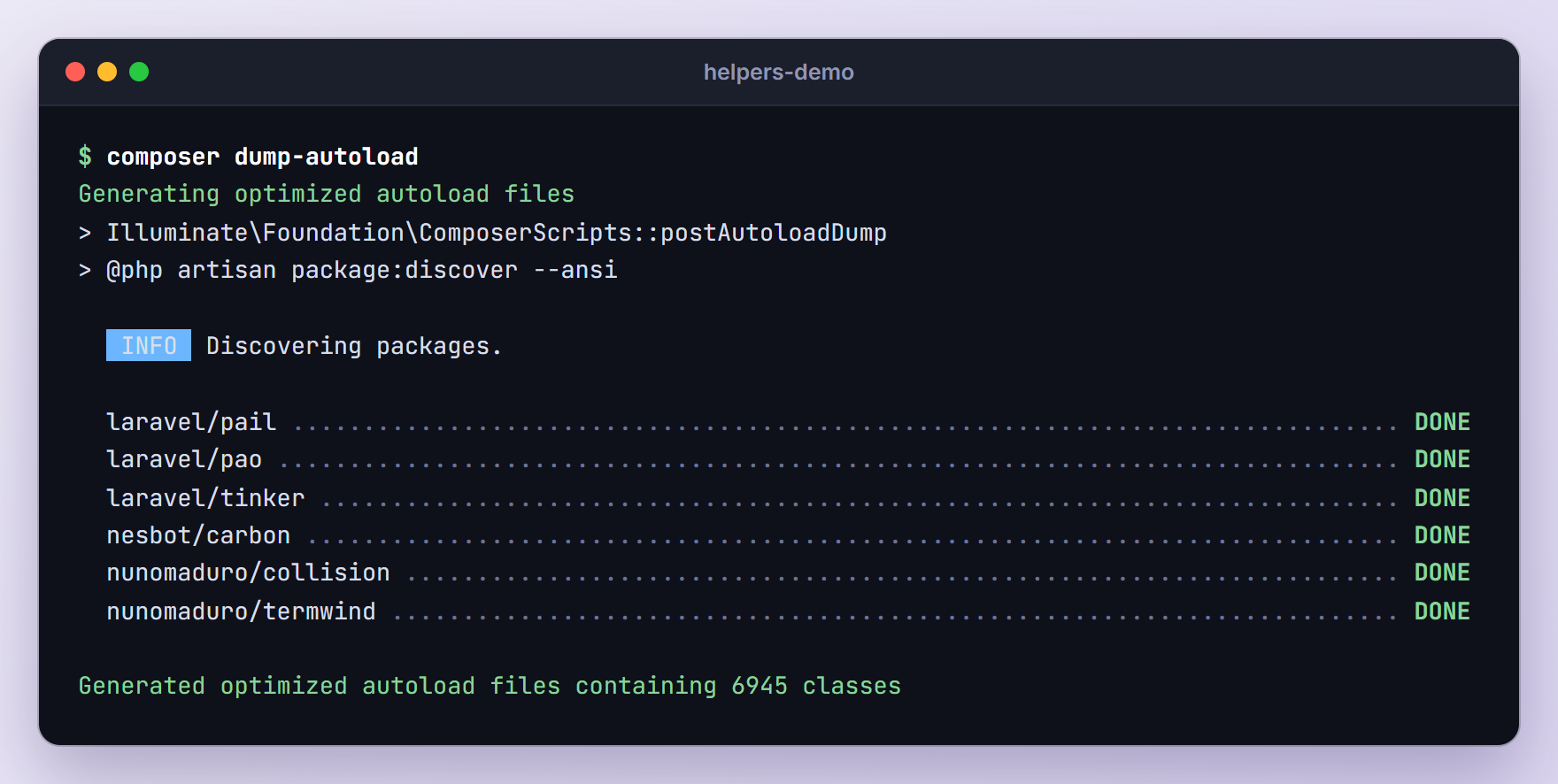
Then regenerate the autoloader:
composer dump-autoload
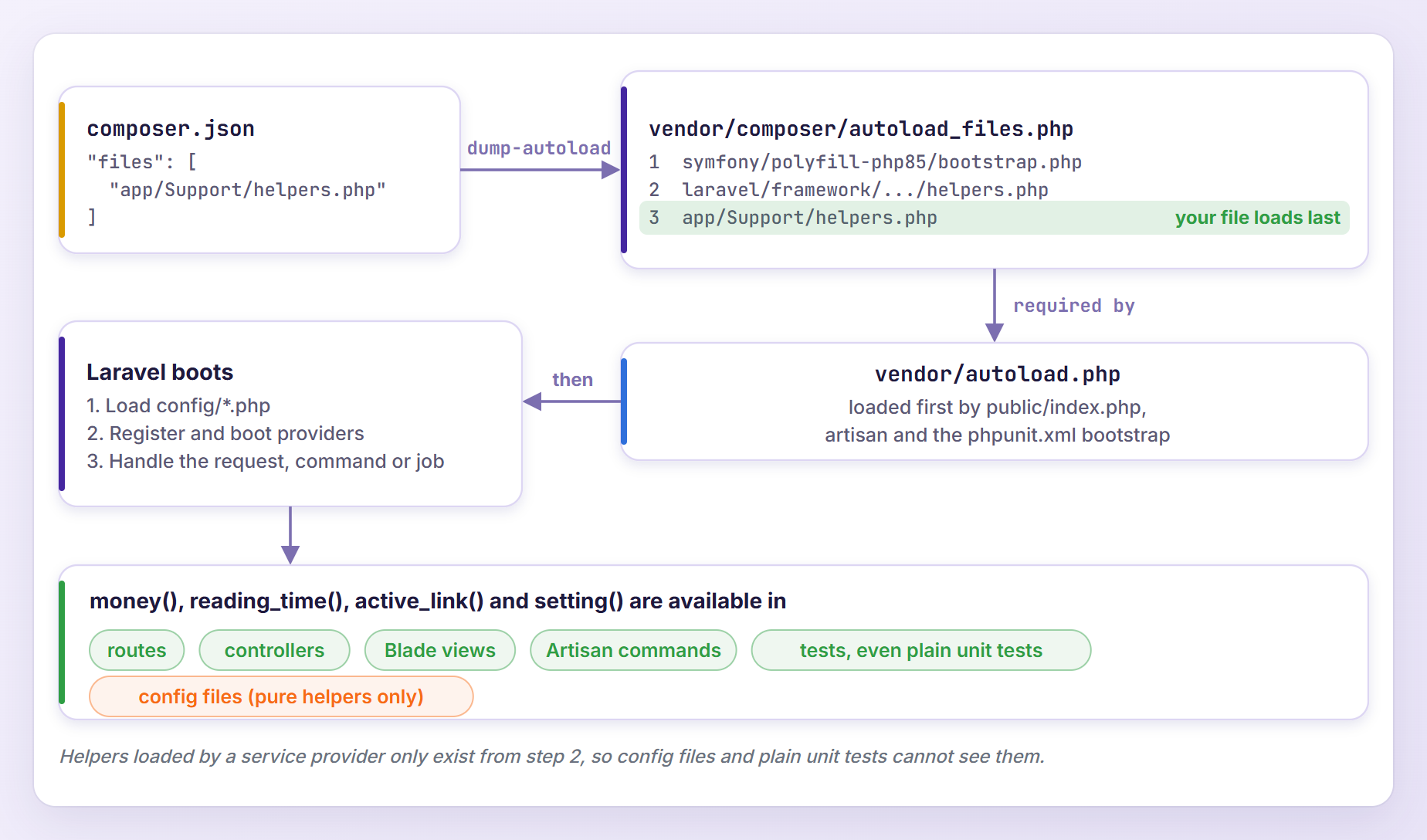
Composer adds the path to vendor/composer/autoload_files.php, after your packages’ helper files. vendor/autoload.php now requires it, and every entry point loads that file before Laravel boots: public/index.php, artisan, and PHPUnit through the bootstrap setting in phpunit.xml.
Let’s check that it works:
php artisan tinker --execute="echo money(1999);"
$19.99
You only need composer dump-autoload again when the files list changes.
Step 4: Add More Useful Helpers
Our blog needs three more helpers. First, add these imports to the top of app/Support/helpers.php, below the existing use line:
use App\Models\Setting;
use Illuminate\Support\Facades\Cache;
use Illuminate\Support\Str;
reading_time() for Blog Posts
Add this function at the bottom of the file:
if (! function_exists('reading_time')) {
    /**
     * Estimate how long a post takes to read, for example "4 min read".
     */
    function reading_time(string $html, int $wordsPerMinute = 200): string
    {
        $words = Str::wordCount(strip_tags($html));

        $minutes = max(1, (int) ceil($words / $wordsPerMinute));

        return "{$minutes} min read";
    }
}
strip_tags() removes the HTML first, so tags like <strong> are not counted as words. The result is rounded up and never drops below one minute.
active_link() for Navigation Menus
if (! function_exists('active_link')) {
    /**
     * Return the CSS class when the current route name matches a pattern.
     */
    function active_link(string|array $patterns, string $class = 'active'): string
    {
        return request()->routeIs($patterns) ? $class : '';
    }
}
request()->routeIs() compares route names and understands * wildcards, so active_link('blog.*') highlights the Blog link on the blog index and on every post. You can also pass an array such as ['pricing', 'home']. For a single link, Blade’s @class(['active' => request()->routeIs('blog.*')]) does the same job, but the helper keeps a whole menu short and consistent.
setting() for Site-Wide Settings
The last helper reads key and value pairs, such as the site name, from a settings table. Create the model and its migration:
php artisan make:model Setting -m
In the new migration, add two columns to the Schema::create() call:
Schema::create('settings', function (Blueprint $table) {
    $table->id();
    $table->string('key')->unique();
    $table->text('value')->nullable();
    $table->timestamps();
});
Replace app/Models/Setting.php with this:
<?php

namespace App\Models;

use Illuminate\Database\Eloquent\Attributes\Fillable;
use Illuminate\Database\Eloquent\Model;
use Illuminate\Support\Facades\Cache;

#[Fillable(['key', 'value'])]
class Setting extends Model
{
    /**
     * Clear the cached settings whenever one changes.
     */
    protected static function booted(): void
    {
        static::saved(fn () => Cache::memo()->forget('settings'));
        static::deleted(fn () => Cache::memo()->forget('settings'));
    }
}
Now add the helper to the bottom of app/Support/helpers.php:
if (! function_exists('setting')) {
    /**
     * Get a site-wide setting from the settings table.
     */
    function setting(string $key, mixed $default = null): mixed
    {
        $settings = Cache::memo()->rememberForever('settings', function () {
            return Setting::query()->pluck('value', 'key')->all();
        });

        return $settings[$key] ?? $default;
    }
}
Here is what is happening:
rememberForever()loads all settings with one query and keeps them in your cache store (the database store in a fresh Laravel 13 app).Cache::memo()also keeps the value in memory for the rest of the request or job, so callingsetting()ten times in a layout reads the cache once. The docs call this cache memoization.- The model clears the cache whenever a setting is saved or deleted. Update settings through a model instance, because mass updates such as
Setting::where(...)->update()do not fire model events.
Run the migration and create two settings:
php artisan migrate
php artisan tinker --execute="App\Models\Setting::create(['key' => 'site_name', 'value' => 'TutsForWeb Demo']); App\Models\Setting::create(['key' => 'show_newsletter', 'value' => '1']);"
Step 5: Use the Helpers in Routes, Controllers and Blade
Helpers work the same everywhere, which is the whole point. Let’s build a few small pages.
In Routes
Replace the contents of routes/web.php:
<?php

use App\Http\Controllers\BlogController;
use Illuminate\Support\Facades\Route;

Route::view('/', 'home')->name('home');

Route::get('/blog', [BlogController::class, 'index'])->name('blog.index');
Route::get('/blog/{slug}', [BlogController::class, 'show'])->name('blog.show');

Route::get('/pricing', function () {
    $plans = collect(['Starter' => 900, 'Pro' => 2900, 'Team' => 9900])
        ->map(fn (int $cents) => money($cents));

    return view('pricing', ['plans' => $plans]);
})->name('pricing');
The pricing route formats every plan price with money() before it reaches the view.
In a Controller
Create the controller with php artisan make:controller BlogController and replace its contents:
<?php

namespace App\Http\Controllers;

use Illuminate\View\View;

class BlogController extends Controller
{
    public function index(): View
    {
        $posts = collect($this->posts())->map(fn (array $post) => [
            ...$post,
            'reading_time' => reading_time($post['body']),
        ]);

        return view('blog.index', ['posts' => $posts]);
    }

    public function show(string $slug): View
    {
        $post = $this->posts()[$slug] ?? abort(404);

        return view('blog.show', ['post' => $post]);
    }

    /**
     * Demo posts, so this example does not need a posts table.
     */
    private function posts(): array
    {
        $sentence = 'Helpers keep small formatting rules in one place. ';

        return [
            'custom-helpers' => ['title' => 'Custom Helper Functions in Laravel 13', 'body' => str_repeat($sentence, 170)],
            'collections' => ['title' => 'Laravel Collection Methods You Will Use Daily', 'body' => str_repeat($sentence, 100)],
            'scheduling' => ['title' => 'Task Scheduling in Laravel 13', 'body' => str_repeat($sentence, 30)],
        ];
    }
}
To keep the focus on helpers, the posts come from an array instead of a database table. The index() method calls reading_time() once for every post.
In Blade Views
Create the shared layout as an anonymous component in resources/views/components/layout.blade.php:
@props(['title' => null])

<!DOCTYPE html>
<html lang="en">
<head>
    <meta charset="utf-8">
    <title>{{ $title ?? setting('site_name', config('app.name')) }}</title>
    <style>
        body { margin: 0; font-family: system-ui, sans-serif; background: #f8fafc; color: #0f172a; }
        header { display: flex; justify-content: space-between; align-items: center; padding: 1rem 2rem; background: #fff; border-bottom: 1px solid #e2e8f0; }
        nav a { margin-left: .5rem; padding: .5rem 1rem; border-radius: .5rem; color: #475569; text-decoration: none; }
        nav a.active { background: #dc2626; color: #fff; }
        main { max-width: 44rem; margin: 2rem auto; padding: 0 1rem; }
        article, aside { padding: 1rem 1.25rem; margin-bottom: 1rem; background: #fff; border: 1px solid #e2e8f0; border-radius: .75rem; }
        article h2 { margin: 0 0 .25rem; font-size: 1.15rem; }
        article a { color: inherit; text-decoration: none; }
        .meta { margin: 0; color: #64748b; }
    </style>
</head>
<body>
    <header>
        <strong>{{ setting('site_name', config('app.name')) }}</strong>
        <nav>
            <a href="{{ route('home') }}" class="{{ active_link('home') }}">Home</a>
            <a href="{{ route('blog.index') }}" class="{{ active_link('blog.*') }}">Blog</a>
            <a href="{{ route('pricing') }}" class="{{ active_link('pricing') }}">Pricing</a>
        </nav>
    </header>

    <main>
        {{ $slot }}

        @if (setting('show_newsletter'))
            <aside>Get one Laravel tip in your inbox every Friday.</aside>
        @endif
    </main>
</body>
</html>
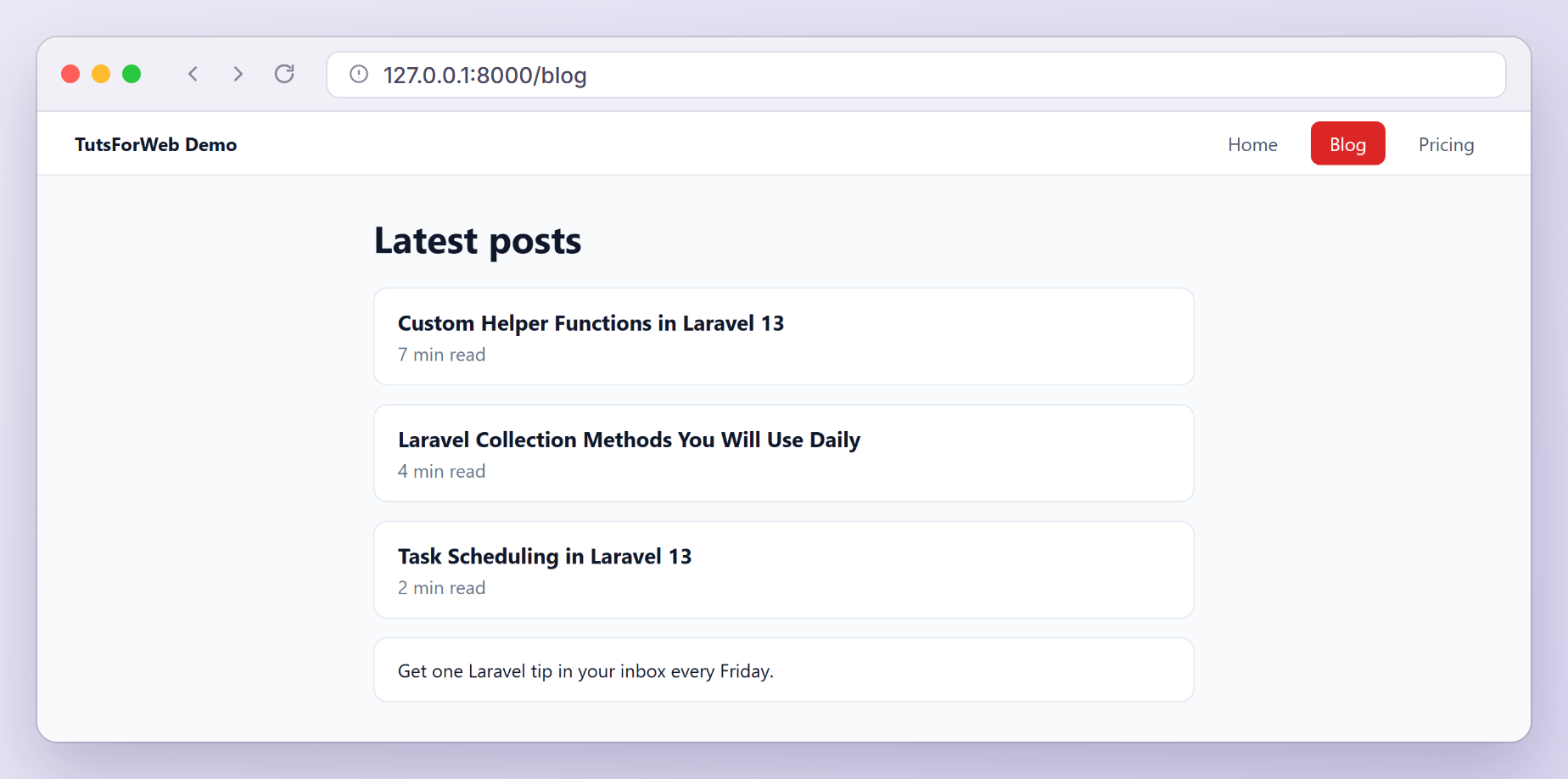
The header shows the site name from setting(), each menu link asks active_link() for its class, and the newsletter box only appears when the show_newsletter setting is on.
The pages are short. resources/views/home.blade.php:
<x-layout>
    <h1>Welcome</h1>
    <p>Practical Laravel tutorials, updated for Laravel 13.</p>
</x-layout>
resources/views/blog/index.blade.php prints the reading time the controller calculated:
<x-layout title="Blog">
    <h1>Latest posts</h1>

    @foreach ($posts as $slug => $post)
        <article>
            <h2><a href="{{ route('blog.show', $slug) }}">{{ $post['title'] }}</a></h2>
            <p class="meta">{{ $post['reading_time'] }}</p>
        </article>
    @endforeach
</x-layout>
resources/views/blog/show.blade.php calls reading_time() directly in the view:
<x-layout :title="$post['title']">
    <h1>{{ $post['title'] }}</h1>
    <p class="meta">{{ reading_time($post['body']) }}</p>
    <p>{{ $post['body'] }}</p>
</x-layout>
And resources/views/pricing.blade.php lists the prices formatted in the route:
<x-layout title="Pricing">
    <h1>Pricing</h1>

    @foreach ($plans as $name => $price)
        <article>
            <h2>{{ $name }}</h2>
            <p class="meta">{{ $price }} per month</p>
        </article>
    @endforeach
</x-layout>
Run php artisan serve and open /blog. Thanks to the blog.* pattern, the Blog link stays highlighted on every post too:
In Artisan Commands
Helpers are just as handy in the console. Add this command to the bottom of routes/console.php:
Artisan::command('helpers:demo', function () {
    $body = str_repeat('Helpers keep small formatting rules in one place. ', 100);

    $this->table(['Call', 'Result'], [
        ['money(1999)', money(1999)],
        ["money(250000, 'EUR')", money(250000, 'EUR')],
        ['reading_time($body)', reading_time($body)],
        ["setting('site_name')", setting('site_name')],
        ["setting('missing', 'default')", setting('missing', 'default')],
    ]);
})->purpose('Show the custom helpers in action');
Run it with php artisan helpers:demo:
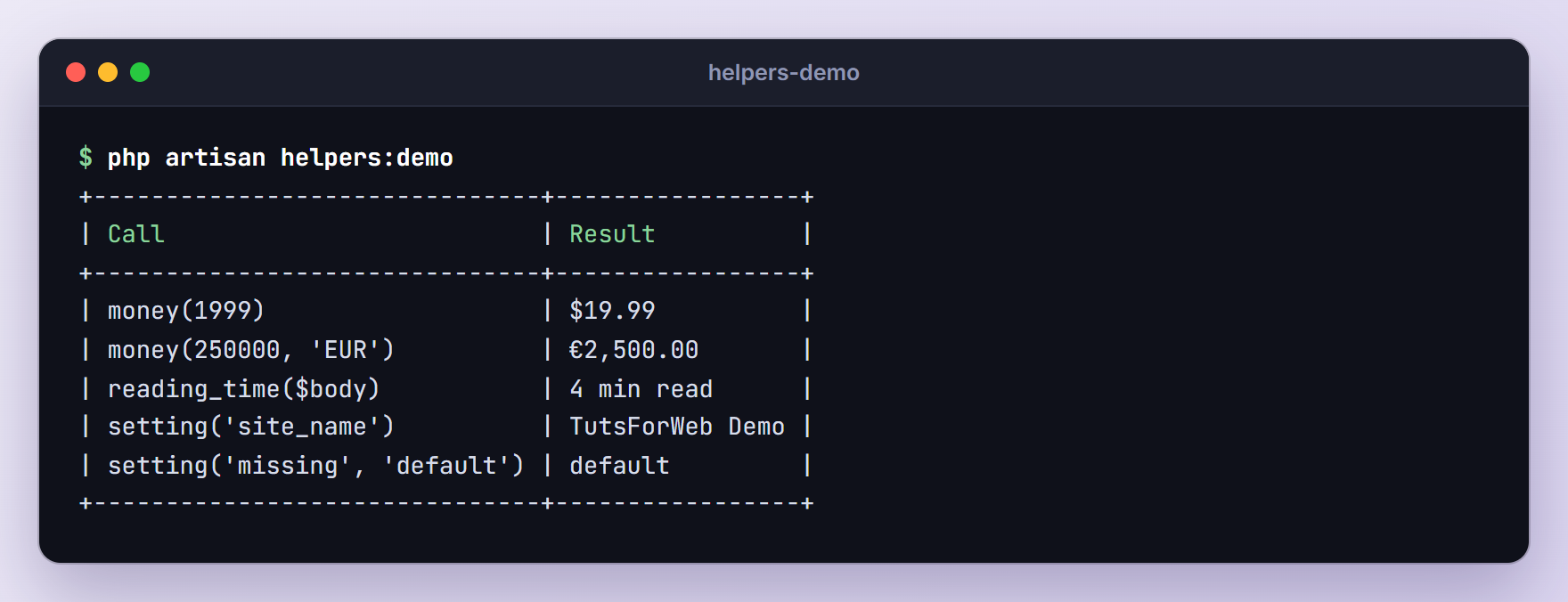
The 800-word body gives “4 min read”, and the missing setting falls back to its default.
Alternatives to Global Helper Functions
Global functions are not always the best fit. Here are four alternatives, each running in the same demo app.
A Static Helper Class
When several helpers belong together, a class with static methods groups them under one name. Classes autoload through PSR-4, so there is no files entry to add and no dump-autoload to run. Create app/Support/Seo.php:
<?php

namespace App\Support;

use Illuminate\Support\Str;

class Seo
{
    /**
     * Build a page title like "Blog | TutsForWeb Demo".
     */
    public static function title(?string $page = null): string
    {
        $site = setting('site_name', config('app.name'));

        return $page ? "{$page} | {$site}" : $site;
    }

    /**
     * Turn a post body into a meta description.
     */
    public static function description(string $html, int $limit = 155): string
    {
        return Str::limit(Str::squish(strip_tags($html)), $limit);
    }
}
Blade views do not see the imports of your PHP files, so import the class with the @use directive. In resources/views/components/layout.blade.php, add @use('App\Support\Seo') on the line below @props, then change the title tag:
<title>{{ Seo::title($title) }}</title>
The blog index is now titled “Blog | TutsForWeb Demo”. Prefer a class like this for a family of related functions, or for logic that may later need dependencies, since a class is easy to turn into an injectable service.
Macros on Str and Collection
Macros add methods to Laravel classes at runtime. Str, Stringable, Arr, Number, Collection, Request and the query builder all use the Macroable trait. Register macros in the boot() method of app/Providers/AppServiceProvider.php, importing Illuminate\Support\Collection and Illuminate\Support\Str at the top:
public function boot(): void
{
    Str::macro('possessive', function (string $name) {
        return str_ends_with(strtolower($name), 's') ? "{$name}'" : "{$name}'s";
    });

    Collection::macro('sumMoney', function (string $key) {
        return money($this->sum($key));
    });
}
Let’s try them:
php artisan tinker --execute="echo Str::possessive('Taylor'), PHP_EOL, Str::possessive('James'), PHP_EOL, collect([['price' => 2900], ['price' => 9900]])->sumMoney('price');"
Taylor's
James'
$128.00
Inside a collection macro, $this is the collection, which is why sumMoney() can call $this->sum(). One catch: Str::macro() does not reach fluent strings, so str('Taylor')->possessive() throws BadMethodCallException: Method Illuminate\Support\Stringable::possessive does not exist. Register a separate Stringable::macro() (where $this->value holds the string) if you need both. Prefer a macro when the logic is clearly a method of that type.
Custom Blade Directives
For view-only syntax, Blade lets you define your own directives. Add these lines to the same boot() method and import Illuminate\Support\Facades\Blade:
Blade::directive('money', function (string $expression) {
    return "<?php echo e(money({$expression})); ?>";
});

Blade::if('setting', function (string $key) {
    return (bool) setting($key);
});
Blade::directive() receives the raw expression between the parentheses and returns PHP code, so Blade compiles @money(29000) to <?php echo e(money(29000)); ?>. Compiled views are cached, so run php artisan view:clear after changing a directive. Blade::if() is a shortcut for custom conditionals. Replace the @if block around the newsletter box in the layout with:
@setting('show_newsletter')
    <aside>Get one Laravel tip in your inbox every Friday.</aside>
@endsetting
We will use @money on the pricing page in the next section.
Namespaced Functions With use function
Global names can collide. Laravel’s newer helpers avoid that by living in a namespace (use function Illuminate\Support\minutes;), and the helpers documentation even recommends importing Illuminate\Support\defer this way because the Swoole extension has a global defer() of its own. Your helpers can do the same. Create app/Support/pricing.php:
<?php

namespace App\Support;

use Illuminate\Support\Number;

function percent_off(int $was, int $now): string
{
    return Number::percentage(($was - $now) / $was * 100);
}
The namespace already protects the name, so there is no function_exists() guard. Functions still cannot be autoloaded, though, so add the file to the files list in composer.json and run composer dump-autoload again:
"files": [
    "app/Support/helpers.php",
    "app/Support/pricing.php"
]
In PHP files, import it with use function App\Support\percent_off;. In Blade, the @use directive accepts the function keyword. Add this line to the top of resources/views/pricing.blade.php:
@use(function App\Support\percent_off)
Then add this paragraph just before </x-layout>:
<p>Pro yearly: @money(29000), save {{ percent_off(34800, 29000) }}.</p>
The page now reads “Pro yearly: $290.00, save 17%.” If you forget the import, PHP looks for the function in the current namespace, then in the global one, and fails with an error like Call to undefined function App\Http\Controllers\percent_off().
IDE Autocompletion
PhpStorm and VS Code (with Intelephense) index helpers.php like any other project file, the same way they find Laravel’s own helpers, so types and docblocks show up as you type. Macros only exist at runtime, so editors cannot see them. The barryvdh/laravel-ide-helper package fixes that: after composer require --dev barryvdh/laravel-ide-helper, php artisan ide-helper:generate writes an _ide_helper.php file, and with version 3.7.0 it included both of our macros.
Loading a Folder of Helpers With a Service Provider
The old tutorial also loaded helpers from a service provider. That still works in Laravel 13, and make:provider now registers the provider for you:
php artisan make:provider HelperServiceProvider
After the command, bootstrap/providers.php lists both providers:
<?php

return [
    App\Providers\AppServiceProvider::class,
    App\Providers\HelperServiceProvider::class,
];
Then require every PHP file in app/Helpers from the register() method of app/Providers/HelperServiceProvider.php:
<?php

namespace App\Providers;

use Illuminate\Support\ServiceProvider;

class HelperServiceProvider extends ServiceProvider
{
    /**
     * Load every helper file in app/Helpers.
     */
    public function register(): void
    {
        foreach (glob(app_path('Helpers/*.php')) as $file) {
            require_once $file;
        }
    }
}
Loading files in register() uses no services, and it makes the helpers available in every provider’s boot() method.
To compare, I moved helpers.php into app/Helpers and removed it from the Composer files list. Pages and Artisan commands kept working, because both boot the providers, but two things broke:
- Unit tests. Tests made with
make:test --unitnever boot Laravel, so every call failed withCall to undefined function Tests\Unit\money(). - Config files. Laravel loads configuration before it registers providers, so
money()in a config file failed withCall to undefined function money().
That is why the Composer files approach is usually simpler: it runs first, everywhere, with no extra class. Use a provider only when you must decide at runtime which helper files to load. I switched the demo back to Composer afterwards.
Testing Your Laravel Custom Helper Functions
Pure helpers like money() and reading_time() do not need the framework, so they fit fast unit tests:
php artisan make:test HelpersTest --unit
Replace the contents of tests/Unit/HelpersTest.php:
<?php

namespace Tests\Unit;

use PHPUnit\Framework\TestCase;

use function App\Support\percent_off;

class HelpersTest extends TestCase
{
    public function test_money_formats_cents_as_currency(): void
    {
        $this->assertSame('$19.99', money(1999));
        $this->assertSame('€2,500.00', money(250000, 'EUR'));
    }

    public function test_reading_time_rounds_up_to_whole_minutes(): void
    {
        $this->assertSame('1 min read', reading_time('A short post.'));
        $this->assertSame('2 min read', reading_time(str_repeat('word ', 201)));
    }

    public function test_reading_time_ignores_html_tags(): void
    {
        $html = '<p>'.str_repeat('<strong>word</strong> ', 200).'</p>';

        $this->assertSame('1 min read', reading_time($html));
    }

    public function test_namespaced_percent_off_helper(): void
    {
        $this->assertSame('17%', percent_off(34800, 29000));
    }
}
These tests extend PHPUnit’s own TestCase, so Laravel never boots. The helpers still exist because phpunit.xml bootstraps vendor/autoload.php, where Composer loads them. The last test imports the namespaced helper with use function.
active_link() and setting() need a request, a database and the cache, so they belong in a feature test:
php artisan make:test NavigationTest
Replace the contents of tests/Feature/NavigationTest.php:
<?php

namespace Tests\Feature;

use App\Models\Setting;
use Illuminate\Foundation\Testing\RefreshDatabase;
use Tests\TestCase;

class NavigationTest extends TestCase
{
    use RefreshDatabase;

    public function test_blog_link_is_active_on_every_blog_page(): void
    {
        $this->get('/blog/scheduling')
            ->assertOk()
            ->assertSee('<a href="'.route('blog.index').'" class="active">Blog</a>', false)
            ->assertSee('<a href="'.route('pricing').'" class="">Pricing</a>', false);
    }

    public function test_setting_returns_fresh_values_after_an_update(): void
    {
        $setting = Setting::create(['key' => 'site_name', 'value' => 'TutsForWeb Demo']);

        $this->assertSame('TutsForWeb Demo', setting('site_name'));

        $setting->update(['value' => 'Laravel Tips']);

        $this->assertSame('Laravel Tips', setting('site_name'));
        $this->assertSame('fallback', setting('missing', 'fallback'));
    }
}
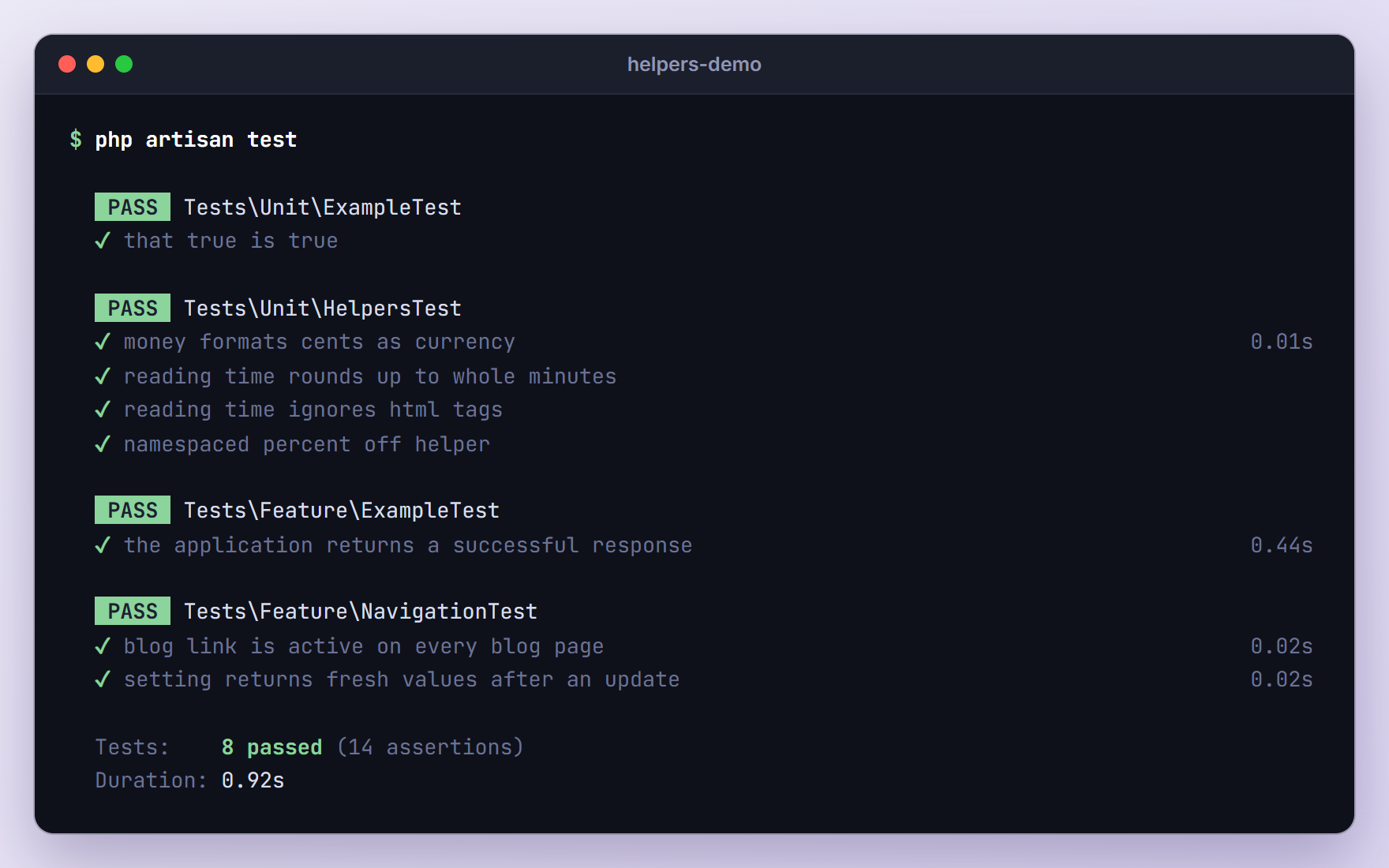
The first test opens a blog post and checks that only the Blog link is active. The second proves that the model event clears the memoized cache, so an update is visible straight away.
One more change: the default tests/Feature/ExampleTest.php requests /, and the layout now reads the settings table. Without migrations that test fails with no such table: settings, so uncomment its RefreshDatabase import and add use RefreshDatabase; inside the class. Then run the suite:
php artisan test
Troubleshooting
Call to undefined function money()
The function was never loaded. This is the exact error from Tinker when you add the files entry but skip composer dump-autoload:
Error Call to undefined function money().
Run composer dump-autoload and try again. If the path in the files list is wrong, composer dump-autoload itself fails with Failed to open stream: No such file or directory and prints the path it tried. Inside a namespace the message includes that namespace, for example Call to undefined function Tests\Unit\money(), but the cause is the same.
Cannot redeclare function array_first()
Another function already owns the name. A real example: Laravel 5 had an array_first($array, $callback) helper that people still copy around. PHP 8.5 added its own array_first(), and on PHP 8.3 and 8.4 a fresh Laravel 13 app defines it through symfony/polyfill-php85. Without a guard, nothing boots (paths shortened):
Fatal error: Cannot redeclare function array_first() (previously declared in ...\vendor\symfony\polyfill-php85\bootstrap.php:27) in ...\app\Support\helpers.php on line 56
With a guard it is worse, because nothing fails. Composer loads your files after the package files, so the polyfill wins and ignores your callback: array_first([10, 20, 30], fn ($n) => $n > 15) returned 10 instead of 20 in my test. Before you name a helper, ask PHP who owns the name:
php artisan tinker --execute="echo (new ReflectionFunction('array_first'))->getFileName();"
It printed the polyfill’s bootstrap.php path. Rename your helper or move it into a namespace. Expect more of this: PHP 8.6 is adding clamp(), and symfony/polyfill-php86 already defines it in a fresh Laravel 13 app.
Helper Not Working in a Config File
It depends on how the helper is loaded and what it does. Composer loads helpers before configuration, so pure helpers work. I tested it with config/shop.php:
<?php

return [
    'free_shipping_label' => 'Free shipping on orders over '.money(5000),
];
config('shop.free_shipping_label') returned “Free shipping on orders over $50.00”, and php artisan config:cache stored that finished string, so the value stays frozen until you cache the config again. Two cases fail: helpers loaded by a service provider (Call to undefined function money()), and helpers that use facades, the cache or the database, such as setting(). Facades are not ready while config files load, so you get A facade root has not been set. Read values like settings at runtime instead.
Stale Values in Octane or Queue Workers
Laravel Octane boots your application once and keeps it in memory between requests, and php artisan queue:work does the same between jobs. A static variable inside a helper survives too, so this version of setting() is a trap:
function setting(string $key, mixed $default = null): mixed
{
    static $settings;

    $settings ??= Setting::query()->pluck('value', 'key')->all();

    return $settings[$key] ?? $default;
}
I ran one queue worker, dispatched a job whose handle() method runs info('Site name: '.setting('site_name')), renamed the site from another terminal, and dispatched the job again:
[2026-10-25 07:14:05] local.INFO: Site name: TutsForWeb Demo
[2026-10-25 07:14:11] local.INFO: Site name: TutsForWeb Demo
The second job still saw the old name. With the Cache::memo() version from Step 4, it logged “Laravel Tips”, because memoized values only live for one request or job. The once() helper is not a full fix: Octane flushes it after every request, but the queue worker kept the old value between jobs in the same test. Use Cache::memo() for values that can change, and never collect data in static arrays, which the Octane docs call a memory leak.
Upgrading From the Laravel 5 Version of This Tutorial
If your project still follows the old post, here is what changes:
- Register providers in bootstrap/providers.php instead of the
providersarray in config/app.php.make:providerdoes it for you. - The skeleton’s config/app.php has no
aliasesarray, and you rarely need one: import classes withusein PHP and@usein Blade. If you add an alias anyway, merge it intoIlluminate\Support\Facades\Facade::defaultAliases()and call->toArray(), as the framework’s own config does. A plain array replaces all 47 default aliases, includingStr. - Remove helpers the framework now covers, such as
human_file_size()(useNumber::fileSize()). - Laravel 6 moved the old
str_andarray_helpers into thelaravel/helperspackage. Switch toStrandArrmethods rather than copying them back, especiallyarray_first()andarray_last(), which clash with PHP 8.5.
Frequently Asked Questions
Where should I put custom helper functions in Laravel?
Any file listed under autoload.files in composer.json works. app/Support/helpers.php and app/helpers.php are the most common choices. Keep the file name lowercase, guard every function with function_exists(), and confirm a name is free (with function_exists() or ReflectionFunction) before you use it. When the file grows large, split it by topic and list each new file in files.
Do I need to run composer dump-autoload every time I add a helper?
No. Run it when you add, rename or remove a file in the files list, because that is what Composer records. New functions inside a file that is already listed work immediately. I confirmed this by adding a function to helpers.php and calling it from Tinker without regenerating the autoloader.
Can I override a built-in Laravel helper like now()?
Not from your helpers file. Laravel guards its helpers with function_exists() too, but Composer loads your project’s files after the framework’s, so Laravel’s version is defined first and yours is skipped. When I added a guarded now() that returned a string, now() still returned an Illuminate\Support\Carbon instance. Pick a different name, or add a macro to the class you want to extend.
Should I use a helper function or a static class?
Use a global function for short calls you repeat constantly, mostly in Blade, where money($price) reads better than a long class name. Use a static class for a family of related helpers or when you want to avoid global names. A good compromise is to keep the logic in a class and add a one-line global function that calls it.
Wrapping Up
We built four Laravel custom helper functions in a Composer-loaded file, used them across the app, and covered them with unit and feature tests. We also saw when a static class, a macro, a Blade directive or a namespaced function fits better, how to avoid name collisions, and why static caches go stale in long-running processes.
Keep helpers small, check every name before you claim it, and let classes handle anything that needs dependencies.
Learn more about Laravel:
