


Every support inbox starts the day the same way: someone reads each new ticket, decides how urgent it is, looks up the customer’s order and types a first reply. The Laravel AI SDK lets your app do that first pass, with the same PHP code whether the model comes from Anthropic, OpenAI, Gemini or another provider.
In this tutorial we will build a ticket triage agent for the helpdesk of an online store. It reads a ticket, calls a tool that looks up the customer’s recent orders in our database, and returns structured JSON: a category, a priority, the customer’s sentiment, a one-sentence summary and a suggested reply. We will validate that output before saving it, run the agent on the queue, and test everything without calling a real provider, so you can follow along without an API key.
We will use Laravel 13 (version 13.38 at the time of writing), laravel/ai 1.3.0 and PHP 8.4. Everything here works on PHP 8.3 or newer.
Table of Contents
Prerequisites
- PHP 8.3 or newer and Composer
- Basic Laravel knowledge: migrations, Eloquent, routes and queues
- An Anthropic or OpenAI API key, only if you want to run the agent against a real model (the tests do not need one)
Installing the Laravel AI SDK
Create a new project (or run laravel new helpdesk if you use the Laravel installer) and install the package:
composer create-project laravel/laravel helpdesk
cd helpdesk
composer require laravel/ai
php artisan vendor:publish --provider="Laravel\Ai\AiServiceProvider"
php artisan migrate
A fresh Laravel 13 project already uses SQLite and the database queue driver, which is all we need. The vendor:publish command copies config/ai.php, a migration for the agent_conversations and agent_conversation_messages tables (the SDK’s conversation memory), and the stubs behind make:agent and make:tool into a stubs folder in case you want to customize them.
Note: Run vendor:publish only once. A second run copies the conversation migration again under a new timestamp, and php artisan migrate then fails with table "agent_conversations" already exists. If that happens, delete the newer copy.
Adding Your Provider Keys
Open .env and add a key for each provider you plan to use. Our agent tries Anthropic first and falls back to OpenAI, so I add both:
ANTHROPIC_API_KEY=your-anthropic-key
OPENAI_API_KEY=your-openai-key
config/ai.php reads these with env(), next to entries for Gemini, Azure OpenAI, Bedrock, Groq, Mistral, xAI, Ollama and more. Its default option is openai, the provider an agent uses when it does not pick one. Keep keys in .env only, never in code or Git.
Creating the Helpdesk Tables
Our helpdesk needs customers, their orders and their tickets. The existing users table holds the support staff who call the API.
php artisan make:model Customer -m
php artisan make:model Order -m
php artisan make:model Ticket -m
Open each new migration in database/migrations and fill in its Schema::create() call:
// ..._create_customers_table.php
Schema::create('customers', function (Blueprint $table) {
    $table->id();
    $table->string('name');
    $table->string('email')->unique();
    $table->timestamps();
});

// ..._create_orders_table.php
Schema::create('orders', function (Blueprint $table) {
    $table->id();
    $table->foreignId('customer_id')->constrained()->cascadeOnDelete();
    $table->string('number')->unique();
    $table->string('status');
    $table->decimal('total', 10, 2);
    $table->timestamp('placed_at');
    $table->timestamp('shipped_at')->nullable();
    $table->timestamps();
});

// ..._create_tickets_table.php
Schema::create('tickets', function (Blueprint $table) {
    $table->id();
    $table->foreignId('customer_id')->constrained()->cascadeOnDelete();
    $table->string('subject');
    $table->text('body');
    $table->string('category')->nullable();
    $table->string('priority')->nullable();
    $table->string('sentiment')->nullable();
    $table->text('summary')->nullable();
    $table->text('suggested_reply')->nullable();
    $table->timestamp('triaged_at')->nullable();
    $table->timestamp('triage_failed_at')->nullable();
    $table->timestamps();
});
The triage columns are nullable because a ticket exists before the agent has seen it, and triage_failed_at lets a human find tickets that need manual sorting.
Now the models. Here is app/Models/Customer.php:
<?php

namespace App\Models;

use Illuminate\Database\Eloquent\Attributes\Fillable;
use Illuminate\Database\Eloquent\Model;
use Illuminate\Database\Eloquent\Relations\HasMany;

#[Fillable(['name', 'email'])]
class Customer extends Model
{
    public function orders(): HasMany
    {
        return $this->hasMany(Order::class);
    }

    public function tickets(): HasMany
    {
        return $this->hasMany(Ticket::class);
    }
}
app/Models/Order.php only lists its fillable columns:
<?php

namespace App\Models;

use Illuminate\Database\Eloquent\Attributes\Fillable;
use Illuminate\Database\Eloquent\Model;

#[Fillable(['number', 'status', 'total', 'placed_at', 'shipped_at'])]
class Order extends Model
{
    //
}
And app/Models/Ticket.php for now:
<?php

namespace App\Models;

use Illuminate\Database\Eloquent\Attributes\Fillable;
use Illuminate\Database\Eloquent\Model;
use Illuminate\Database\Eloquent\Relations\BelongsTo;

#[Fillable([
    'subject', 'body', 'category', 'priority', 'sentiment',
    'summary', 'suggested_reply', 'triaged_at', 'triage_failed_at',
])]
class Ticket extends Model
{
    protected function casts(): array
    {
        return [
            'triaged_at' => 'datetime',
            'triage_failed_at' => 'datetime',
        ];
    }

    public function customer(): BelongsTo
    {
        return $this->belongsTo(Customer::class);
    }
}
#[Fillable] is the attribute form of the $fillable property; the default User model in Laravel 13 uses it too.
Next, some demo data. Replace the run() method in database/seeders/DatabaseSeeder.php and add use App\Models\Customer; to its imports:
public function run(): void
{
    User::factory()->create([
        'name' => 'Support Agent',
        'email' => 'support@example.com',
    ]);

    $maya = Customer::create(['name' => 'Maya Lopez', 'email' => 'maya@example.com']);

    $maya->orders()->createMany([
        [
            'number' => '1042', 'status' => 'shipped', 'total' => 189.90,
            'placed_at' => now()->subDays(9), 'shipped_at' => now()->subDays(8),
        ],
        [
            'number' => '1017', 'status' => 'delivered', 'total' => 24.50,
            'placed_at' => now()->subDays(40), 'shipped_at' => now()->subDays(39),
        ],
    ]);

    $maya->tickets()->create([
        'subject' => 'Where is my tent?',
        'body' => 'I ordered a tent over a week ago (order 1042) and it still has not arrived. I need it for a trip on Saturday!',
    ]);

    $sam = Customer::create(['name' => 'Sam Patel', 'email' => 'sam@example.com']);

    $sam->orders()->create([
        'number' => '1050', 'status' => 'processing', 'total' => 75.00, 'placed_at' => now()->subDay(),
    ]);
}
Run the migrations and the seeder:
php artisan migrate --seed
Sam matters later: our tests prove that the agent never sees his order while it works on Maya’s ticket. If seeders are new to you, read Laravel migrations and database seeding first.
Creating the Ticket Triage Agent
The SDK ships generators for agents and tools:
php artisan make:agent TicketTriage --structured
php artisan make:tool RecentOrders
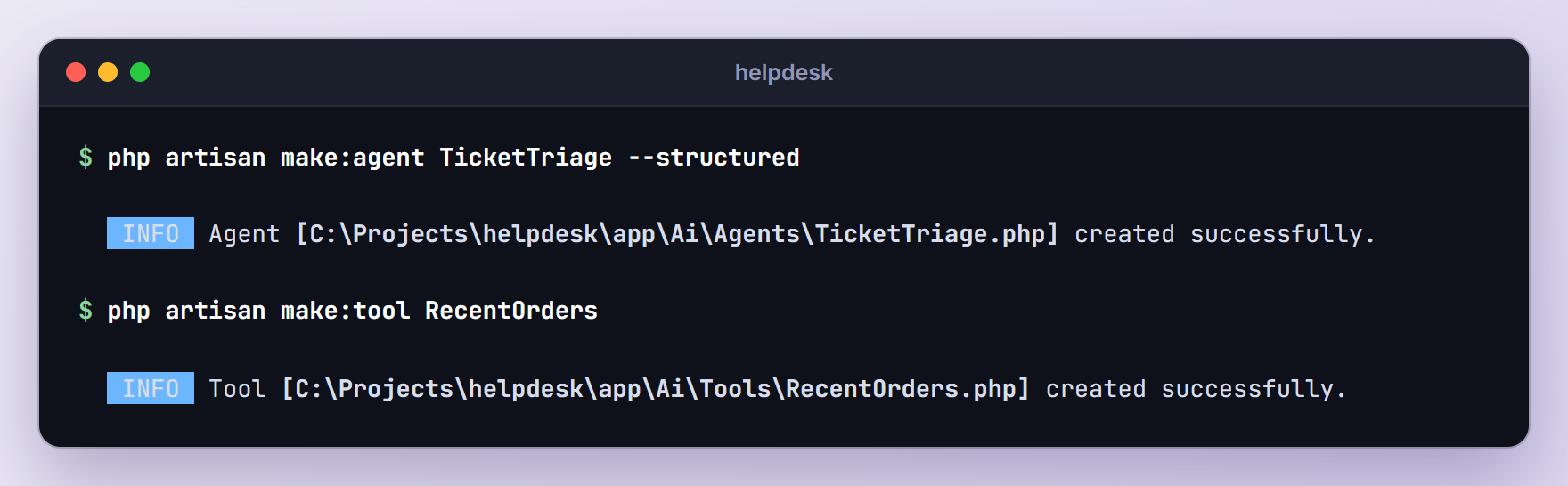
The --structured flag (or -s) uses the stub with a schema() method. Agents land in app/Ai/Agents and tools in app/Ai/Tools. Replace the generated app/Ai/Agents/TicketTriage.php with this:
<?php

namespace App\Ai\Agents;

use App\Ai\Tools\RecentOrders;
use App\Models\Customer;
use Illuminate\Contracts\JsonSchema\JsonSchema;
use Laravel\Ai\Attributes\MaxSteps;
use Laravel\Ai\Attributes\MaxTokens;
use Laravel\Ai\Attributes\Provider;
use Laravel\Ai\Attributes\Timeout;
use Laravel\Ai\Contracts\Agent;
use Laravel\Ai\Contracts\HasStructuredOutput;
use Laravel\Ai\Contracts\HasTools;
use Laravel\Ai\Enums\Lab;
use Laravel\Ai\Promptable;
use Stringable;

#[Provider([
    Lab::Anthropic->value => 'claude-haiku-5-5',
    Lab::OpenAI->value => 'gpt-6-luna',
])]
#[MaxTokens(1024)]
#[MaxSteps(3)]
#[Timeout(30)]
class TicketTriage implements Agent, HasStructuredOutput, HasTools
{
    use Promptable;

    public const CATEGORIES = ['order', 'returns', 'billing', 'product', 'account', 'other'];

    public const PRIORITIES = ['low', 'normal', 'high', 'urgent'];

    public const SENTIMENTS = ['positive', 'neutral', 'negative'];

    public function __construct(public Customer $customer) {}

    public function instructions(): Stringable|string
    {
        return <<<'PROMPT'
            You triage customer support tickets for an online outdoor gear store.

            Read the ticket and return:
            - category: the main topic of the ticket.
            - priority: "urgent" for payment problems such as double charges, "high" for
              late, lost or damaged orders, "normal" for most requests, "low" for feedback.
            - sentiment: the customer's tone.
            - summary: one sentence for the support team.
            - suggested_reply: a short, friendly reply that a human agent will review
              before sending. Start with "Hi there," and do not sign it with a name.

            If the ticket is about an existing order, call the RecentOrders tool and base
            your reply on the real order status. Never invent order numbers, tracking
            numbers, delivery dates or refunds.
            PROMPT;
    }

    public function tools(): iterable
    {
        return [new RecentOrders($this->customer)];
    }

    public function schema(JsonSchema $schema): array
    {
        return [
            'category' => $schema->string()->enum(self::CATEGORIES)->required(),
            'priority' => $schema->string()->enum(self::PRIORITIES)->required(),
            'sentiment' => $schema->string()->enum(self::SENTIMENTS)->required(),
            'summary' => $schema->string()->description('One sentence for the support team.')->required(),
            'suggested_reply' => $schema->string()->description('A reply a human agent can edit and send.')->required(),
        ];
    }
}
There is a lot in this class, so let me go through it.
The Promptable trait gives the agent its prompt(), stream() and queue() methods, plus the testing helpers we use later. The generated stub also implemented Conversational with an empty messages() method. Triage has no chat history, so I removed both.
The attributes live in Laravel\Ai\Attributes. With a single provider you would write #[Provider(Lab::Anthropic)] plus #[Model('claude-haiku-5-5')]. Here #[Provider] gets an array keyed by Lab::...->value (enum cases cannot be array keys), which pins a model per provider and turns on failover: if Anthropic is rate limited, overloaded, out of credits or unreachable, the SDK sends the same prompt to OpenAI. Do not pair a plain list like [Lab::Anthropic, Lab::OpenAI] with #[Model]: the SDK ignores #[Model] when the provider is an array and uses each provider’s default model.
#[MaxTokens(1024)] caps the answer length, #[MaxSteps(3)] caps how many model calls one prompt may make (a tool round trip uses a step), and #[Timeout(30)] sets the HTTP timeout per request in seconds (the default is 60). Temperature, TopP, UseCheapestModel and UseSmartestModel are also available.
Note: Model names change quickly. claude-haiku-5-5 and gpt-6-luna are the models laravel/ai 1.3 itself uses as the cheapest Anthropic and OpenAI text models (see cheapestTextModel() in vendor/laravel/ai/src/Providers). Check your provider’s model list before you deploy.
The constants hold the allowed values. schema() uses them in enum(), and we will reuse them for validation. The SDK converts the schema to JSON Schema and sends it with every request, so the provider knows the exact shape we expect.
The constructor takes the Customer who wrote the ticket and hands it to the tool, so every lookup is scoped to that customer. Finally, instructions() is the system prompt, and plain rules work better than clever wording. Asking for “Hi there,” instead of a name means we never need to send the customer’s name.
Giving the Agent a Tool to Look Up Orders
Replace app/Ai/Tools/RecentOrders.php with this:
<?php

namespace App\Ai\Tools;

use App\Models\Customer;
use Illuminate\Contracts\JsonSchema\JsonSchema;
use Laravel\Ai\Contracts\Tool;
use Laravel\Ai\Tools\Request;
use Stringable;

class RecentOrders implements Tool
{
    public function __construct(protected Customer $customer) {}

    public function description(): Stringable|string
    {
        return 'Get the most recent orders of the customer who wrote the ticket, newest first.';
    }

    public function handle(Request $request): Stringable|string
    {
        $limit = $request->validate([
            'limit' => ['required', 'integer', 'min:1', 'max:10'],
        ])['limit'];

        return $this->customer->orders()
            ->latest('placed_at')
            ->limit($limit)
            ->get(['number', 'status', 'total', 'placed_at', 'shipped_at'])
            ->toJson();
    }

    public function schema(JsonSchema $schema): array
    {
        return [
            'limit' => $schema->integer()->min(1)->max(10)->description('How many orders to return.')->required(),
        ];
    }
}
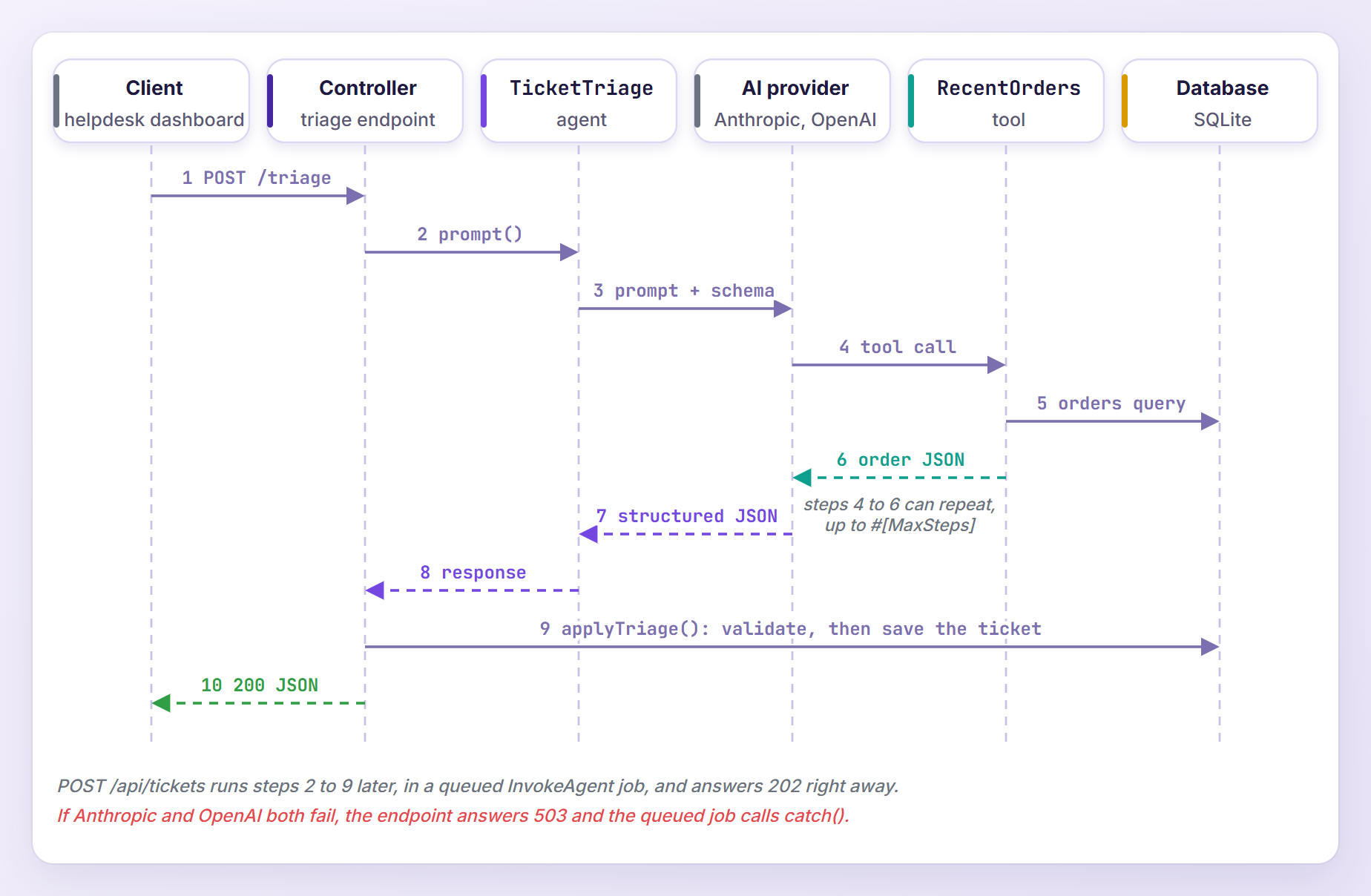
The model never sees this PHP. It sees the tool name (the class name, RecentOrders, which is why the instructions mention it), the description and the schema, and it decides when to call the tool. The SDK then runs handle() and sends the returned string back to the model.
A few things to notice:
- The model chooses how many orders it wants, but not whose. The customer comes from our code, so a crafted ticket cannot ask for someone else’s orders.
$request->validate()works like form validation. If the model asks for 50 orders, the SDK sends “The limit field must not be greater than 10.” back as the tool result so the model can try again.- We return five columns and nothing else. No address, email or payment data leaves your server.
Here is the whole round trip, from the HTTP request to the saved ticket:
Calling the Agent From a Controller
Guarding the Structured Output
The schema makes a well-formed answer very likely, but it is not a guarantee. When a reply is cut off by #[MaxTokens] or is not valid JSON, the SDK hands you an empty array instead of throwing. So we validate before anything touches the database. Add these imports and two methods to app/Models/Ticket.php:
use App\Ai\Agents\TicketTriage;
use Illuminate\Support\Facades\Validator;
use Illuminate\Validation\Rule;

// Inside the Ticket class...

public function triagePrompt(): string
{
    // Only the ticket text goes to the provider: no name, no email.
    return "Subject: {$this->subject}\n\n{$this->body}";
}

public function applyTriage(array $triage): void
{
    $validated = Validator::validate($triage, [
        'category' => ['required', Rule::in(TicketTriage::CATEGORIES)],
        'priority' => ['required', Rule::in(TicketTriage::PRIORITIES)],
        'sentiment' => ['required', Rule::in(TicketTriage::SENTIMENTS)],
        'summary' => ['required', 'string', 'max:500'],
        'suggested_reply' => ['required', 'string', 'max:3000'],
    ]);

    $this->update([...$validated, 'triaged_at' => now(), 'triage_failed_at' => null]);
}
triagePrompt() builds the user message, and applyTriage() is the only way triage data gets saved. Validator::validate() throws a ValidationException when a value is missing or not in our lists, and it returns only the keys we listed, so an unexpected extra field from the model is dropped.
Adding the API Routes
Our endpoints are JSON APIs for the helpdesk dashboard, so let’s install Laravel’s API scaffolding:
php artisan install:api
The command installs Laravel Sanctum, creates routes/api.php and offers to run the new migration (answer yes). As it reminds you, add the Laravel\Sanctum\HasApiTokens trait to your User model. Issuing tokens is covered in Laravel 13 Sanctum API authentication, so here we only protect the routes.
Every call to these endpoints costs money, so rate limit them. Open app/Providers/AppServiceProvider.php and register a limiter in boot():
use Illuminate\Cache\RateLimiting\Limit;
use Illuminate\Http\Request;
use Illuminate\Support\Facades\RateLimiter;

public function boot(): void
{
    RateLimiter::for('ai', function (Request $request) {
        return Limit::perMinute(10)->by($request->user()?->id ?: $request->ip());
    });
}
Next, generate the two controllers we are about to write:
php artisan make:controller TicketTriageController --invokable
php artisan make:controller TicketController
Then add the routes at the bottom of routes/api.php:
use App\Http\Controllers\TicketController;
use App\Http\Controllers\TicketTriageController;

Route::middleware(['auth:sanctum', 'throttle:ai'])->group(function () {
    Route::post('/tickets', [TicketController::class, 'store']);
    Route::post('/tickets/{ticket}/triage', TicketTriageController::class);
});
Note: Keep this order. Laravel checks invokable controllers while it registers routes, so an invokable route that points at a class you have not created yet breaks every Artisan command with Invalid route action.
The Synchronous Triage Endpoint
Open app/Http/Controllers/TicketTriageController.php and replace its contents:
<?php

namespace App\Http\Controllers;

use App\Ai\Agents\TicketTriage;
use App\Models\Ticket;
use Illuminate\Http\JsonResponse;
use Illuminate\Support\Facades\Log;
use Illuminate\Validation\ValidationException;
use Laravel\Ai\Exceptions\FailoverableException;

class TicketTriageController extends Controller
{
    public function __invoke(Ticket $ticket): JsonResponse
    {
        try {
            $response = (new TicketTriage($ticket->customer))
                ->prompt($ticket->triagePrompt());

            $ticket->applyTriage($response->toArray());
        } catch (FailoverableException $e) {
            report($e);

            return response()->json(['message' => 'The AI providers are busy. Try again in a minute.'], 503);
        } catch (ValidationException $e) {
            Log::warning('Unusable triage output', ['ticket' => $ticket->id, 'errors' => $e->errors()]);

            return response()->json(['message' => 'The AI response did not match the expected format.'], 502);
        }

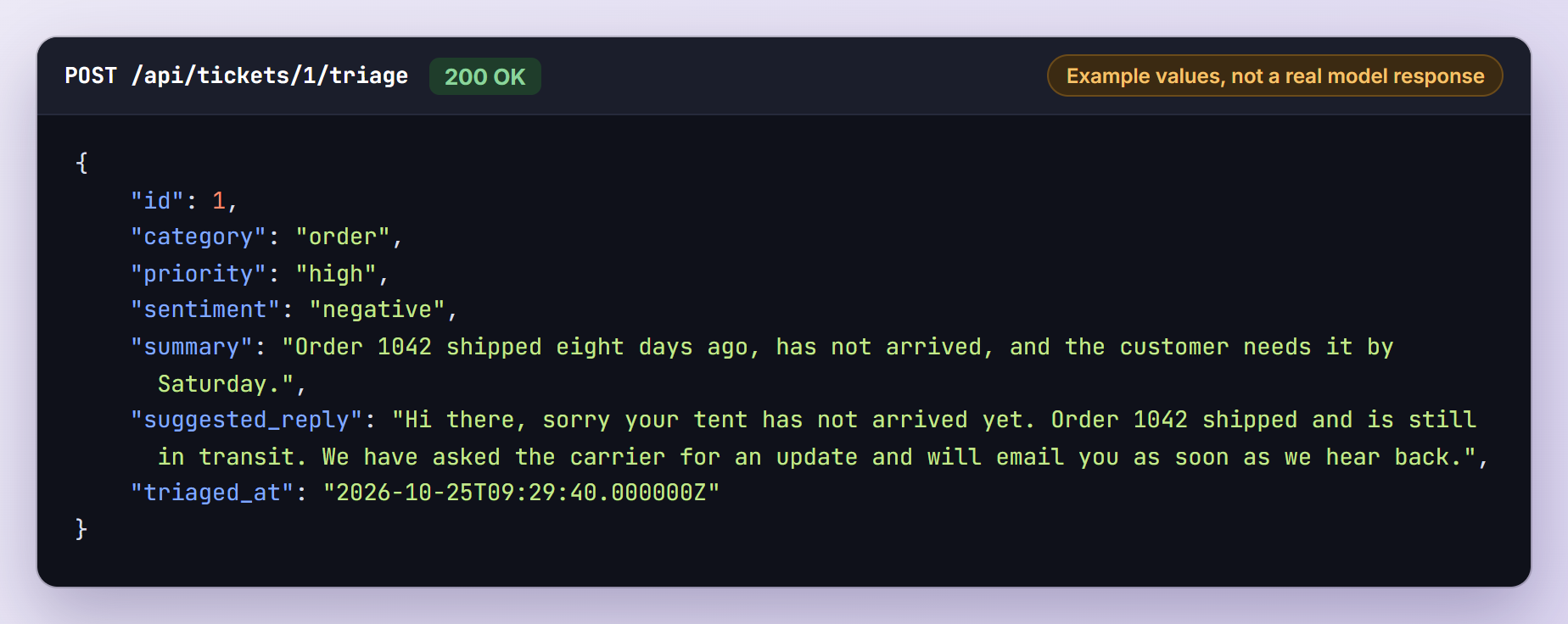
        return response()->json($ticket->only([
            'id', 'category', 'priority', 'sentiment', 'summary', 'suggested_reply', 'triaged_at',
        ]));
    }
}
Let me explain the code above. prompt() runs the whole loop (model call, tool call, final answer) and returns a StructuredAgentResponse. It behaves like an array, so $response['priority'] works, and toArray() gives us all the structured data.
FailoverableException is the interface behind RateLimitedException, ProviderOverloadedException, InsufficientCreditsException and ProviderConnectionException. When one reaches our controller, OpenAI has already failed too, so we answer 503. Anything else, such as a wrong API key, is a configuration problem and should surface as a normal 500 error.
A ValidationException here means the model broke our rules, not that the client sent bad input, so we answer 502 instead of Laravel’s usual 422. We log it with Log::warning() because report() skips validation exceptions.
A successful call returns the stored fields. This is the shape, filled with made-up values:
Queueing Triage for New Tickets
A prompt with a tool call makes at least two model requests, and failover can add more. Nobody needs the triage while the customer waits, so new tickets go through the queue. Replace the contents of app/Http/Controllers/TicketController.php:
<?php

namespace App\Http\Controllers;

use App\Ai\Agents\TicketTriage;
use App\Models\Customer;
use Illuminate\Http\JsonResponse;
use Illuminate\Http\Request;
use Laravel\Ai\Responses\StructuredAgentResponse;
use Throwable;

class TicketController extends Controller
{
    public function store(Request $request): JsonResponse
    {
        $data = $request->validate([
            'email' => ['required', 'email', 'exists:customers,email'],
            'subject' => ['required', 'string', 'max:200'],
            'body' => ['required', 'string', 'max:5000'],
        ]);

        $customer = Customer::where('email', $data['email'])->firstOrFail();

        $ticket = $customer->tickets()->create([
            'subject' => $data['subject'],
            'body' => $data['body'],
        ]);

        (new TicketTriage($customer))
            ->queue($ticket->triagePrompt())
            ->then(function (StructuredAgentResponse $response) use ($ticket) {
                $ticket->applyTriage($response->toArray());
            })
            ->catch(function (Throwable $e) use ($ticket) {
                $ticket->update(['triage_failed_at' => now()]);
            });

        return response()->json(['id' => $ticket->id, 'status' => 'queued'], 202);
    }
}
Here is what is happening. queue() dispatches the SDK’s Laravel\Ai\Jobs\InvokeAgent job with our agent and prompt. The agent is serialized like any job, so its Customer is stored as a model identifier and loaded fresh by the worker. The then() closure runs after a successful prompt and catch() runs when the job fails. Both closures are serialized too, together with the $ticket they use.
The max:5000 rule on body is cost control as much as validation, because it caps how much text we pay to send. The job calls prompt() for us, so #[Timeout], #[MaxTokens] and failover apply in the worker as well. Start a worker to process the jobs:
php artisan queue:work
If workers, retries and failed jobs are new to you, the Laravel 13 queues and jobs tutorial covers them in depth.
Testing Laravel AI SDK Agents Without an API Key
Every provider except Amazon Bedrock (which uses the AWS SDK) sends its requests through Laravel’s HTTP client, so a few lines in tests/TestCase.php stop any test from reaching Anthropic, OpenAI or any other API:
<?php

namespace Tests;

use Illuminate\Foundation\Testing\TestCase as BaseTestCase;
use Illuminate\Support\Facades\Http;

abstract class TestCase extends BaseTestCase
{
    protected function setUp(): void
    {
        parent::setUp();

        // Fail any test that tries to reach a real AI provider (or any other API).
        Http::preventStrayRequests();
    }
}
Http::preventStrayRequests() throws an exception for any request you did not fake. Now generate the test class:
php artisan make:test TicketTriageTest
Replace tests/Feature/TicketTriageTest.php with the following:
<?php

namespace Tests\Feature;

use App\Ai\Agents\TicketTriage;
use App\Ai\Tools\RecentOrders;
use App\Models\Customer;
use App\Models\Ticket;
use App\Models\User;
use Illuminate\Foundation\Testing\RefreshDatabase;
use Laravel\Ai\Exceptions\RateLimitedException;
use Laravel\Ai\Prompts\AgentPrompt;
use Laravel\Ai\QueuedAgentPrompt;
use Laravel\Ai\Tools\Request;
use Laravel\Sanctum\Sanctum;
use Tests\TestCase;

class TicketTriageTest extends TestCase
{
    use RefreshDatabase;

    protected $seed = true;

    private const TRIAGE = [
        'category' => 'order',
        'priority' => 'high',
        'sentiment' => 'negative',
        'summary' => 'Order 1042 has not arrived and the customer needs it by Saturday.',
        'suggested_reply' => 'Hi there, order 1042 is on its way and should arrive soon.',
    ];

    private Ticket $ticket;

    protected function setUp(): void
    {
        parent::setUp();

        Sanctum::actingAs(User::first());

        $this->ticket = Ticket::first();
    }

    public function test_it_triages_a_ticket_and_returns_json(): void
    {
        TicketTriage::fake([self::TRIAGE])->preventStrayPrompts();

        $this->postJson("/api/tickets/{$this->ticket->id}/triage")
            ->assertOk()
            ->assertJson(['category' => 'order', 'priority' => 'high']);

        $this->assertSame('high', $this->ticket->fresh()->priority);

        TicketTriage::assertPrompted(fn (AgentPrompt $prompt) => $prompt->contains('order 1042'));
    }

    public function test_it_does_not_save_output_that_breaks_the_rules(): void
    {
        TicketTriage::fake([[...self::TRIAGE, 'priority' => 'whenever']]);

        $this->postJson("/api/tickets/{$this->ticket->id}/triage")->assertStatus(502);

        $this->assertNull($this->ticket->fresh()->triaged_at);
    }

    public function test_it_returns_503_when_the_providers_are_unavailable(): void
    {
        TicketTriage::fake(function () {
            throw RateLimitedException::forProvider('anthropic');
        });

        $this->postJson("/api/tickets/{$this->ticket->id}/triage")->assertStatus(503);
    }

    public function test_new_tickets_are_triaged_on_the_queue(): void
    {
        TicketTriage::fake([self::TRIAGE]);

        $this->postJson('/api/tickets', [
            'email' => 'maya@example.com',
            'subject' => 'Charged twice',
            'body' => 'I was charged twice for order 1017.',
        ])->assertAccepted();

        TicketTriage::assertQueued(fn (QueuedAgentPrompt $prompt) => $prompt->contains('charged twice'));

        // phpunit.xml uses the sync queue, so the then() callback has already run.
        $this->assertSame('high', Ticket::latest('id')->first()->priority);
    }

    public function test_a_failed_triage_is_flagged_on_the_ticket(): void
    {
        config(['queue.default' => 'database']);

        TicketTriage::fake(function () {
            throw RateLimitedException::forProvider('anthropic');
        });

        $this->postJson('/api/tickets', [
            'email' => 'maya@example.com',
            'subject' => 'Broken zipper',
            'body' => 'The zipper on my new jacket broke.',
        ])->assertAccepted();

        $this->artisan('queue:work', ['--once' => true]);

        $this->assertNotNull(Ticket::latest('id')->first()->triage_failed_at);
    }

    public function test_the_tool_only_returns_the_customers_own_orders(): void
    {
        $maya = Customer::where('email', 'maya@example.com')->first();

        $orders = (new RecentOrders($maya))->handle(new Request(['limit' => 5]));

        $this->assertStringContainsString('1042', $orders);
        $this->assertStringNotContainsString('1050', $orders);
    }

    public function test_the_ai_endpoints_are_rate_limited(): void
    {
        TicketTriage::fake();

        for ($i = 0; $i < 10; $i++) {
            $this->postJson("/api/tickets/{$this->ticket->id}/triage")->assertOk();
        }

        $this->postJson("/api/tickets/{$this->ticket->id}/triage")->assertTooManyRequests();
    }
}
TicketTriage::fake() swaps out the request to the provider, so no tokens are spent, while the rest of the SDK runs as usual. Each array you pass comes back as structured output, in order, and preventStrayPrompts() fails the test if the agent gets a prompt you did not plan for. With no arguments, as in the rate limit test, the fake generates random data that matches the schema, enums included.
assertPrompted() hands you each AgentPrompt, so you can check exactly what was sent, and assertQueued() does the same for queued prompts. A fake() closure that throws RateLimitedException covers the failure paths: the SDK treats it like a real rate limit, tries OpenAI, fails again and passes the exception to our code.
The failed-triage test switches to the database queue and runs queue:work --once, so the job fails the way it would in production and our catch() callback runs. The tool test needs no fake at all, because a tool is a plain class we can call with a Laravel\Ai\Tools\Request.
Note: The documentation shows fake() closures that type-hint AgentPrompt. In laravel/ai 1.3.0 the closure receives the prompt text as a string (followed by the attachments, the provider and the model), so function (AgentPrompt $prompt) throws a TypeError. Use fn (string $prompt) => ... or a closure without parameters, and inspect prompts with assertPrompted().
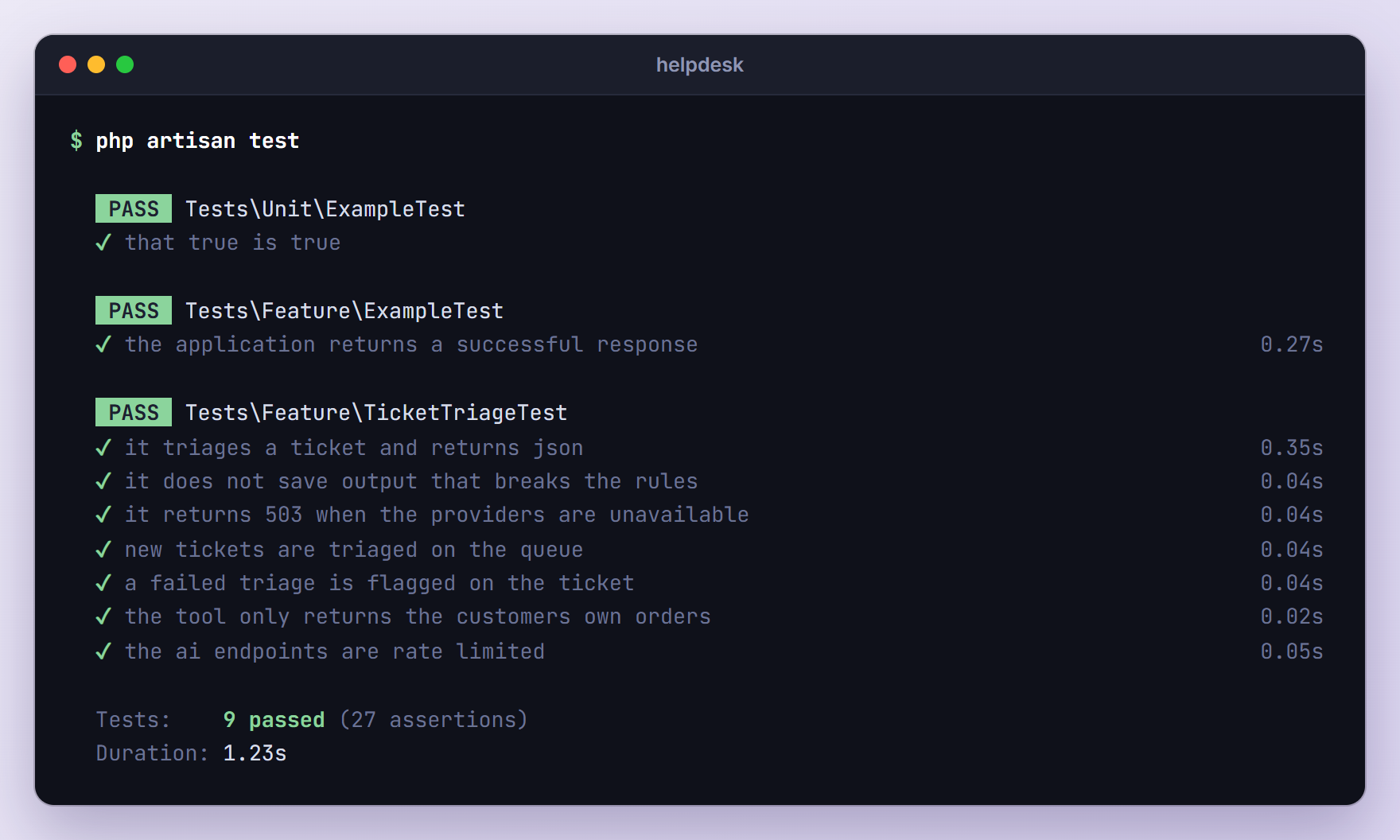
Run the suite:
php artisan test
Production Checklist
The tests prove the logic. These points keep the feature fast, cheap and safe once real customers use it:
- Cap time and tokens. Set
#[Timeout]and#[MaxTokens]on every agent. Without#[MaxTokens], the SDK’s Anthropic gateway asks for up to 64,000 output tokens. One prompt can make#[MaxSteps]calls per provider, so our agent may spend three 30-second calls on Anthropic before failing over. The worker’s own--timeoutis 60 seconds by default, so raise it (andretry_afterin config/queue.php) above your worst case, for examplephp artisan queue:work --timeout=200 --tries=3 --backoff=30. Each retry sends the prompt again, andcatch()only runs after the last attempt fails. - Expect provider errors. Failover covers
FailoverableExceptionerrors only: HTTP 429 and 402, overloaded responses such as 502, 503, 504 and Anthropic’s 529, and connection failures or timeouts. A bad key or an invalid request is thrown right away. - Watch the bill. Rate limit per user, cap input sizes, use small models for classification, and log
$response->usage->inputTokensand$response->usage->outputTokens(or listen for the SDK’sLaravel\Ai\Events\AgentPromptedevent) to see what each feature costs. - Keep keys in .env. Use separate keys per environment, and remember that cached config (
php artisan config:cache) only changes when you cache it again. - Send only what the model needs. Our prompt holds the ticket text, and the tool returns five order columns. Names, emails and addresses stay in your database.
- Keep a human in the loop. The agent suggests a reply and a person sends it.
Troubleshooting
Instance driver [antropic] is not supported.
The provider name has no entry in config/ai.php, so the SDK tried to use it as a driver name. Fix the typo, or use the Lab enum (Lab::Anthropic) so your editor catches mistakes.
HTTP request returned status code 401
The SDK does not check keys before sending a request, so a missing or wrong ANTHROPIC_API_KEY goes to the provider, which rejects it with a 401, and you get an Illuminate\Http\Client\RequestException. A 401 is not a failover error, so OpenAI is not tried. Check .env, run php artisan config:clear if you cached the config, and run php artisan queue:restart so workers pick up the new key.
Provider [Laravel\Ai\Providers\AnthropicProvider] does not support image generation.
Not every provider supports every feature. Anthropic handles text and files but not images or embeddings, so Image::of(...)->generate(provider: Lab::Anthropic) throws a LogicException. Check the provider support table, and note that config/ai.php has separate defaults such as default_for_images and default_for_embeddings.
Undefined array key “priority” or an empty triage
Reading $response['priority'] throws an ErrorException when the model left that key out, and an answer cut off by #[MaxTokens] comes back as an empty array. Always validate structured output, as applyTriage() does. If it happens often, raise #[MaxTokens], simplify the schema or tighten the instructions.
Could not connect to AI provider [openai].
ProviderConnectionException wraps connection failures and timeouts. With failover, the message names the last provider tried, which means both failed. Raise #[Timeout] or pass timeout: to prompt(), keep #[MaxSteps] low because every step is a separate request, and move slow work to the queue.
Attempted request to [https://api.anthropic.com/v1/messages] without a matching fake.
A test prompted an agent you did not fake, and Http::preventStrayRequests() blocked a real, billable request. Add TicketTriage::fake() to the test. If you see “Attempted prompt […] without a fake agent response.” instead, preventStrayPrompts() caught a prompt that has no fake response defined.
Frequently Asked Questions
Does the Laravel AI SDK work with Laravel 12?
Yes. laravel/ai 1.3 requires PHP 8.3, and its Composer constraints accept Laravel 12 and 13 components, with Laravel 12.62 as the minimum on the 12.x line because of the JSON Schema component it depends on. The SDK was introduced with Laravel 13 and is documented in the 13.x docs, which is what this tutorial targets. Laravel 11 and older are not supported.
Which AI providers are supported?
For agents and text generation: OpenAI, Anthropic, Gemini, Azure OpenAI, Amazon Bedrock, Groq, xAI, DeepSeek, Mistral, Cohere, OpenRouter, Ollama and any OpenAI-compatible server such as LM Studio or vLLM. Images, audio, transcription, embeddings and reranking have their own lists, where ElevenLabs, Jina and VoyageAI also appear. The official documentation keeps the current table.
Can an agent remember earlier messages?
Yes. Implement Conversational and use the Laravel\Ai\Concerns\RemembersConversations trait in the agent. Start a conversation with ->forUser($user)->prompt(...) and keep $response->conversationId. Later, ->continue($conversationId, as: $user) loads the earlier messages from the agent_conversations and agent_conversation_messages tables we migrated at the start. A one-shot job like triage does not need memory, which is why our agent has none.
Can I stream the reply instead of waiting for it?
Yes. Call stream() instead of prompt() and return the result from a route. Laravel sends it as server-sent events (text/event-stream), with the text arriving in small chunks, and fakes work with streaming too. Streaming suits chat answers. For structured output like our triage you want the complete object, so prompt() or queue() fits better.
Can I use a local model instead of a paid API?
Yes. The published config/ai.php includes an ollama provider that points at http://localhost:11434 by default (change it with OLLAMA_URL). Point #[Provider] at Lab::Ollama, add #[Model] with a model you have pulled, and test the output as carefully as you would with a hosted model, since tool calling and structured output depend on the model you choose.
Wrapping Up
We built a complete AI feature: an agent with clear instructions, a tool scoped to one customer, a JSON schema, validation before every save, failover between two providers, a queued path for new tickets and a test suite that runs without keys or network access. The same pattern of instructions, tools, schema and validation works for product descriptions, review moderation or lead scoring.
From here, add a dashboard that lists tickets by priority, or give the agent a second tool for your returns policy. The official AI SDK documentation covers streaming, conversation memory, embeddings, images and audio in detail.
Learn more about Laravel:
