


Few Laravel errors confuse people like 419 Page Expired. A form is submitted and the user lands on a nearly empty page, because the request failed Laravel’s cross-site request forgery (CSRF) check, usually by arriving without a valid Laravel CSRF token. In this tutorial we build a small help desk, reproduce every common cause of the error, fix each one and exclude a webhook from the check without leaving it unprotected.
Our Laravel 5 guide to TokenMismatchException added routes to the $except array in app/Http/Middleware/VerifyCsrfToken.php, a file new apps don’t have. Laravel 13 renamed the middleware to PreventRequestForgery, made it trust the browser’s Sec-Fetch-Site header before it looks at the token, and moved the exclusions to bootstrap/app.php.
We will use Laravel 13 (version 13.39 at the time of writing) with PHP 8.4. Everything here works on PHP 8.3 or newer.
Table of Contents
What You Will Build
- A support form and a login form protected with
@csrf - A Save draft button that sends the token with
fetch(), plus the Axios version - A GitHub webhook that skips the CSRF check but verifies an HMAC signature
- A friendly 419 page, and a redirect back to the form that keeps the input
- Feature tests that switch CSRF protection back on
Prerequisites
- PHP 8.3 or newer and Composer
- Basic Laravel knowledge: routes, controllers and Blade
- curl and openssl for the command-line checks (Git Bash on Windows includes both)
- Node.js and npm, only for the optional Axios example
How Laravel 13 Checks the CSRF Token
Every route in routes/web.php runs through the web middleware group, which starts the session and then runs Illuminate\Foundation\Http\Middleware\PreventRequestForgery. That middleware lets a request through as soon as one of these conditions is true, in this order:
- The method is
GET,HEADorOPTIONS. - The test suite is running.
- The URI is on the list of excluded routes.
- The
Sec-Fetch-Siteheader sayssame-origin(orsame-site, if you allow it). - The token from the
_tokenfield, theX-CSRF-TOKENheader or theX-XSRF-TOKENheader matches the token in the session.
Otherwise it throws a TokenMismatchException (“CSRF token mismatch.”), which the exception handler turns into a 419 response: the “Page Expired” page for browsers, JSON for requests that expect it, and no log entry.
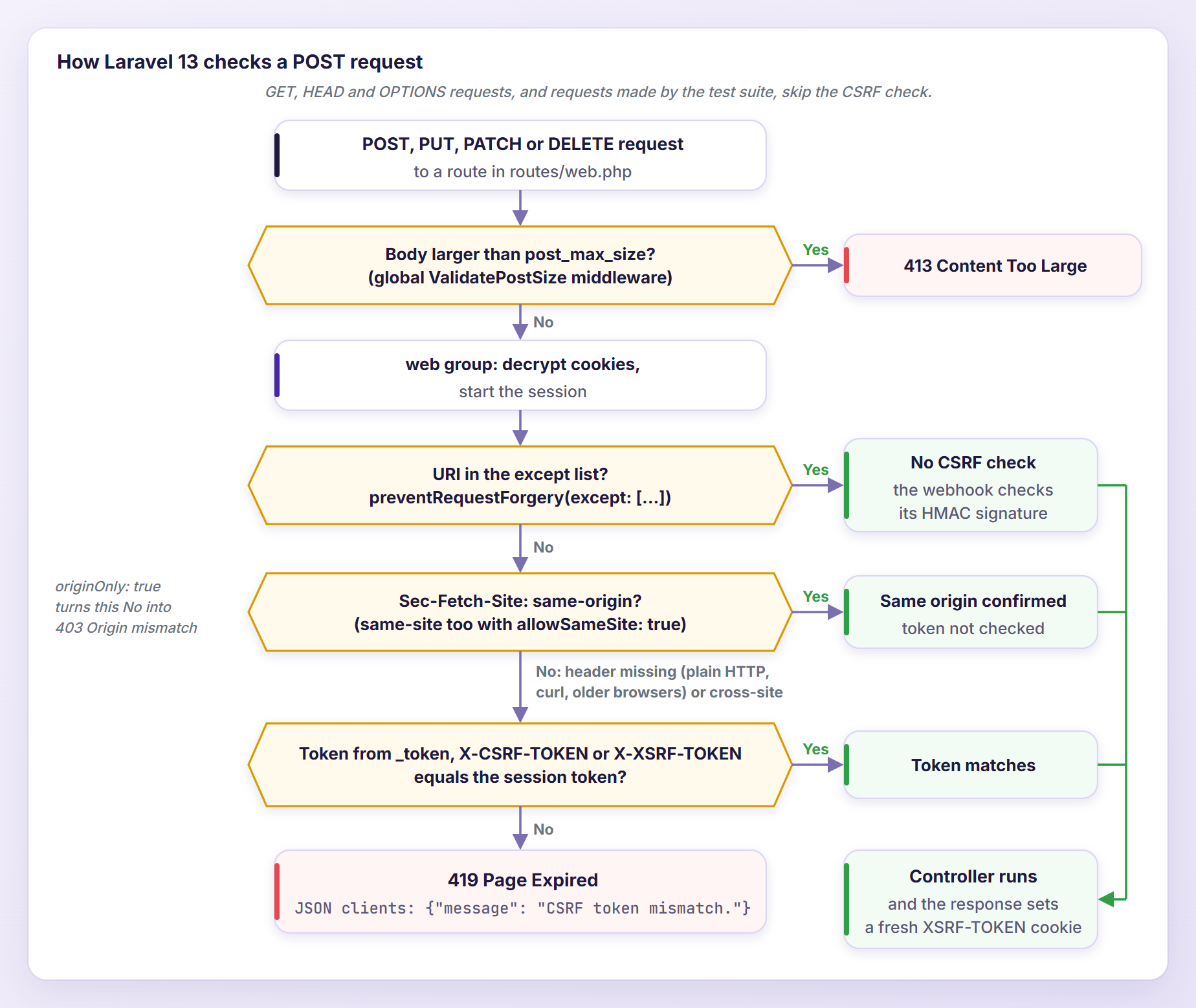
Step 4 is new. Browsers add Sec-Fetch-Site to requests for secure origins: HTTPS sites and, during development, http://localhost and http://127.0.0.1. Scripts can’t set it, so another site can’t fake it. When it says same-origin, Laravel never looks at the token, which is why many 419 errors only appear away from your machine.
VerifyCsrfToken and ValidateCsrfToken survive as deprecated, empty subclasses of PreventRequestForgery. Routes in routes/api.php (created by php artisan install:api) are not affected: the api group has no session and no PreventRequestForgery, and in my lab a tokenless POST to an API route returned 200.
Setting Up the Help Desk
Creating the Project
composer create-project laravel/laravel helpdesk
cd helpdesk
php artisan db:seed
laravel new helpdesk works too. New projects use SQLite and the database session driver and come migrated, so db:seed only adds the user test@example.com with the password password. Generate the classes we need:
php artisan make:controller SupportTicketController
php artisan make:controller Auth/LoginController
php artisan make:controller GitHubWebhookController --invokable
php artisan make:middleware VerifyGitHubSignature
Adding the Routes
Replace routes/web.php with:
<?php

use App\Http\Controllers\Auth\LoginController;
use App\Http\Controllers\GitHubWebhookController;
use App\Http\Controllers\SupportTicketController;
use App\Http\Middleware\VerifyGitHubSignature;
use Illuminate\Support\Facades\Route;

Route::get('/', function () {
    return view('welcome');
});

Route::get('/support', [SupportTicketController::class, 'create'])->name('support.create');
Route::post('/support', [SupportTicketController::class, 'store'])->name('support.store');
Route::post('/support/draft', [SupportTicketController::class, 'saveDraft'])->name('support.draft');

Route::middleware('guest')->group(function () {
    Route::get('/login', [LoginController::class, 'create'])->name('login');
    Route::post('/login', [LoginController::class, 'store'])->name('login.store');
});

Route::post('/logout', [LoginController::class, 'destroy'])->middleware('auth')->name('logout');

Route::post('/webhooks/github', GitHubWebhookController::class)
    ->middleware(VerifyGitHubSignature::class)
    ->name('webhooks.github');
The support form is public, login sits behind guest and logout needs auth. The webhook gets a signature middleware, which we write later.
Writing the Controllers
Fill in app/Http/Controllers/SupportTicketController.php:
<?php

namespace App\Http\Controllers;

use Illuminate\Http\JsonResponse;
use Illuminate\Http\RedirectResponse;
use Illuminate\Http\Request;
use Illuminate\Support\Facades\Log;
use Illuminate\View\View;

class SupportTicketController extends Controller
{
    /**
     * Show the support form.
     */
    public function create(Request $request): View
    {
        return view('support.create', [
            'draft' => $request->session()->get('support_draft', []),
        ]);
    }

    /**
     * Validate and store a new support ticket.
     */
    public function store(Request $request): RedirectResponse
    {
        $ticket = $request->validate([
            'email' => ['required', 'email'],
            'subject' => ['required', 'string', 'max:120'],
            'message' => ['required', 'string', 'max:5000'],
            'attachment' => ['nullable', 'file', 'max:2048'],
        ]);

        $path = $request->file('attachment')?->store('attachments');

        // A real help desk would save the ticket and notify the team here.
        Log::info('Support ticket received', [
            'email' => $ticket['email'],
            'subject' => $ticket['subject'],
            'attachment' => $path,
        ]);

        $request->session()->forget('support_draft');

        return to_route('support.create')
            ->with('status', 'Thanks! We received your ticket and will reply by email.');
    }

    /**
     * Save a draft of the form, called from JavaScript.
     */
    public function saveDraft(Request $request): JsonResponse
    {
        $draft = $request->validate([
            'subject' => ['nullable', 'string', 'max:120'],
            'message' => ['nullable', 'string', 'max:5000'],
        ]);

        $request->session()->put('support_draft', $draft);

        return response()->json(['saved_at' => now()->format('H:i:s')]);
    }
}
store() validates the ticket and redirects with a status message, and saveDraft() is the JSON endpoint our JavaScript calls. The 2 MB limit matches PHP’s default upload_max_filesize.
Then fill in app/Http/Controllers/Auth/LoginController.php:
<?php

namespace App\Http\Controllers\Auth;

use App\Http\Controllers\Controller;
use Illuminate\Http\RedirectResponse;
use Illuminate\Http\Request;
use Illuminate\Support\Facades\Auth;
use Illuminate\Validation\ValidationException;
use Illuminate\View\View;

class LoginController extends Controller
{
    /**
     * Show the login form.
     */
    public function create(): View
    {
        return view('auth.login');
    }

    /**
     * Log the customer in.
     */
    public function store(Request $request): RedirectResponse
    {
        $credentials = $request->validate([
            'email' => ['required', 'email'],
            'password' => ['required'],
        ]);

        if (! Auth::attempt($credentials)) {
            throw ValidationException::withMessages([
                'email' => __('auth.failed'),
            ]);
        }

        $request->session()->regenerate();

        return redirect()->intended(route('support.create'));
    }

    /**
     * Log the customer out.
     */
    public function destroy(Request $request): RedirectResponse
    {
        Auth::logout();

        $request->session()->invalidate();
        $request->session()->regenerateToken();

        return to_route('login');
    }
}
This is a plain Auth::attempt() login, like the one in our redirect after login tutorial. For CSRF, two lines matter: regenerate() after a login and regenerateToken() after a logout give the session a new token, so every form rendered earlier carries an outdated one.
Adding the Laravel CSRF Token to Forms
Create the layout as an anonymous Blade component in resources/views/components/layout.blade.php:
@props(['title'])

<!DOCTYPE html>
<html lang="en">
<head>
    <meta charset="utf-8">
    <meta name="viewport" content="width=device-width, initial-scale=1">
    <meta name="csrf-token" content="{{ csrf_token() }}">
    <title>{{ $title }} | Helpdesk</title>
    <style>
        body { max-width: 640px; margin: 40px auto; padding: 0 16px; font-family: system-ui, sans-serif; }
        header { display: flex; justify-content: space-between; margin-bottom: 24px; }
        form.card { display: grid; gap: 10px; }
        .status { padding: 12px; background: #ecfdf5; color: #065f46; }
        .errors { padding: 12px; background: #fef2f2; color: #991b1b; }
    </style>
</head>
<body>
    <header>
        <a href="{{ route('support.create') }}">Helpdesk</a>

        @auth
            <form method="POST" action="{{ route('logout') }}">
                @csrf
                <button type="submit">Log out</button>
            </form>
        @else
            <a href="{{ route('login') }}">Log in</a>
        @endauth
    </header>

    @if (session('status'))
        <p class="status">{{ session('status') }}</p>
    @endif

    @if ($errors->any())
        <div class="errors">
            @foreach ($errors->all() as $error)
                <div>{{ $error }}</div>
            @endforeach
        </div>
    @endif

    {{ $slot }}
</body>
</html>
The csrf-token meta tag hands the token to JavaScript, and even the Log out button needs @csrf, because it is a POST form. Create resources/views/support/create.blade.php:
<x-layout title="Contact support">
    <h1>Contact support</h1>

    <form class="card" method="POST" action="{{ route('support.store') }}" enctype="multipart/form-data">
        @csrf

        <label for="email">Email</label>
        <input id="email" name="email" type="email" value="{{ old('email', auth()->user()?->email) }}" required>

        <label for="subject">Subject</label>
        <input id="subject" name="subject" value="{{ old('subject', $draft['subject'] ?? '') }}" required>

        <label for="message">Message</label>
        <textarea id="message" name="message" rows="6" required>{{ old('message', $draft['message'] ?? '') }}</textarea>

        <label for="attachment">Attachment (optional, up to 2 MB)</label>
        <input id="attachment" name="attachment" type="file">

        <div>
            <button type="submit">Send ticket</button>
            <button type="button" id="save-draft">Save draft</button>
            <span id="draft-status"></span>
        </div>
    </form>

    <script>
        document.getElementById('save-draft').addEventListener('click', async () => {
            const response = await fetch('{{ route('support.draft') }}', {
                method: 'POST',
                headers: {
                    'Content-Type': 'application/json',
                    'Accept': 'application/json',
                    'X-CSRF-TOKEN': document.querySelector('meta[name="csrf-token"]').content,
                },
                body: JSON.stringify({
                    subject: document.getElementById('subject').value,
                    message: document.getElementById('message').value,
                }),
            });

            const data = await response.json();

            document.getElementById('draft-status').textContent = response.ok
                ? `Draft saved at ${data.saved_at}`
                : data.message;
        });
    </script>
</x-layout>
And the login page, resources/views/auth/login.blade.php:
<x-layout title="Log in">
    <h1>Log in</h1>

    <form class="card" method="POST" action="{{ route('login.store') }}">
        @csrf

        <label for="email">Email</label>
        <input id="email" name="email" type="email" value="{{ old('email') }}" required autofocus>

        <label for="password">Password</label>
        <input id="password" name="password" type="password" required>

        <div>
            <button type="submit">Log in</button>
        </div>
    </form>
</x-layout>
@csrf renders a hidden field. This is the line from my lab:
<input type="hidden" name="_token" value="aRtSQrhU3G6DjUacIoiTsGWgjrJMp6sm26p6oLwa" autocomplete="off">
csrf_field() returns the same HTML, and csrf_token() returns only the 40-character token, as in the meta tag. Every POST, PUT, PATCH and DELETE form needs the field, including forms that use @method('DELETE').
Run php artisan serve and open http://127.0.0.1:8000/support. Surprisingly, the form still works in Chrome without @csrf, thanks to Sec-Fetch-Site: same-origin. Keep it anyway: the same form fails on a plain HTTP host and from scripts.
Sending the CSRF Token With JavaScript
fetch() and the csrf-token Meta Tag
fetch() knows nothing about Laravel’s token, so the Save draft script reads it from the meta tag and sends it in the X-CSRF-TOKEN header. Accept: application/json makes Laravel answer errors in JSON, so a failure shows “CSRF token mismatch.” next to the button.
Axios and the XSRF-TOKEN Cookie
Laravel 13’s skeleton no longer installs Axios, but many apps still use it, and it handles the token by itself. Install it:
npm install axios
Replace the contents of resources/js/app.js:
import axios from 'axios';

window.axios = axios;
Load the bundle with @vite('resources/js/app.js') in the layout’s <head> and run npm run build. This call then needs no header code:
const { status, data } = await window.axios.post('/support/draft', { subject: 'Saved with Axios', message: 'Draft body' });
Responses from the web group set an XSRF-TOKEN cookie holding the encrypted token. It isn’t HttpOnly, so Axios reads it and sends it back as X-XSRF-TOKEN on same-origin requests, and PreventRequestForgery decrypts it. In my lab the call passed on a host where only the token counts. If you set that header yourself, send the URL-decoded cookie value: the raw one ends in %3D and fails.
For a separate single page app, use Sanctum’s SPA authentication, which starts with a request to /sanctum/csrf-cookie, as our Laravel 13 Sanctum tutorial explains.
Excluding Routes From CSRF Protection
GitHub can’t know your CSRF token, and a signed test delivery to /webhooks/github got a 419 in my lab. Where Laravel 5 used $except, Laravel 13 takes the routes in bootstrap/app.php:
->withMiddleware(function (Middleware $middleware): void {
    $middleware->preventRequestForgery(except: [
        'webhooks/*',
    ]);
})
The full signature is preventRequestForgery(array $except = [], bool $originOnly = false, bool $allowSameSite = false). Patterns are matched with $request->is() and $request->fullUrlIs():
*matches anything, slashes included:webhooks/*covers/webhooks/githuband/webhooks/github/push, but not/webhooksor/api/webhooks/github.- A leading slash makes no difference.
- A full URL pattern applies to one host only. In my lab, a pattern starting with
http://127.0.0.1still left the same path onlocalhostprotected.
The CSRF docs suggest keeping such routes out of the web group, and with reason: there, each webhook call started a session and added a row to my sessions table. Routes in routes/api.php avoid that, and a single route can drop the check with ->withoutMiddleware(PreventRequestForgery::class).
Verifying the Webhook Signature
An excluded route accepts posts from anyone who finds the URL, so the webhook needs its own proof. GitHub signs the raw body of every delivery with HMAC-SHA256 and a secret you choose, and sends sha256= plus the hex digest in the X-Hub-Signature-256 header. Most other providers, Stripe included, work the same way with their own header format.
Generate a secret and paste it into the webhook settings on GitHub:
php -r 'echo bin2hex(random_bytes(20));'
Add it to .env:
GITHUB_WEBHOOK_SECRET=paste-the-generated-value-here
Register it at the top of the array in config/services.php:
'github' => [
    'webhook_secret' => env('GITHUB_WEBHOOK_SECRET'),
],
Now fill in app/Http/Middleware/VerifyGitHubSignature.php:
<?php

namespace App\Http\Middleware;

use Closure;
use Illuminate\Http\Request;
use Symfony\Component\HttpFoundation\Response;

class VerifyGitHubSignature
{
    /**
     * Reject webhook calls that were not signed with our shared secret.
     *
     * @param  Closure(Request): (Response)  $next
     */
    public function handle(Request $request, Closure $next): Response
    {
        $secret = (string) config('services.github.webhook_secret');

        abort_if($secret === '', 500, 'The GitHub webhook secret is not configured.');

        $expected = 'sha256='.hash_hmac('sha256', $request->getContent(), $secret);

        if (! hash_equals($expected, (string) $request->header('X-Hub-Signature-256'))) {
            abort(403, 'Invalid webhook signature.');
        }

        return $next($request);
    }
}
A few things to notice:
getContent()returns the body exactly as GitHub signed it; re-encoding$request->all()would change the bytes.hash_equals()compares in constant time, so response times reveal nothing about the expected value.- A missing secret stops the request with a 500, so nobody can sign requests with an empty key.
The controller only runs for signed requests. Fill in app/Http/Controllers/GitHubWebhookController.php:
<?php

namespace App\Http\Controllers;

use Illuminate\Http\JsonResponse;
use Illuminate\Http\Request;
use Illuminate\Support\Facades\Log;

class GitHubWebhookController extends Controller
{
    /**
     * Turn newly opened GitHub issues into support tickets.
     */
    public function __invoke(Request $request): JsonResponse
    {
        if ($request->header('X-GitHub-Event') === 'issues' && $request->input('action') === 'opened') {
            // A real help desk would create a ticket here.
            Log::info('Ticket created from GitHub issue', [
                'issue' => $request->input('issue.number'),
                'title' => $request->input('issue.title'),
            ]);
        }

        return response()->json(['received' => true]);
    }
}
A signature proves who sent a request, not that it is new. If replays matter, store the unique X-GitHub-Delivery ID that GitHub sends with each delivery.
Checking the Token and the Webhook With curl
curl sends no Sec-Fetch-Site header, so it shows the token check at work. Run these from the project folder while php artisan serve is running:
APP=http://127.0.0.1:8000

curl -s -o /dev/null -w "%{http_code}\n" -X POST $APP/support -d "email=jane@example.com&subject=Refund&message=Charged+twice"

TOKEN=$(curl -s -c cookies.txt $APP/support | grep -o 'name="_token" value="[^"]*"' | cut -d'"' -f4)
curl -s -o /dev/null -w "%{http_code}\n" -b cookies.txt -c cookies.txt -X POST $APP/support -d "_token=$TOKEN&email=jane@example.com&subject=Refund&message=Charged+twice"
curl -s -b cookies.txt $APP/support | grep -o "Thanks[^<]*"

SECRET=$(grep ^GITHUB_WEBHOOK_SECRET= .env | cut -d= -f2)
BODY='{"action":"opened","issue":{"number":42,"title":"Checkout button does nothing"}}'
SIG=$(printf "%s" "$BODY" | openssl dgst -sha256 -hmac "$SECRET" | cut -d" " -f2)
curl -s -w " %{http_code}\n" -X POST $APP/webhooks/github -H "Content-Type: application/json" -H "X-GitHub-Event: issues" -H "X-Hub-Signature-256: sha256=$SIG" -d "$BODY"
curl -s -o /dev/null -w "%{http_code}\n" -X POST $APP/webhooks/github -H "Content-Type: application/json" -H "X-Hub-Signature-256: sha256=forged" -d "$BODY"
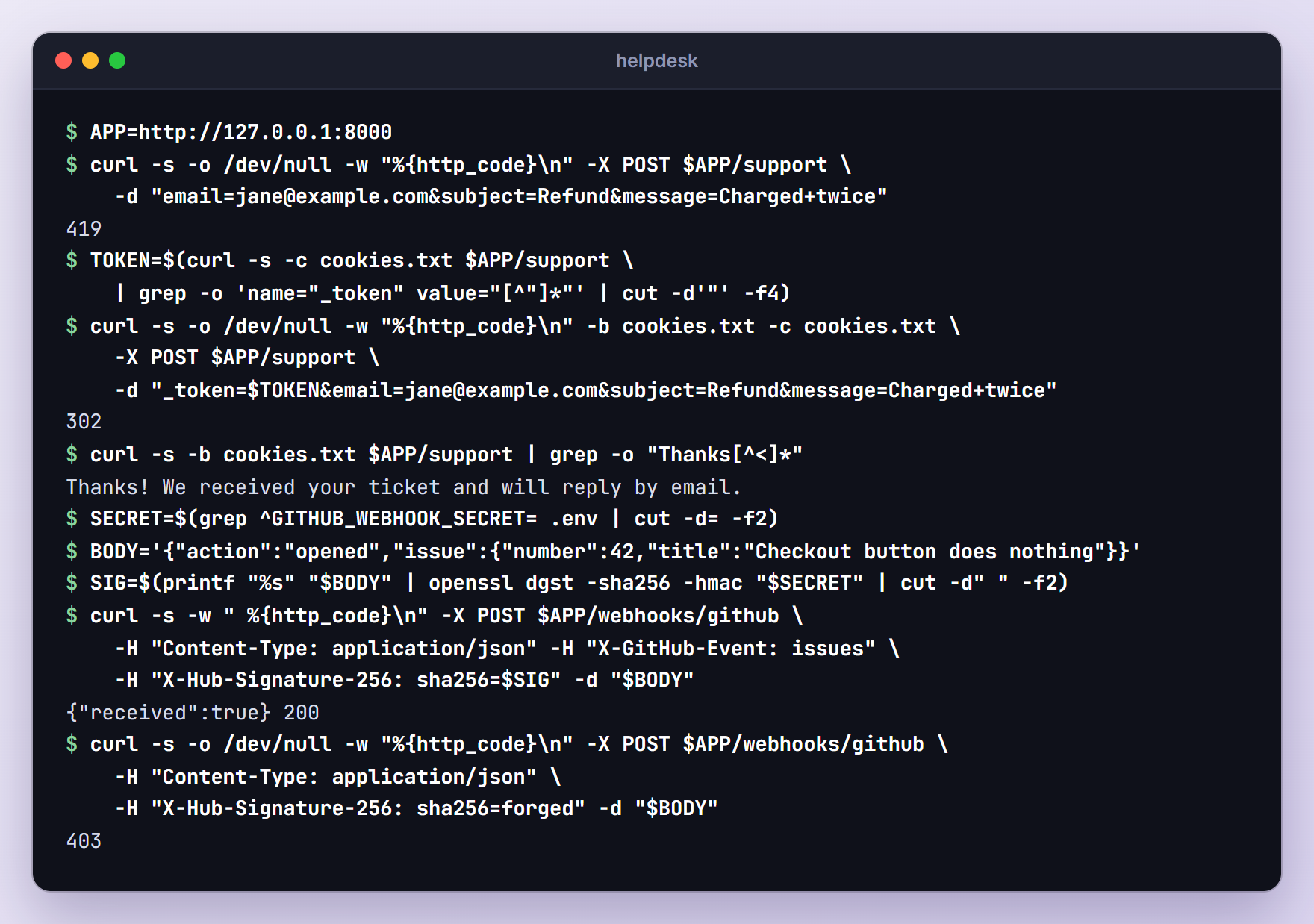
Without a token the form gets a 419. With the token from the page and the session cookie from cookies.txt, it returns a 302 to the thank-you message. The webhook needs neither: a correct signature returns {"received":true} with a 200, and a forged one gets a 403.
Why the Same Form Works on localhost and Fails Elsewhere
I submitted the help desk forms in headless Chrome 156 on http://127.0.0.1, http://localhost and http://shop.test (a plain HTTP host name pointed at 127.0.0.1 with Chrome’s --host-resolver-rules switch), then repeated the requests with curl:
| Scenario | Chrome on 127.0.0.1 or localhost | Chrome on shop.test | curl |
|---|---|---|---|
Form without @csrf | Accepted | 419 | 419 |
| Form opened before logging in or out in another tab | Accepted | 419 | 419 |
Session expired (SESSION_LIFETIME=1, posted after 75 seconds) | Accepted, in a new empty session | 419 | 419 |
SESSION_DOMAIN set to another domain | Accepted, but nothing is saved in the session | 419 | 419 |
SESSION_SECURE_COOKIE=true | Works | 419 | Works on 127.0.0.1, 419 on shop.test |
Body larger than post_max_size | 413 | 413 | 413 |
On 127.0.0.1 and localhost, Chrome sent Sec-Fetch-Site: same-origin with every form and fetch() call, so no request reached the token check. On shop.test it sent no such header, and every problem became a 419. Chrome sent an Origin header everywhere, but Laravel 13.39 ignores it. A real forgery failed too: a form on another site arrived with Sec-Fetch-Site: cross-site and no cookies (the session cookie is SameSite=Lax), and got a 419.
On HTTPS, modern browsers behave like the first column, while plain HTTP servers, older browsers and scripts behave like the other two.
Creating a Friendly 419 Page
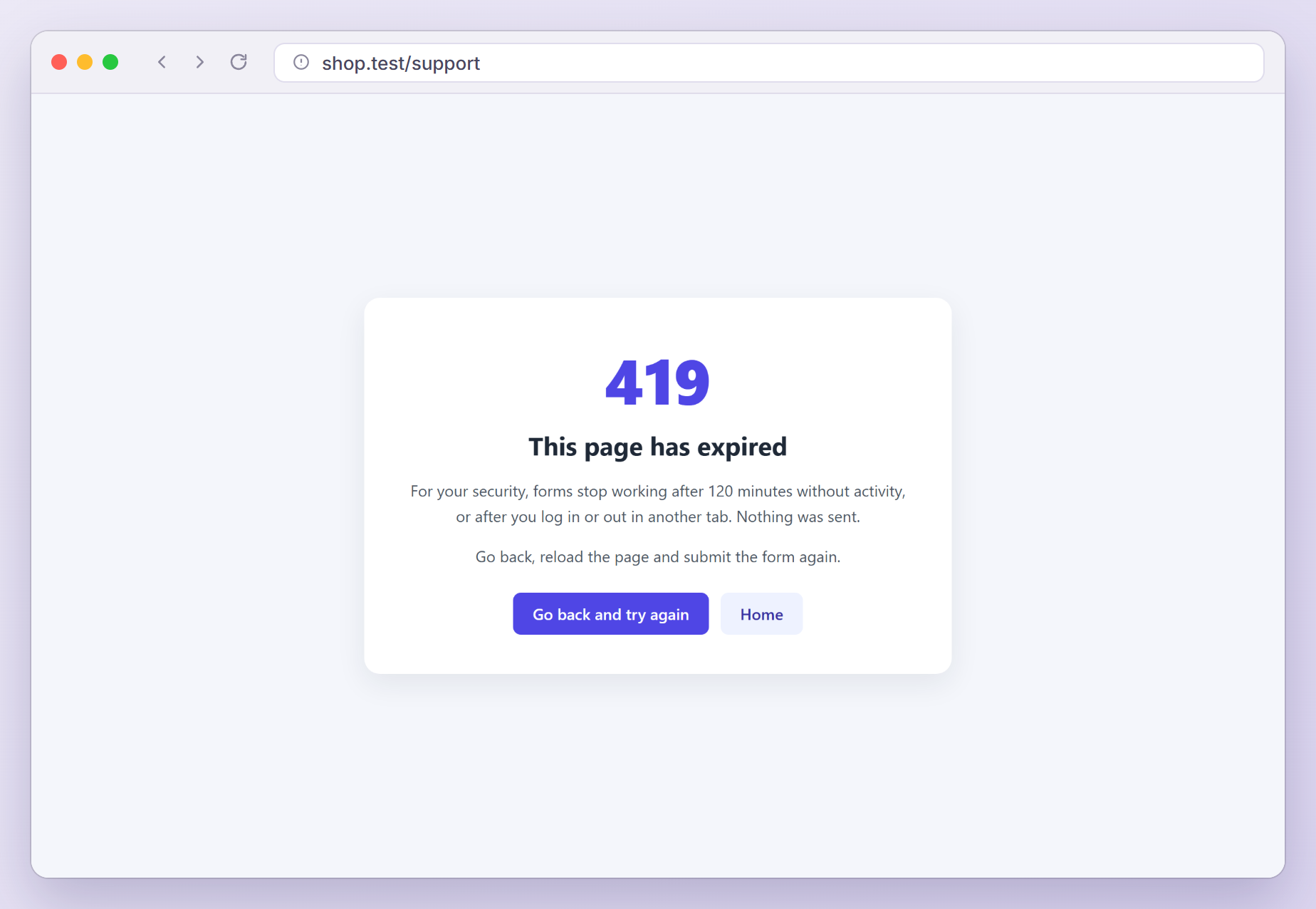
When the check fails, Laravel renders its built-in 419 view:
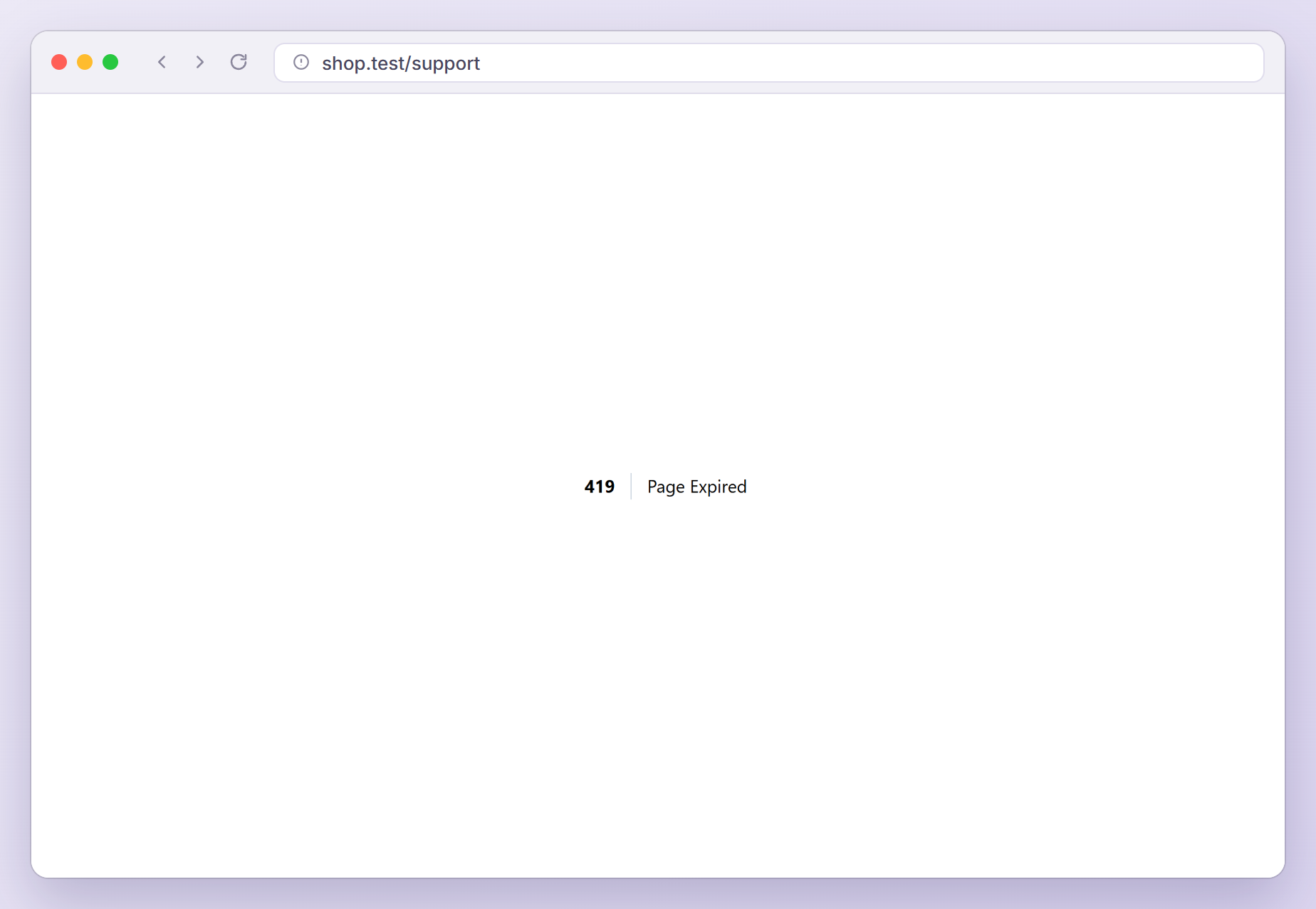
Create resources/views/errors/419.blade.php to explain what happened:
<!DOCTYPE html>
<html lang="en">
<head>
    <meta charset="utf-8">
    <meta name="viewport" content="width=device-width, initial-scale=1">
    <title>Page Expired | Helpdesk</title>
    <style>
        body { margin: 0; min-height: 100vh; display: grid; place-items: center; font-family: system-ui, "Segoe UI", Roboto, sans-serif; background: #f4f6fb; color: #1f2937; }
        .card { max-width: 520px; margin: 24px; padding: 40px; border-radius: 16px; background: #fff; text-align: center; box-shadow: 0 10px 30px rgba(31, 41, 55, .08); }
        .code { font-size: 64px; font-weight: 800; color: #4f46e5; }
        h1 { margin: 8px 0 12px; font-size: 26px; }
        p { color: #4b5563; line-height: 1.6; }
        .actions { display: flex; gap: 12px; justify-content: center; margin-top: 24px; }
        .button { padding: 11px 20px; border-radius: 8px; background: #4f46e5; color: #fff; font-weight: 600; text-decoration: none; }
        .button.light { background: #eef2ff; color: #3730a3; }
    </style>
</head>
<body>
    <div class="card">
        <div class="code">419</div>
        <h1>This page has expired</h1>
        <p>For your security, forms stop working after {{ config('session.lifetime') }} minutes without activity, or after you log in or out in another tab. Nothing was sent.</p>
        <p>Go back, reload the page and submit the form again.</p>

        <div class="actions">
            <a class="button" href="{{ url()->previous() }}">Go back and try again</a>
            <a class="button light" href="{{ url('/') }}">Home</a>
        </div>
    </div>
</body>
</html>
Laravel uses this view for every 419 that doesn’t expect JSON. It renders inside the web group, after the session started, so url()->previous() links back to the form. The view also receives $exception, but its “CSRF token mismatch.” message is meant for developers. For one design across all error pages, see our custom error pages tutorial.
Sending Users Back to the Form Instead
A friendly page still throws away a long support message. For the forms where that hurts, redirect back with the input. Add a respond() callback inside withExceptions() in bootstrap/app.php, with use Symfony\Component\HttpFoundation\Response; at the top of the file:
// Send people back to these forms with their input instead of showing the 419 page.
$exceptions->respond(function (Response $response, Throwable $e, Request $request) {
    if ($response->getStatusCode() === 419 && $request->routeIs('login.store', 'support.store')) {
        return back()
            ->withInput($request->except(['password', 'password_confirmation', 'current_password']))
            ->with('status', 'Your session expired, so the form was not sent. Please check it and send it again.');
    }

    return $response;
});
Here is what is happening:
respond()sees every response the exception handler builds. Arender()closure type-hinted withTokenMismatchExceptionnever runs, because Laravel converts it into anHttpExceptionwith status 419 first; in my lab only a closure forHttpExceptionfired.withInput()flashes the input minus the password fields. Uploaded files are dropped, so the user picks the attachment again.- Other forms, such as the logout button, keep the 419 page, and
fetch()calls keep their JSON. - Laravel keeps a single
respond()callback. If you added the one from the redirect after login tutorial, replace it: this version covers its login case too, returning the email but not the password.
If the session expired, Laravel already started a fresh one for the failed request, so the message and old input survive the redirect. The first curl command above now gets a 302 instead of the 419.
Testing CSRF Protection
Laravel switches CSRF checks off while tests run: PreventRequestForgery lets everything through in the console when the environment is testing, which phpunit.xml sets. That keeps feature tests short, but no test can see a 419. The test class below therefore binds a subclass whose runningUnitTests() method returns false, and because Laravel resolves middleware from the service container, the web group uses it.
Generate the test:
php artisan make:test CsrfProtectionTest
Replace the contents of tests/Feature/CsrfProtectionTest.php:
<?php

namespace Tests\Feature;

use App\Models\User;
use Illuminate\Foundation\Http\Middleware\PreventRequestForgery;
use Illuminate\Foundation\Testing\RefreshDatabase;
use Tests\TestCase;

class CsrfProtectionTest extends TestCase
{
    use RefreshDatabase;

    /**
     * @var array<string, string>
     */
    private array $ticket = [
        'email' => 'jane@example.com',
        'subject' => 'Refund for order 1042',
        'message' => 'I was charged twice for order 1042.',
    ];

    public function test_csrf_checks_are_skipped_while_running_tests(): void
    {
        $this->post(route('support.store'), $this->ticket)
            ->assertRedirect(route('support.create'))
            ->assertSessionHas('status', 'Thanks! We received your ticket and will reply by email.');
    }

    public function test_a_form_post_without_a_token_is_rejected(): void
    {
        $this->enableCsrfProtection();

        $user = User::factory()->create();

        $this->actingAs($user)->post(route('logout'))->assertStatus(419);

        $this->assertAuthenticatedAs($user);
    }

    public function test_a_form_post_with_a_valid_token_is_accepted(): void
    {
        $this->enableCsrfProtection();

        $this->withSession(['_token' => 'test-token'])
            ->post(route('support.store'), [...$this->ticket, '_token' => 'test-token'])
            ->assertRedirect(route('support.create'))
            ->assertSessionHas('status', 'Thanks! We received your ticket and will reply by email.');
    }

    public function test_same_origin_requests_pass_without_a_token(): void
    {
        $this->enableCsrfProtection();

        $this->withHeader('Sec-Fetch-Site', 'same-origin')
            ->postJson(route('support.draft'), ['subject' => 'Draft'])
            ->assertOk();

        $this->withHeader('Sec-Fetch-Site', 'cross-site')
            ->postJson(route('support.draft'), ['subject' => 'Draft'])
            ->assertStatus(419)
            ->assertJson(['message' => 'CSRF token mismatch.']);
    }

    public function test_javascript_can_send_the_token_in_a_header(): void
    {
        $this->enableCsrfProtection();

        $this->withSession(['_token' => 'test-token'])
            ->withHeader('X-CSRF-TOKEN', 'test-token')
            ->postJson(route('support.draft'), ['subject' => 'Draft'])
            ->assertOk()
            ->assertJsonStructure(['saved_at']);
    }

    public function test_an_expired_form_redirects_back_with_the_input(): void
    {
        $this->enableCsrfProtection();

        $this->from(route('support.create'))
            ->post(route('support.store'), $this->ticket)
            ->assertRedirect(route('support.create'))
            ->assertSessionHas('status', 'Your session expired, so the form was not sent. Please check it and send it again.')
            ->assertSessionHasInput('message', 'I was charged twice for order 1042.');
    }

    public function test_an_expired_login_form_keeps_the_email_but_not_the_password(): void
    {
        $this->enableCsrfProtection();

        $this->from(route('login'))
            ->post(route('login.store'), ['email' => 'jane@example.com', 'password' => 'secret-password'])
            ->assertRedirect(route('login'))
            ->assertSessionHasInput('email', 'jane@example.com')
            ->assertSessionMissingInput('password');
    }

    public function test_the_github_webhook_is_excluded_from_csrf_protection(): void
    {
        $this->enableCsrfProtection();
        config(['services.github.webhook_secret' => 'test-secret']);

        $payload = ['action' => 'opened', 'issue' => ['number' => 42, 'title' => 'Checkout button does nothing']];
        $signature = 'sha256='.hash_hmac('sha256', json_encode($payload), 'test-secret');

        $this->postJson(route('webhooks.github'), $payload, [
            'X-GitHub-Event' => 'issues',
            'X-Hub-Signature-256' => $signature,
        ])->assertOk()->assertExactJson(['received' => true]);
    }

    public function test_the_github_webhook_rejects_a_wrong_signature(): void
    {
        $this->enableCsrfProtection();
        config(['services.github.webhook_secret' => 'test-secret']);

        $this->postJson(route('webhooks.github'), ['action' => 'opened'], [
            'X-Hub-Signature-256' => 'sha256='.hash_hmac('sha256', 'something else', 'test-secret'),
        ])->assertForbidden();
    }

    /**
     * Laravel skips the CSRF check in tests, so swap in a copy that always checks.
     */
    private function enableCsrfProtection(): void
    {
        $this->app->bind(PreventRequestForgery::class, fn ($app) => new class($app, $app['encrypter']) extends PreventRequestForgery
        {
            protected function runningUnitTests()
            {
                return false;
            }
        });
    }
}
A few things to notice:
- The first test skips the helper and shows the default: a form without a token goes through.
- The logout test gets a real 419, because logout is not in the
respond()list, and the user stays logged in. withSession(['_token' => 'test-token'])gives the session a known token, andfrom()sets the URLback()returns to.- The webhook test signs
json_encode($payload), the exact bodypostJson()sends. - Bind
PreventRequestForgery: the same override bound toVerifyCsrfTokenchanged nothing in my lab.
Run the tests:
php artisan test tests/Feature/CsrfProtectionTest.php
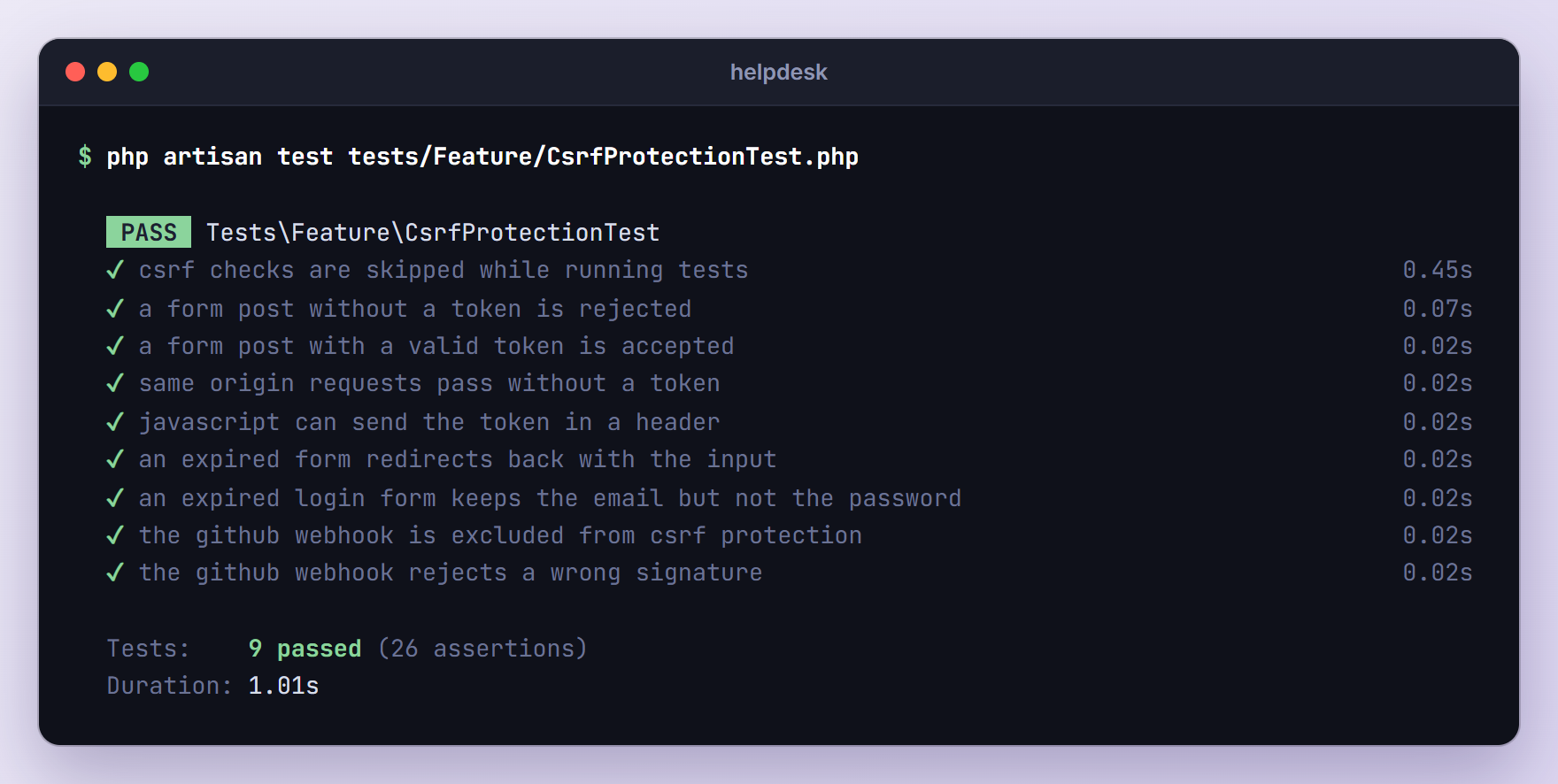
The full php artisan test run, with Laravel’s two example tests, reports 11 passed tests (28 assertions).
Warning: If tests suddenly get 419 responses, look for a cached config. After php artisan config:cache, Laravel ignores phpunit.xml: the environment stays local, so CSRF checks run, and in my lab RefreshDatabase emptied the real SQLite database. Run php artisan config:clear before testing.
Troubleshooting
419 Page Expired on a Plain HTTP Host but Not on localhost
The form has no @csrf. Chrome on localhost, 127.0.0.1 and HTTPS sends Sec-Fetch-Site: same-origin, which hides the missing token until the app runs on a plain HTTP host, in an older browser or behind a script. Add @csrf to every POST, PUT, PATCH and DELETE form, the logout button included, and test once with curl.
419 Page Expired After the Form Was Open for a While
The session expired. SESSION_LIFETIME (120 minutes by default) limits both the session cookie and how long the database driver accepts a session, counted from the last request. With SESSION_LIFETIME=1, a form posted after 75 seconds arrived without cookies and got a 419. Sending the old cookie by hand with curl failed too, because the driver ignores expired sessions. Raise the lifetime for long forms, and keep the respond() redirect so nobody loses their text.
419 Page Expired After Logging In or Out in Another Tab
Logging in calls regenerate() and logging out calls invalidate() and regenerateToken(), so every form rendered before, in any tab, carries a dead token. The classic case is a login page left open while the user signs in with another tab. Both directions failed on shop.test and passed on 127.0.0.1. The respond() redirect handles this well: the user gets the form back with a fresh token and the email filled in.
419 Page Expired on Every Form: Session Cookie Not Stored
If every POST fails, the browser isn’t keeping the session cookie. Look at the Set-Cookie headers:
curl -s -D - -o /dev/null http://127.0.0.1:8000/login | grep -i set-cookie
A SESSION_DOMAIN that doesn’t match the address bar (I tried helpdesk.example.com) adds a domain= attribute, and browsers and curl drop the cookie. SESSION_SECURE_COOKIE=true adds secure, and browsers drop the cookie on plain HTTP hosts, though Chrome and curl kept it on 127.0.0.1 and localhost. Keep SESSION_DOMAIN=null unless you share sessions across subdomains, and enable SESSION_SECURE_COOKIE only with HTTPS.
413 Content Too Large Instead of 419 on Big Uploads
Older answers blame 419 errors on uploads larger than post_max_size, because PHP then drops the body, _token included. Laravel 13 answers with a 413 first: the global ValidatePostSize middleware throws a PostTooLargeException (“The POST data is too large.”). With PHP’s defaults (upload_max_filesize=2M, post_max_size=8M), a 10 MB file got a 413, and a 3 MB file failed validation with “The attachment failed to upload.” With display_errors on, PHP adds a warning above the page:
Warning: PHP Request Startup: POST Content-Length of 10486476 bytes exceeds the limit of 8388608 bytes in Unknown on line 0
With APP_DEBUG=false, Laravel has no 413 view and shows a bare “Oops! An Error Occurred” page, so add resources/views/errors/413.blade.php. To accept bigger files, raise both PHP limits and your web server’s (Nginx’s client_max_body_size, for example).
“CSRF token mismatch.” From fetch() or Axios
A failed JavaScript request gets a JSON 419. With APP_DEBUG=false the whole body is:
{
    "message": "CSRF token mismatch."
}
Check the csrf-token meta tag and the X-CSRF-TOKEN header. With Axios, use relative URLs such as /support/draft, because it only adds X-XSRF-TOKEN to same-origin requests. The plain token in X-XSRF-TOKEN, or the cookie value without URL-decoding, fails too.
Upgrading From Older Laravel Versions
| Laravel 5.x to 10 | Laravel 11 and 12 | Laravel 13 |
|---|---|---|
App\Http\Middleware\VerifyCsrfToken, registered in app/Http/Kernel.php | ValidateCsrfToken (alias of VerifyCsrfToken) | PreventRequestForgery |
protected $except = [...] | $middleware->validateCsrfTokens(except: [...]) | $middleware->preventRequestForgery(except: [...]) |
| Token check only | Token check only | Sec-Fetch-Site, then the token |
The class hierarchy flipped: in Laravel 11 and 12, ValidateCsrfToken extended VerifyCsrfToken, and now both extend PreventRequestForgery. Laravel skips a route middleware when its class or a parent class is listed in withoutMiddleware(), so ->withoutMiddleware(VerifyCsrfToken::class) now does nothing. In my lab that route still returned 419, while PreventRequestForgery::class, which the upgrade guide recommends, gave a 200.
Apps that kept the old structure keep working: my Laravel 10 style app/Http/Middleware/VerifyCsrfToken.php, swapped into the web group, still honored its $except list and gained the Sec-Fetch-Site check. validateCsrfTokens() survives as a deprecated wrapper, and the old handle() override for api/* is unnecessary, because routes/api.php never runs the check.
Frequently Asked Questions
Why Does My Form Work Without @csrf on localhost?
Chrome sends Sec-Fetch-Site: same-origin to localhost, 127.0.0.1 and HTTPS sites, and Laravel 13 accepts such requests without looking at the token. The same form fails with a 419 on a plain HTTP host, in browsers without the header and from tools like curl. Keep @csrf in every form and test once with curl before you deploy.
Can Laravel 13 Skip the CSRF Token Completely?
Yes, with $middleware->preventRequestForgery(originOnly: true). Then only Sec-Fetch-Site counts, a failed check returns 403 “Origin mismatch.” instead of 419, and Laravel stops setting the XSRF-TOKEN cookie. In my lab even a valid token got a 403 without the header, which rules out plain HTTP, older browsers and scripts. Use it only for HTTPS apps.
Should I Exclude the Logout Route From CSRF Protection?
No. The 2018 version of this tutorial suggested it, but then other pages can log your users out. The SameSite=Lax session cookie blocks most cross-site attempts, yet the check costs nothing. A stale logout form usually means the user is already logged out, after an expired session or a logout in another tab, and the friendly 419 page says so.
Wrapping Up
Laravel 13 keeps @csrf, the meta tag and the XSRF-TOKEN cookie, but puts the Sec-Fetch-Site check in front of them, so a missing Laravel CSRF token often shows up only on plain HTTP hosts, in older browsers and in scripts. Our help desk sends the token from forms, fetch() and Axios, protects its webhook with an HMAC signature instead, softens the 419 error with a friendly page or a redirect, and tests all of it.
When a 419 appears, check the token field, the session lifetime, other tabs, the session cookie and the request size, in that order.
Learn more about Laravel:
