


A store that ships coffee to Madrid and Munich needs more than an English page. Laravel localization lets one codebase speak several languages: you keep the text in language files, wrap it in __() in your views, and Laravel picks the right translation for each request.
In this tutorial we translate the subscription page of a small coffee roaster into Spanish and German. We will store the text in PHP and JSON language files, use placeholders and plural rules, and pick the language from the URL, the session, the user’s profile or the browser. Then we translate validation messages, format prices and dates, log missing translations and test it all.
Our older post about the __() function covered JSON files in resources/lang on Laravel 5.6. Since then the folder has moved to the project root, new apps only get one when you run lang:publish, and the locale settings come from .env.
We will use Laravel 13 (version 13.39 at the time of writing) with PHP 8.4. Everything here works on PHP 8.3 or newer.
Table of Contents
Prerequisites
- PHP 8.3 or newer with the
intlextension (php -mlists it) - Composer
- Basic Laravel knowledge (routes, controllers and Blade)
Creating the Project and Publishing the Language Files
Create the project and move into it:
composer create-project laravel/laravel little-roastery
cd little-roastery
If you have the Laravel installer, laravel new little-roastery works too. Open .env, set the store name and look at the three locale settings that a fresh app already has:
APP_NAME="Little Roastery"

APP_LOCALE=en
APP_FALLBACK_LOCALE=en
APP_FAKER_LOCALE=en_US
APP_LOCALE is the default language, and APP_FALLBACK_LOCALE is used when a translation is missing. APP_FAKER_LOCALE only sets the language of the fake data from fake() and model factories. config/app.php reads them into app.locale, app.fallback_locale and app.faker_locale. Add the languages our store supports right below those keys:
'faker_locale' => env('APP_FAKER_LOCALE', 'en_US'),

'supported_locales' => [
    'en' => 'English',
    'es' => 'Español',
    'de' => 'Deutsch',
],
The keys are locale codes, and the values are the names the language switcher shows, each in its own language.
A new Laravel 13 app has no lang folder. The English messages for validation, authentication, password resets and pagination ship inside the framework, so everything works without one. To customize them, publish the files:
php artisan lang:publish
This creates lang/en with auth.php, pagination.php, passwords.php and validation.php. Only English is published, and running the command again skips existing files unless you add --force.
PHP Language Files or JSON Files?
Laravel reads translations from two kinds of files, and one app can use both:
| PHP files with short keys | JSON files with the text as the key | |
|---|---|---|
| File | lang/es/shop.php | lang/es.json |
| In code | __('shop.title') | __('Subscribe') |
| Structure | Nested arrays, one file per topic | One flat file per language |
| Missing in the current language | Fallback language, then the key | The key itself |
| Good for | Page content, plural rules | Buttons, labels, short messages |
Short keys keep long texts out of your views and group them by page or feature. JSON keys read naturally in a template because the key is the English text, so you don’t need an English JSON file. I use PHP files for page content and JSON for short interface strings, and the store follows that split.
Short Keys in PHP Files
Create lang/en/shop.php:
<?php

return [
    'title' => 'Coffee subscriptions',
    'intro' => 'Freshly roasted coffee from :city, delivered to your door.',
    'promo' => 'Use code :CODE at checkout for a free bag in your first box.',
    'per_month' => 'per month',
    'bags' => ':count bag a month|:count bags a month',
    'stock' => '{0} Sold out this month|{1} Only one box left|[2,10] Only :count boxes left|[11,*] Available',
    'next_roast' => 'Next roast day: :date',

    'plans' => [
        'single' => [
            'name' => 'For one',
            'description' => 'Our house blend, roasted every week.',
        ],
        'duo' => [
            'name' => 'For two',
            'description' => 'A different single origin coffee every month.',
        ],
        'office' => [
            'name' => 'For the office',
            'description' => 'Enough coffee for the whole team.',
        ],
    ],
];
The Spanish version goes in lang/es/shop.php, with exactly the same keys:
<?php

return [
    'title' => 'Suscripciones de café',
    'intro' => 'Café recién tostado en :city, directo a tu puerta.',
    'promo' => 'Usa el código :CODE al pagar y llévate una bolsa gratis en tu primera caja.',
    'per_month' => 'al mes',
    'bags' => ':count bolsa al mes|:count bolsas al mes',
    'stock' => '{0} Agotado este mes|{1} Solo queda una caja|[2,10] Solo quedan :count cajas|[11,*] Disponible',
    'next_roast' => 'Próximo día de tueste: :date',

    'plans' => [
        'single' => [
            'name' => 'Para una persona',
            'description' => 'Nuestra mezcla de la casa, tostada cada semana.',
        ],
        'duo' => [
            'name' => 'Para dos',
            'description' => 'Un café de origen único distinto cada mes.',
        ],
        'office' => [
            'name' => 'Para la oficina',
            'description' => 'Café de sobra para todo el equipo.',
        ],
    ],
];
And the German one in lang/de/shop.php:
<?php

return [
    'title' => 'Kaffee-Abos',
    'intro' => 'Frisch gerösteter Kaffee aus :city, direkt zu dir nach Hause.',
    'promo' => 'Mit dem Code :CODE bekommst du eine Packung gratis zu deiner ersten Box.',
    'per_month' => 'pro Monat',
    'bags' => ':count Packung pro Monat|:count Packungen pro Monat',
    'stock' => '{0} Diesen Monat ausverkauft|{1} Nur noch eine Box verfügbar|[2,10] Nur noch :count Boxen verfügbar|[11,*] Verfügbar',
    'next_roast' => 'Nächster Rösttag: :date',

    'plans' => [
        'single' => [
            'name' => 'Für eine Person',
            'description' => 'Unsere Hausmischung, jede Woche frisch geröstet.',
        ],
        'duo' => [
            'name' => 'Für zwei',
            'description' => 'Jeden Monat ein anderer Single-Origin-Kaffee.',
        ],
        'office' => [
            'name' => 'Fürs Büro',
            'description' => 'Genug Kaffee für das ganze Team.',
        ],
    ],
];
A key such as shop.plans.duo.name means the file shop.php, then the nested plans, duo and name keys. For regional variants, the localization documentation recommends folder names with an underscore, such as lang/en_GB.
The Text as the Key in JSON Files
Create lang/es.json:
{
    "Language": "Idioma",
    "Free shipping on orders over :amount.": "Envío gratis en pedidos de más de :amount.",
    "Join our newsletter": "Suscríbete a nuestro boletín",
    "Name": "Nombre",
    "Email": "Correo electrónico",
    "Subscribe": "Suscribirme",
    "Thanks, :Name! Please check your inbox.": "¡Gracias, :Name! Revisa tu bandeja de entrada."
}
And lang/de.json:
{
    "Language": "Sprache",
    "Free shipping on orders over :amount.": "Versandkostenfrei ab :amount Bestellwert.",
    "Join our newsletter": "Abonniere unseren Newsletter",
    "Name": "Name",
    "Email": "E-Mail",
    "Subscribe": "Abonnieren",
    "Thanks, :Name! Please check your inbox.": "Danke, :Name! Bitte schau in dein Postfach."
}
There is no lang/en.json: when Laravel finds no JSON translation it returns the key, which is already English. Keep the files valid. A trailing comma after the last entry made every Spanish lookup in my test fail with “Translation file [lang/es.json] contains an invalid JSON structure.”
Placeholders and Pluralization
Replacing :name, :Name and :NAME
A placeholder is a word with a colon in front, filled from the array you pass as the second argument of __(). Its spelling sets the case of the value: :name inserts it unchanged, :Name capitalizes the first letter and :NAME uppercases everything. Our promo line uses :CODE and the newsletter’s thank-you message uses :Name, so let’s try both in Tinker:
php artisan tinker --execute="App::setLocale('es'); echo __('shop.promo', ['code' => 'firstbrew']), PHP_EOL, __('Thanks, :Name! Please check your inbox.', ['name' => 'maría']), PHP_EOL, trans_choice('shop.stock', 3);"
Usa el código FIRSTBREW al pagar y llévate una bolsa gratis en tu primera caja.
¡Gracias, María! Revisa tu bandeja de entrada.
Solo quedan 3 cajas
firstbrew became FIRSTBREW, and maría became María, accent included. The third line comes from trans_choice(), which is next. Placeholders also let each language put the value where its grammar needs it: German puts the shipping amount in the middle of the sentence, in Versandkostenfrei ab :amount Bestellwert.
Plural Forms and Ranges With trans_choice()
trans_choice() picks a form based on a number. The simplest version separates the singular and the plural with a pipe:
'bags' => ':count bag a month|:count bags a month',
Laravel picks the form with the current language’s plural rules and replaces :count with the number, so trans_choice('shop.bags', 1) gives “1 bag a month”. The rules also cover languages with more forms, such as Arabic with six.
When the wording changes at specific numbers, put a condition before each form: {0} matches exactly zero, [2,10] matches two to ten, and * leaves a range open:
'stock' => '{0} Sold out this month|{1} Only one box left|[2,10] Only :count boxes left|[11,*] Available',
trans_choice('shop.stock', 3) returns “Only 3 boxes left” and 25 returns “Available”. Pass an array or a collection instead of a number, and Laravel counts it for you.
Setting the Locale for Each Request
App::setLocale('es') switches the language, App::currentLocale() returns the active locale and App::isLocale('es') checks it. The switch only lasts until the end of the request, so middleware has to call setLocale() on every request.
Localized Routes
Replace routes/web.php:
<?php

use App\Http\Controllers\NewsletterController;
use App\Http\Controllers\PricingController;
use Illuminate\Support\Facades\Route;

Route::get('/', function () {
    return to_route('pricing');
});

Route::prefix('{locale}')
    ->whereIn('locale', array_keys(config('app.supported_locales')))
    ->group(function () {
        Route::get('/', PricingController::class)->name('pricing');
        Route::post('/newsletter', [NewsletterController::class, 'store'])->name('newsletter.store');
    });
Every store page now starts with a language code, and whereIn() allows only our three codes, so /fr returns a 404. The bare / redirects to the pricing page in the language the middleware picks. to_route('pricing') passes no locale, because the middleware takes care of that.
Creating the SetLocale Middleware
Generate the class:
php artisan make:middleware SetLocale
Replace app/Http/Middleware/SetLocale.php with:
<?php

namespace App\Http\Middleware;

use Closure;
use Illuminate\Http\Request;
use Illuminate\Support\Facades\App;
use Illuminate\Support\Facades\URL;
use Illuminate\Support\Number;
use Symfony\Component\HttpFoundation\Response;

class SetLocale
{
    /**
     * Pick the locale from the URL, the session, the user or the browser.
     *
     * @param  Closure(Request): (Response)  $next
     */
    public function handle(Request $request, Closure $next): Response
    {
        $supported = array_keys(config('app.supported_locales'));

        $locale = $request->route('locale')
            ?? $request->session()->get('locale')
            ?? $request->user()?->locale
            ?? $request->getPreferredLanguage($supported);

        if (! in_array($locale, $supported, true)) {
            $locale = config('app.fallback_locale');
        }

        App::setLocale($locale);
        Number::useLocale($locale);
        URL::defaults(['locale' => $locale]);

        $request->session()->put('locale', $locale);
        $request->route()->forgetParameter('locale');

        return $next($request);
    }
}
Here is what is happening:
- The locale comes from the first source that has one: the URL prefix, the session, the signed-in user’s
localecolumn, then the browser’sAccept-Languageheader.getPreferredLanguage()returns the best match from our list, or its first entry when nothing matches. - An unsupported value, such as an outdated session value, falls back to
app.fallback_locale. App::setLocale()updates the translator andapp.localeand fires aLocaleUpdatedevent, which Carbon listens to, so dates switch language too.Numberkeeps its own locale, so we set it separately.URL::defaults()fills in{locale}wheneverroute()is called without it.- The session remembers the choice for the plain
/URL. forgetParameter('locale')hides the prefix from controllers. Without it, Laravel passesesas the first argument: on a/{locale}/plans/{plan}route, ashow(string $plan)method receivedesinstead of the plan in my test.
Saving Each User’s Preferred Language
The middleware reads a locale column on the users table, so let’s add one:
php artisan make:migration add_locale_to_users_table
In the new migration, add the column in up() and drop it in down():
/**
 * Run the migrations.
 */
public function up(): void
{
    Schema::table('users', function (Blueprint $table) {
        $table->string('locale', 5)->nullable();
    });
}

/**
 * Reverse the migrations.
 */
public function down(): void
{
    Schema::table('users', function (Blueprint $table) {
        $table->dropColumn('locale');
    });
}
Run php artisan migrate, then add 'locale' to the #[Fillable] attribute in app/Models/User.php. Without it, $user->update(['locale' => 'de']) from an account settings form silently skips the column:
#[Fillable(['name', 'email', 'password', 'locale'])]
Registering the Middleware in bootstrap/app.php
Open bootstrap/app.php, add use App\Http\Middleware\SetLocale; to the imports and append the middleware to the web group:
->withMiddleware(function (Middleware $middleware): void {
    $middleware->web(append: [
        SetLocale::class,
    ]);
})
By the time the web group reaches our middleware, the session has started and the route is matched. Registered as global middleware with $middleware->append(), it would have neither, as the troubleshooting section shows.
Building the Multilingual Pricing Page
Create the two controllers:
php artisan make:controller PricingController --invokable
php artisan make:controller NewsletterController
Replace app/Http/Controllers/PricingController.php:
<?php

namespace App\Http\Controllers;

use Illuminate\View\View;

class PricingController extends Controller
{
    /**
     * Show the subscription plans in the current locale.
     */
    public function __invoke(): View
    {
        return view('pricing', [
            'plans' => [
                ['key' => 'single', 'price' => 12.90, 'bags' => 1, 'left' => 24],
                ['key' => 'duo', 'price' => 23.90, 'bags' => 2, 'left' => 3],
                ['key' => 'office', 'price' => 79, 'bags' => 8, 'left' => 0],
            ],
            'nextRoast' => now()->next('Thursday'),
        ]);
    }
}
The plans are hardcoded to keep the example short. Only keys, prices and counts live in PHP; every word comes from the language files.
Replace app/Http/Controllers/NewsletterController.php:
<?php

namespace App\Http\Controllers;

use Illuminate\Http\RedirectResponse;
use Illuminate\Http\Request;

class NewsletterController extends Controller
{
    /**
     * Validate the signup form and thank the new subscriber.
     */
    public function store(Request $request): RedirectResponse
    {
        $validated = $request->validate([
            'name' => ['required', 'string', 'max:50'],
            'email' => ['required', 'email'],
        ]);

        // Save the subscriber here.

        return to_route('pricing')->with('status', __('Thanks, :Name! Please check your inbox.', [
            'name' => $validated['name'],
        ]));
    }
}
The thank-you message is translated in the controller and flashed to the session, in the language the middleware set from the form’s URL, such as /es/newsletter.
Now create the view, resources/views/pricing.blade.php:
<!DOCTYPE html>
<html lang="{{ str_replace('_', '-', App::currentLocale()) }}">
<head>
    <meta charset="utf-8">
    <meta name="viewport" content="width=device-width, initial-scale=1">
    <title>{{ __('shop.title') }} | {{ config('app.name') }}</title>
    @foreach (config('app.supported_locales') as $code => $name)
        <link rel="alternate" hreflang="{{ $code }}" href="{{ route(Route::currentRouteName(), ['locale' => $code]) }}">
    @endforeach
    <link rel="stylesheet" href="{{ asset('css/shop.css') }}">
</head>
<body>
    <header>
        <span class="brand">{{ config('app.name') }}</span>

        <nav aria-label="{{ __('Language') }}">
            @foreach (config('app.supported_locales') as $code => $name)
                <a href="{{ route(Route::currentRouteName(), ['locale' => $code]) }}"
                   hreflang="{{ $code }}"
                   @class(['active' => App::isLocale($code)])>{{ $name }}</a>
            @endforeach
        </nav>
    </header>

    <main>
        <h1>{{ __('shop.title') }}</h1>
        <p class="lead">{{ __('shop.intro', ['city' => 'Rotterdam']) }}</p>
        <p class="promo">{{ __('shop.promo', ['code' => 'firstbrew']) }}</p>

        <div class="plans">
            @foreach ($plans as $plan)
                <article class="plan">
                    <h2>{{ __("shop.plans.{$plan['key']}.name") }}</h2>
                    <p>{{ __("shop.plans.{$plan['key']}.description") }}</p>
                    <p class="price">
                        {{ Number::currency($plan['price'], in: 'EUR') }}
                        <small>{{ __('shop.per_month') }}</small>
                    </p>
                    <p>{{ trans_choice('shop.bags', $plan['bags']) }}</p>
                    <p @class(['stock', 'low' => $plan['left'] <= 10, 'out' => $plan['left'] === 0])>
                        {{ trans_choice('shop.stock', $plan['left']) }}
                    </p>
                </article>
            @endforeach
        </div>

        <div class="notes">
            <p>{{ __('Free shipping on orders over :amount.', ['amount' => Number::currency(30, in: 'EUR', precision: 0)]) }}</p>
            <p>{{ __('shop.next_roast', ['date' => $nextRoast->isoFormat('dddd, LL')]) }}</p>
        </div>

        <section class="newsletter">
            <h2>@lang('Join our newsletter')</h2>

            <form method="POST" action="{{ route('newsletter.store') }}">
                @csrf
                <label>{{ __('Name') }} <input name="name" value="{{ old('name') }}"></label>
                <label>{{ __('Email') }} <input name="email" type="email" value="{{ old('email') }}"></label>
                <button type="submit">{{ __('Subscribe') }}</button>
            </form>

            @if (session('status'))
                <p class="status">{{ session('status') }}</p>
            @endif

            @if ($errors->any())
                <ul class="errors">
                    @foreach ($errors->all() as $error)
                        <li>{{ $error }}</li>
                    @endforeach
                </ul>
            @endif
        </section>
    </main>
</body>
</html>
A few things to notice:
<html lang>usesApp::currentLocale(), with codes likeen_GBturned intoen-GB, the format HTML expects.- The
alternatelinks point search engines to the other language versions of the page. @lang('Join our newsletter')translates like__()but prints the result unescaped, like{!! !!}, so only use it for text you control. The same goes for@choice, the directive version oftrans_choice().- public/css/shop.css only sets colors, spacing and the three-column grid, so I won’t list it.
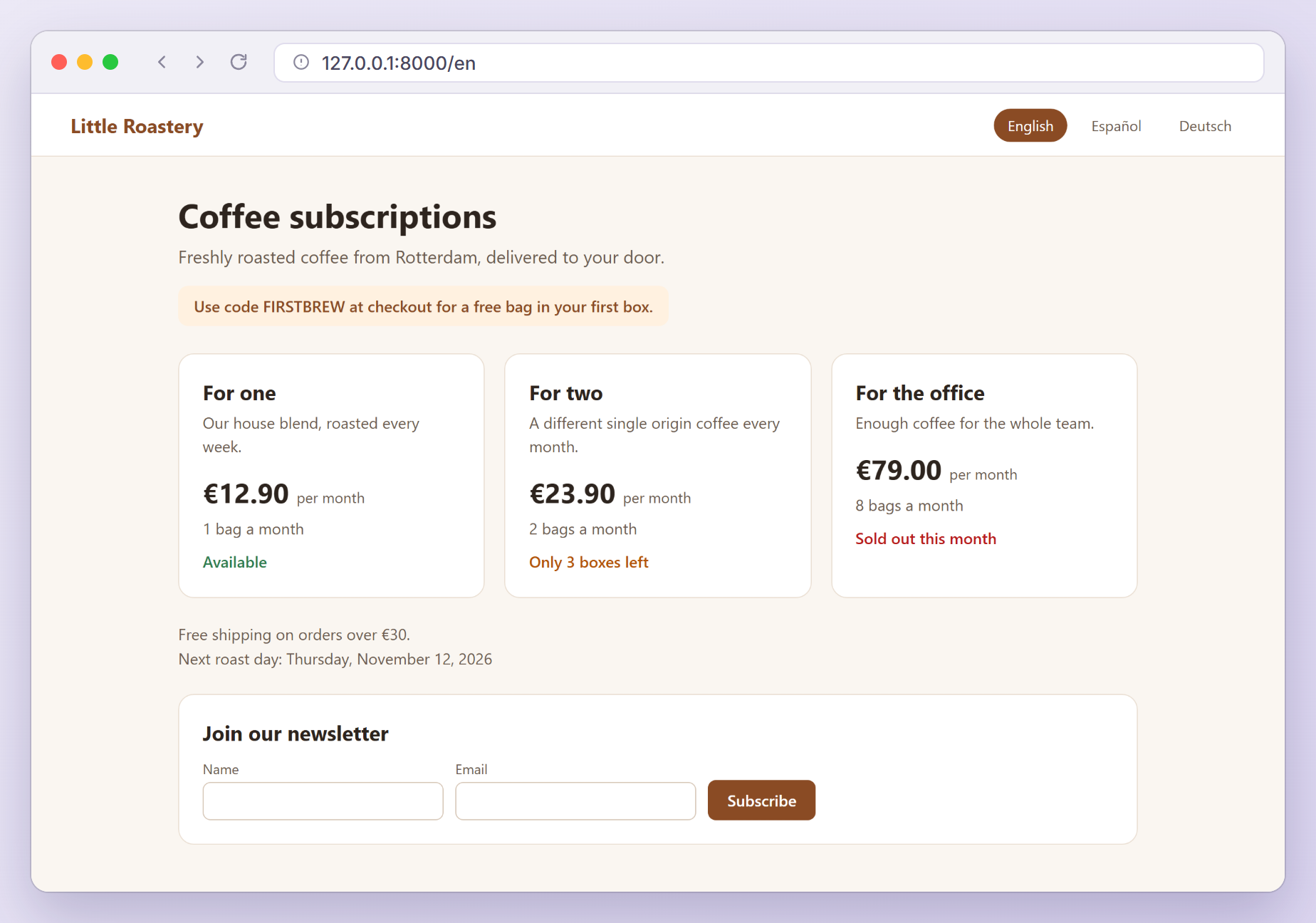
Run php artisan serve and open http://127.0.0.1:8000. With an English browser, / redirects to /en:
Adding a Language Switcher in Blade
The switcher is the <nav> at the top of the view:
<nav aria-label="{{ __('Language') }}">
    @foreach (config('app.supported_locales') as $code => $name)
        <a href="{{ route(Route::currentRouteName(), ['locale' => $code]) }}"
           hreflang="{{ $code }}"
           @class(['active' => App::isLocale($code)])>{{ $name }}</a>
    @endforeach
</nav>
Route::currentRouteName() returns pricing, so each link opens the current page in another language, and App::isLocale() highlights the active one. Clicking Español opens /es and saves es in the session, so the next visit to / lands on /es.
On pages with more route parameters, such as /{locale}/plans/{plan}, merge them in, or route() fails with a “Missing required parameter” error:
<a href="{{ route(Route::currentRouteName(), ['locale' => $code] + request()->route()->parameters()) }}">{{ $name }}</a>
Translating Validation Messages and Attribute Names
Validation messages come from validation.php in the current language, and lang:publish only gave us English. Create lang/es/validation.php with the rules our form uses:
<?php

return [
    'required' => 'El campo :attribute es obligatorio.',
    'email' => 'El campo :attribute debe ser una dirección de correo válida.',
    'max' => [
        'string' => 'El campo :attribute no puede tener más de :max caracteres.',
    ],

    'attributes' => [
        'name' => 'nombre',
        'email' => 'correo electrónico',
    ],
];
And lang/de/validation.php:
<?php

return [
    'required' => 'Bitte fülle das Feld :attribute aus.',
    'email' => 'Bitte gib eine gültige E-Mail-Adresse ein.',
    'max' => [
        'string' => 'Das Feld :attribute darf höchstens :max Zeichen lang sein.',
    ],

    'attributes' => [
        'name' => 'Name',
        'email' => 'E-Mail-Adresse',
    ],
];
The attributes array replaces the field name in :attribute, so the Spanish error says “nombre” instead of “name”. Size rules such as max have one message per type, hence the nested array. Rules you leave out fall back to English, which produces mixed sentences. With only these lines, a min:3 rule on a Spanish page says:
The nombre field must be at least 3 characters.
So translate every rule your forms use, or start from a complete file. The community laravel-lang/common package maintains them for more than 120 languages. I tested version 6.8.0 on Laravel 13.39: after composer require laravel-lang/common --dev, running php artisan lang:add es wrote lang/es.json and six files in lang/es, including validation.php. Review them before you commit.
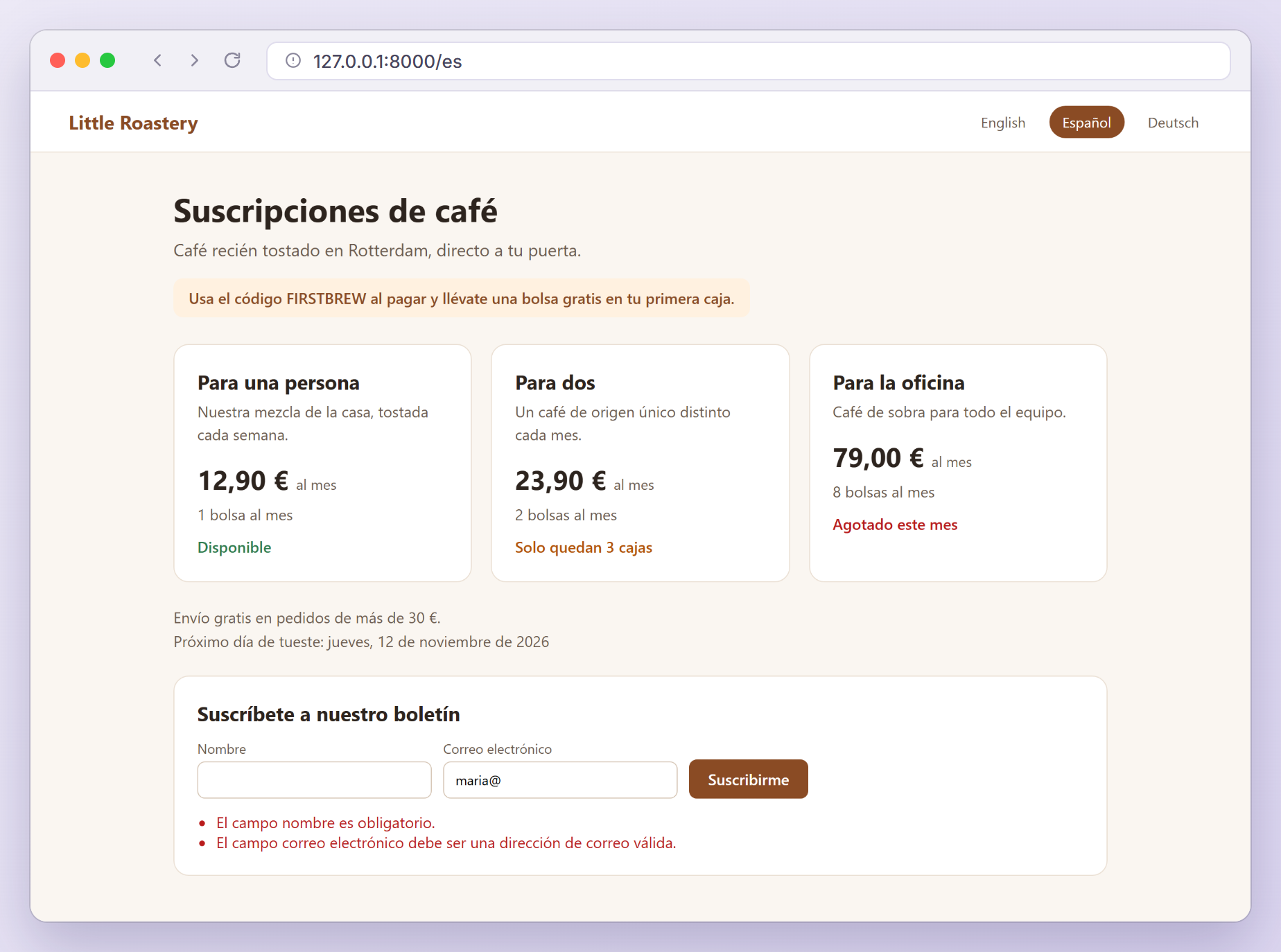
Submit the Spanish form with an empty name and a broken email address, and the errors come back in Spanish:
Formatting Prices, Numbers and Dates per Locale
Numbers and dates have local formats too. Laravel’s Number class formats them with PHP’s intl extension, and Carbon ships its own day and month names. Here is one number and one date in our three languages:
php artisan tinker --execute="\$date = Illuminate\Support\Carbon::parse('2026-11-12'); foreach (['en', 'es', 'de'] as \$locale) { App::setLocale(\$locale); echo Number::format(1234.5, locale: \$locale), ' | ', \$date->isoFormat('dddd, LL'), ' | ', \$date->translatedFormat('l j F Y'), PHP_EOL; }"
1,234.5 | Thursday, November 12, 2026 | Thursday 12 November 2026
1.234,5 | jueves, 12 de noviembre de 2026 | jueves 12 noviembre 2026
1.234,5 | Donnerstag, 12. November 2026 | Donnerstag 12 November 2026
Number::format() swaps the separators. isoFormat('dddd, LL') uses each language’s own long date format, while translatedFormat() translates the names but keeps your pattern, which is why the Spanish date lacks its “de” words. For full dates I use isoFormat() with the L formats.
Number::currency(12.9, in: 'EUR') returns “€12.90” in English. In Spanish and German, the decimal point becomes a comma and the euro sign moves behind the amount, after a non-breaking space. The in: argument is the currency, which is a business decision: our store charges euros in every language.
The middleware calls Number::useLocale() because Number ignores App::setLocale(). Without it, the German page still showed “€12.90” in my test. For a single call, you can pass locale: 'de' instead.
Handling Missing Translations
To find a translation, __() checks these places in order:
- The JSON file of the current language, such as lang/es.json.
- The PHP file of the current language, such as lang/es/shop.php, merged over Laravel’s built-in files.
- The same PHP file in the fallback language, lang/en/shop.php.
- If nothing matches, it returns the key, with the placeholders filled in.
JSON files have no fallback: if lang/de.json lacks “Subscribe”, German visitors see the key, “Subscribe”, even when the fallback language is Spanish and lang/es.json has it.
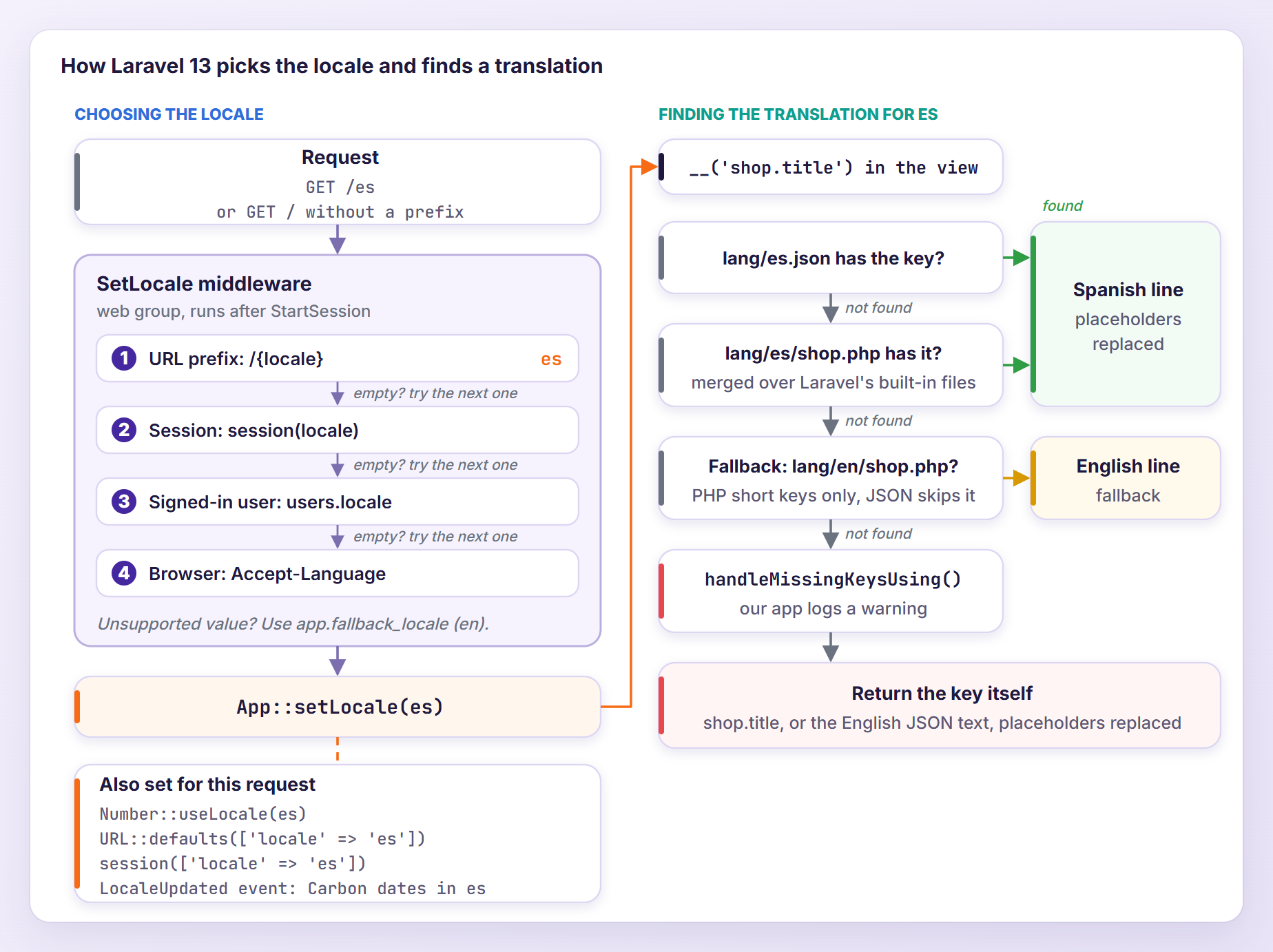
Either way, the visitor sees English and nobody tells you. Lang::handleMissingKeysUsing() registers a callback for step 4. Add it to the boot() method of app/Providers/AppServiceProvider.php, and import Illuminate\Support\Facades\Lang and Illuminate\Support\Facades\Log at the top:
public function boot(): void
{
    Lang::handleMissingKeysUsing(function (string $key, array $replacements, string $locale) {
        $expected = $locale === config('app.fallback_locale')
            || str_starts_with($key, 'validation.custom.');

        if (! $expected) {
            Log::warning("Missing translation [{$key}] for locale [{$locale}].");
        }

        return $key;
    });
}
Laravel prints whatever the callback returns, so we return the key unchanged. Two kinds of misses are expected and skipped. In the fallback language, English, every JSON lookup misses, because the key is the text (a missing English short key still shows up on the page as the raw key). And for every failed rule, the validator looks for an optional custom message such as validation.custom.email.email. With those filtered out, browsing all three languages and submitting broken forms logged nothing, while an untranslated JSON string on a German page logged this:
[2026-11-08 17:39:31] local.WARNING: Missing translation [Gift wrapping] for locale [de].
The callback doesn’t run when step 3 finds the line, though. A line missing from lang/de/shop.php but present in English quietly shows English, and one of the tests below catches that.
Testing Laravel Localization
Create two feature tests:
php artisan make:test LocalizationTest
php artisan make:test TranslationsTest
Replace tests/Feature/LocalizationTest.php:
<?php

namespace Tests\Feature;

use App\Models\User;
use Illuminate\Foundation\Testing\RefreshDatabase;
use Tests\TestCase;

class LocalizationTest extends TestCase
{
    use RefreshDatabase;

    public function test_each_language_has_its_own_url(): void
    {
        $this->get('/en')->assertOk()->assertSee('<html lang="en">', false)->assertSee('Coffee subscriptions');
        $this->get('/es')->assertOk()->assertSee('<html lang="es">', false)->assertSee('Suscripciones de café');
        $this->get('/de')->assertOk()->assertSee('<html lang="de">', false)->assertSee('Kaffee-Abos');
    }

    public function test_unsupported_languages_return_a_404(): void
    {
        $this->get('/fr')->assertNotFound();
    }

    public function test_the_home_page_uses_the_browser_language(): void
    {
        $this->get('/', ['Accept-Language' => 'de-DE,de;q=0.9,en;q=0.8'])
            ->assertRedirect('/de');
    }

    public function test_the_chosen_language_is_remembered(): void
    {
        $this->get('/es')->assertSessionHas('locale', 'es');

        $this->get('/')->assertRedirect('/es');
    }

    public function test_signed_in_users_get_their_saved_language(): void
    {
        $user = User::factory()->create(['locale' => 'de']);

        $this->actingAs($user)->get('/')->assertRedirect('/de');
    }

    public function test_validation_messages_are_translated(): void
    {
        $this->from('/es')
            ->post('/es/newsletter', ['name' => str_repeat('a', 51), 'email' => 'maria@'])
            ->assertRedirect('/es')
            ->assertSessionHasErrors([
                'name' => 'El campo nombre no puede tener más de 50 caracteres.',
                'email' => 'El campo correo electrónico debe ser una dirección de correo válida.',
            ]);
    }

    public function test_the_thank_you_message_capitalizes_the_name(): void
    {
        $this->post('/de/newsletter', ['name' => 'jonas', 'email' => 'jonas@example.com'])
            ->assertRedirect('/de')
            ->assertSessionHas('status', 'Danke, Jonas! Bitte schau in dein Postfach.');
    }

    public function test_prices_and_dates_follow_the_language(): void
    {
        $this->travelTo('2026-11-09');

        $this->get('/en')->assertSee('€12.90')->assertSee('Thursday, November 12, 2026');
        $this->get('/es')->assertSee("12,90\u{a0}€")->assertSee('jueves, 12 de noviembre de 2026');
        $this->get('/de')->assertSee("12,90\u{a0}€")->assertSee('Donnerstag, 12. November 2026');
    }
}
Then replace tests/Feature/TranslationsTest.php:
<?php

namespace Tests\Feature;

use Illuminate\Support\Arr;
use Illuminate\Support\Facades\App;
use Illuminate\Support\Facades\Log;
use Tests\TestCase;

class TranslationsTest extends TestCase
{
    public function test_stock_messages_use_the_right_range(): void
    {
        $this->assertSame('Sold out this month', trans_choice('shop.stock', 0));
        $this->assertSame('Only one box left', trans_choice('shop.stock', 1));
        $this->assertSame('Only 7 boxes left', trans_choice('shop.stock', 7));
        $this->assertSame('Available', trans_choice('shop.stock', 25));

        App::setLocale('es');

        $this->assertSame('Solo queda una caja', trans_choice('shop.stock', 1));
        $this->assertSame('Solo quedan 10 cajas', trans_choice('shop.stock', 10));
    }

    public function test_bag_counts_use_singular_and_plural_forms(): void
    {
        $this->assertSame('1 bag a month', trans_choice('shop.bags', 1));
        $this->assertSame('2 bags a month', trans_choice('shop.bags', 2));
        $this->assertSame('8 Packungen pro Monat', trans_choice('shop.bags', 8, locale: 'de'));
    }

    public function test_every_language_has_the_same_keys(): void
    {
        $shopKeys = fn (string $locale) => array_keys(Arr::dot(require lang_path("{$locale}/shop.php")));
        $jsonKeys = fn (string $locale) => array_keys(json_decode(file_get_contents(lang_path("{$locale}.json")), true));

        foreach (['es', 'de'] as $locale) {
            $this->assertEqualsCanonicalizing($shopKeys('en'), $shopKeys($locale), "lang/{$locale}/shop.php");
        }

        $this->assertEqualsCanonicalizing($jsonKeys('es'), $jsonKeys('de'));
    }

    public function test_missing_translations_are_logged(): void
    {
        Log::shouldReceive('warning')
            ->once()
            ->with('Missing translation [Gift wrapping] for locale [de].');

        App::setLocale('de');

        $this->assertSame('Gift wrapping', __('Gift wrapping'));
    }
}
A few notes on these tests:
- Test requests send
Accept-Language: en-us,en;q=0.5by default, so the browser test sets its own header. - Session data survives between requests within one test, which the “remembered” test relies on.
travelTo()freezes the clock on a Monday, so the next roast day is always Thursday, November 12, 2026. The non-breaking space in the Spanish and German prices is written as"\u{a0}".- The key comparison catches lines that the fallback would hide, and the last test mocks the
Logfacade to check our callback.
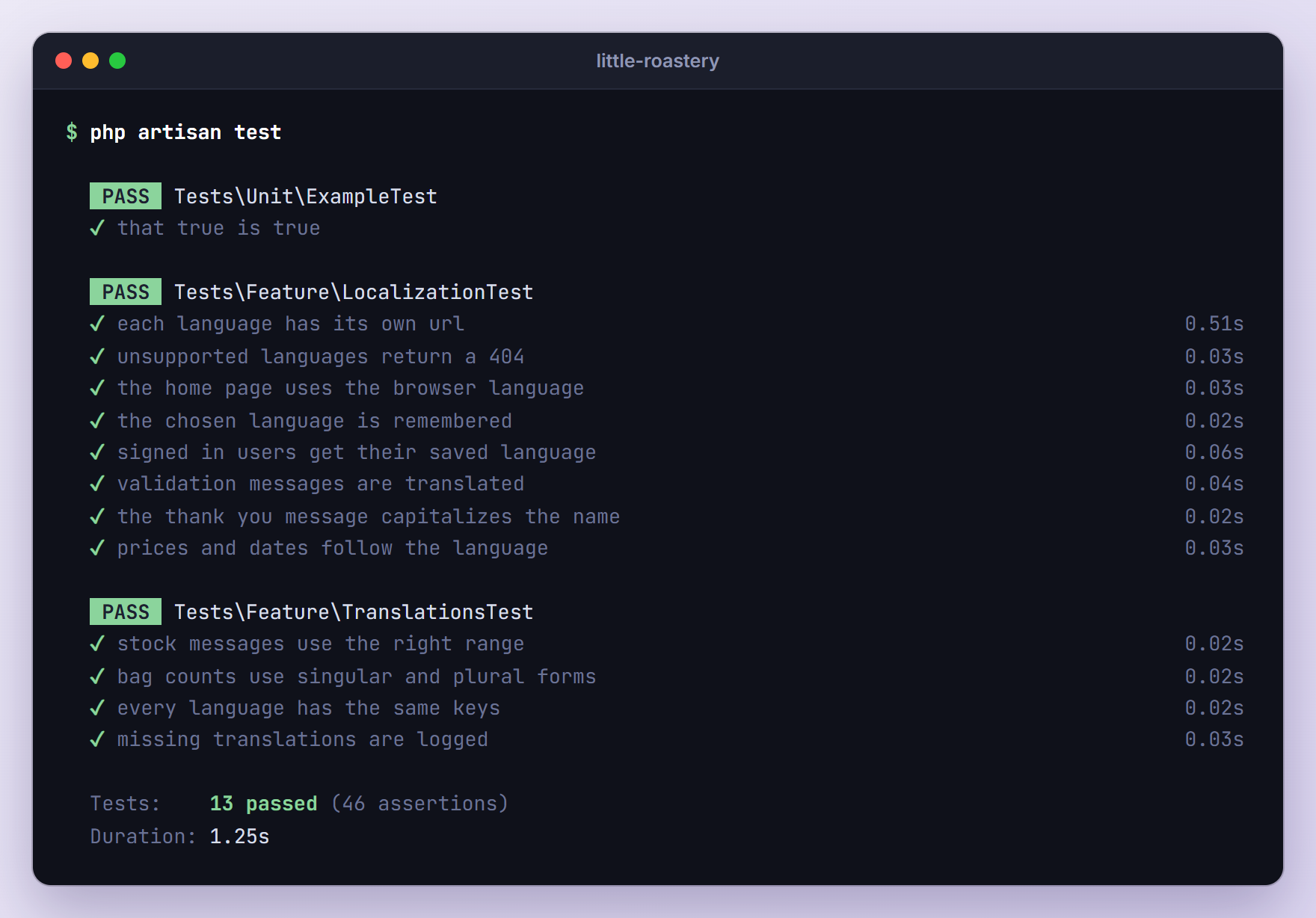
The default tests/Feature/ExampleTest.php expects a 200 response from /, which now redirects, so delete it. Then run the suite:
php artisan test
Troubleshooting
The Page Shows shop.title Instead of the Text
Laravel found the key in neither the current nor the fallback language. Check for typos and the file location: __('shop.title') reads lang/{locale}/shop.php, which must return an array. In apps upgraded from Laravel 8 or older, look for a resources/lang folder too. When it exists, Laravel uses it and ignores lang; even an empty leftover resources/lang made __('shop.title') print shop.title in my test. Keep only one of the two.
htmlspecialchars(): Argument #1 ($string) must be of type string, array given
__() returned an array. That happens when a key without a dot matches a PHP translation file name and the current language’s JSON file lacks the key: Laravel then returns the whole file. I added a {{ __('Shop') }} link to the header, and the English page failed, because without lang/en.json Laravel returned lang/en/shop.php. Windows and macOS file systems ignore case by default, so Shop matched shop.php; on Linux, only a file named exactly Shop.php would. Rename the key or the file, or add the key to every language’s JSON file, English included.
The Language Resets to English on the Next Page
App::setLocale() only lasts for one request, so store the choice (in the session, a cookie or the users table) and set it on every request, as SetLocale does. Then check the registration. Added with $middleware->append(), the middleware runs globally, before the session starts and the route is matched, and every page fails with “Session store not set on request.” Append it to the web group instead.
The “intl” PHP Extension Is Required to Use the [currency] Method
Number needs PHP’s intl extension. With it disabled, Number::currency() failed with:
RuntimeException The "intl" PHP extension is required to use the [currency] method.
Enable extension=intl in php.ini on Windows, or install your distribution’s PHP intl package on Linux, then restart PHP and check php -m. Translations and Carbon dates kept working without intl.
Changing APP_LOCALE in .env Has No Effect
The configuration is cached. php artisan optimize caches config, events, routes and views, and with a cached config Laravel ignores .env until you run php artisan config:clear or cache the config again. Translations are never cached: my edits to lang/es/shop.php showed up immediately with every cache in place. There are two catches. The cached routes contain the whereIn() list from supported_locales, so run php artisan optimize again after adding a language. And PHP language files are loaded with require, so if OPcache doesn’t check file timestamps on your server, reload PHP-FPM after deploying translations.
Upgrading From Older Laravel Versions
If you followed our Laravel 5 post or another older tutorial, here is what changed:
- Laravel 5 to 8 kept translations in resources/lang. Laravel 9 moved new apps to lang in the project root, and Laravel 10 removed the folder from new apps in favor of
php artisan lang:publish. - Laravel 13 still reads resources/lang when that folder exists, so nothing breaks. To switch, run
mv resources/lang langand make sure no resources/lang folder is left behind. - Since Laravel 11, config/app.php reads the locales from
APP_LOCALE,APP_FALLBACK_LOCALEandAPP_FAKER_LOCALE. An upgraded app with'locale' => 'en'keeps working; useenv('APP_LOCALE', 'en')when you want a different default per environment. - A locale middleware from the
webgroup in app/Http/Kernel.php moves to$middleware->web(append: [...])in bootstrap/app.php if you adopt the new structure.
Frequently Asked Questions
What Is the Difference Between __() and trans() in Laravel?
For normal use, none. Both ask the translator for a key, accept the same replacements and an optional locale, and fall back the same way. They only differ without arguments: trans() returns the translator instance, while __() returns null. In Blade, {{ __('Subscribe') }} escapes the result, while @lang('Subscribe') prints it unescaped, so prefer the echo syntax for anything that might contain user input.
Should I Use JSON or PHP Translation Files?
Use JSON files when the key can simply be the English text: buttons, labels, flash messages and other short strings. Use PHP files for longer content, nested groups, plural rules and anything you want to organize by page or feature. You can mix both, as this tutorial does. Just avoid JSON keys that match a PHP file name, such as “Shop” next to shop.php.
Does Laravel Detect the Browser Language Automatically?
No. Laravel starts every request with APP_LOCALE and never reads the Accept-Language header on its own. Read it in middleware with $request->getPreferredLanguage(['en', 'es', 'de']), which returns the best match from your list, or the first entry when nothing matches. Treat it as a first guess and always offer a language switcher, so visitors can override it.
How Do I Get the Current Locale in Laravel?
Call App::currentLocale() or app()->getLocale(); both return the active locale, such as es. To check for one language, use App::isLocale('es'). The value changes during a request when middleware calls App::setLocale(), so read it after your locale middleware has run, for example in controllers and views.
Wrapping Up
The Little Roastery page now speaks English, Spanish and German. Page content lives in PHP files, short strings in JSON, and placeholders and trans_choice() handle names, codes and counts. A middleware picks the language from the URL, the session, the user or the browser, validation messages and number formats follow it, and missing translations end up in the log.
With this setup, Laravel localization becomes routine: to add a fourth language, translate copies of lang/en/shop.php and one JSON file, then add the code to supported_locales and to the key comparison test. The localization documentation covers the rest, such as overriding a package’s language files in lang/vendor.
Learn more about Laravel:
