


When a customer places an order, the shop owner wants to know right away, and Telegram is open on their phone all day. In this tutorial we build Laravel Telegram notifications for a small online store: every new order sends a formatted message with a “View order” button to the shop’s Telegram chat, group or channel.
We will create a bot with BotFather, find the chat ID and write a small notification channel on Laravel’s HTTP client, with no SDK. The notification is queued, respects Telegram’s rate limits, gives up early on errors a retry cannot fix, and is tested without a real bot. We also cover the laravel-notification-channels/telegram package.
We will use Laravel 13 (version 13.39 at the time of writing) with PHP 8.4. Everything here works on PHP 8.3 or newer. Our older guide, Sending Notifications to Telegram Messenger With Laravel, used Laravel 5.6, the irazasyed/telegram-bot-sdk package and a controller that posted straight to a channel. This version uses Laravel’s notification system, so one class reaches a channel, a group or a single user.
Table of Contents
Prerequisites
- PHP 8.3 or newer and Composer
- Basic Laravel knowledge: routes, controllers, Eloquent and queues
- A Telegram account to create the bot (the tests do not need one)
How Laravel Telegram Notifications Work
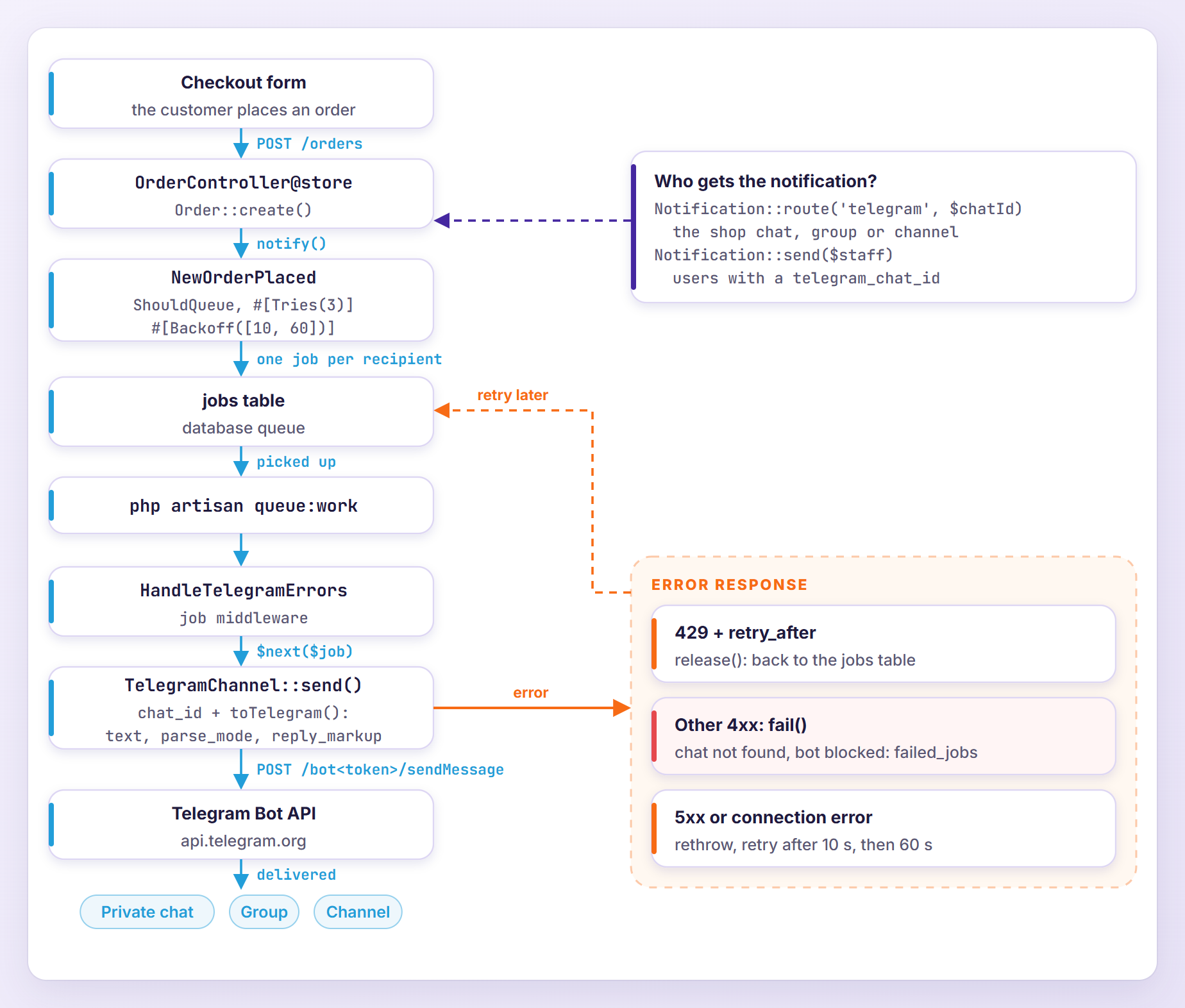
A notification is a class that describes one message (“a new order was placed”) and lists the channels that deliver it in its via() method. Laravel supports mail, database, broadcast, Vonage and Slack; for Telegram we add our own channel. Because the class implements ShouldQueue, the controller only stores a job, and a queue worker makes the HTTP call to the Bot API’s sendMessage method a moment later.
Creating a Telegram Bot With BotFather
Every Telegram bot is created through @BotFather, Telegram’s own bot for managing bots:
- Open Telegram, search for @BotFather and start a chat.
- Send
/newbot. - Enter a display name, for example “Pet Shop Orders”.
- Enter a username. It must end in “bot” (like
petshop_orders_bot), be 5 to 32 characters long and use only Latin letters, numbers and underscores.
BotFather replies with the bot’s token, a string like 110201543:AAHdqTcvCH1vGWJxfSeofSAs0K5PALDsaw (the example from Telegram’s docs). Anyone who has the token controls the bot, so keep it out of Git. If it leaks, send /token to BotFather to generate a new one.
Finding the Chat ID
The Bot API delivers every message to a chat_id. Bots cannot start conversations, so someone has to open the chat first, and the chat type decides how:
| Where alerts should go | What to do first | chat.type | The ID looks like |
|---|---|---|---|
| A private chat | Open t.me/<bot_username> and press Start | private | 123456789 |
| A group | Add the bot, then send /start@<bot_username> in the group | group or supergroup | -987654321 or -1001234567890 |
| A channel | Add the bot as an administrator, then post a message | channel | -1001234567890 |
In groups, bots run in privacy mode by default and mostly see commands and replies, so a plain “hello” may never reach the bot. Channels only accept bots as administrators with the right to post messages. User IDs are positive, while group IDs are negative and supergroup and channel IDs start with -100 (Telegram’s ID reference), so keep the minus sign.
Now ask Telegram what the bot has seen. Open this URL in your browser, with your token after bot:
https://api.telegram.org/bot<token>/getUpdates
getUpdates returns the bot’s recent updates as JSON. Here is an example of the shape, built from the Update, Message and Chat objects in the Bot API docs (trimmed, IDs made up):
{
    "ok": true,
    "result": [
        {
            "update_id": 482019001,
            "message": {
                "message_id": 1,
                "from": {
                    "id": 123456789,
                    "is_bot": false,
                    "first_name": "Sarah"
                },
                "chat": {
                    "id": 123456789,
                    "first_name": "Sarah",
                    "type": "private"
                },
                "date": 1793000000,
                "text": "/start"
            }
        },
        {
            "update_id": 482019002,
            "channel_post": {
                "message_id": 7,
                "chat": {
                    "id": -1001234567890,
                    "title": "Pet Shop Orders",
                    "type": "channel"
                },
                "date": 1793000100,
                "text": "Hello"
            }
        }
    ]
}
Copy message.chat.id for a private chat or group, or channel_post.chat.id for a channel. If result is an empty array, jump to the troubleshooting section.
Setting Up the Laravel Project
Create a new project (or run laravel new telegram-shop with the Laravel installer):
composer create-project laravel/laravel telegram-shop
cd telegram-shop
A new Laravel 13 app uses SQLite and the database queue connection out of the box, which is all we need.
Adding the Bot Token to .env and config/services.php
Add the token and the chat ID to .env:
TELEGRAM_BOT_TOKEN=your-bot-token
TELEGRAM_STORE_CHAT_ID=your-chat-id
Then open config/services.php and add a telegram entry after slack:
'telegram' => [
    'token' => env('TELEGRAM_BOT_TOKEN'),
    'store_chat_id' => env('TELEGRAM_STORE_CHAT_ID'),
],
Our code reads these values with config(), never env(), so they keep working after php artisan config:cache. The laravel-notification-channels package reads the same services.telegram.token key, so this setup works for both approaches in this article.
Creating the Orders Table
php artisan make:model Order -mf
Fill in the Schema::create() call of the new migration in database/migrations:
Schema::create('orders', function (Blueprint $table) {
    $table->id();
    $table->string('customer_name');
    $table->string('customer_email');
    $table->decimal('total', 10, 2);
    $table->text('note')->nullable();
    $table->timestamps();
});
The note column holds free text from the customer, which matters when we format the message. Replace app/Models/Order.php with this:
<?php

namespace App\Models;

use Illuminate\Database\Eloquent\Attributes\Fillable;
use Illuminate\Database\Eloquent\Factories\HasFactory;
use Illuminate\Database\Eloquent\Model;

#[Fillable(['customer_name', 'customer_email', 'total', 'note'])]
class Order extends Model
{
    /** @use HasFactory<\Database\Factories\OrderFactory> */
    use HasFactory;

    /**
     * Get the attributes that should be cast.
     *
     * @return array<string, string>
     */
    protected function casts(): array
    {
        return [
            'total' => 'decimal:2',
        ];
    }
}
Then fill in definition() in database/factories/OrderFactory.php for the tests:
public function definition(): array
{
    return [
        'customer_name' => fake()->name(),
        'customer_email' => fake()->safeEmail(),
        'total' => fake()->randomFloat(2, 10, 300),
        'note' => null,
    ];
}
Storing Chat IDs on Users
Staff members can get alerts in their own private chat too, so give users a column for their chat ID:
php artisan make:migration add_telegram_chat_id_to_users_table
Fill in both methods of the new migration:
public function up(): void
{
    Schema::table('users', function (Blueprint $table) {
        $table->string('telegram_chat_id')->nullable();
    });
}

public function down(): void
{
    Schema::table('users', function (Blueprint $table) {
        $table->dropColumn('telegram_chat_id');
    });
}
A string column fits every kind of chat ID, including @channelusername for public channels. Next, open app/Models/User.php, add 'telegram_chat_id' to the #[Fillable] list and add this method to the class:
/**
 * Route notifications for the Telegram channel.
 */
public function routeNotificationForTelegram(): ?string
{
    return $this->telegram_chat_id;
}
The User model already uses the Notifiable trait. When a channel asks a model for its telegram route, the trait calls routeNotificationForTelegram(). Run the migrations:
php artisan migrate
Choosing Between a Package and a Custom Channel
We will write our own channel. It is about 30 lines, adds no dependency and goes through Laravel’s HTTP client, so Http::fake() can check the exact JSON we send. The laravel-notification-channels/telegram package (8.0.0 supports Laravel 13) wins when you need photos, documents, polls or keyboards, but it uses its own Guzzle client, which Http::fake() cannot see, and its own error handling. We cover it later in this article.
Building the Telegram Notification Channel
A custom channel is any class with a send() method. Generate an empty class:
php artisan make:class Notifications/Channels/TelegramChannel
Replace app/Notifications/Channels/TelegramChannel.php with the following:
<?php

namespace App\Notifications\Channels;

use Illuminate\Http\Client\ConnectionException;
use Illuminate\Notifications\Notification;
use Illuminate\Support\Facades\Http;

class TelegramChannel
{
    /**
     * Send the given notification with the Telegram Bot API.
     */
    public function send(object $notifiable, Notification $notification): ?array
    {
        $chatId = $notifiable->routeNotificationFor('telegram', $notification);

        if (blank($chatId)) {
            return null;
        }

        $token = config()->string('services.telegram.token');

        try {
            $response = Http::timeout(10)->post("https://api.telegram.org/bot{$token}/sendMessage", [
                'chat_id' => $chatId,
                ...$notification->toTelegram($notifiable),
            ]);
        } catch (ConnectionException $e) {
            // cURL errors contain the full URL, and the URL contains the token.
            throw new ConnectionException(str_replace($token, '[hidden]', $e->getMessage()));
        }

        return $response->throw()->json('result');
    }
}
Let me explain the code above.
routeNotificationFor('telegram') asks the notifiable where the message goes. For a User it calls routeNotificationForTelegram(), and for an on-demand notification it returns the chat ID given to Notification::route(). Recipients without a chat ID are skipped quietly, the same way Laravel’s mail channel skips users without an email address.
config()->string() throws an exception naming the key when the token is not set. The URL format, https://api.telegram.org/bot<token>/sendMessage, comes from the Bot API docs. Laravel’s HTTP client sends JSON, which Telegram accepts, so nested parameters like reply_markup stay plain PHP arrays. Everything except chat_id comes from the notification’s toTelegram() method.
The try/catch exists because the token is part of the URL. A cURL error message ends with the full URL, so without the str_replace() the token would end up in storage/logs/laravel.log and in the failed_jobs table. Finally, throw() turns any 4xx or 5xx response into an Illuminate\Http\Client\RequestException. On success we return the sent message (result), which Laravel passes to the NotificationSent event as $event->response.
Creating the New Order Notification
php artisan make:notification NewOrderPlaced
Replace app/Notifications/NewOrderPlaced.php with this:
<?php

namespace App\Notifications;

use App\Jobs\Middleware\HandleTelegramErrors;
use App\Models\Order;
use App\Notifications\Channels\TelegramChannel;
use Illuminate\Bus\Queueable;
use Illuminate\Contracts\Queue\ShouldQueue;
use Illuminate\Notifications\Notification;
use Illuminate\Queue\Attributes\Backoff;
use Illuminate\Queue\Attributes\Tries;
use Illuminate\Support\Facades\Log;
use Illuminate\Support\Str;
use Throwable;

#[Tries(3)]
#[Backoff([10, 60])]
class NewOrderPlaced extends Notification implements ShouldQueue
{
    use Queueable;

    /**
     * Create a new notification instance.
     */
    public function __construct(public Order $order)
    {
        //
    }

    /**
     * Get the notification's delivery channels.
     *
     * @return array<int, string>
     */
    public function via(object $notifiable): array
    {
        return [TelegramChannel::class];
    }

    /**
     * Get the sendMessage parameters for the Telegram Bot API.
     *
     * @return array<string, mixed>
     */
    public function toTelegram(object $notifiable): array
    {
        $order = $this->order;

        $lines = [
            "<b>New order #{$order->id}</b>",
            '',
            'Customer: '.e($order->customer_name),
            "Total: <b>\${$order->total}</b>",
        ];

        if ($order->note) {
            $lines[] = 'Note: <i>'.e(Str::limit($order->note, 300)).'</i>';
        }

        return [
            'text' => implode("\n", $lines),
            'parse_mode' => 'HTML',
            'reply_markup' => [
                'inline_keyboard' => [[
                    ['text' => 'View order', 'url' => url("/admin/orders/{$order->id}")],
                ]],
            ],
        ];
    }

    /**
     * Get the middleware the queued notification should pass through.
     *
     * @return array<int, object>
     */
    public function middleware(object $notifiable, string $channel): array
    {
        return [new HandleTelegramErrors];
    }

    /**
     * Handle a notification that failed for good.
     */
    public function failed(Throwable $exception): void
    {
        Log::warning("Telegram alert for order #{$this->order->id} failed.", [
            'error' => $exception->getMessage(),
        ]);
    }
}
Here is what is happening:
ShouldQueueand theQueueabletrait (both imported by the generator) make Laravel queue one job per recipient and channel instead of calling Telegram during the request.via()returns our channel’s class name, which Laravel resolves from the container, so there is nothing to register.toTelegram()returns the sendMessage parameters exceptchat_id.reply_markupadds an inline keyboard with one URL button.#[Tries(3)]and#[Backoff([10, 60])]are Laravel 13 queue attributes that the queued job inherits: three attempts, with 10 seconds before the second and 60 before the third.middleware()adds the error handler we write next, andfailed()runs once when the notification gives up for good.
Formatting the Message With HTML
We use Telegram’s HTML parse mode because Laravel already has the right escaping helper. The formatting rules require <, > and & for any <, > and & outside a tag, and accept only those, " and numeric entities. e() produces exactly those (' becomes '), so we escape everything a customer typed. Otherwise a customer called Tom & Jerry <Pet Shop> would break the message.
Str::limit() runs before e(), so we never cut an entity like & in half, and 300 characters stay far below the 4,096 character limit of sendMessage. Button URLs must be HTTP(S) or tg:// links, so set APP_URL in .env to your shop’s public address and point the button at your admin panel’s order page.
Here is the exact request the channel builds for an order with a note, recorded with Http::fake():
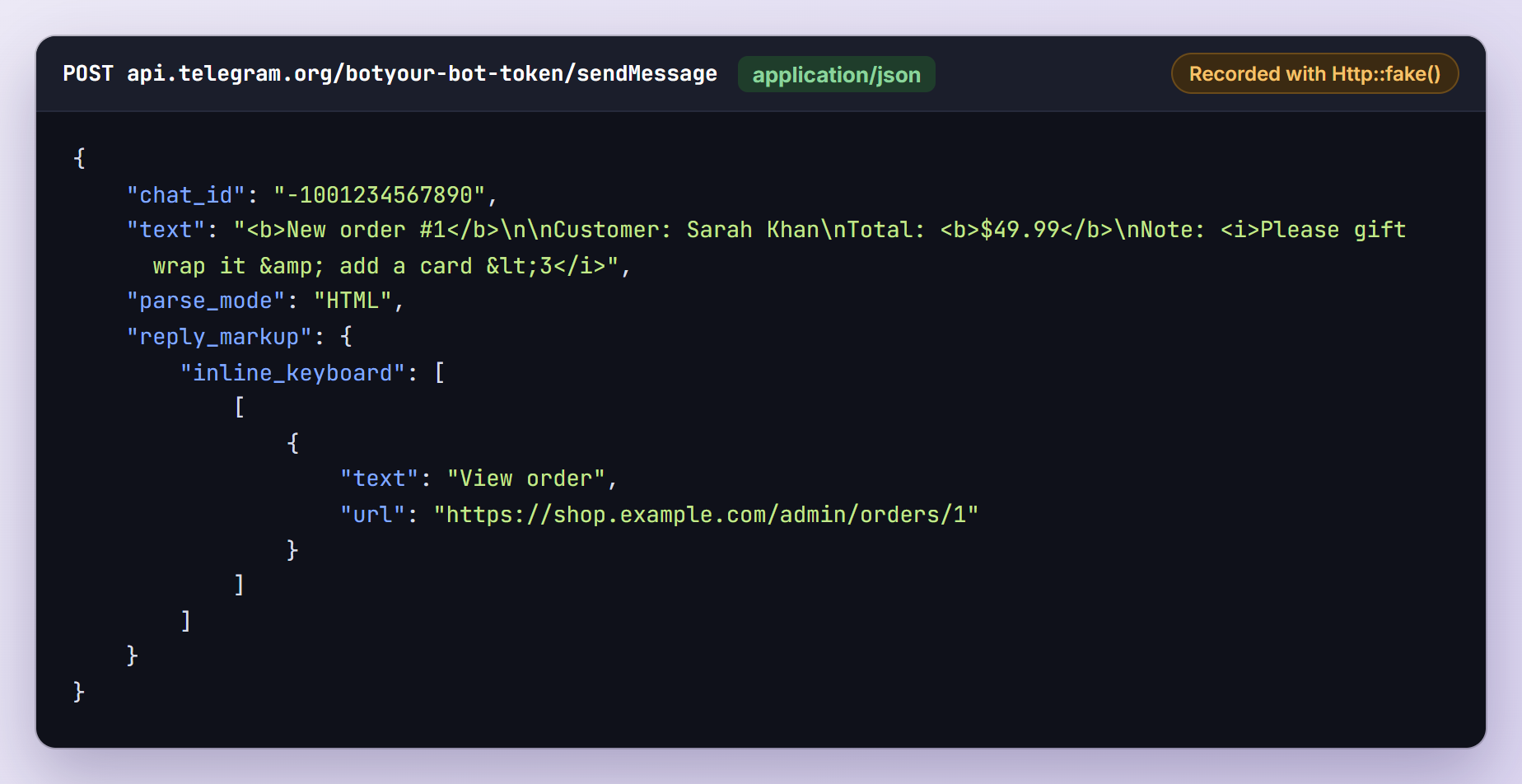
The customer’s & and < arrive as & and <, while our own <b> and <i> tags stay as tags.
Handling Telegram API Errors
A failed request returns "ok": false with an error_code, a description and, for some errors, a parameters object. Here is an example shape (documented fields, made-up values):
{
    "ok": false,
    "error_code": 429,
    "description": "Too Many Requests: retry after 35",
    "parameters": {
        "retry_after": 35
    }
}
These errors need different treatment:
- 429 Too Many Requests means we hit flood control, and
retry_aftersays how many seconds to wait. - Other 4xx errors, such as 400 “chat not found” or 403 “bot was blocked by the user”, fail the same way on every attempt, so retrying only delays the failure.
- 5xx errors and timeouts are usually temporary, so the normal retries with backoff fit them.
A job middleware can make that decision on every attempt. Generate one:
php artisan make:job-middleware HandleTelegramErrors
Replace app/Jobs/Middleware/HandleTelegramErrors.php with this:
<?php

namespace App\Jobs\Middleware;

use Closure;
use Illuminate\Http\Client\RequestException;

class HandleTelegramErrors
{
    /**
     * Process the queued job.
     *
     * @param  Closure(object): void  $next
     */
    public function handle(object $job, Closure $next): void
    {
        try {
            $next($job);
        } catch (RequestException $e) {
            // 429 Too Many Requests: try again when Telegram says we may.
            if ($e->response->status() === 429) {
                $job->release($e->response->json('parameters.retry_after', 30));

                return;
            }

            // Any other 4xx (chat not found, bot blocked, bad formatting)
            // fails the same way every time, so do not waste the retries.
            if ($e->response->clientError()) {
                $job->fail($e);

                return;
            }

            throw $e;
        }
    }
}
Here $job is the SendQueuedNotifications job that Laravel creates for our notification. release() puts it back on the queue for retry_after seconds (a release still uses one of the three tries), and fail() moves it straight to failed_jobs and calls our failed() method. Anything else is rethrown, so the worker retries it after the backoff.
Note: Laravel 13 ships a FailOnException job middleware, but it stores a closure. Notification middleware is serialized into the queued job, so returning FailOnException from middleware() fails with “Failed to serialize job of type [Illuminate\Notifications\SendQueuedNotifications]: Serialization of ‘Closure’ is not allowed”. A small class like ours avoids that.
Sending Notifications When an Order Is Placed
Now the trigger. Generate the controller:
php artisan make:controller OrderController
Replace app/Http/Controllers/OrderController.php with the following:
<?php

namespace App\Http\Controllers;

use App\Models\Order;
use App\Models\User;
use App\Notifications\NewOrderPlaced;
use Illuminate\Http\RedirectResponse;
use Illuminate\Http\Request;
use Illuminate\Support\Facades\Notification;
use Illuminate\View\View;

class OrderController extends Controller
{
    /**
     * Show the checkout form.
     */
    public function create(): View
    {
        return view('checkout');
    }

    /**
     * Place a new order and tell the shop in Telegram.
     */
    public function store(Request $request): RedirectResponse
    {
        $order = Order::create($request->validate([
            'customer_name' => ['required', 'string', 'max:100'],
            'customer_email' => ['required', 'email'],
            'total' => ['required', 'numeric', 'min:0'],
            'note' => ['nullable', 'string', 'max:1000'],
        ]));

        // The shop's own chat, group or channel from .env
        Notification::route('telegram', config('services.telegram.store_chat_id'))
            ->notify(new NewOrderPlaced($order));

        // Staff members who connected their Telegram account
        Notification::send(
            User::whereNotNull('telegram_chat_id')->get(),
            new NewOrderPlaced($order)
        );

        return to_route('checkout')->with('status', "Order #{$order->id} placed. Thank you!");
    }
}
Notification::route() sends an on-demand notification to a recipient that is not a model, here the shop’s chat from .env. Notification::send() notifies a collection of users, each in their own chat through routeNotificationForTelegram(). Keep one or both. Neither call talks to Telegram: they only add rows to the jobs table, so checkout stays fast even when Telegram is slow.
Add the routes to routes/web.php:
use App\Http\Controllers\OrderController;

Route::get('/checkout', [OrderController::class, 'create'])->name('checkout');
Route::post('/orders', [OrderController::class, 'store'])->name('orders.store');
And create a minimal form in resources/views/checkout.blade.php:
<!DOCTYPE html>
<html lang="en">
<head>
    <meta charset="utf-8">
    <title>Checkout</title>
    <style>
        body { font-family: system-ui, sans-serif; background: #f4f5f7; color: #1f2933; }
        main { max-width: 420px; margin: 40px auto; background: #fff; padding: 28px; border-radius: 10px; box-shadow: 0 2px 10px rgba(0, 0, 0, .08); }
        label { display: block; margin-top: 14px; font-weight: 600; }
        input, textarea { width: 100%; box-sizing: border-box; margin-top: 6px; padding: 9px; border: 1px solid #cbd2d9; border-radius: 6px; font: inherit; }
        button { margin-top: 20px; width: 100%; padding: 11px; border: 0; border-radius: 6px; background: #229ed9; color: #fff; font: inherit; font-weight: 600; }
        .status { background: #e3f8e9; color: #18603a; padding: 10px; border-radius: 6px; }
        .error { color: #b42318; font-size: 14px; }
    </style>
</head>
<body>
<main>
    <h1>Checkout</h1>

    @if (session('status'))
        <p class="status">{{ session('status') }}</p>
    @endif

    <form method="POST" action="{{ route('orders.store') }}">
        @csrf

        <label>Name <input name="customer_name" value="{{ old('customer_name') }}" required></label>
        <label>Email <input name="customer_email" type="email" value="{{ old('customer_email') }}" required></label>
        <label>Total <input name="total" type="number" step="0.01" value="{{ old('total', '49.99') }}" required></label>
        <label>Note for the shop <textarea name="note" rows="3">{{ old('note') }}</textarea></label>

        @foreach ($errors->all() as $error)
            <p class="error">{{ $error }}</p>
        @endforeach

        <button type="submit">Place order</button>
    </form>
</main>
</body>
</html>
Start the app and, in a second terminal, a queue worker:
php artisan serve
php artisan queue:work
Open http://127.0.0.1:8000/checkout and place an order:
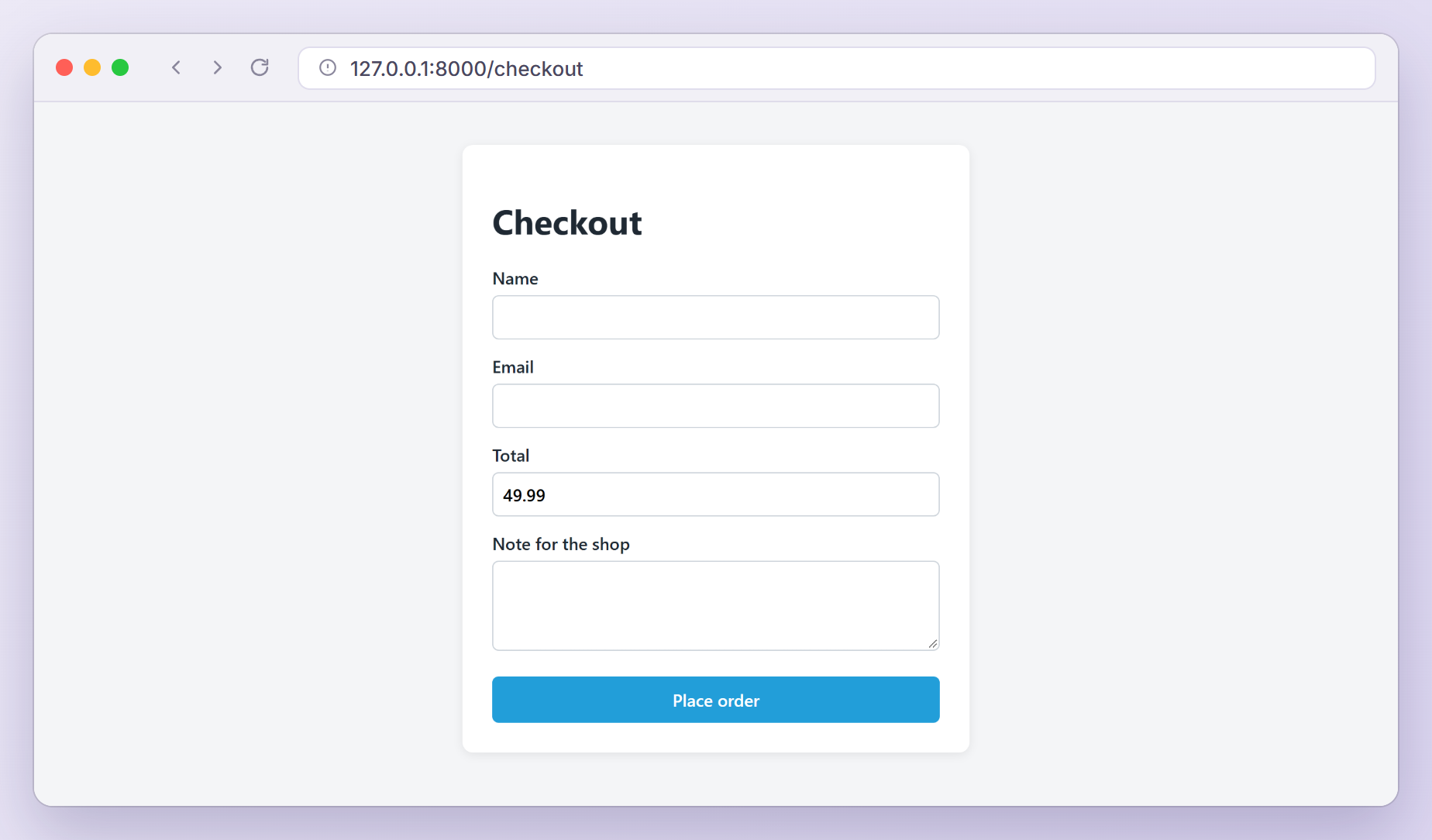
The page comes back with “Order #1 placed. Thank you!” while the job waits in the jobs table. The worker picks it up within a few seconds, and with a valid token and chat ID the message shows up in your Telegram chat. If the queue worker is new to you, our Laravel 13 queues and jobs tutorial covers it in depth.
Watching the Retries
To see the retries without waiting for a real outage, I placed an order and started the worker with the HTTPS_PROXY environment variable pointing at a closed local port, so every request failed to connect (--max-time=85 stops the worker after 85 seconds):
HTTPS_PROXY=http://127.0.0.1:9 php artisan queue:work --max-time=85
  2026-11-08 17:37:35 App\Notifications\NewOrderPlaced ................................... RUNNING
  2026-11-08 17:37:37 App\Notifications\NewOrderPlaced ................................... 2s FAIL
  2026-11-08 17:37:49 App\Notifications\NewOrderPlaced ................................... RUNNING
  2026-11-08 17:37:51 App\Notifications\NewOrderPlaced ................................... 2s FAIL
  2026-11-08 17:38:51 App\Notifications\NewOrderPlaced ................................... RUNNING
  2026-11-08 17:38:55 App\Notifications\NewOrderPlaced ................................... 3s FAIL
The second attempt started 12 seconds after the first failure (the 10 second backoff plus the worker’s polling) and the third 60 seconds after the second. Then the job moved to failed_jobs, failed() logged its warning, and the logged error ended with https://api.telegram.org/bot[hidden]/sendMessage.
Note: A job that our middleware released after a 429 shows up as DONE in the worker output, because from the worker’s point of view it ended without an exception. It is still in the jobs table, with available_at set retry_after seconds ahead.
Using the laravel-notification-channels/telegram Package Instead
If you prefer the package, install it:
composer require laravel-notification-channels/telegram
It registers a telegram channel and reads services.telegram.token, so the config from earlier works as it is. In app/Notifications/NewOrderPlaced.php, delete the middleware() method, remove the HandleTelegramErrors, TelegramChannel and Str imports, then add two imports and replace via() and toTelegram():
use NotificationChannels\Telegram\Enums\ParseMode;
use NotificationChannels\Telegram\TelegramMessage;

// Inside the NewOrderPlaced class...

public function via(object $notifiable): array
{
    return ['telegram'];
}

public function toTelegram(object $notifiable): TelegramMessage
{
    $order = $this->order;

    return TelegramMessage::create()
        ->parseMode(ParseMode::HTML)
        ->content("<b>New order #{$order->id}</b>\n\n")
        ->line('Customer: '.e($order->customer_name))
        ->line("Total: <b>\${$order->total}</b>")
        ->button('View order', url("/admin/orders/{$order->id}"));
}
content() sets the text, line() appends a line, and button() adds an inline URL button. The package asks notifiables for the same telegram route, so routeNotificationForTelegram() and Notification::route('telegram', ...) keep working. A few things I confirmed in the 8.0.0 source and with tests:
TelegramMessagedefaults to the legacyMarkdownparse mode, so setParseMode::HTMLwhen you escape withe().- It posts form data, with
reply_markupencoded as a JSON string. - After a 429 with a
retry_afterof 60 seconds or less, it sleeps that long inside the worker and tries once more. Other errors throwCouldNotSendNotification, whose message holds the status code and Telegram’s description. - On connection errors its exception message contains the token, just like a raw cURL error.
Notification::fake() works as usual, but Http::fake() never sees the package’s requests. To test the message itself, call toTelegram() in your test:
$order = Order::factory()->create(['customer_name' => 'Tom & Jerry', 'total' => 49.99]);
$owner = User::factory()->create(['telegram_chat_id' => '123456789']);

$message = (new NewOrderPlaced($order))->toTelegram($owner);

$this->assertSame('HTML', $message->getPayloadValue('parse_mode'));
$this->assertStringContainsString('Customer: Tom & Jerry', $message->getPayloadValue('text'));
Testing Telegram Notifications Without a Real Bot
Back to our own channel. First, make sure no test can reach the real API. Replace tests/TestCase.php with this:
<?php

namespace Tests;

use Illuminate\Foundation\Testing\TestCase as BaseTestCase;
use Illuminate\Support\Facades\Http;

abstract class TestCase extends BaseTestCase
{
    protected function setUp(): void
    {
        parent::setUp();

        // Fail any test that tries to reach the real Telegram API.
        Http::preventStrayRequests();
    }
}
Http::preventStrayRequests() throws an exception for any request that is not faked. Generate the test class:
php artisan make:test OrderTelegramNotificationTest
Replace tests/Feature/OrderTelegramNotificationTest.php with the following:
<?php
namespace Tests\Feature;
use App\Models\Order;
use App\Models\User;
use App\Notifications\NewOrderPlaced;
use Illuminate\Foundation\Testing\RefreshDatabase;
use Illuminate\Http\Client\ConnectionException;
use Illuminate\Http\Client\Request;
use Illuminate\Support\Facades\DB;
use Illuminate\Support\Facades\Http;
use Illuminate\Support\Facades\Notification;
use Tests\TestCase;
class OrderTelegramNotificationTest extends TestCase
{
use RefreshDatabase;
protected function setUp(): void
{
parent::setUp();
config([
'services.telegram.token' => 'test-token',
'services.telegram.store_chat_id' => '-1001234567890',
]);
}
public function test_placing_an_order_notifies_the_shop_and_connected_staff(): void
{
Notification::fake();
$owner = User::factory()->create(['telegram_chat_id' => '123456789']);
$assistant = User::factory()->create();
$this->post('/orders', [
'customer_name' => 'Sarah Khan',
'customer_email' => 'sarah@example.com',
'total' => 49.99,
])->assertRedirect('/checkout');
$order = Order::sole();
Notification::assertSentOnDemand(
NewOrderPlaced::class,
function (NewOrderPlaced $notification, array $channels, object $notifiable) use ($order) {
return $notifiable->routes['telegram'] === '-1001234567890'
&& $notification->order->is($order);
}
);
Notification::assertSentTo($owner, NewOrderPlaced::class);
Notification::assertNotSentTo($assistant, NewOrderPlaced::class);
}
public function test_the_channel_sends_the_exact_payload_to_send_message(): void
{
Http::fake([
'api.telegram.org/*' => Http::response(['ok' => true, 'result' => ['message_id' => 42]]),
]);
$order = Order::factory()->create([
'customer_name' => 'Tom & Jerry <Pet Shop>',
'total' => 49.99,
'note' => 'Please gift wrap it',
]);
Notification::route('telegram', '-1001234567890')->notify(new NewOrderPlaced($order));
Http::assertSent(function (Request $request) use ($order) {
return $request->url() === 'https://api.telegram.org/bottest-token/sendMessage'
&& $request->isJson()
&& $request->data() === [
'chat_id' => '-1001234567890',
'text' => "<b>New order #{$order->id}</b>\n\n"
."Customer: Tom & Jerry <Pet Shop>\n"
."Total: <b>\$49.99</b>\n"
.'Note: <i>Please gift wrap it</i>',
'parse_mode' => 'HTML',
'reply_markup' => [
'inline_keyboard' => [[
['text' => 'View order', 'url' => url("/admin/orders/{$order->id}")],
]],
],
];
});
}
public function test_users_without_a_chat_id_are_skipped(): void
{
Http::fake();
$user = User::factory()->create(['telegram_chat_id' => null]);
$user->notify(new NewOrderPlaced(Order::factory()->create()));
Http::assertNothingSent();
}
public function test_a_rate_limited_message_waits_for_retry_after(): void
{
config(['queue.default' => 'database']);
$this->freezeTime();
Http::fake([
'api.telegram.org/*' => Http::response([
'ok' => false,
'error_code' => 429,
'description' => 'Too Many Requests: retry after 35',
'parameters' => ['retry_after' => 35],
], 429),
]);
Notification::route('telegram', '-1001234567890')
->notify(new NewOrderPlaced(Order::factory()->create()));
$this->artisan('queue:work', ['--once' => true]);
$job = DB::table('jobs')->sole();
$this->assertSame(1, $job->attempts);
$this->assertSame(now()->addSeconds(35)->getTimestamp(), $job->available_at);
}
public function test_a_blocked_bot_fails_the_job_without_retrying(): void
{
config(['queue.default' => 'database']);
Http::fake([
'api.telegram.org/*' => Http::response([
'ok' => false,
'error_code' => 403,
'description' => 'Forbidden: bot was blocked by the user',
], 403),
]);
Notification::route('telegram', '123456789')
->notify(new NewOrderPlaced(Order::factory()->create()));
$this->artisan('queue:work', ['--once' => true]);
$this->assertSame(0, DB::table('jobs')->count());
$this->assertSame(1, DB::table('failed_jobs')->count());
Http::assertSentCount(1);
}
public function test_the_bot_token_never_reaches_the_logs(): void
{
Http::fake(['api.telegram.org/*' => Http::failedConnection()]);
try {
Notification::route('telegram', '-1001234567890')
->notify(new NewOrderPlaced(Order::factory()->create()));
$this->fail('Expected a connection exception.');
} catch (ConnectionException $e) {
$this->assertStringNotContainsString('test-token', $e->getMessage());
$this->assertStringContainsString('[hidden]', $e->getMessage());
}
}
}
A few things to notice:
- The first test uses
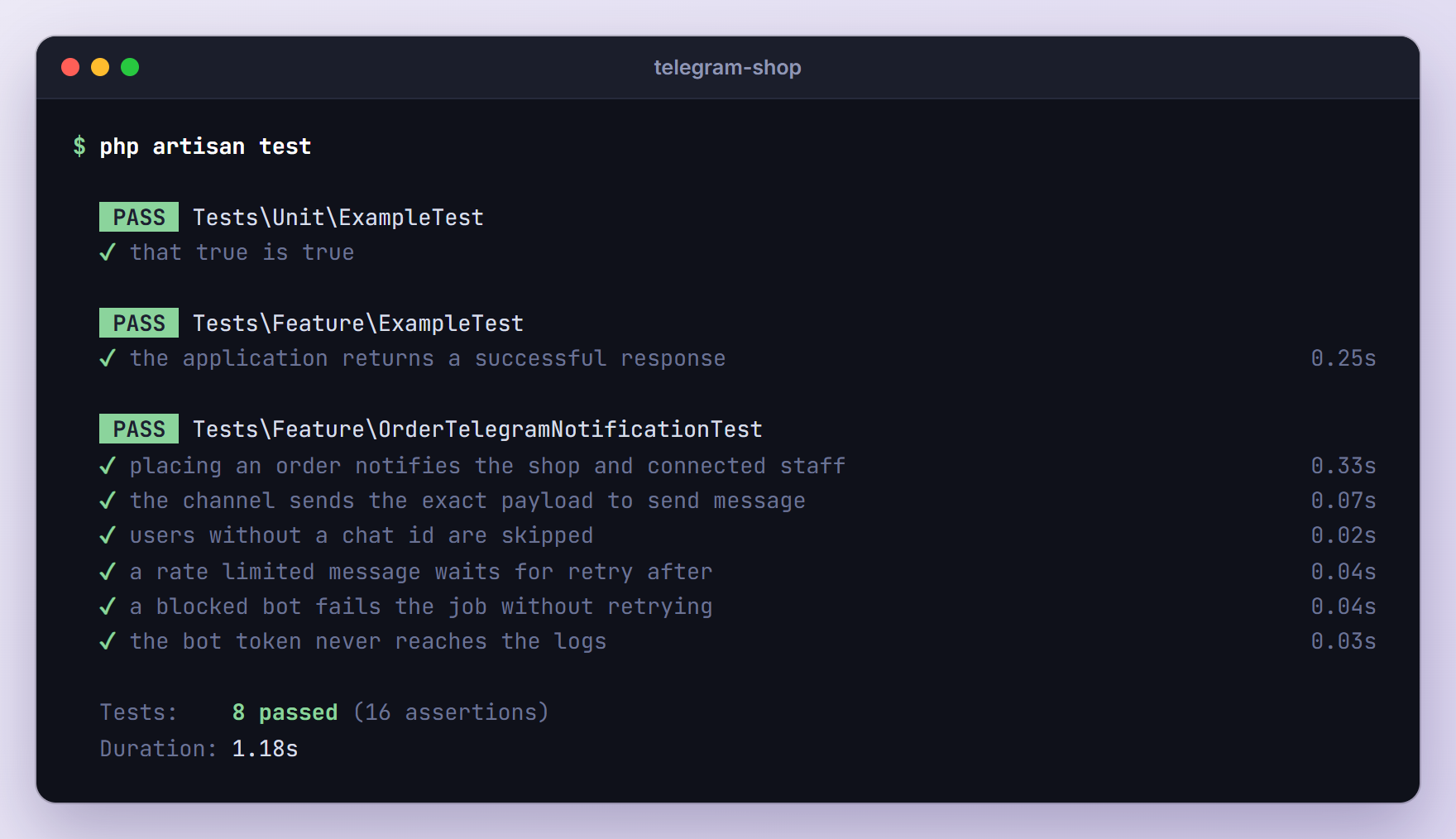
Notification::fake(), so nothing is queued or sent.assertSentOnDemand()checks the route and the order,assertSentTo()the staff member with a chat ID andassertNotSentTo()the one without. - The payload test runs the real channel against
Http::fake()and compares the URL and the whole JSON body, so a changed character in the message fails it. - phpunit.xml uses the
syncqueue, which never retries. The 429 and 403 tests switch to thedatabasequeue and run one job with the real worker: the rate limited job waits exactlyretry_afterseconds, and the blocked one lands infailed_jobsafter a single request. Http::failedConnection()fakes a cURL error that includes the full URL, which proves the token is hidden.
Run the suite:
php artisan test
Troubleshooting
Bad Request: chat not found
The chat ID is wrong, or the bot cannot access that chat. Copy the full ID with its minus sign, and check that the bot is still in the group (or an administrator of the channel) and that the private chat was started with Start. The token must belong to the same bot, because a bot can only use chats it already knows. Our middleware fails these jobs at once, so check failed_jobs and storage/logs/laravel.log.
Forbidden: bot was blocked by the user
The person blocked your bot, and Telegram answers 403 until they unblock it, so the middleware fails the job instead of retrying. Clear that user’s telegram_chat_id to stop queueing messages for them. Telegram also reports blocks and unblocks as my_chat_member updates.
getUpdates Returns an Empty Result
The bot has no pending updates. Send it a new message (or /start@<bot_username> in a group, or a new channel post) and reload. Updates are kept for 24 hours at most, and once any getUpdates call uses a higher offset, older updates are confirmed and never returned again, so another script polling the same bot can take them first. While the bot has a webhook, getUpdates does not work at all: open https://api.telegram.org/bot<token>/deleteWebhook to remove it, if nothing else depends on it.
MarkdownV2 Special Characters Break the Message
With parse_mode set to MarkdownV2, each of these characters in normal text must be preceded by a backslash, and so must the backslash itself:
_ * [ ] ( ) ~ ` > # + - = | { } . !
Even a total like 49.99 breaks the message because of the dot. Escape every dynamic value with this line, which I checked against all 18 characters and the backslash:
$safe = preg_replace('/[_*\[\]()~`>#+\-=|{}.!\\\\]/', '\\\\$0', $text);
Inside code blocks and link URLs the rules differ, so keep user input out of those, or use HTML mode as we did.
Notifications Are Never Sent
The notification implements ShouldQueue, so notify() only adds a row to the jobs table and the checkout still reports success. Without a running php artisan queue:work, nothing reaches Telegram. In production, keep the worker alive with Supervisor, and run php artisan queue:restart after each deploy, because a running worker keeps the old code and config. php artisan queue:failed lists the jobs that gave up.
Frequently Asked Questions
Do I Need a Webhook to Send Telegram Notifications?
No. Webhooks deliver incoming updates, such as messages users send to your bot. Sending only needs the token and sendMessage. You need incoming updates once, to find a chat ID, and getUpdates covers that. The two methods exclude each other: while a webhook is set, getUpdates stops working, so check for an old webhook if you reuse an existing bot.
How Can Users Connect Their Own Telegram Account?
Use a deep link. Store a random code for the user and show a link like https://t.me/your_bot?start=<code>. When they press Start, the bot receives the message /start <code>, so you can match the code and save the sender’s chat ID in telegram_chat_id. Reading those messages needs a webhook or a scheduled getUpdates call. The code allows letters, digits, _ and -, up to 64 characters.
How Many Messages Can a Telegram Bot Send?
Telegram’s bot FAQ says to avoid more than one message per second in a single chat, at most 20 messages per minute in a group, and about 30 messages per second for bulk notifications. Above that you get 429 errors with retry_after, which our middleware respects. Bots with at least 100,000 Stars and 100,000 monthly active users can enable paid broadcasts of up to 1,000 messages per second.
Can I Send Photos or Documents Too?
Yes. The Bot API has sendPhoto, sendDocument and similar methods, and new files are uploaded as multipart/form-data, which Laravel’s HTTP client sends with its attach() method. If files are a big part of your alerts, the laravel-notification-channels package saves work: its TelegramFile and TelegramMediaGroup classes wrap those methods, including uploads from local paths.
Wrapping Up
We built Laravel Telegram notifications without an SDK: a bot from BotFather, a small channel on the HTTP client, a queued notification with escaped HTML, middleware that respects rate limits and stops hopeless retries, and tests that check the exact request. The same channel works for any event, from failed payments to low stock.
Next, send the notification from a model observer, so orders created anywhere trigger an alert, or add a deep link so staff can connect Telegram themselves. The Laravel notifications documentation covers delays, notification events and more.
Learn more about Laravel:
