


A new online store has no customers, no products and no orders, yet you need all three to build the catalog page, demo the checkout and write tests. Laravel model factories describe how to build one fake model, and seeders decide which records go into the database and in what order. Together they turn an empty database into a realistic store with one command.
Our older factories tutorial was written for Laravel 5.5, when factories were $factory->define() closures in database/factories/ModelFactory.php and you called them with the global factory() helper. Laravel 8 rewrote factories as classes and dropped the helper, so code from that post now stops with “Call to undefined function factory()”. The seeding half of our migrations and seeding post has aged the same way.
We will seed a small computer store (categories, products, customers, orders and line items), keep the fake data out of production, test everything and time a few ways to seed thousands of rows. We will use Laravel 13 (version 13.39 at the time of writing) with PHP 8.4. Everything here works on PHP 8.3 or newer.
Table of Contents
Prerequisites
- PHP 8.3 or newer and Composer
- Basic Laravel knowledge (models, migrations, Eloquent relationships)
- No database server: the default SQLite database is enough
Setting Up the Store Project
Create a new project and move into it (or run laravel new store-seeding):
composer create-project laravel/laravel store-seeding
cd store-seeding
A fresh Laravel 13 app uses SQLite and has already run its first migrations.
Generating Models, Factories and Seeders
Generate the models with their migrations (-m), factories (-f) and seeders (-s):
php artisan make:model Category -mfs
php artisan make:model Product -mfs
php artisan make:model Order -mfs
php artisan make:model OrderItem -mf
php artisan make:seeder UserSeeder
Factories land in database/factories and seeders in database/seeders. Line items need no seeder because orders create them, and User already ships with a UserFactory. Keep this order: migrations run by timestamp, and products point at categories. For an existing model, php artisan make:factory ReviewFactory --model=Review creates just the factory.
Creating the Tables
Replace the Schema::create() call in each of the four new migrations (the Laravel 13 migrations tutorial explains the column types):
// create_categories_table
Schema::create('categories', function (Blueprint $table) {
    $table->id();
    $table->string('name');
    $table->string('slug')->unique();
    $table->timestamps();
});

// create_products_table
Schema::create('products', function (Blueprint $table) {
    $table->id();
    $table->foreignId('category_id')->constrained();
    $table->string('name');
    $table->string('slug')->unique();
    $table->string('sku')->unique();
    $table->text('description')->nullable();
    $table->unsignedInteger('price');
    $table->unsignedInteger('stock')->default(0);
    $table->timestamp('published_at')->nullable();
    $table->timestamps();
});

// create_orders_table
Schema::create('orders', function (Blueprint $table) {
    $table->id();
    $table->foreignId('user_id')->constrained();
    $table->string('number')->unique();
    $table->string('status')->default('pending');
    $table->unsignedInteger('total')->default(0);
    $table->timestamp('placed_at');
    $table->timestamp('paid_at')->nullable();
    $table->timestamps();
});

// create_order_items_table
Schema::create('order_items', function (Blueprint $table) {
    $table->id();
    $table->foreignId('order_id')->constrained()->cascadeOnDelete();
    $table->foreignId('product_id')->constrained();
    $table->unsignedInteger('quantity');
    $table->unsignedInteger('unit_price');
    $table->timestamps();
});
Prices are integers in cents (4999 means 49.99), so totals are exact. Run php artisan migrate.
Writing the Models
Replace the contents of app/Models/Category.php:
<?php

namespace App\Models;

use Database\Factories\CategoryFactory;
use Illuminate\Database\Eloquent\Attributes\Fillable;
use Illuminate\Database\Eloquent\Factories\HasFactory;
use Illuminate\Database\Eloquent\Model;
use Illuminate\Database\Eloquent\Relations\HasMany;

#[Fillable(['name', 'slug'])]
class Category extends Model
{
    /** @use HasFactory<CategoryFactory> */
    use HasFactory;

    /**
     * Get the products in the category.
     */
    public function products(): HasMany
    {
        return $this->hasMany(Product::class);
    }
}
app/Models/Product.php:
<?php

namespace App\Models;

use Database\Factories\ProductFactory;
use Illuminate\Database\Eloquent\Attributes\Fillable;
use Illuminate\Database\Eloquent\Factories\HasFactory;
use Illuminate\Database\Eloquent\Model;
use Illuminate\Database\Eloquent\Relations\BelongsTo;

#[Fillable(['name', 'slug', 'sku', 'description', 'price', 'stock', 'published_at'])]
class Product extends Model
{
    /** @use HasFactory<ProductFactory> */
    use HasFactory;

    /**
     * Get the attributes that should be cast.
     *
     * @return array<string, string>
     */
    protected function casts(): array
    {
        return [
            'price' => 'integer',
            'stock' => 'integer',
            'published_at' => 'datetime',
        ];
    }

    /**
     * Get the category the product belongs to.
     */
    public function category(): BelongsTo
    {
        return $this->belongsTo(Category::class);
    }
}
app/Models/Order.php:
<?php

namespace App\Models;

use Database\Factories\OrderFactory;
use Illuminate\Database\Eloquent\Attributes\Fillable;
use Illuminate\Database\Eloquent\Factories\HasFactory;
use Illuminate\Database\Eloquent\Model;
use Illuminate\Database\Eloquent\Relations\BelongsTo;
use Illuminate\Database\Eloquent\Relations\BelongsToMany;
use Illuminate\Database\Eloquent\Relations\HasMany;
use Illuminate\Support\Facades\DB;

#[Fillable(['number', 'status', 'placed_at', 'paid_at'])]
class Order extends Model
{
    /** @use HasFactory<OrderFactory> */
    use HasFactory;

    /**
     * Get the attributes that should be cast.
     *
     * @return array<string, string>
     */
    protected function casts(): array
    {
        return [
            'total' => 'integer',
            'placed_at' => 'datetime',
            'paid_at' => 'datetime',
        ];
    }

    /**
     * Get the customer who placed the order.
     */
    public function user(): BelongsTo
    {
        return $this->belongsTo(User::class);
    }

    /**
     * Get the line items of the order.
     */
    public function items(): HasMany
    {
        return $this->hasMany(OrderItem::class);
    }

    /**
     * Get the ordered products, with the line item columns as pivot data.
     */
    public function products(): BelongsToMany
    {
        return $this->belongsToMany(Product::class, 'order_items')
            ->withPivot('quantity', 'unit_price')
            ->withTimestamps();
    }

    /**
     * Store the sum of all line items in the total column.
     */
    public function recalculateTotal(): void
    {
        $this->forceFill([
            'total' => (int) $this->items()->sum(DB::raw('quantity * unit_price')),
        ])->save();
    }
}
And app/Models/OrderItem.php:
<?php

namespace App\Models;

use Database\Factories\OrderItemFactory;
use Illuminate\Database\Eloquent\Attributes\Fillable;
use Illuminate\Database\Eloquent\Factories\HasFactory;
use Illuminate\Database\Eloquent\Model;
use Illuminate\Database\Eloquent\Relations\BelongsTo;

#[Fillable(['product_id', 'quantity', 'unit_price'])]
class OrderItem extends Model
{
    /** @use HasFactory<OrderItemFactory> */
    use HasFactory;

    /**
     * Get the order the line item belongs to.
     */
    public function order(): BelongsTo
    {
        return $this->belongsTo(Order::class);
    }

    /**
     * Get the product that was ordered.
     */
    public function product(): BelongsTo
    {
        return $this->belongsTo(Product::class);
    }
}
Finally, open app/Models/User.php, import Illuminate\Database\Eloquent\Relations\HasMany and add the orders relationship:
/**
 * Get the orders the customer has placed.
 */
public function orders(): HasMany
{
    return $this->hasMany(Order::class);
}
A few things to notice. items() returns the line item models, while products() reads the same order_items table as a many-to-many pivot, which hasAttached() needs later. user_id and total are missing from the #[Fillable] list on purpose, so a request can never set them, which is also why recalculateTotal() uses forceFill().
How Laravel Finds a Model’s Factory
The HasFactory trait gives every model a static factory() method. To find the class, Laravel strips App\Models\ from the model name, adds Database\Factories\ in front and Factory at the end. App\Models\Product becomes Database\Factories\ProductFactory, and a model in a subfolder such as App\Models\Billing\Invoice needs Database\Factories\Billing\InvoiceFactory.
If a factory lives somewhere else, point the model at it with the #[UseFactory] attribute:
<?php

namespace App\Models\Billing;

use Database\Factories\InvoiceFactory;
use Illuminate\Database\Eloquent\Attributes\UseFactory;
use Illuminate\Database\Eloquent\Factories\HasFactory;
use Illuminate\Database\Eloquent\Model;

#[UseFactory(InvoiceFactory::class)]
class Invoice extends Model
{
    use HasFactory;
}
Older code overrides the static newFactory() method instead. It still works, but then the factory guesses its model from its own name, and my make() failed with Class "App\Invoice" not found until I added #[UseModel(Invoice::class)] to the factory. #[UseFactory] connects both directions.
Writing Factory Definitions With fake()
A factory’s definition() method returns the default attributes for one model. Laravel calls it for every model it builds, and the fake() helper returns a Faker generator for names, emails, dates, text and much more.
Fill in the definition() method of database/factories/CategoryFactory.php and import Illuminate\Support\Str:
public function definition(): array
{
    return [
        'name' => fake()->unique()->randomElement([
            'Laptops', 'Monitors', 'Keyboards', 'Mice', 'Headphones', 'Webcams', 'Storage', 'Cables',
            'Printers', 'Speakers', 'Microphones', 'Tablets', 'Chargers', 'Networking', 'Docks', 'Software',
        ]),
        'slug' => fn (array $attributes) => Str::slug($attributes['name']),
    ];
}
unique() makes Faker skip values it has already returned, so two categories cannot share a name. The slug is a closure: Laravel calls it after applying overrides and states, so create(['name' => 'Gaming Chairs']) gets the slug gaming-chairs.
Next, database/factories/ProductFactory.php (import App\Models\Category and Illuminate\Support\Str):
public function definition(): array
{
    $name = fake()->randomElement(['Wireless', 'Compact', 'Pro', 'Slim', 'Travel', 'Ultra'])
        .' '.fake()->randomElement(['Keyboard', 'Mouse', 'Monitor', 'Headset', 'Webcam', 'USB-C Hub']);

    return [
        'category_id' => Category::factory(),
        'name' => $name,
        'sku' => fake()->unique()->numerify('SKU-#####'),
        'slug' => fn (array $attributes) => Str::slug($attributes['name'].' '.$attributes['sku']),
        'description' => fake()->optional(0.8)->paragraph(),
        'price' => fake()->numberBetween(10, 400) * 100 - 1,
        'stock' => fake()->numberBetween(1, 150),
        'published_at' => fake()->dateTimeBetween('-1 year'),
    ];
}
Here is what is happening:
Category::factory()as a value creates a category when the product needs one. Overrides,for()andrecycle()replace it with an existing one.numerify()turns each#into a digit, which gives SKUs likeSKU-11020.optional(0.8)returns a paragraph 80% of the time andnullotherwise, so the nullable column gets both cases.- The price formula produces shop prices from 9.99 to 399.99 that always end in .99.
The order factory in database/factories/OrderFactory.php needs use App\Models\User;:
public function definition(): array
{
    return [
        'user_id' => User::factory(),
        'number' => fake()->unique()->numerify('ORD-#####'),
        'status' => 'pending',
        'total' => 0,
        'placed_at' => fake()->dateTimeBetween('-3 months'),
        'paid_at' => null,
    ];
}
And database/factories/OrderItemFactory.php (import App\Models\Order and App\Models\Product) copies the product’s price into the line item:
public function definition(): array
{
    return [
        'order_id' => Order::factory(),
        'product_id' => Product::factory(),
        'quantity' => fake()->numberBetween(1, 3),
        'unit_price' => fn (array $attributes) => Product::find($attributes['product_id'])->price,
    ];
}
When the closure runs, product_id already holds a real product key, the pattern the factory docs use for dependent columns.
Faker also speaks other languages. With APP_FAKER_LOCALE=de_DE in .env, fake()->name() returned “Roman Vetter” and fake()->city() returned “Burgwedel”, while fake('fr_FR')->name() switched to French for one call (“Manon Simon-Klein”).
Creating Models With make(), create() and raw()
Open php artisan tinker and try the basic methods. The comments show what I got:
use App\Models\Category;
use App\Models\Product;

$product = Product::factory()->make();
$product->exists;  // false
Product::count();  // 0
Category::count(); // 1

$chairs = Category::factory()->create(['name' => 'Gaming Chairs']);
$chairs->slug;     // "gaming-chairs"

$products = Product::factory()->count(3)->create(['category_id' => $chairs->id]);
$products::class;  // "Illuminate\Database\Eloquent\Collection"
Product::count();  // 3
Category::count(); // 2

Product::factory(2)->make(['category_id' => $chairs->id])->count(); // 2

Product::factory()->raw(['category_id' => $chairs->id]);
// ['category_id' => 2, 'name' => 'Ultra Mouse', 'sku' => 'SKU-11020', 'slug' => 'ultra-mouse-sku-11020',
//  'description' => null, 'price' => 11999, 'stock' => 11, 'published_at' => DateTime object]

Product::factory()->state(['price' => 1999])->make(['category_id' => $chairs->id])->price; // 1999
make() builds models in memory and create() saves them with Eloquent’s save(). Look at the first block, though: make() did not save the product, but it inserted a category, because nested factories in a definition create their model even during make(). Pass the foreign key (or use for()) when that matters.
count(3) returns an Eloquent collection, and Product::factory(2) is a shortcut for count(2). An array passed to make() or create() overrides attributes, and state() does the same earlier in the chain. raw() is missing from the docs but present in the factory source: it returns the attributes as a plain array (that null description was optional() at work), and it also creates missing parents.
Factory States
States are named variations of the definition. Add two to ProductFactory:
/**
 * Indicate that the product is sold out.
 */
public function outOfStock(): static
{
    return $this->state(fn (array $attributes) => [
        'stock' => 0,
    ]);
}

/**
 * Indicate that the product is a draft that is not in the catalog yet.
 */
public function unpublished(): static
{
    return $this->state(['published_at' => null]);
}
And two to OrderFactory:
/**
 * Indicate that the order has been paid.
 */
public function paid(): static
{
    return $this->state(['status' => 'paid']);
}

/**
 * Indicate that the order has been cancelled.
 */
public function cancelled(): static
{
    return $this->state(['status' => 'cancelled']);
}
state() accepts a plain array or a closure, and the closure receives the attributes built so far, which helps when a value depends on another column. States chain freely, as in Product::factory()->count(5)->outOfStock()->unpublished()->create(). Every call returns a new factory instance, so a factory stored in a variable can be reused safely.
Sequences
A sequence cycles through values for each new model. Our seeder will spread order statuses with the sequence() shorthand:
Order::factory()
    ->count(4)
    ->sequence(['status' => 'paid'], ['status' => 'pending'])
    ->make();
// statuses: paid, pending, paid, pending
For computed values, pass a closure to a Sequence. Its $index property counts the models made so far:
use Illuminate\Database\Eloquent\Factories\Sequence;

Order::factory()
    ->count(3)
    ->state(new Sequence(fn (Sequence $sequence) => [
        'placed_at' => now()->subDays($sequence->index)->startOfDay(),
    ]))
    ->create();
// placed_at: 2026-11-08, 2026-11-07, 2026-11-06
Sequences set attributes, so they cannot call a state method like paid(). A paid order still needs its paid_at date, which is a job for a callback.
Factory Callbacks: afterMaking and afterCreating
Callbacks run code after the factory has built or saved a model. Register them in a configure() method, which Laravel calls when Order::factory() creates a new factory. Add this to OrderFactory:
/**
 * Configure the model factory.
 */
public function configure(): static
{
    return $this
        ->afterMaking(function (Order $order) {
            // make() and create(): a paid order needs a payment date, even
            // when the status came from an override or a sequence.
            if ($order->status === 'paid') {
                $order->paid_at ??= $order->placed_at;
            }
        })
        ->afterCreating(function (Order $order) {
            // create() only: the line items exist now, so sum them up.
            $order->recalculateTotal();
        });
}
The order matters. create() first makes the models, which runs the afterMaking callbacks. Then it saves each model and creates the children from has() and hasAttached(), and only then runs afterCreating, so the total is correct however the line items were added.
Building Relationships With Factories
Factories can create related models in the same call, in both directions.
Has Many Relationships With has() and hasProducts()
has() creates child models for a has-many relationship, and Laravel guesses the relationship name (products) from the child model:
$category = Category::factory()->hasProducts(3)->create();

Category::factory()
    ->has(Product::factory()->count(2)->outOfStock())
    ->create();

Category::factory()
    ->hasProducts(['name' => 'Pro Keyboard'], ['name' => 'Slim Mouse'])
    ->create();
hasProducts(3) is the magic version: has plus the relationship name. With several arrays, each child gets its own attributes. The children never create extra categories, because Laravel replaces the Category::factory() in their definition with the parent’s key.
Belongs To Relationships With for()
for() works in the other direction and attaches new models to a parent:
$customer = User::factory()->create();

Order::factory()->count(2)->for($customer)->create();

Order::factory()->forUser(['name' => 'Jessica Archer'])->create();
Pass a model to reuse it, or attributes to the magic forUser() to create a new parent.
Many to Many Relationships With hasAttached()
For many-to-many relationships, hasAttached() creates the related models and fills the pivot columns, which is perfect for a test that needs an exact total:
$order = Order::factory()
    ->hasAttached(
        Product::factory()->count(2)->state(['price' => 2500]),
        ['quantity' => 2, 'unit_price' => 2500],
    )
    ->create();

$order->total; // 10000
Two products at 25.00, two of each: 100.00, summed by our afterCreating callback. A list of arrays gives each row its own pivot data, and Laravel sets the count to match:
Order::factory()
    ->hasAttached(Product::factory()->state(['price' => 1000]), [
        ['quantity' => 1, 'unit_price' => 1000],
        ['quantity' => 3, 'unit_price' => 1000],
    ])
    ->create();
The pivot can also be a closure, but the source passes it the parent order, not the product. When a pivot value depends on the related model, like the price, give the pivot table its own factory, as OrderItemFactory does.
Reusing Existing Models With recycle()
By default every nested factory creates a new model, so 20 orders would bring 20 new customers. recycle() hands the factory existing models instead, and when you pass a collection it picks a random one each time, nested factories included:
$customers = User::factory()->count(5)->create();
$categories = Category::factory()->count(3)->create();
$products = Product::factory()->count(10)->recycle($categories)->create();

Order::factory()
    ->count(20)
    ->recycle($customers)
    ->recycle($products)
    ->hasItems(3)
    ->create();
// on a fresh database: users 5, categories 3, products 10, orders 20, order_items 60
The line items took their product_id from the recycled products, so no new products or categories appeared. An empty collection is silently ignored, and the factories go back to creating new models.
Seeding the Store With Laravel Model Factories
Seeders decide what goes into the store. Ours use the Laravel model factories from above for fake data and plain Eloquent for the categories that production needs too.
Writing the Seeders
Replace the contents of database/seeders/CategorySeeder.php:
<?php

namespace Database\Seeders;

use App\Models\Category;
use Illuminate\Database\Seeder;
use Illuminate\Support\Str;

class CategorySeeder extends Seeder
{
    /**
     * Run the database seeds.
     */
    public function run(): void
    {
        $names = ['Laptops', 'Monitors', 'Keyboards', 'Mice', 'Headphones', 'Webcams'];

        foreach ($names as $name) {
            Category::firstOrCreate(['slug' => Str::slug($name)], ['name' => $name]);
        }
    }
}
With firstOrCreate() instead of a factory, this seeder never creates duplicates and does not need Faker (see the FAQ).
database/seeders/UserSeeder.php:
<?php

namespace Database\Seeders;

use App\Models\User;
use Illuminate\Database\Seeder;

class UserSeeder extends Seeder
{
    /**
     * Run the database seeds.
     */
    public function run(): void
    {
        // A known account to log in with (the password is "password").
        User::factory()->create([
            'name' => 'Test User',
            'email' => 'test@example.com',
        ]);

        User::factory()->count(25)->create();
    }
}
database/seeders/ProductSeeder.php:
<?php

namespace Database\Seeders;

use App\Models\Category;
use App\Models\Product;
use Illuminate\Database\Seeder;

class ProductSeeder extends Seeder
{
    /**
     * Run the database seeds.
     */
    public function run(): void
    {
        $categories = Category::all();

        Product::factory()->count(40)->recycle($categories)->create();
        Product::factory()->count(5)->outOfStock()->recycle($categories)->create();
        Product::factory()->count(3)->unpublished()->recycle($categories)->create();
    }
}
database/seeders/OrderSeeder.php:
<?php

namespace Database\Seeders;

use App\Models\Order;
use App\Models\Product;
use App\Models\User;
use Illuminate\Database\Seeder;

class OrderSeeder extends Seeder
{
    /**
     * Run the database seeds.
     */
    public function run(): void
    {
        $testUser = User::where('email', 'test@example.com')->firstOrFail();
        $customers = User::whereKeyNot($testUser->id)->get();
        $products = Product::whereNotNull('published_at')->get();

        // Three paid orders for the account we log in with.
        Order::factory()
            ->count(3)
            ->for($testUser)
            ->recycle($products)
            ->hasItems(2)
            ->paid()
            ->create();

        // Sixty orders spread over the other customers.
        Order::factory()
            ->count(60)
            ->recycle($customers)
            ->recycle($products)
            ->hasItems(3)
            ->sequence(
                ['status' => 'paid'],
                ['status' => 'paid'],
                ['status' => 'pending'],
                ['status' => 'cancelled'],
            )
            ->create();
    }
}
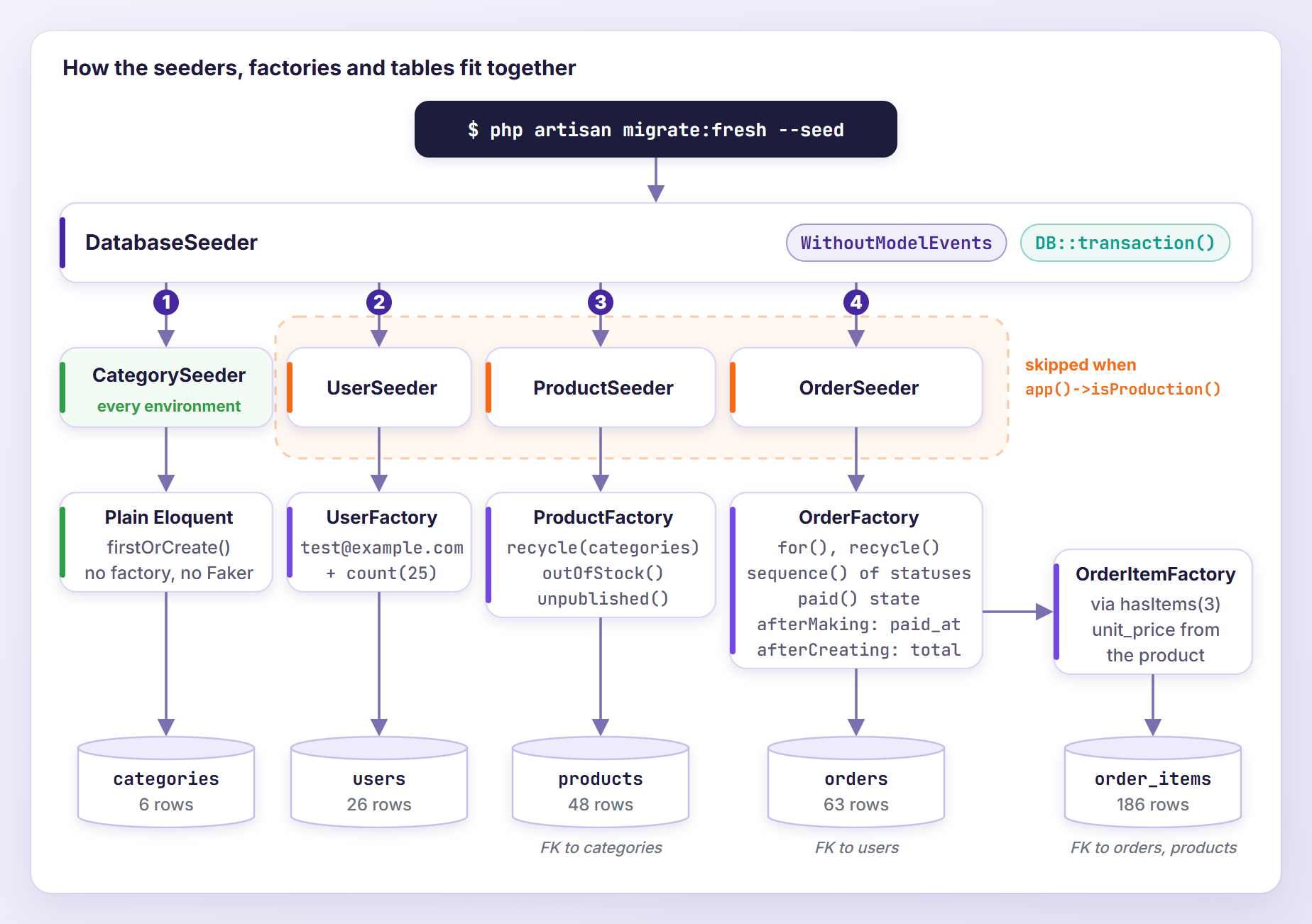
In the order seeder, for() gives the test account its own orders, recycle() spreads the rest over existing customers and published products, and the sequence makes half of them paid.
Calling the Seeders From DatabaseSeeder
db:seed runs database/seeders/DatabaseSeeder.php, so it decides the order. Replace its contents:
<?php

namespace Database\Seeders;

use Illuminate\Database\Console\Seeds\WithoutModelEvents;
use Illuminate\Database\Seeder;
use Illuminate\Support\Facades\DB;

class DatabaseSeeder extends Seeder
{
    use WithoutModelEvents;

    /**
     * Seed the application's database.
     */
    public function run(): void
    {
        DB::transaction(function () {
            // Reference data the store needs in every environment.
            $this->call(CategorySeeder::class);

            // Fake customers, products and orders never go to production.
            if (app()->isProduction()) {
                return;
            }

            $this->call([
                UserSeeder::class,
                ProductSeeder::class,
                OrderSeeder::class,
            ]);
        });
    }
}
$this->call() runs seeders in the order listed, so parents come before children. DB::transaction() turns hundreds of small commits into one, which makes seeding much faster (numbers below), and a seeder that fails rolls everything back. The WithoutModelEvents trait (already in the default seeder) mutes model events in every seeder it calls, so observers stay quiet. Factory callbacks are not model events, so afterCreating still runs.
Running the Seeders
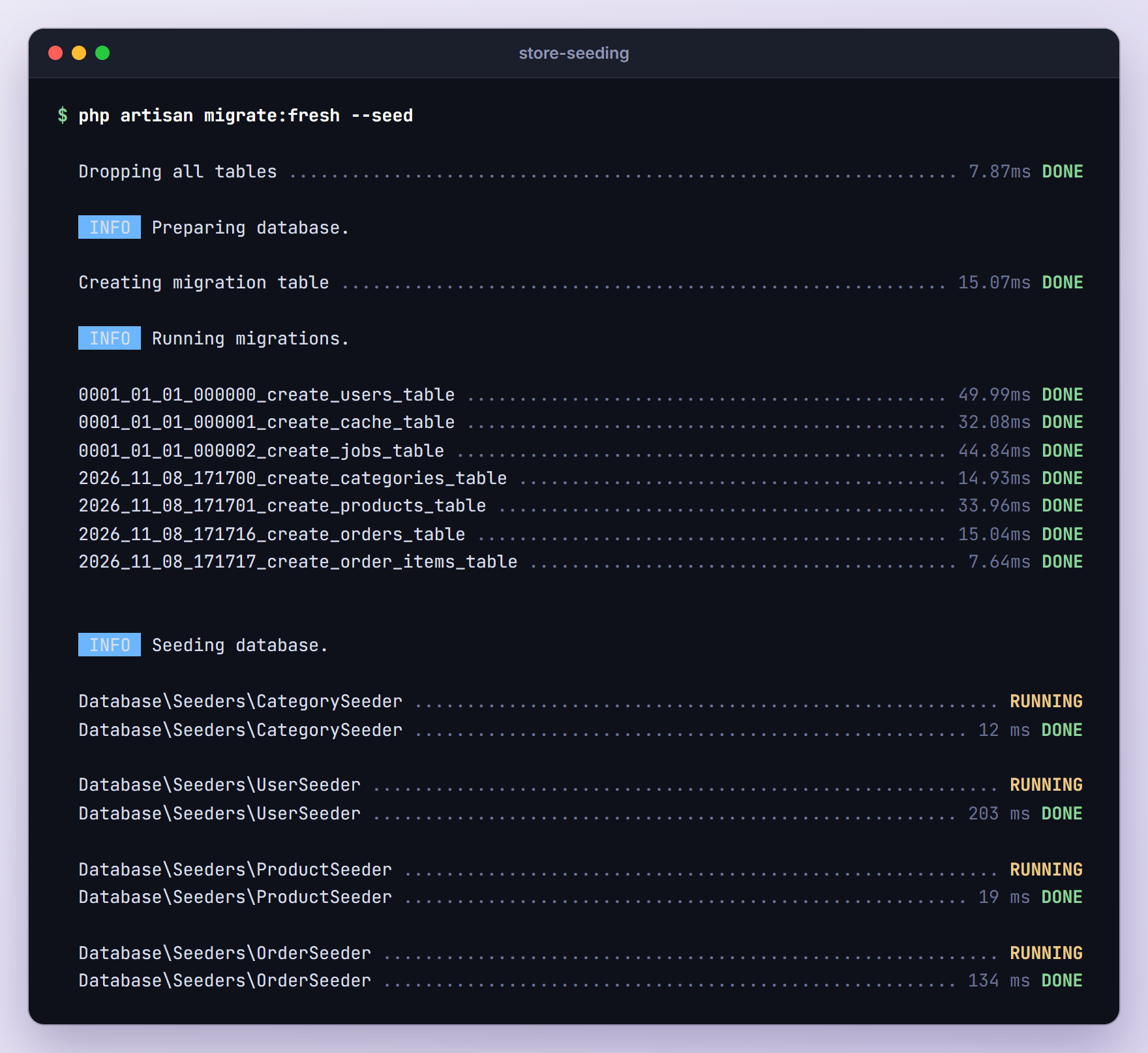
migrate:fresh drops every table, runs all migrations again and, with --seed, calls DatabaseSeeder:
php artisan migrate:fresh --seed
The other variations you will use:
php artisan db:seed
php artisan db:seed --class=ProductSeeder
php artisan migrate:fresh --seeder=CategorySeeder
db:seed adds rows to what is already there, so a second run stopped with UNIQUE constraint failed: users.email on our test account. Use migrate:fresh --seed to start over.
To check the result, I added a small command to routes/console.php (with use App\Models\Order; and use Illuminate\Support\Facades\DB; at the top):
Artisan::command('store:stats', function () {
    $this->table(['Table', 'Rows'], collect(['categories', 'users', 'products', 'orders', 'order_items'])
        ->map(fn (string $table) => [$table, DB::table($table)->count()]));

    $this->table(['Order status', 'Orders'], Order::query()
        ->selectRaw('status, count(*) as orders')
        ->groupBy('status')
        ->orderBy('status')
        ->get()
        ->map(fn (Order $order) => [$order->status, $order->orders]));
})->purpose('Show how many rows the seeders created');
Run php artisan store:stats:
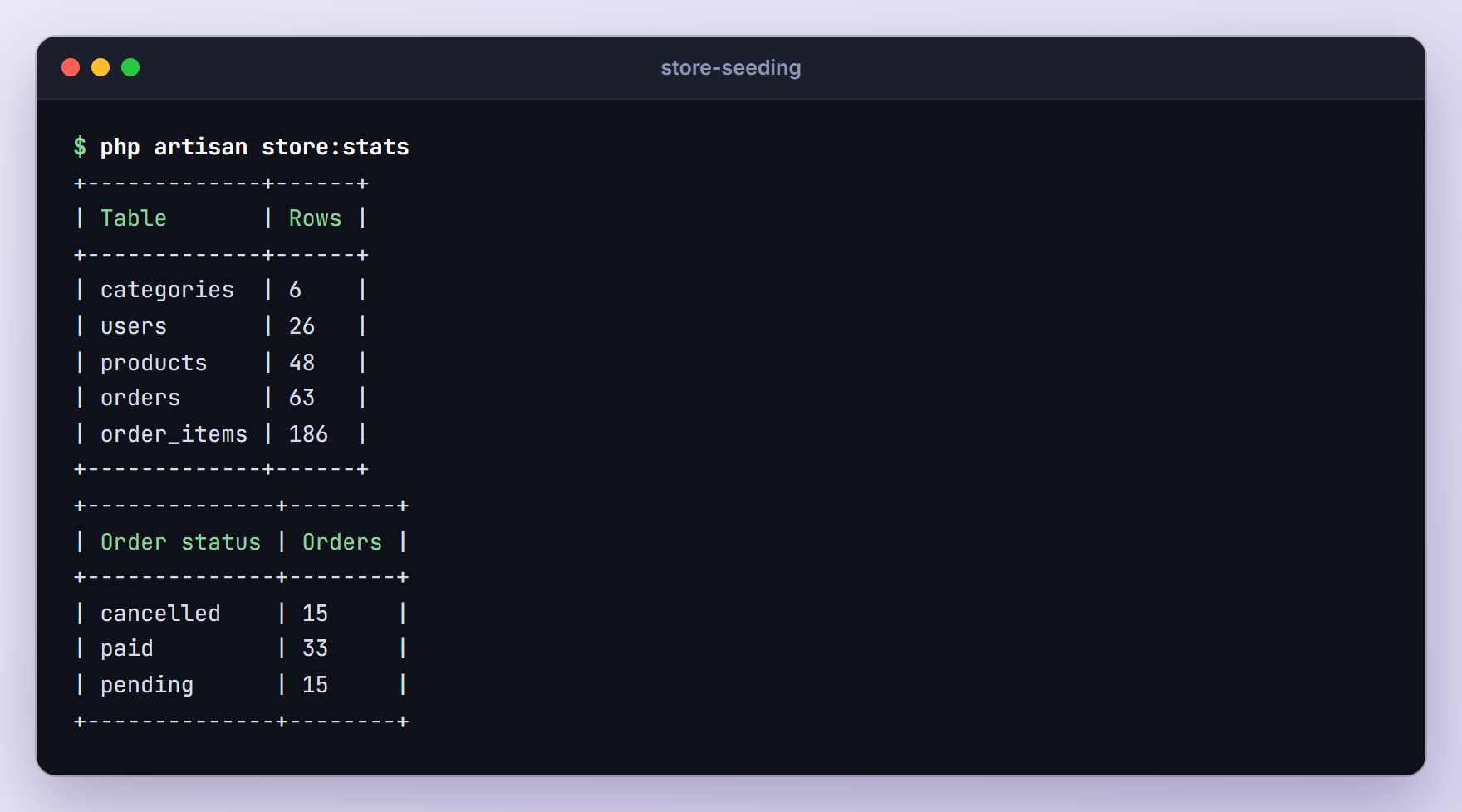
Six categories, 26 users, 48 products and 63 orders with 186 line items (3 x 2 plus 60 x 3). The sequence made 30 of the 60 orders paid, plus the test account’s three.
Seeding in Production
When APP_ENV is production, db:seed first asks “Are you sure you want to run this command?”. With --no-interaction, as many deploy scripts use, it cancels:
                                     APPLICATION IN PRODUCTION.

   WARN  Command cancelled.
php artisan db:seed --force skips the question, and our isProduction() check stops after CategorySeeder: with APP_ENV=production I got six categories and no users, products or orders. If production should never be seeded, add SeedCommand::prohibit($this->app->isProduction()); to the boot() method of app/Providers/AppServiceProvider.php (import Illuminate\Database\Console\Seeds\SeedCommand), and db:seed prints “This command is prohibited from running in this environment.” DB::prohibitDestructiveCommands() does not cover db:seed.
Testing With Factories and Seeders
Laravel model factories really pay off in tests. Generate two feature tests:
php artisan make:test StoreFactoriesTest
php artisan make:test DatabaseSeederTest
Replace tests/Feature/StoreFactoriesTest.php:
<?php

namespace Tests\Feature;

use App\Models\Category;
use App\Models\Order;
use App\Models\Product;
use App\Models\User;
use Illuminate\Foundation\Testing\RefreshDatabase;
use Tests\TestCase;

class StoreFactoriesTest extends TestCase
{
    use RefreshDatabase;

    public function test_make_does_not_save_the_product_but_creates_its_category(): void
    {
        $product = Product::factory()->make();

        $this->assertFalse($product->exists);
        $this->assertDatabaseCount('products', 0);
        $this->assertDatabaseCount('categories', 1);
    }

    public function test_the_slug_follows_an_overridden_name(): void
    {
        $category = Category::factory()->create(['name' => 'Gaming Chairs']);

        $this->assertSame('gaming-chairs', $category->slug);
    }

    public function test_states_change_the_default_attributes(): void
    {
        $product = Product::factory()->outOfStock()->unpublished()->create();

        $this->assertSame(0, $product->stock);
        $this->assertNull($product->published_at);
    }

    public function test_a_category_can_be_created_with_products(): void
    {
        $category = Category::factory()->hasProducts(3)->create();

        $this->assertCount(3, $category->products);
        $this->assertDatabaseCount('categories', 1);
    }

    public function test_the_order_total_adds_up_its_line_items(): void
    {
        $order = Order::factory()
            ->hasAttached(
                Product::factory()->count(2)->state(['price' => 2500]),
                ['quantity' => 2, 'unit_price' => 2500],
            )
            ->create();

        $this->assertCount(2, $order->products);
        $this->assertSame(10000, $order->total);
    }

    public function test_recycle_reuses_the_customer_and_the_product(): void
    {
        $customer = User::factory()->create();
        $product = Product::factory()->create();

        Order::factory()
            ->count(5)
            ->recycle($customer)
            ->recycle($product)
            ->hasItems(2)
            ->create();

        $this->assertCount(5, $customer->orders);
        $this->assertDatabaseCount('users', 1);
        $this->assertDatabaseCount('products', 1);
        $this->assertDatabaseCount('order_items', 10);
    }

    public function test_a_sequence_alternates_the_status(): void
    {
        $orders = Order::factory()
            ->count(4)
            ->sequence(['status' => 'paid'], ['status' => 'pending'])
            ->make();

        $this->assertSame(['paid', 'pending', 'paid', 'pending'], $orders->pluck('status')->all());
        $this->assertNotNull($orders[0]->paid_at);
        $this->assertNull($orders[1]->paid_at);
    }
}
And tests/Feature/DatabaseSeederTest.php:
<?php

namespace Tests\Feature;

use App\Models\Order;
use App\Models\OrderItem;
use Database\Seeders\CategorySeeder;
use Illuminate\Foundation\Testing\RefreshDatabase;
use Tests\TestCase;

class DatabaseSeederTest extends TestCase
{
    use RefreshDatabase;

    public function test_it_seeds_the_demo_store(): void
    {
        $this->seed();

        $this->assertDatabaseCount('categories', 6);
        $this->assertDatabaseCount('users', 26);
        $this->assertDatabaseCount('products', 48);
        $this->assertDatabaseCount('orders', 63);
        $this->assertDatabaseCount('order_items', 186);
    }

    public function test_every_order_total_matches_its_line_items(): void
    {
        $this->seed();

        foreach (Order::with('items')->get() as $order) {
            $this->assertSame(
                $order->items->sum(fn (OrderItem $item) => $item->quantity * $item->unit_price),
                $order->total,
            );
        }
    }

    public function test_orders_only_contain_published_products(): void
    {
        $this->seed();

        $this->assertFalse(
            OrderItem::whereHas('product', fn ($query) => $query->whereNull('published_at'))->exists()
        );
    }

    public function test_the_category_seeder_can_run_twice(): void
    {
        $this->seed(CategorySeeder::class);
        $this->seed(CategorySeeder::class);

        $this->assertDatabaseCount('categories', 6);
    }

    public function test_production_only_gets_the_categories(): void
    {
        $this->app['env'] = 'production';

        $this->artisan('db:seed', ['--force' => true])->assertSuccessful();

        $this->assertDatabaseCount('categories', 6);
        $this->assertDatabaseEmpty('users');
        $this->assertDatabaseEmpty('orders');
    }
}
Let me explain the code above. RefreshDatabase migrates the test database and wraps every test in a transaction that is rolled back afterwards, so each test starts empty. $this->seed() runs DatabaseSeeder, and $this->seed(CategorySeeder::class) runs one seeder. Setting $this->app['env'] to production is enough for isProduction(), so the last test proves the demo data stays out. Faker’s unique() also starts fresh in every test, since each test boots a new application.
Laravel 13 can also seed automatically: put the #[Seed] attribute on tests/TestCase.php to run DatabaseSeeder when RefreshDatabase migrates, or use #[Seeder(CategorySeeder::class)] for one seeder (the older $seed and $seeder properties still work). The database is migrated and seeded only once per test run, by the first class that uses RefreshDatabase, so when an unseeded class ran first, my #[Seeder] class found zero categories. Keep the attribute on the base class, as the docs do, or call $this->seed().
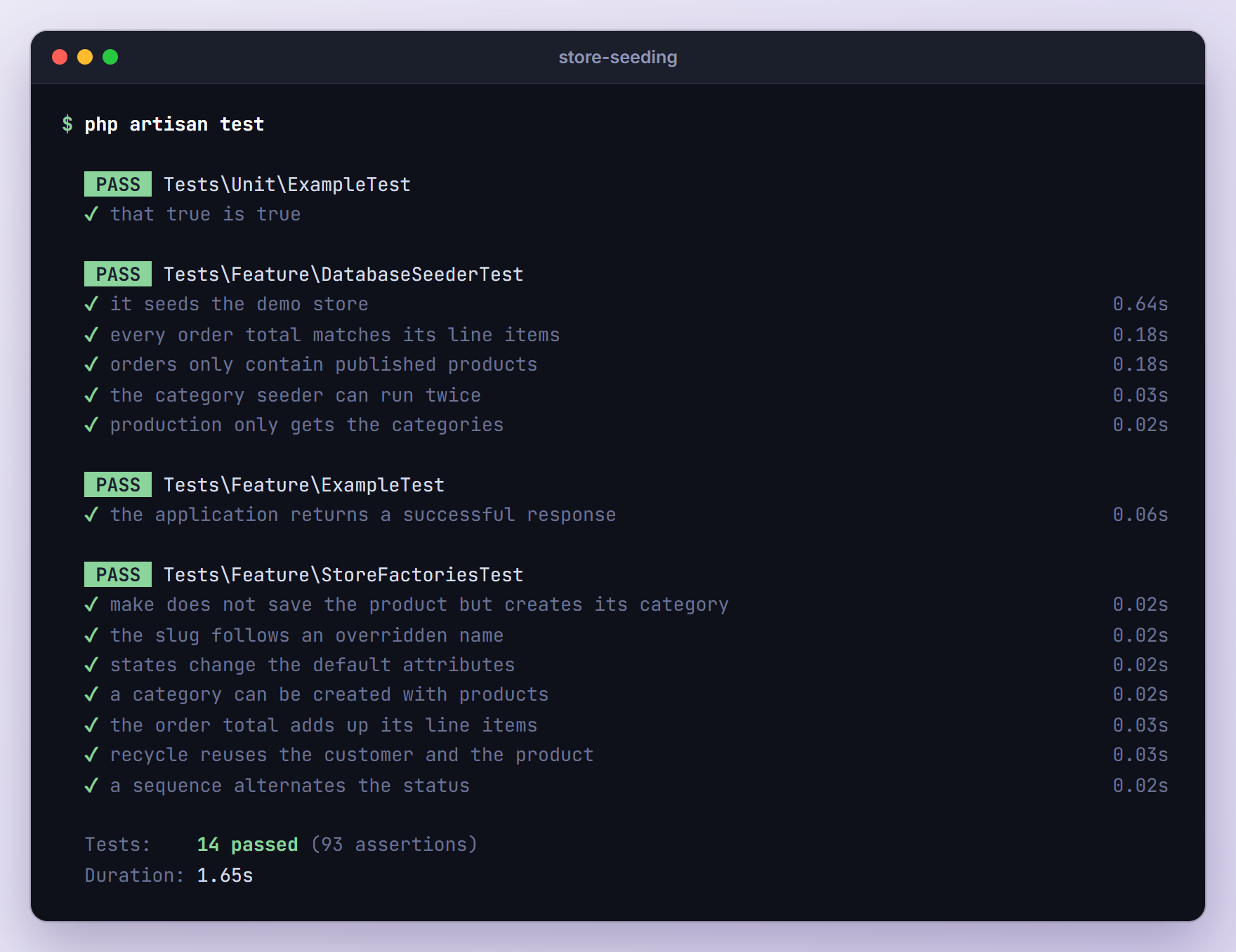
To check that the tests catch real bugs, I commented out recalculateTotal() in the callback: both total tests failed. With it back, run the suite:
php artisan test
Seeding Thousands of Rows Faster
Every create() is one INSERT, and outside a transaction SQLite commits each one separately. To measure the cost, add this command to routes/console.php (with use App\Models\Category;, use App\Models\Product; and use Illuminate\Support\Benchmark; at the top):
Artisan::command('store:benchmark {strategy} {count=5000}', function (string $strategy, int $count) {
    $factory = Product::factory()->recycle(Category::all());

    $milliseconds = Benchmark::measure(function () use ($strategy, $count, $factory) {
        if ($strategy === 'create') {
            $factory->count($count)->create();
        }

        if ($strategy === 'transaction') {
            DB::transaction(fn () => $factory->count($count)->create());
        }

        if ($strategy === 'insert') {
            // One INSERT per 1,000 rows keeps SQLite under its bound-variable limit.
            for ($done = 0; $done < $count; $done += 1000) {
                $factory->count(min(1000, $count - $done))->insert();
            }
        }
    });

    $this->info(sprintf('%s: %s products in %s ms', $strategy, number_format(Product::count()), number_format($milliseconds)));

    Product::query()->delete();
})->purpose('Time one way of seeding many products');
Run it on a database that only has categories, so the products can be deleted again:
php artisan migrate:fresh --seeder=CategorySeeder
php artisan store:benchmark create
php artisan store:benchmark transaction
php artisan store:benchmark insert
These are my numbers for 5,000 products (Windows 11, PHP 8.4, SQLite file database), three rounds:
| Strategy | Round 1 | Round 2 | Round 3 |
|---|---|---|---|
create() | 58,588 ms | 100,850 ms | 57,430 ms |
create() in one transaction | 1,720 ms | 2,242 ms | 3,581 ms |
insert() in chunks of 1,000 | 1,896 ms | 2,849 ms | 1,811 ms |
The numbers jumped around between rounds, but plain create() was always 16 to 45 times slower than one transaction. The factory’s insert() method, not in the docs yet, makes the models (so afterMaking runs), adds timestamps and writes one multi-row INSERT, but it fires no model events, skips afterCreating and ignores has(). It was not reliably faster here: making the 5,000 products alone took about a second. Inserting all 5,000 at once failed with General error: 1 too many SQL variables, hence the chunks.
This is why our DatabaseSeeder wraps everything in DB::transaction(). In three runs of migrate:fresh --seed without the transaction, OrderSeeder took 3,149 to 4,370 ms and ProductSeeder 359 to 542 ms. With it, they took 128 to 143 ms and 18 to 19 ms. When I made OrderSeeder throw an exception, the rollback left every table empty. Most of the remaining 200 ms in UserSeeder is one bcrypt hash (170 ms on my machine), which UserFactory computes once and reuses for every user.
Troubleshooting
Call to undefined function factory()
The global helper was removed in Laravel 8. In a seeder, the error names the seeder’s namespace:
Call to undefined function Database\Seeders\factory()
Replace factory(User::class, 10)->create() with User::factory()->count(10)->create() and make sure the model uses HasFactory. The upgrade section below covers the rest.
Class “Database\Factories\…Factory” not found
For a model in app/Models/Billing, Laravel looked for the factory in a matching subfolder:
Class "Database\Factories\Billing\InvoiceFactory" not found
Move the factory to database/factories/Billing with the namespace Database\Factories\Billing, or add #[UseFactory] to the model. In apps upgraded from Laravel 7 or older, check composer.json too: with the old "classmap": ["database/factories"] autoloading, a brand-new factory failed the same way until I ran composer dump-autoload. The PSR-4 entries in the upgrade section avoid that.
OverflowException: Maximum retries of 10000 reached without finding a unique value
Running php artisan db:seed --class=ProductSeeder on an empty database stopped with this. ProductSeeder recycles Category::all(), which was empty, so every product created its own category, and the 17th found no unused name in our list of 16. Faker tracks unique values per formatter for the whole process, across all factories.
Run the parent seeders first, or create the parents and pass them to recycle() or for(). Use a bigger pool of values, or call fake()->unique(true) to reset the tracking.
FOREIGN KEY constraint failed While Seeding
Older tutorials often guessed parent IDs with something like 'category_id' => fake()->numberBetween(1, 6). On a database without categories, that stopped with:
SQLSTATE[23000]: Integrity constraint violation: 19 FOREIGN KEY constraint failed
Never guess IDs: use Category::factory(), for() or recycle() with real models, and list parents first in DatabaseSeeder. If you also run a seeder alone with --class, $this->callOnce(CategorySeeder::class) at the top of its run() method runs the parent seeder unless it already ran in the same db:seed call.
Mass Assignment and Factories
Factories ignore #[Fillable] and $guarded, and so does every seeder run by db:seed. Outside of them, the protection still applies (results from tinker):
$customer = User::first();

Order::create(['user_id' => $customer->id, 'number' => 'ORD-90001', 'placed_at' => now()]);
// SQLSTATE[23000]: Integrity constraint violation: 19 NOT NULL constraint failed: orders.user_id

Order::factory()->create(['user_id' => $customer->id])->user_id;
// 1

Order::factory()->create(['discount' => 500]);
// SQLSTATE[HY000]: General error: 1 table orders has no column named discount
create() silently dropped user_id because it is not fillable, while the factory set it. A typo in a factory attribute is never dropped either: it goes straight into the INSERT.
Upgrading From Older Laravel Versions
A factory written in the Laravel 5.5 style of the old post looks like this:
use Faker\Generator as Faker;

$factory->define(App\Product::class, function (Faker $faker) {
    return [
        'category_id' => function () {
            return factory(App\Category::class)->create()->id;
        },
        'name' => $faker->words(2, true),
        'slug' => $faker->unique()->slug,
        'sku' => $faker->unique()->numerify('SKU-#####'),
        'price' => $faker->numberBetween(999, 39999),
        'stock' => $faker->numberBetween(1, 150),
    ];
});

$factory->state(App\Product::class, 'outOfStock', [
    'stock' => 0,
]);
Here is how each piece maps to the class-based factories we wrote:
| Laravel 5.x to 7.x | Laravel 8 to 13 |
|---|---|
$factory->define(Product::class, ...) | class ProductFactory extends Factory with definition() |
function () { return factory(Category::class)->create()->id; } | Category::factory() |
$faker->name | fake()->name() or $this->faker->name() |
$factory->state(Product::class, 'outOfStock', [...]) | an outOfStock() method returning $this->state([...]) |
$factory->afterCreating(Product::class, ...) | afterCreating() inside configure() |
factory(Product::class, 10)->create() | Product::factory()->count(10)->create() |
->states('outOfStock') | ->outOfStock() |
Then add use HasFactory; to each model, move seeders from database/seeds to database/seeders with namespace Database\Seeders;, and drop Model::unguard() from DatabaseSeeder, because db:seed unguards for you. Make sure composer.json has the PSR-4 entries of a new app and run composer dump-autoload:
"autoload": {
    "psr-4": {
        "App\\": "app/",
        "Database\\Factories\\": "database/factories/",
        "Database\\Seeders\\": "database/seeders/"
    }
},
With hundreds of old factory calls, laravel/legacy-factories brings back $factory->define() and factory() while you convert. Version 1.4.2 lists Laravel 13 support, but on a fresh Laravel 13.39 app composer require laravel/legacy-factories failed until I added -W, which downgraded symfony/finder from 8.1 to 7.4. Then the old factory above and the class-based UserFactory worked side by side.
Frequently Asked Questions
What Is the Difference Between a Factory and a Seeder?
A factory describes how to build one model with fake but realistic attributes, plus its states and relationships. A seeder is a class whose run() method decides what goes into the database, usually by calling factories, sometimes with plain Eloquent like our CategorySeeder. Tests use factories directly, while db:seed and migrate:fresh --seed run seeders.
Do Factories Fire Model Events and Observers?
Yes. create() saves through Eloquent: in my app it fired saving, creating, created and saved, so observers run too. createQuietly() fired none of them, and the WithoutModelEvents trait mutes them for a whole seeding run. If an observer fills a required column, a muted seeder fails, which the Laravel 13 model observers tutorial shows in its troubleshooting section.
How Do I Get the Same Fake Data Every Time I Seed?
Call fake()->seed(42) at the top of DatabaseSeeder::run(). In two runs with the same seed, every Faker value matched: names, emails, SKUs, prices, order numbers and quantities. The relationships did not, because recycle() picks its random models with PHP’s Random\Randomizer, which the Faker seed does not control. Timestamps differ too, since they depend on the current time.
Can I Use Model Factories in Production?
Not on a typical server. Faker is a dev dependency (fakerphp/faker sits in require-dev), and after composer install --no-dev the fake() helper does not exist, so UserSeeder failed with “Call to undefined function Database\Factories\fake()”. Our CategorySeeder still ran, because it uses firstOrCreate() without Faker. Seed production data with plain Eloquent and keep factories for development and tests.
Wrapping Up
Our store now seeds itself from five factories and five seeders: realistic definitions, states for special cases, sequences and callbacks for consistent data, has(), for(), hasAttached() and recycle() for relationships, and a DatabaseSeeder that keeps fake data out of production. The tests prove the totals add up.
If you remember one thing, wrap big seeds in a transaction: on SQLite it made seeding many times faster.
Learn more about Laravel:
