


A mobile app, a single page app on another domain or a second backend service all need a way to prove who is calling your API. Laravel JWT authentication handles this with a signed token: the user logs in once, receives a JSON Web Token and sends it in an Authorization: Bearer header on every request.
We will build a small store API with the tymon/jwt-auth package: register, login, me, refresh and logout endpoints plus per-customer orders, with token lifetimes, a blacklist, JSON 401 errors and tests.
We will use Laravel 13 (version 13.39 at the time of writing) with PHP 8.4 and tymon/jwt-auth 2.3.1. Everything here works on PHP 8.3 or newer.
This guide replaces our RESTful API in Laravel 5.6 using JWT authentication, which used a 1.0 release candidate. The package is stable now, there is no Kernel.php to edit, and new projects ship without an API routes file. The upgrade section near the end lists the changes.
Table of Contents
What You Will Build
| Method | URI | Purpose | Token |
|---|---|---|---|
| POST | /api/register | Create an account, get a token | none |
| POST | /api/login | Get a token (throttled) | none |
| GET | /api/me | The authenticated user | required |
| POST | /api/refresh | Swap the token for a new one | required |
| POST | /api/logout | Blacklist the token | required |
| GET | /api/orders | List your orders | required |
| POST | /api/orders | Place an order | required |
| GET | /api/orders/{id} | Show one order | required |
Prerequisites
- PHP 8.3 or newer and Composer
- Basic Laravel knowledge (routes, controllers, Eloquent, migrations)
- A terminal with curl (macOS, Linux, WSL or Git Bash on Windows)
- No database server: new Laravel 13 apps use SQLite
JWT or Sanctum: Which One Should You Use?
Laravel’s own token solution is Sanctum, covered in our Laravel 13 Sanctum API authentication tutorial. A Sanctum token is a random string whose hash lives in the database, so every request looks it up and deleting the row revokes it at once.
A JWT carries its data and a signature. There is no token table (jwt-auth still loads the user on each request), and any service that knows the secret, or the public key with RS256, can verify the token on its own. The price is revocation: a JWT stays valid until it expires unless it is on a blacklist, which jwt-auth keeps in your cache.
Choose JWT when several services must trust one token or your clients already speak JWT. For a single Laravel app with its own frontend, Sanctum is simpler.
Choosing a JWT Package for Laravel 13
Two packages declare Laravel 13 support on Packagist. tymon/jwt-auth is the original that our old tutorial used. It had no release between November 2020 and February 2023, but it is maintained again: 2.3.0 added Laravel 13 in March 2026 and 2.3.1 followed in October. php-open-source-saver/jwt-auth is a community fork from 2021. It releases more often (2.10.0 in November 2026), has far fewer open issues, needs PHP 8.3 and Laravel 12 or newer, and adds a jwt:generate-certs command. Both documentation sites are nearly identical and still show Laravel 5 code.
I chose tymon/jwt-auth: it has about twice the monthly installs, adds a single dependency (lcobucci/jwt), and the old tutorial’s readers know it. The fork keeps the same classes under the PHPOpenSourceSaver\JWTAuth namespace; with that swap, this project’s tests passed on its 2.9.3 release.
How Laravel JWT Authentication Works
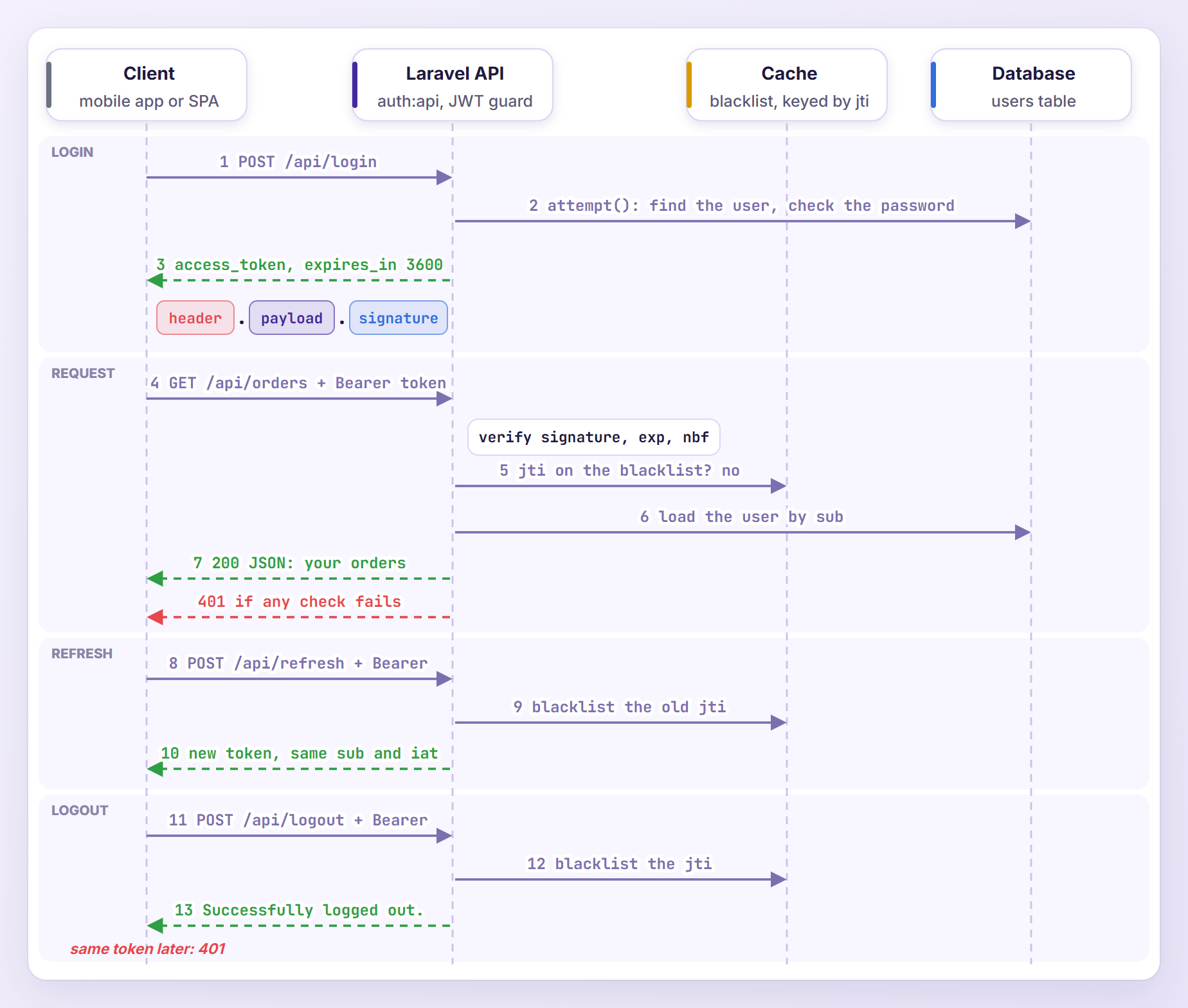
A JWT is three Base64Url strings joined by dots: a header naming the algorithm (HS256 by default), a payload of claims such as the user ID (sub) and the expiry time (exp), and a signature. jwt-auth signs the first two parts with your JWT_SECRET, so changing one character of the payload breaks the signature.
On login, auth('api')->attempt() checks the password and returns a token. On protected routes, the auth:api middleware asks the JWT guard for the user. The guard verifies the signature and the exp, nbf and iat claims, checks that the token ID (jti) is not blacklisted, and loads the user whose ID is in sub.
Step 1: Create a New Laravel 13 Project
composer create-project laravel/laravel jwt-api
cd jwt-api
With the Laravel installer, laravel new jwt-api works too. The project uses SQLite and runs its first migrations during installation.
Step 2: Install and Configure tymon/jwt-auth
composer require tymon/jwt-auth
Composer picked 2.3.1 (^2.3) plus lcobucci/jwt 5.6.1, which does the signing, and package discovery registers the service provider. Publish the configuration file:
php artisan vendor:publish --provider="Tymon\JWTAuth\Providers\LaravelServiceProvider"
This creates config/jwt.php. Then generate the signing secret:
php artisan jwt:secret
jwt-auth secret [<your-64-character-secret>] set successfully.
The command appends a random 64-character JWT_SECRET to .env and prints it, so I replaced mine with a placeholder. If a secret already exists, it asks before overwriting it, because a new secret invalidates every token (--force skips the question).
Step 3: Add the JWT Guard
Open config/auth.php and add an api guard that uses the package’s jwt driver:
'guards' => [
    'web' => [
        'driver' => 'session',
        'provider' => 'users',
    ],

    'api' => [
        'driver' => 'jwt',
        'provider' => 'users',
    ],
],
The jwt driver comes from the package. I kept web as the default guard, so the controller asks for the JWT guard with auth('api'). Routes behind auth:api switch the default to api for the request, which is why $request->user() works in protected controllers.
Step 4: Create the API Routes Without Sanctum
New Laravel 13 projects have no routes/api.php, and php artisan install:api always installs a token package with it: it requires laravel/sanctum:^4.0, publishes Sanctum’s personal_access_tokens migration and adds a sample auth:sanctum route (or installs Passport with --passport). A JWT API needs neither, so we wire the file up ourselves. In bootstrap/app.php, add the api line to withRouting():
->withRouting(
    web: __DIR__.'/../routes/web.php',
    api: __DIR__.'/../routes/api.php',
    commands: __DIR__.'/../routes/console.php',
    health: '/up',
)
Laravel loads that file with the /api prefix and the api middleware group. Now create routes/api.php:
<?php

use App\Http\Controllers\Api\AuthController;
use App\Http\Controllers\Api\OrderController;
use Illuminate\Support\Facades\Route;

Route::post('/register', [AuthController::class, 'register']);
Route::post('/login', [AuthController::class, 'login'])->middleware('throttle:5,1');

Route::middleware('auth:api')->group(function () {
    Route::get('/me', [AuthController::class, 'me']);
    Route::post('/logout', [AuthController::class, 'logout']);
    Route::post('/refresh', [AuthController::class, 'refresh']);

    Route::get('/orders', [OrderController::class, 'index']);
    Route::post('/orders', [OrderController::class, 'store']);
    Route::get('/orders/{id}', [OrderController::class, 'show'])->whereNumber('id');
});
Register and login are public, and throttle:5,1 allows five login attempts per minute per IP address (the sixth got 429 Too Many Requests in my test). Everything else needs a valid token, and whereNumber('id') returns 404 for IDs such as abc.
Step 5: Implement JWTSubject on the User Model
Replace app/Models/User.php:
<?php

namespace App\Models;

// use Illuminate\Contracts\Auth\MustVerifyEmail;
use Database\Factories\UserFactory;
use Illuminate\Database\Eloquent\Attributes\Fillable;
use Illuminate\Database\Eloquent\Attributes\Hidden;
use Illuminate\Database\Eloquent\Factories\HasFactory;
use Illuminate\Database\Eloquent\Relations\HasMany;
use Illuminate\Foundation\Auth\User as Authenticatable;
use Illuminate\Notifications\Notifiable;
use Tymon\JWTAuth\Contracts\JWTSubject;

#[Fillable(['name', 'email', 'password'])]
#[Hidden(['password', 'remember_token'])]
class User extends Authenticatable implements JWTSubject
{
    /** @use HasFactory<UserFactory> */
    use HasFactory, Notifiable;

    /**
     * Get the attributes that should be cast.
     *
     * @return array<string, string>
     */
    protected function casts(): array
    {
        return [
            'email_verified_at' => 'datetime',
            'password' => 'hashed',
        ];
    }

    /**
     * The orders the customer has placed.
     */
    public function orders(): HasMany
    {
        return $this->hasMany(Order::class);
    }

    /**
     * Get the identifier that will be stored in the token's "sub" claim.
     */
    public function getJWTIdentifier(): mixed
    {
        return $this->getKey();
    }

    /**
     * Get the extra claims to add to the token.
     *
     * @return array<string, mixed>
     */
    public function getJWTCustomClaims(): array
    {
        return [
            'name' => $this->name,
        ];
    }
}
JWTSubject asks for two methods. getJWTIdentifier() returns the value for the token’s sub claim, here the primary key. getJWTCustomClaims() adds claims to every token; the name lets a client greet the user without an extra request. Only add data you would not mind anyone reading, because the payload is encoded, not encrypted.
Step 6: Create the Order Model
php artisan make:model Order -mf
In the new migration in database/migrations (its name ends with _create_orders_table.php), replace the up() method:
public function up(): void
{
    Schema::create('orders', function (Blueprint $table) {
        $table->id();
        $table->foreignId('user_id')->constrained()->cascadeOnDelete();
        $table->string('product');
        $table->unsignedInteger('quantity');
        $table->decimal('total', 10, 2);
        $table->timestamps();
    });
}
Then replace app/Models/Order.php:
<?php

namespace App\Models;

use Database\Factories\OrderFactory;
use Illuminate\Database\Eloquent\Attributes\Fillable;
use Illuminate\Database\Eloquent\Factories\HasFactory;
use Illuminate\Database\Eloquent\Model;
use Illuminate\Database\Eloquent\Relations\BelongsTo;

#[Fillable(['product', 'quantity', 'total'])]
class Order extends Model
{
    /** @use HasFactory<OrderFactory> */
    use HasFactory;

    /**
     * Get the attributes that should be cast.
     *
     * @return array<string, string>
     */
    protected function casts(): array
    {
        return [
            'quantity' => 'integer',
            'total' => 'decimal:2',
        ];
    }

    /**
     * The customer who placed the order.
     */
    public function user(): BelongsTo
    {
        return $this->belongsTo(User::class);
    }
}
user_id is not fillable on purpose: orders are created through $request->user()->orders()->create(), which sets the owner. (A real store would calculate the total from a cart.) Fill in definition() in database/factories/OrderFactory.php for the tests, importing App\Models\User:
public function definition(): array
{
    return [
        'user_id' => User::factory(),
        'product' => fake()->words(2, true),
        'quantity' => fake()->numberBetween(1, 5),
        'total' => fake()->randomFloat(2, 10, 500),
    ];
}
Run the migration:
php artisan migrate
Step 7: Build the AuthController
php artisan make:controller Api/AuthController
Replace app/Http/Controllers/Api/AuthController.php:
<?php

namespace App\Http\Controllers\Api;

use App\Http\Controllers\Controller;
use App\Models\User;
use Illuminate\Http\JsonResponse;
use Illuminate\Http\Request;
use Illuminate\Validation\Rules\Password;

class AuthController extends Controller
{
    /**
     * Create an account and return its first token.
     */
    public function register(Request $request): JsonResponse
    {
        $validated = $request->validate([
            'name' => ['required', 'string', 'max:255'],
            'email' => ['required', 'string', 'email', 'max:255', 'unique:users'],
            'password' => ['required', 'confirmed', Password::defaults()],
        ]);

        $user = User::create($validated);

        $token = auth('api')->login($user);

        return $this->respondWithToken($token, 201);
    }

    /**
     * Exchange an email and password for a token.
     */
    public function login(Request $request): JsonResponse
    {
        $credentials = $request->validate([
            'email' => ['required', 'string', 'email'],
            'password' => ['required', 'string'],
        ]);

        if (! $token = auth('api')->attempt($credentials)) {
            return response()->json(['message' => 'Invalid email or password.'], 401);
        }

        return $this->respondWithToken($token);
    }

    /**
     * Return the authenticated user.
     */
    public function me(Request $request): JsonResponse
    {
        return response()->json($request->user());
    }

    /**
     * Invalidate the current token.
     */
    public function logout(): JsonResponse
    {
        auth('api')->logout();

        return response()->json(['message' => 'Successfully logged out.']);
    }

    /**
     * Swap the current token for a new one.
     */
    public function refresh(): JsonResponse
    {
        return $this->respondWithToken(auth('api')->refresh());
    }

    /**
     * Build the JSON response that carries a token.
     */
    private function respondWithToken(string $token, int $status = 200): JsonResponse
    {
        return response()->json([
            'access_token' => $token,
            'token_type' => 'bearer',
            'expires_in' => auth('api')->factory()->getTTL() * 60,
        ], $status);
    }
}
Let me explain the important parts:
register()creates the user (thehashedcast hashes the password) and signs a token for it withauth('api')->login($user).login()usesattempt(), which checks the email and password and returns a token orfalse.me()returns the user the guard loaded from thesubclaim.logout()blacklists the current token, andrefresh()swaps it for a new one.factory()->getTTL()is the lifetime in minutes (60 by default), soexpires_inis in seconds.
Step 8: Build the OrderController
php artisan make:controller Api/OrderController
Replace app/Http/Controllers/Api/OrderController.php:
<?php

namespace App\Http\Controllers\Api;

use App\Http\Controllers\Controller;
use Illuminate\Http\JsonResponse;
use Illuminate\Http\Request;

class OrderController extends Controller
{
    /**
     * List the authenticated customer's orders.
     */
    public function index(Request $request): JsonResponse
    {
        return response()->json($request->user()->orders()->latest('id')->get());
    }

    /**
     * Place an order for the authenticated customer.
     */
    public function store(Request $request): JsonResponse
    {
        $validated = $request->validate([
            'product' => ['required', 'string', 'max:255'],
            'quantity' => ['required', 'integer', 'min:1'],
            'total' => ['required', 'numeric', 'min:0'],
        ]);

        $order = $request->user()->orders()->create($validated);

        return response()->json($order, 201);
    }

    /**
     * Show one of the authenticated customer's orders.
     */
    public function show(Request $request, int $id): JsonResponse
    {
        return response()->json($request->user()->orders()->findOrFail($id));
    }
}
Every query starts from $request->user()->orders(): the list holds only the customer’s orders, new orders get the right owner, and findOrFail() only searches the customer’s own orders, so another customer’s order answers 404 without confirming that the ID exists. Check the routes:
php artisan route:list --path=api
  POST       api/login .................................................. Api\AuthController@login
  POST       api/logout ................................................ Api\AuthController@logout
  GET|HEAD   api/me ........................................................ Api\AuthController@me
  GET|HEAD   api/orders ................................................ Api\OrderController@index
  POST       api/orders ................................................ Api\OrderController@store
  GET|HEAD   api/orders/{id} ............................................ Api\OrderController@show
  POST       api/refresh .............................................. Api\AuthController@refresh
  POST       api/register ............................................ Api\AuthController@register

                                                                                Showing [8] routes
Step 9: Configure Token Lifetime and the Blacklist
Four options in config/jwt.php control how tokens live and die, each read from .env:
| Option | .env variable | Default | Meaning |
|---|---|---|---|
ttl | JWT_TTL | 60 | Minutes until a token expires |
refresh_ttl | JWT_REFRESH_TTL | 20160 | Minutes after login during which tokens can be refreshed (two weeks) |
blacklist_enabled | JWT_BLACKLIST_ENABLED | true | Remember logged-out and refreshed tokens |
blacklist_grace_period | JWT_BLACKLIST_GRACE_PERIOD | 0 | Seconds a blacklisted token keeps working |
For a store API I would use 15-minute tokens and a one-week refresh window. With these values, login returned "expires_in": 900:
JWT_TTL=15
JWT_REFRESH_TTL=10080
refresh() gives the new token a new jti, exp and nbf but copies sub, the custom claims and the original iat. Since the window is measured from iat, refresh_ttl counts from the first login: after a week the user must log in again, however often the app refreshed. Our refresh route sits behind auth:api, so only unexpired tokens can be refreshed; clients should refresh shortly before expires_in runs out.
The blacklist stores one cache entry per token, keyed by its jti. With the default database cache store, logout added a row named laravel-cache- plus the jti, kept until the token’s refresh window closes. With JWT_BLACKLIST_ENABLED=false, logout() throws “You must have the blacklist enabled to invalidate a token.” instead.
Warning: php artisan cache:clear and php artisan optimize:clear empty the blacklist. In my test, a logged-out token worked again right after cache:clear. Use a persistent cache store and keep cache clearing out of your deploy script.
Step 10: Return JSON 401 Errors for Token Problems
jwt-auth throws TokenExpiredException, TokenInvalidException and its subclass TokenBlacklistedException for bad tokens. The JWT guard catches them and reports “no user”, so auth:api throws Laravel’s AuthenticationException. The default shouldRenderJsonWhen() call in bootstrap/app.php renders that as a JSON 401 with "message": "Unauthenticated." for api/* URLs. Two cases still break.
Requests without Accept: application/json, such as plain curl, fail because the auth middleware first builds a redirect to a login route that an API does not have (debug mode on):
HTTP/1.1 500 Internal Server Error
Content-Type: application/json

{
    "message": "Route [login] not defined.",
    "exception": "Symfony\\Component\\Routing\\Exception\\RouteNotFoundException",
    ...
}
Our Sanctum tutorial explains this in detail. The refresh endpoint is the other case. refresh() decodes the token again after the guard accepted it, and it can throw TokenExpiredException once the refresh window is over, or TokenBlacklistedException when two requests refresh the same token at once. To test it, I set JWT_TTL=5 and JWT_REFRESH_TTL=1, logged in and waited a minute. /api/me still worked, but /api/refresh failed (with APP_DEBUG=false):
HTTP/1.1 500 Internal Server Error
Content-Type: application/json

{
    "message": "Server Error"
}
Here is the complete bootstrap/app.php with both fixes:
<?php

use Illuminate\Foundation\Application;
use Illuminate\Foundation\Configuration\Exceptions;
use Illuminate\Foundation\Configuration\Middleware;
use Illuminate\Http\Request;
use Tymon\JWTAuth\Exceptions\TokenExpiredException;
use Tymon\JWTAuth\Exceptions\TokenInvalidException;

return Application::configure(basePath: dirname(__DIR__))
    ->withRouting(
        web: __DIR__.'/../routes/web.php',
        api: __DIR__.'/../routes/api.php',
        commands: __DIR__.'/../routes/console.php',
        health: '/up',
    )
    ->withMiddleware(function (Middleware $middleware): void {
        $middleware->redirectGuestsTo(
            fn (Request $request) => $request->is('api/*') ? null : route('login'),
        );
    })
    ->withExceptions(function (Exceptions $exceptions): void {
        $exceptions->shouldRenderJsonWhen(
            fn (Request $request) => $request->is('api/*') || $request->expectsJson(),
        );

        $exceptions->dontReport([
            TokenExpiredException::class,
            TokenInvalidException::class,
        ]);

        $exceptions->render(function (TokenExpiredException|TokenInvalidException $e, Request $request) {
            return response()->json(['message' => $e->getMessage()], 401);
        });
    })->create();
redirectGuestsTo() returns null for api/* URLs, so API guests get the JSON 401 while web routes still redirect to login once you add one. render() turns the token exceptions into a 401 with the package’s message, so the client knows it has to log in again:
HTTP/1.1 401 Unauthorized
Content-Type: application/json

{
    "message": "Token has expired and can no longer be refreshed"
}
dontReport() keeps these client errors out of storage/logs/laravel.log; before, the failed refresh was logged as an ERROR with a stack trace. I left the base JWTException alone on purpose: a missing JWT_SECRET throws it, and that should stay a 500. See the Laravel error handling docs for more.
Step 11: Test the API With curl
Start the development server in a second terminal and save the base URL:
php artisan serve
API=http://127.0.0.1:8000/api
In the outputs below I formatted the JSON, removed headers such as Date, cut every token to its first 20 characters and ran with APP_DEBUG=false.
Register and Log In
curl -s -i -X POST $API/register \
  -H "Accept: application/json" \
  -H "Content-Type: application/json" \
  -d '{"name":"Hamza","email":"hamza@example.com","password":"password123","password_confirmation":"password123"}'
That returns 201 Created with a first token. Now log in:
curl -s -i -X POST $API/login \
  -H "Accept: application/json" \
  -H "Content-Type: application/json" \
  -d '{"email":"hamza@example.com","password":"password123"}'
HTTP/1.1 200 OK
Content-Type: application/json
X-RateLimit-Limit: 5
X-RateLimit-Remaining: 4

{
    "access_token": "eyJ0eXAiOiJKV1QiLCJh...",
    "token_type": "bearer",
    "expires_in": 3600
}
The X-RateLimit-* headers come from the login throttle. Store the token:
TOKEN="paste-the-access-token-here"
Call the Protected Endpoints
curl -s -i $API/me -H "Accept: application/json" -H "Authorization: Bearer $TOKEN"
HTTP/1.1 200 OK
Content-Type: application/json

{
    "id": 1,
    "name": "Hamza",
    "email": "hamza@example.com",
    "email_verified_at": null,
    "created_at": "2026-11-08T17:35:42.000000Z",
    "updated_at": "2026-11-08T17:35:42.000000Z"
}
Place an order:
curl -s -i -X POST $API/orders \
  -H "Accept: application/json" \
  -H "Content-Type: application/json" \
  -H "Authorization: Bearer $TOKEN" \
  -d '{"product":"Mechanical Keyboard","quantity":1,"total":89.99}'
That returns 201 Created with the new order. After adding a USB-C Hub the same way, list the orders:
curl -s -i $API/orders -H "Accept: application/json" -H "Authorization: Bearer $TOKEN"
HTTP/1.1 200 OK
Content-Type: application/json

[
    {
        "id": 2,
        "user_id": 1,
        "product": "USB-C Hub",
        "quantity": 2,
        "total": "69.00",
        "created_at": "2026-11-08T17:35:44.000000Z",
        "updated_at": "2026-11-08T17:35:44.000000Z"
    },
    {
        "id": 1,
        "user_id": 1,
        "product": "Mechanical Keyboard",
        "quantity": 1,
        "total": "89.99",
        "created_at": "2026-11-08T17:35:43.000000Z",
        "updated_at": "2026-11-08T17:35:43.000000Z"
    }
]
I also registered a second customer, Sara, saved her token as SARA_TOKEN and requested Hamza’s first order:
curl -s -i $API/orders/1 -H "Accept: application/json" -H "Authorization: Bearer $SARA_TOKEN"
HTTP/1.1 404 Not Found
Content-Type: application/json

{
    "message": "No query results for model [App\\Models\\Order] 1"
}
Decode the Token
The payload is plain Base64Url, so one line of PHP decodes it:
php -r 'echo json_encode(json_decode(base64_decode(strtr(explode(".", $argv[1])[1], "-_", "+/"))), JSON_PRETTY_PRINT | JSON_UNESCAPED_SLASHES), PHP_EOL;' "$TOKEN"
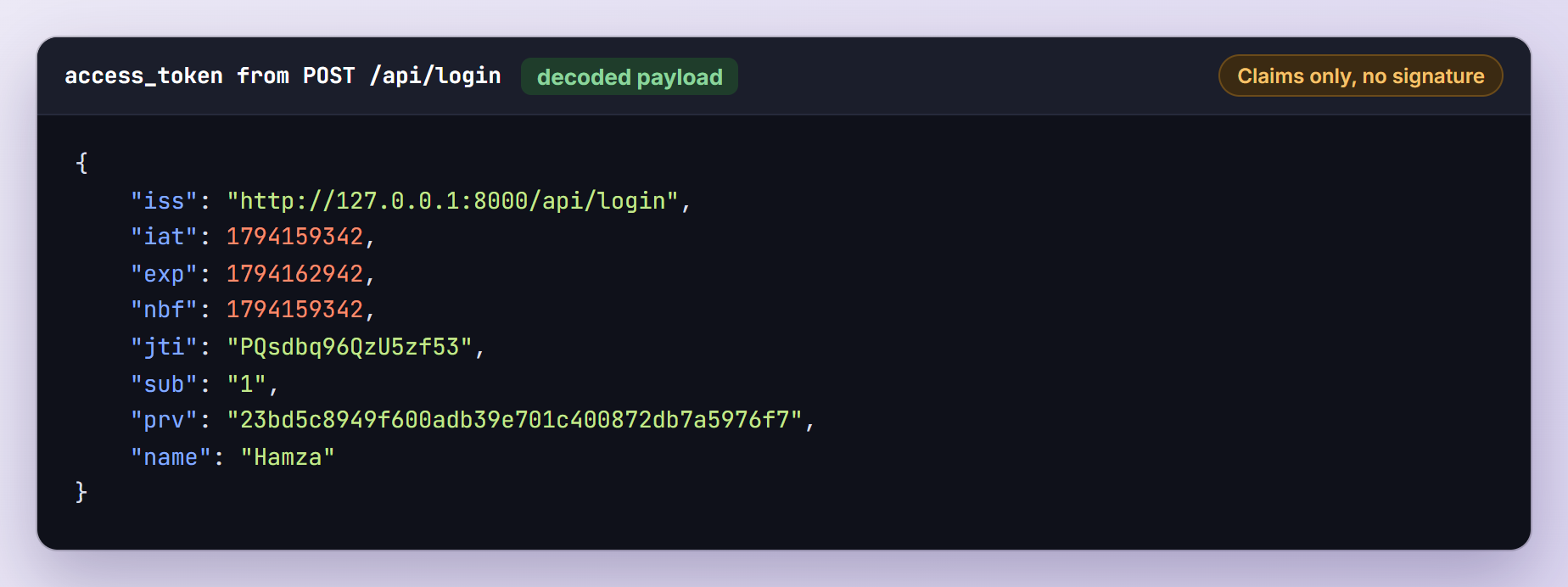
iss is the URL that issued the token, iat, nbf and exp are Unix timestamps (exp is 3,600 seconds after iat), jti is the ID the blacklist uses and sub is Hamza’s user ID. prv is a SHA-1 hash of the user model’s class name, which stops a token for one model from authenticating as another (the lock_subject option).
Refresh, Then Log Out
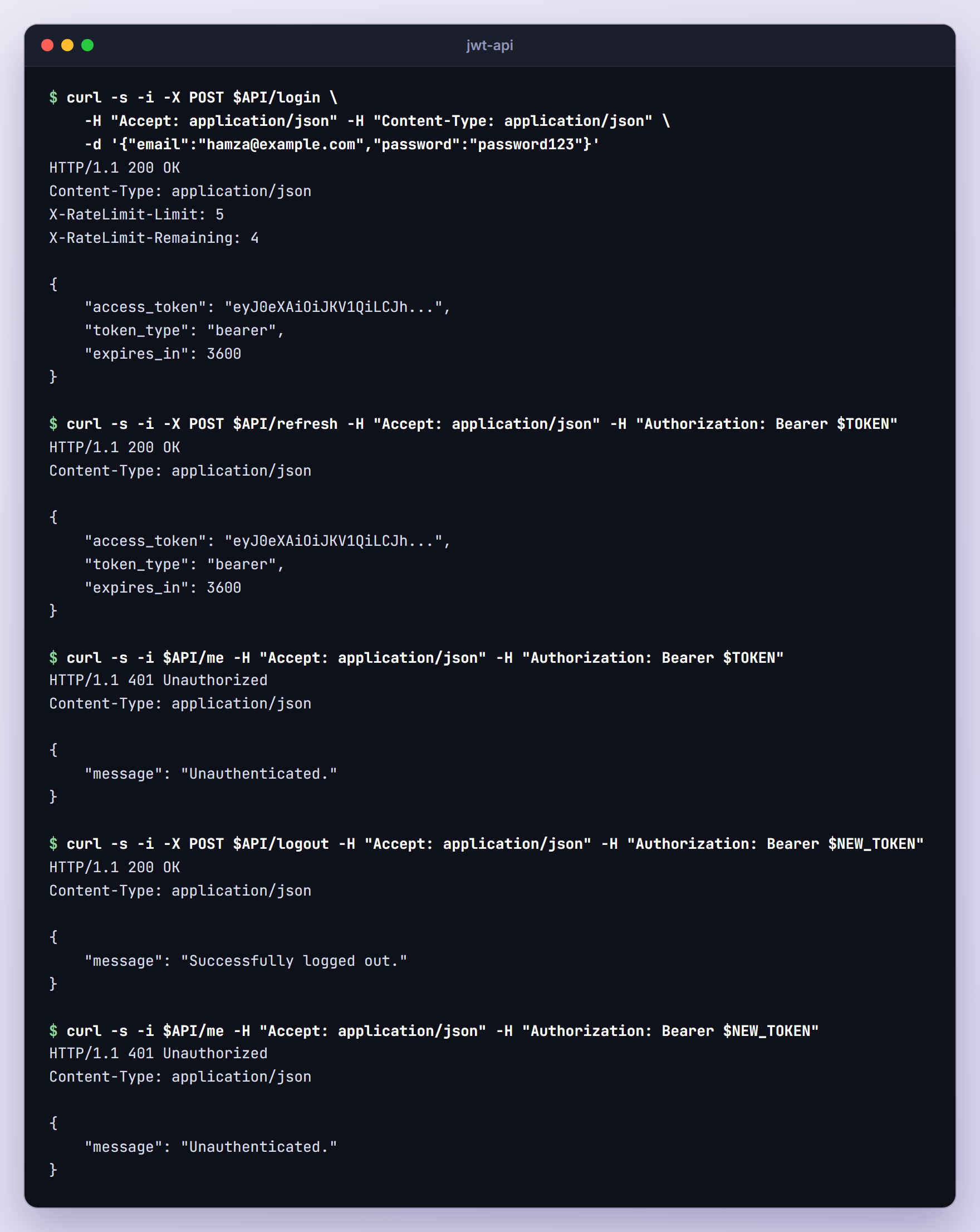
curl -s -i -X POST $API/refresh -H "Accept: application/json" -H "Authorization: Bearer $TOKEN"
The response looks like the login response. Save the new token and try both:
NEW_TOKEN="paste-the-new-access-token-here"
curl -s -i $API/me -H "Accept: application/json" -H "Authorization: Bearer $TOKEN"
curl -s -i $API/me -H "Accept: application/json" -H "Authorization: Bearer $NEW_TOKEN"
The old token gets 401 with "message": "Unauthenticated.", while the new one returns Hamza. Their claims show what refresh changed:
| Claim | Login token | Refreshed token |
|---|---|---|
iat | 1794159342 | 1794159342 |
exp | 1794162942 | 1794162947 |
nbf | 1794159342 | 1794159347 |
jti | PQsdbq96QzU5zf53 | diEgYL9Hs7snkQO4 |
The refresh ran five seconds after the login: exp and nbf moved, jti is new and iat stayed put. Finally, log out and reuse the new token:
curl -s -i -X POST $API/logout -H "Accept: application/json" -H "Authorization: Bearer $NEW_TOKEN"
curl -s -i $API/me -H "Accept: application/json" -H "Authorization: Bearer $NEW_TOKEN"
Requests That Should Fail
Thanks to redirectGuestsTo(), even a request without a token and without the Accept header gets JSON:
curl -s -i $API/me
HTTP/1.1 401 Unauthorized
Content-Type: application/json

{
    "message": "Unauthenticated."
}
A made-up token, a token with one changed signature character, a token without the Bearer prefix and an expired token (I logged in with JWT_TTL=1 and waited a minute) all got this same response.
Step 12: Write Feature Tests
curl proves the API works today; feature tests keep it working. Generate two test classes:
php artisan make:test AuthTest
php artisan make:test OrderTest
Replace tests/Feature/AuthTest.php:
<?php

namespace Tests\Feature;

use App\Models\User;
use Illuminate\Foundation\Testing\RefreshDatabase;
use Tests\TestCase;
use Tymon\JWTAuth\Facades\JWTAuth;

class AuthTest extends TestCase
{
    use RefreshDatabase;

    public function test_a_user_can_register_and_receives_a_token(): void
    {
        $this->postJson('/api/register', [
            'name' => 'Hamza',
            'email' => 'hamza@example.com',
            'password' => 'password123',
            'password_confirmation' => 'password123',
        ])->assertCreated()
            ->assertJsonStructure(['access_token', 'token_type', 'expires_in'])
            ->assertJsonPath('token_type', 'bearer');

        $this->assertDatabaseHas('users', ['email' => 'hamza@example.com']);
    }

    public function test_a_user_can_log_in_and_receives_a_token(): void
    {
        $user = User::factory()->create();

        $response = $this->postJson('/api/login', [
            'email' => $user->email,
            'password' => 'password',
        ]);

        $response->assertOk()->assertJsonPath('expires_in', 3600);

        $payload = JWTAuth::setToken($response->json('access_token'))->getPayload();

        $this->assertSame((string) $user->id, $payload->get('sub'));
        $this->assertSame($user->name, $payload->get('name'));
    }

    public function test_login_fails_with_a_wrong_password(): void
    {
        $user = User::factory()->create();

        $this->postJson('/api/login', [
            'email' => $user->email,
            'password' => 'wrong-password',
        ])->assertUnauthorized()
            ->assertJson(['message' => 'Invalid email or password.']);
    }

    public function test_protected_routes_reject_missing_and_invalid_tokens(): void
    {
        $this->getJson('/api/me')
            ->assertUnauthorized()
            ->assertJson(['message' => 'Unauthenticated.']);

        $this->withToken('not-a-real-token')
            ->getJson('/api/me')
            ->assertUnauthorized();
    }

    public function test_a_valid_token_returns_the_user(): void
    {
        $user = User::factory()->create();
        $token = JWTAuth::fromUser($user);

        $this->withToken($token)
            ->getJson('/api/me')
            ->assertOk()
            ->assertJsonPath('email', $user->email);
    }

    public function test_expired_tokens_are_rejected(): void
    {
        $token = JWTAuth::fromUser(User::factory()->create());

        $this->travel(61)->minutes();

        $this->withToken($token)->getJson('/api/me')->assertUnauthorized();
    }

    public function test_logout_invalidates_the_token(): void
    {
        $token = JWTAuth::fromUser(User::factory()->create());

        $this->withToken($token)->getJson('/api/me')->assertOk();
        $this->withToken($token)->postJson('/api/logout')->assertOk();
        $this->withToken($token)->getJson('/api/me')->assertUnauthorized();
    }

    public function test_refresh_swaps_the_token_and_blacklists_the_old_one(): void
    {
        $oldToken = JWTAuth::fromUser(User::factory()->create());

        $newToken = $this->withToken($oldToken)
            ->postJson('/api/refresh')
            ->assertOk()
            ->json('access_token');

        $this->forgetAuthentication();
        $this->withToken($oldToken)->getJson('/api/me')->assertUnauthorized();

        $this->forgetAuthentication();
        $this->withToken($newToken)->getJson('/api/me')->assertOk();
    }

    public function test_a_token_cannot_be_refreshed_after_the_refresh_window(): void
    {
        config(['jwt.refresh_ttl' => 30]);

        $token = JWTAuth::fromUser(User::factory()->create());

        $this->travel(31)->minutes();

        $this->withToken($token)
            ->postJson('/api/refresh')
            ->assertUnauthorized()
            ->assertJson(['message' => 'Token has expired and can no longer be refreshed']);
    }

    /**
     * Make the next request authenticate from scratch, like a real one.
     */
    private function forgetAuthentication(): void
    {
        $this->app['auth']->forgetGuards();
        $this->app->forgetInstance('tymon.jwt');
    }
}
A few things to notice:
JWTAuth::fromUser()signs a token without logging anyone in, andwithToken()sends it as a Bearer header, so the guard checks a real token. The factory password ispassword.travel()moves the Carbon clock that jwt-auth uses to checkexp.- jwt-auth reads its settings when its objects are first created, so
config(['jwt.refresh_ttl' => 30])must come before the first token. - All requests in a test share one application. The guard keeps the user it resolved and the
tymon.jwtobject keeps the token it parsed: withoutforgetAuthentication()the old token still returned 200, and forgetting only the guards made the new token fail. Logout clears both itself.
Now replace tests/Feature/OrderTest.php:
<?php

namespace Tests\Feature;

use App\Models\Order;
use App\Models\User;
use Illuminate\Foundation\Testing\RefreshDatabase;
use Tests\TestCase;

class OrderTest extends TestCase
{
    use RefreshDatabase;

    public function test_customers_only_see_their_own_orders(): void
    {
        $user = User::factory()->create();
        Order::factory()->count(2)->for($user)->create();
        Order::factory()->count(3)->create();

        $this->actingAs($user, 'api')
            ->getJson('/api/orders')
            ->assertOk()
            ->assertJsonCount(2);
    }

    public function test_a_customer_can_place_an_order(): void
    {
        $user = User::factory()->create();

        $this->actingAs($user, 'api')
            ->postJson('/api/orders', [
                'product' => 'Mechanical Keyboard',
                'quantity' => 1,
                'total' => 89.99,
            ])->assertCreated()
            ->assertJsonPath('total', '89.99');

        $this->assertDatabaseHas('orders', [
            'user_id' => $user->id,
            'product' => 'Mechanical Keyboard',
        ]);
    }

    public function test_another_customers_order_returns_404(): void
    {
        $order = Order::factory()->create();

        $this->actingAs(User::factory()->create(), 'api')
            ->getJson("/api/orders/{$order->id}")
            ->assertNotFound();
    }

    public function test_guests_cannot_list_orders(): void
    {
        $this->getJson('/api/orders')->assertUnauthorized();
    }
}
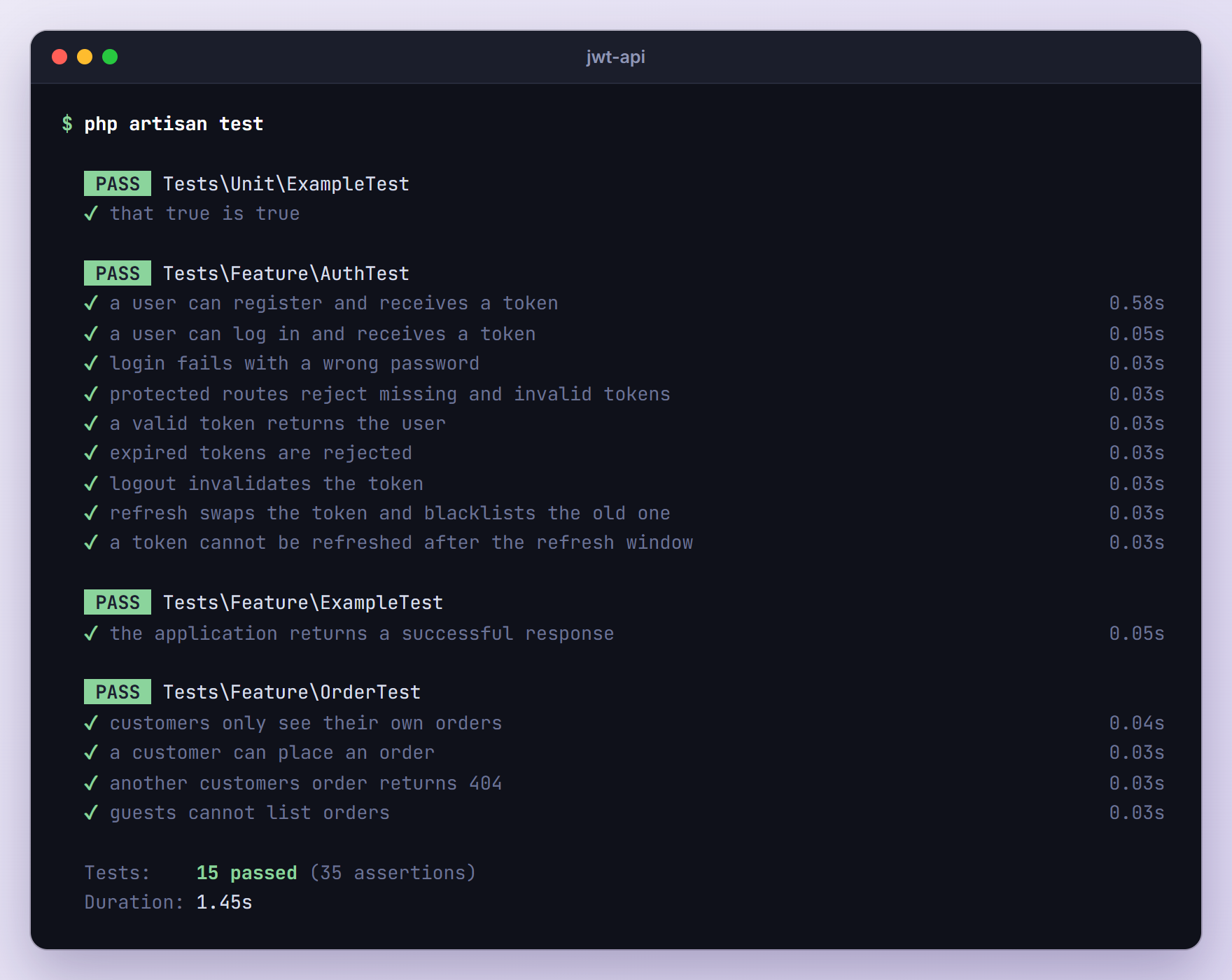
actingAs($user, 'api') puts a user on the JWT guard without a token, which is all the order routes need. Logout and refresh work on the token itself: with actingAs() they failed with “Token could not be parsed from the request.”, which is why AuthTest uses real tokens. Run the suite:
php artisan test
Security Notes
- Guard
JWT_SECRETlike a password. Anyone who has it can sign a token for any user. Keep it out of Git, use one per environment, and remember that changing it logs everyone out. - Keep tokens short-lived. A stolen token works until it expires unless it is blacklisted.
- Use HTTPS. A Bearer token works for whoever holds it, and plain HTTP lets anyone on the network copy it.
- Store tokens carefully. Mobile apps should use the platform’s secure storage (Keychain on iOS, Keystore on Android). In browsers, any script injected through XSS can read
localStorage; for a frontend on your own domain, Sanctum’s cookie-based SPA authentication keeps the credential out of JavaScript.
Accept Tokens Only in the Authorization Header
By default jwt-auth also reads tokens from a token query parameter, input field, route parameter or cookie. URLs end up in server logs and browser history, so I limit the parser to the header in the boot() method of app/Providers/AppServiceProvider.php (import Tymon\JWTAuth\Http\Parser\AuthHeaders):
public function boot(): void
{
    // Only read tokens from the Authorization header, never from URLs or cookies.
    $this->app['tymon.jwt.parser']->setChain([new AuthHeaders]);
}
Before this change, /api/me?token=... returned 200; afterwards it returned 401 while the header kept working. App providers boot after package providers, so this chain replaces the default one.
Troubleshooting
“Auth driver [jwt] for guard [api] is not defined.”
The package’s service provider never loaded. I got this error after composer require tymon/jwt-auth --no-scripts, which skips package discovery (a common flag in Docker builds). Rebuild the package manifest:
php artisan package:discover
401 on Apache Although the Token Works With php artisan serve
When PHP runs as CGI or FastCGI, Apache hides the Authorization header from PHP by default. Laravel’s default public/.htaccess copies it into a server variable that jwt-auth’s header parser falls back to:
# Handle Authorization Header
RewriteCond %{HTTP:Authorization} .
RewriteRule .* - [E=HTTP_AUTHORIZATION:%{HTTP:Authorization}]
Check that the rule survived if you replaced the file, and that Apache reads .htaccess files (mod_rewrite enabled, overrides allowed). On Apache 2.4.13 or newer, CGIPassAuth On in the site’s <Directory> block or in .htaccess passes the header too. Also check the Bearer prefix: without it, jwt-auth finds no token.
“Token could not be parsed from the request.”
logout(), refresh() and payload() need the token, not just a logged-in user. They throw this error when the request has no Authorization header, for example in a test that uses actingAs($user, 'api'), or on a route outside auth:api. Send the header, or use withToken() in tests.
“The token has been blacklisted”
The token was already logged out or refreshed. Our /api/refresh returns this when two requests refresh the same token at once: both pass the guard, the first blacklists the token and the second fails (the package’s jwt.auth middleware returns it for any blacklisted token). Clients should always keep the token that refresh returns, and for parallel requests a grace period keeps a freshly blacklisted token valid for a few seconds:
JWT_BLACKLIST_GRACE_PERIOD=10
“Secret is not set.” or “Key provided is shorter than 256 bits”
The first error means JWT_SECRET is empty: run php artisan jwt:secret, and set the variable on every server and in CI, because the tests read .env too. The second comes from lcobucci/jwt 5, which rejects HMAC keys shorter than the hash. With JWT_SECRET=secret, login failed with “Could not create token: Key provided is shorter than 256 bits, only 48 bits provided”. The 64 characters from jwt:secret cover even HS512.
Upgrading From the Laravel 5.6 JWT Tutorial
Coming from our old tutorial? These are the changes:
- Install the stable 2.x release with
composer require tymon/jwt-authinstead ofdev-develop. - There is no
app/Http/Kernel.php. jwt-auth registers itsjwt.auth,jwt.check,jwt.refreshandjwt.renewaliases itself, andauth:apiworks with thejwtguard. - Create routes/api.php yourself, because
install:apiwould add Sanctum. - Replace
JWTAuth::attempt()andJWTAuth::parseToken()->authenticate()in constructors withauth('api')->attempt()and$request->user(). Laravel 11 and newer controllers have no$this->middleware()method, so middleware goes on the routes. - Logout no longer needs a
tokenfield:auth('api')->logout()reads the header. Make it a POST route. - A hand-written secret under 32 characters triggers the “shorter than 256 bits” error.
php artisan jwt:secret --forcereplaces it and logs everyone out once. App\Useris nowApp\Models\User, with ahashedcast instead ofbcrypt()calls.
Frequently Asked Questions
Can a client refresh a token after it has expired?
Not with these routes, because auth:api rejects expired tokens before refresh() runs. jwt-auth itself allows it: refresh mode ignores exp and only checks refresh_ttl, and in my test an expired token refreshed fine on a route outside auth:api. If you build that, also handle the “Token could not be parsed from the request.” exception, and keep refresh_ttl short, since any leaked token could then be renewed.
How do I add a role or other data to a single token?
Pass claims to the guard before attempt(): auth('api')->claims(['role' => 'admin'])->attempt($credentials). They are merged with the claims from getJWTCustomClaims(), and a protected request reads them with auth('api')->payload()->get('role'). Anyone holding the token can read them, so treat claims as hints and still check permissions on the server.
Can I sign tokens with RS256 instead of a shared secret?
Yes. Set JWT_ALGO=RS256 and point JWT_PRIVATE_KEY and JWT_PUBLIC_KEY at PEM files with a file:// path (plus JWT_PASSPHRASE if the key has one). The API signs with the private key, and other services verify tokens with the public key alone, so they cannot create tokens. I tested it with a 2048-bit pair from openssl genrsa, and the token header switched to "alg": "RS256".
Wrapping Up
We added Laravel JWT authentication to a Laravel 13 store API with tymon/jwt-auth: a jwt guard, register, login, me, refresh and logout endpoints, per-customer orders, a cache-backed blacklist, JSON 401 errors for every token problem, and tests with real tokens.
Next, move validation into Form Requests (php artisan make:request) as the API grows and tune the token lifetimes for your clients. If only your own app will use the tokens, compare this setup with Sanctum first.
Learn more about Laravel:
