


Almost every Blade view loops over something: products in a table, lines in an order, categories in a menu. The Laravel Blade foreach directive does the looping, and its $loop variable answers the questions that come up inside: which row is this, is it the first or the last, how many are left? We will build a small coffee shop’s product table and category page and use every loop directive and $loop property on real data.
Our 2018 post about the $loop variable listed the eight properties Laravel 5 had. Since then Laravel added $loop->even and $loop->odd, the @class directive, <x-...> components and lazy collections, and each one changes how you write loops, gotchas included.
We will use Laravel 13 (version 13.39 at the time of writing) with PHP 8.4. Everything here works on PHP 8.3 or newer.
Table of Contents
Prerequisites
- PHP 8.3 or newer and Composer
- Basic Laravel knowledge: routes, controllers, Eloquent models and migrations
- The
intlPHP extension, whichNumber::currency()uses to format prices
Setting Up the Store Project
Creating the Project
Create a new project and move into it:
composer create-project laravel/laravel blade-loops-store
cd blade-loops-store
laravel new blade-loops-store works too if you use the Laravel installer. New apps use SQLite out of the box, so there is no database to configure.
Adding Categories and Products
Our store sells coffee beans, brewing gear and mugs. Generate the two models with their migrations:
php artisan make:model Category -m
php artisan make:model Product -m
Replace the Schema::create() call in each new migration in database/migrations:
// database/migrations/xxxx_xx_xx_xxxxxx_create_categories_table.php
Schema::create('categories', function (Blueprint $table) {
    $table->id();
    $table->string('name');
    $table->timestamps();
});

// database/migrations/xxxx_xx_xx_xxxxxx_create_products_table.php
Schema::create('products', function (Blueprint $table) {
    $table->id();
    $table->foreignId('category_id')->constrained();
    $table->string('name');
    $table->string('sku')->unique();
    $table->decimal('price', 8, 2);
    $table->unsignedInteger('stock');
    $table->timestamps();
});
Laravel 13 models declare their fillable fields with the #[Fillable] attribute. Replace app/Models/Category.php with:
<?php

namespace App\Models;

use Illuminate\Database\Eloquent\Attributes\Fillable;
use Illuminate\Database\Eloquent\Model;
use Illuminate\Database\Eloquent\Relations\HasMany;

#[Fillable(['name'])]
class Category extends Model
{
    public function products(): HasMany
    {
        return $this->hasMany(Product::class);
    }
}
And app/Models/Product.php with:
<?php

namespace App\Models;

use Illuminate\Database\Eloquent\Attributes\Fillable;
use Illuminate\Database\Eloquent\Model;
use Illuminate\Database\Eloquent\Relations\BelongsTo;

#[Fillable(['category_id', 'name', 'sku', 'price', 'stock'])]
class Product extends Model
{
    protected function casts(): array
    {
        return [
            'price' => 'float',
            'stock' => 'integer',
        ];
    }

    public function category(): BelongsTo
    {
        return $this->belongsTo(Category::class);
    }
}
The casts give us a number for Number::currency() and an integer for the $product->stock === 0 checks in our views.
Seeding the Catalog
Fixed data keeps the outputs in this guide predictable. Create a seeder:
php artisan make:seeder StoreSeeder
Replace database/seeders/StoreSeeder.php with:
<?php

namespace Database\Seeders;

use App\Models\Category;
use Illuminate\Database\Seeder;

class StoreSeeder extends Seeder
{
    /**
     * Seed a small coffee shop catalog: three categories, twelve products.
     */
    public function run(): void
    {
        $catalog = [
            'Coffee Beans' => [
                ['Brazil Santos 1kg', 'BEAN-101', 24.00, 18],
                ['Colombia Supremo 250g', 'BEAN-102', 9.50, 0],
                ['Ethiopia Yirgacheffe 250g', 'BEAN-103', 12.90, 7],
                ['Kenya AA 250g', 'BEAN-104', 13.50, 3],
            ],
            'Brewing Gear' => [
                ['Pour-Over Dripper', 'GEAR-201', 22.00, 12],
                ['Gooseneck Kettle', 'GEAR-202', 49.00, 5],
                ['Burr Grinder', 'GEAR-203', 129.00, 2],
                ['French Press 1L', 'GEAR-204', 34.00, 0],
            ],
            'Mugs and Cups' => [
                ['Ceramic Mug 350ml', 'MUG-301', 14.00, 40],
                ['Double-Wall Glass 250ml', 'MUG-302', 18.50, 9],
                ['Travel Tumbler 500ml', 'MUG-303', 26.00, 15],
                ['Espresso Cup Set', 'MUG-304', 32.00, 6],
            ],
        ];

        foreach ($catalog as $categoryName => $products) {
            $category = Category::create(['name' => $categoryName]);

            foreach ($products as [$name, $sku, $price, $stock]) {
                $category->products()->create(compact('name', 'sku', 'price', 'stock'));
            }
        }
    }
}
These are plain PHP loops, and Blade’s @foreach compiles to the same PHP foreach, so everything you know about them applies in views too.
Call the seeder at the end of the run() method in database/seeders/DatabaseSeeder.php:
$this->call(StoreSeeder::class);
Then rebuild the database with the new tables and data:
php artisan migrate:fresh --seed
Laravel Blade foreach Basics
@foreach takes the same expression as PHP’s foreach and ends with @endforeach:
<ul>
    @foreach ($products as $product)
        <li>{{ $product->name }}</li>
    @endforeach
</ul>
It works with anything PHP can iterate: arrays, collections, Eloquent results, paginators, lazy collections and generators. When you need the key as well, use the $key => $value form. Here pluck() returns category names as keys and the summed stock as values:
$stock = Category::withSum('products', 'stock')->orderBy('name')->pluck('products_sum_stock', 'name');
// ['Brewing Gear' => 19, 'Coffee Beans' => 28, 'Mugs and Cups' => 70]
@foreach ($stock as $category => $units)
    <li>{{ $category }}: {{ $units }} units</li>
@endforeach
Keys and positions are different things. Filter the name-sorted products collection with where('stock', 0) and the two sold-out products keep their keys, 3 and 7, while the $loop->index we meet below counts 0 and 1.
Building the Product Table With @forelse
The Controllers and Routes
Generate a controller for each page we build:
php artisan make:controller ProductController
php artisan make:controller CategoryController
Replace app/Http/Controllers/ProductController.php with:
<?php

namespace App\Http\Controllers;

use App\Models\Product;
use Illuminate\View\View;

class ProductController extends Controller
{
    public function index(): View
    {
        $products = Product::with('category')
            ->orderBy('name')
            ->get();

        return view('products.index', compact('products'));
    }
}
with('category') eager loads the categories in one extra query instead of one query per row. We will measure the difference later.
Open routes/web.php, add the imports below the existing use line and the routes at the bottom:
use App\Http\Controllers\CategoryController;
use App\Http\Controllers\ProductController;

// ...

Route::get('/products', [ProductController::class, 'index'])->name('products.index');
Route::get('/categories', [CategoryController::class, 'index'])->name('categories.index');
A Layout Component
Both pages share a layout. Create resources/views/components/layout.blade.php:
@props(['title'])

<!DOCTYPE html>
<html lang="en">
<head>
    <meta charset="utf-8">
    <meta name="viewport" content="width=device-width, initial-scale=1">
    <title>{{ $title }}</title>
    <style>
        body { font-family: system-ui, sans-serif; color: #1f2937; max-width: 860px; margin: 2rem auto; padding: 0 1rem; }
        nav a { margin-right: 1rem; color: #2563eb; }
        table { width: 100%; border-collapse: collapse; }
        th, td { text-align: left; padding: .6rem .75rem; border-bottom: 1px solid #e5e7eb; }
        th { background: #e5e7eb; font-size: .8rem; text-transform: uppercase; }
        .row-even { background: #f3f4f6; }
        .out-of-stock { color: #9ca3af; }
        .badge { margin-left: .5rem; padding: .1rem .5rem; border-radius: 1rem; font-size: .75rem; background: #dbeafe; color: #1e40af; }
        .pager a { margin-left: .5rem; color: #2563eb; }
        .pager .current { font-weight: bold; color: #1f2937; text-decoration: none; }
    </style>
</head>
<body>
    <nav>
        <a href="{{ route('products.index') }}">Products</a>
        <a href="{{ route('categories.index') }}">Categories</a>
    </nav>

    {{ $slot }}
</body>
</html>
@props(['title']) turns the title attribute into a variable, and {{ $slot }} prints whatever a page puts between its <x-layout> tags. The CSS styles the classes our loops will add.
The Product View
Create resources/views/products/index.blade.php:
<x-layout title="Products">
    <h1>Products</h1>

    <table>
        <thead>
            <tr>
                <th>#</th>
                <th>Product</th>
                <th>Category</th>
                <th>Price</th>
                <th>Stock</th>
            </tr>
        </thead>
        <tbody>
            @forelse ($products as $product)
                <tr>
                    <td>{{ $loop->iteration }}</td>
                    <td>{{ $product->name }}</td>
                    <td>{{ $product->category->name }}</td>
                    <td>{{ Number::currency($product->price) }}</td>
                    <td>{{ $product->stock }}</td>
                </tr>
            @empty
                <tr>
                    <td colspan="5">No products found.</td>
                </tr>
            @endforelse
        </tbody>
    </table>
</x-layout>
@forelse is @foreach with a fallback: the @empty block renders when the loop runs zero times, so an empty catalog shows “No products found.” instead of a bare table. $loop->iteration numbers the rows from 1, and Number works in any view without an import.
Run php artisan serve and open http://127.0.0.1:8000/products to see all twelve products, numbered 1 to 12.
The $loop Variable
Inside every @foreach and @forelse, Blade gives you a $loop object. These are all the properties Laravel 13 provides, with the values they take in a loop over five products:
| Property | What it holds | Values over 5 items |
|---|---|---|
$loop->index | Position of the current item, counting from 0 | 0, 1, 2, 3, 4 |
$loop->iteration | Position of the current item, counting from 1 | 1, 2, 3, 4, 5 |
$loop->remaining | Iterations still to come after this one | 4, 3, 2, 1, 0 |
$loop->count | Total number of items | 5 on every row |
$loop->first | true on the first iteration | true, false, false, false, false |
$loop->last | true on the last iteration | false, false, false, false, true |
$loop->even | true on even iterations (2nd, 4th) | false, true, false, true, false |
$loop->odd | true on odd iterations (1st, 3rd, 5th) | true, false, true, false, true |
$loop->depth | Nesting level, 1 for the outermost loop | 1 on every row |
$loop->parent | The enclosing loop’s $loop, or null | null on every row |
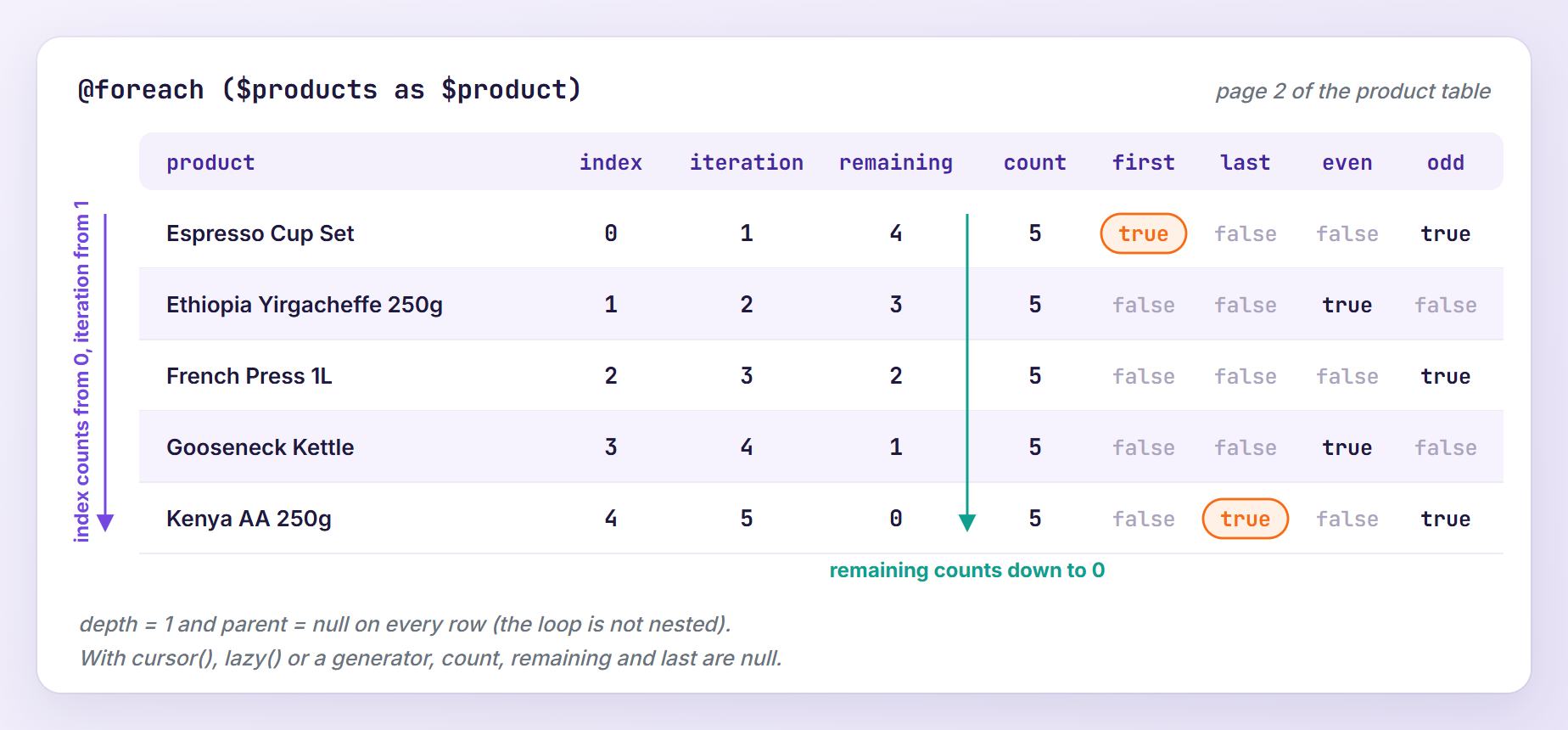
even and odd follow iteration, so the first row is odd (see the official $loop reference).
Three properties depend on knowing the total up front. Blade counts the items when the loop starts, in Illuminate\View\Concerns\ManagesLoops::addLoop():
$length = is_countable($data) && ! $data instanceof LazyCollection
    ? count($data)
    : null;
A LazyCollection (what cursor() and lazy() return) is skipped on purpose: counting one walks through every item, and for cursor() that means running the query a second time. A generator cannot be counted at all. In those loops count, remaining and last are null, while the other properties work as usual.
Styling Rows With @class
Let’s put the properties to work: striped rows, a grayed-out row for sold-out products, and “First” and “Last” badges that make the values visible. In resources/views/products/index.blade.php, replace the opening <tr> and the first two cells:
<tr @class([
    'row-even' => $loop->even,
    'out-of-stock' => $product->stock === 0,
])>
    <td>{{ $loop->iteration }}</td>
    <td>
        {{ $product->name }}

        @if ($loop->first)
            <span class="badge">First</span>
        @endif

        @if ($loop->last)
            <span class="badge">Last</span>
        @endif
    </td>
@class takes an array where each key is a class and each value a condition, and it renders only the classes whose condition is true. The fourth row, Colombia Supremo, is both even and sold out, so it gets class="row-even out-of-stock". Its sibling @style does the same for inline styles.
Note: CSS tr:nth-child(even) stripes rows too. $loop->even is handy when one item renders several elements, such as two <tr> rows per product.
Numbering Rows Across Pages
A real catalog does not fit on one page. In the controller, replace ->get() with ->paginate(5):
$products = Product::with('category')
    ->orderBy('name')
    ->paginate(5);
The view keeps working, because a paginator is iterable, but $loop->iteration now restarts at 1 on every page. firstItem() returns the position of the first item on the current page (6 on page 2), so adding the zero-based $loop->index continues the numbering. Replace the number cell:
<td>{{ $products->firstItem() + $loop->index }}</td>
Then add page links after the closing </table> tag:
@if ($products->hasPages())
    <p class="pager">
        Showing {{ $products->firstItem() }} to {{ $products->lastItem() }} of {{ $products->total() }}

        @for ($page = 1; $page <= $products->lastPage(); $page++)
            <a href="{{ $products->url($page) }}" @class(['current' => $page === $products->currentPage()])>{{ $page }}</a>
        @endfor
    </p>
@endif
@for fits here because we need a counter, not a list. hasPages() hides the block when everything fits on one page, including an empty table, where firstItem() is null. In most apps {{ $products->links() }} does the job with Laravel’s built-in, Tailwind-styled links, and the pagination docs list every paginator method.
Open /products?page=2:
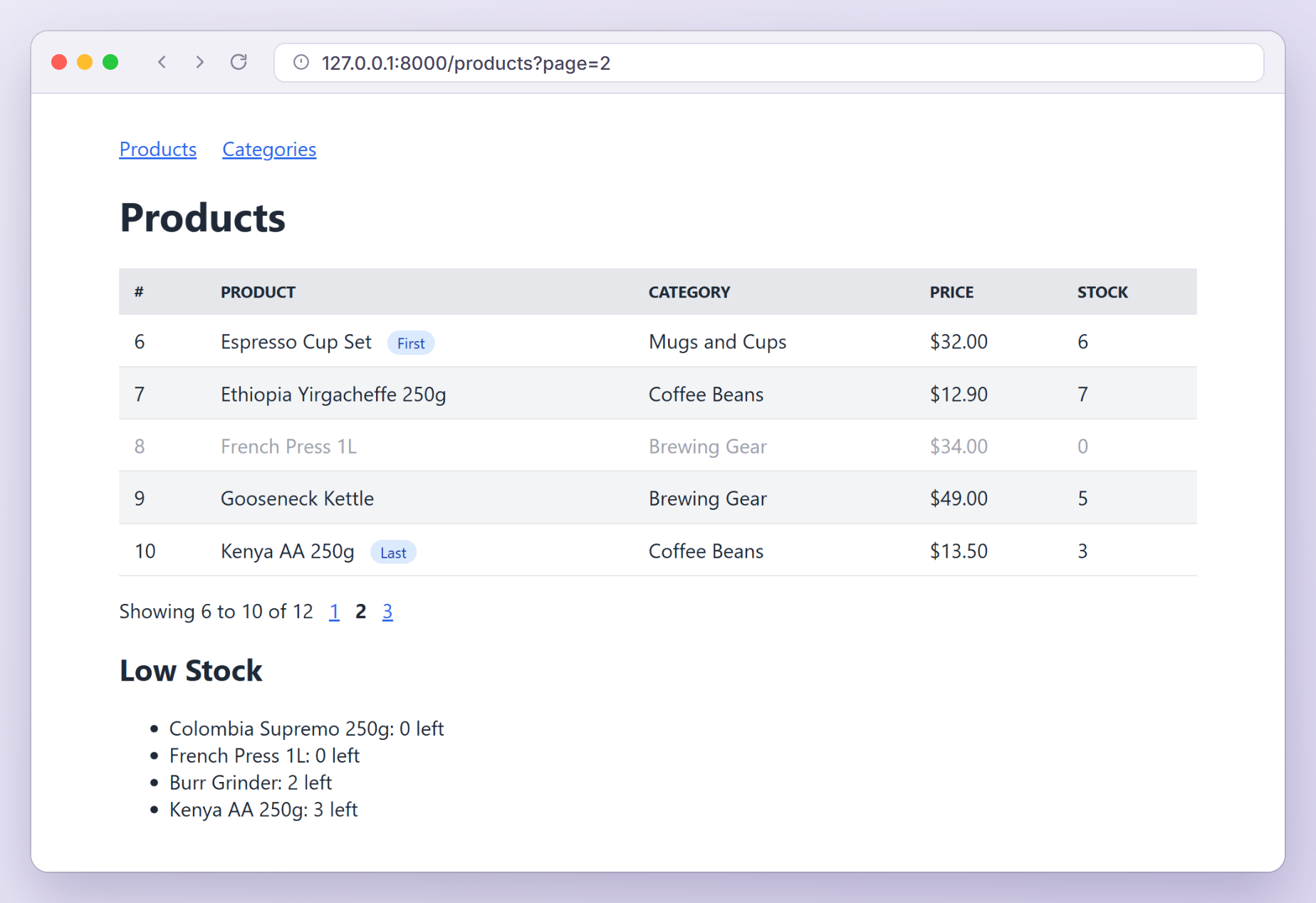
The badges sit on rows 6 and 10 because first and last describe the loop, and the loop only sees the five items on this page. For the same reason $loop->count is 5 (the paginator counts the items on the current page), while $products->total() is 12. The stripes restart too: row 6 is the first iteration, so it is odd.
Choosing Between @foreach, @forelse, @for and @while
| Directive | Use it when | $loop available |
|---|---|---|
@foreach | You have a list: an array, a collection, query results, a paginator | Yes |
@forelse | The list may be empty and you want fallback content | Yes |
@for | You need a counter, such as page numbers | No |
@while | The loop ends on a condition rather than after a known count | No |
@while is the one you will rarely need in a view. Here are the same page links written with it:
@php($page = 1)

@while ($page <= $products->lastPage())
    <a href="{{ $products->url($page) }}">{{ $page }}</a>
    @php($page++)
@endwhile
It renders identical links, but the counter now lives in three places instead of one. When a view needs @while plus a few @php lines, that logic usually belongs in the controller.
Nested Loops With $loop->parent and $loop->depth
The categories page lists every category with its products, numbered 1.1, 1.2, 2.1 and so on. That is a loop inside a loop, and the inner $loop can see the outer one.
Replace app/Http/Controllers/CategoryController.php with:
<?php

namespace App\Http\Controllers;

use App\Models\Category;
use App\Models\Product;
use Illuminate\View\View;

class CategoryController extends Controller
{
    public function index(): View
    {
        $categories = Category::with(['products' => fn ($query) => $query->orderBy('name')])
            ->orderBy('name')
            ->get();

        $giftIdeas = Product::orderBy('price')->get();

        return view('categories.index', compact('categories', 'giftIdeas'));
    }
}
The closure in with() sorts each category’s products inside the eager loading query. $giftIdeas feeds the box we build in the next section.
Create resources/views/categories/index.blade.php:
<x-layout title="Categories">
    <h1>Shop by Category</h1>

    @foreach ($categories as $category)
        <h2>{{ $loop->iteration }}. {{ $category->name }}</h2>

        <ul>
            @foreach ($category->products as $product)
                @include('categories.partials.product', [
                    'number' => $loop->parent->iteration.'.'.$loop->iteration,
                ])
            @endforeach
        </ul>
    @endforeach

    <h2>Gifts Under $20</h2>

    <ul>
        @foreach ($giftIdeas as $product)
            @continue($product->stock === 0)
            @break($product->price >= 20)

            <li>{{ $product->name }}, {{ Number::currency($product->price) }}</li>
        @endforeach
    </ul>
</x-layout>
Then create the partial it includes, resources/views/categories/partials/product.blade.php:
<li @class(['out-of-stock' => $product->stock === 0])>
    {{ $number }} {{ $product->name }}
</li>
Inside the inner loop, $loop describes the product loop and $loop->parent the category loop, so $loop->parent->iteration.'.'.$loop->iteration builds “2.3” for the third product of the second category. $loop->depth is 1 in the category loop and 2 in the product loop, and a third level reaches the outer loop through $loop->parent->parent.
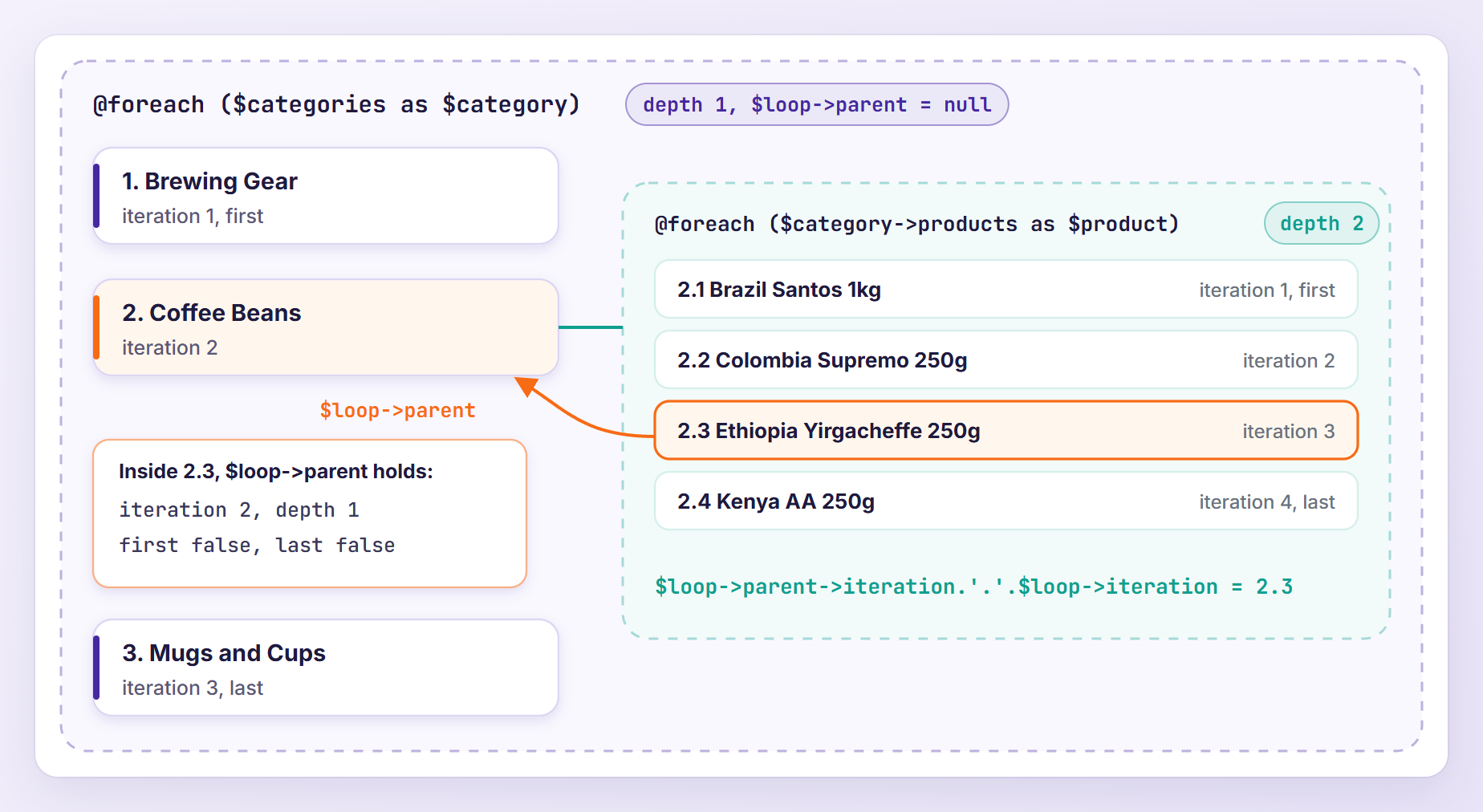
$loop->parent is a copy of the outer loop’s state taken when the inner loop starts. At the top level it is null, so $loop->parent->iteration fails outside a nested loop (see Troubleshooting).
Blade keeps one loop stack per render, so a loop inside a partial included from a @foreach has depth 2. That makes $loop->depth handy in recursive partials, such as a category tree that indents each level.
Skipping and Stopping With @continue and @break
The “Gifts Under $20” box walks through all products from cheapest to most expensive. @continue($product->stock === 0) skips sold-out products, and @break($product->price >= 20) stops at the first product costing $20 or more; the list is sorted by price, so nothing after it could qualify. The box shows four gifts, without the sold-out Colombia Supremo.
Without a condition, both directives work like PHP’s continue and break, usually inside an @if:
@if ($product->stock === 0)
    @continue
@endif
Two things to keep in mind:
- Skipped items still count.
$loopadvances before your@continueruns, so if the box numbered its items with$loop->iteration, the first gift would be number 2, because Colombia Supremo was iteration 1. Likewise, the last item shown before a@breakis not$loop->last. - The query loads all twelve products to show four. Fine for a small shop, but on a big catalog put the conditions in the query (
where('stock', '>', 0)->where('price', '<', 20)) so the loop has nothing to skip.
Warning: Blade also compiles @break(2) and @continue(2) to PHP’s break 2 and continue 2. This form is undocumented and jumps past the inner @endforeach, where Blade removes the finished loop from its stack. In my test, after @continue(2) the outer loop reported depth 2 and last true on its second item. Use a flag or reshape the data instead.
Rendering a Component or Partial per Item
The product row has grown to twenty lines, so let’s give it its own file. Blade offers three ways to render a file per item, and they differ in what the file can see, $loop included.
Blade Components
Create an anonymous component:
php artisan make:component ProductRow --view
Replace the generated resources/views/components/product-row.blade.php with:
@props(['product', 'number', 'first' => false, 'last' => false])

<tr {{ $attributes->class(['out-of-stock' => $product->stock === 0]) }}>
    <td>{{ $number }}</td>
    <td>
        {{ $product->name }}

        @if ($first)
            <span class="badge">First</span>
        @endif

        @if ($last)
            <span class="badge">Last</span>
        @endif
    </td>
    <td>{{ $product->category->name }}</td>
    <td>{{ Number::currency($product->price) }}</td>
    <td>{{ $product->stock }}</td>
</tr>
In resources/views/products/index.blade.php, replace the whole <tr>...</tr> block between @forelse and @empty with the component:
@forelse ($products as $product)
    <x-product-row
        :$product
        :number="$products->firstItem() + $loop->index"
        :first="$loop->first"
        :last="$loop->last"
        @class(['row-even' => $loop->even])
    />
@empty
The page renders exactly as before. A component’s template does not see the parent view’s variables, so $loop and $products are undefined in there. The parent computes everything loop-related and passes plain values, which @props turns into variables, with defaults for use outside a loop. :$product is short for :product="$product", and @class on a component tag lands in $attributes, where $attributes->class() merges it with the component’s own class (class="out-of-stock row-even" for Colombia Supremo on page 1).
One exception: the content between an opening and a closing component tag (the slot) is compiled in the parent view, so $loop works there.
@include
@include hands every variable of the parent view to the partial, $loop included, so our categories partial could have read $loop->parent->iteration itself. We pass number anyway, because a partial that depends on being included from a nested loop breaks as soon as you reuse it elsewhere. For an include that sees only what you pass, use @includeIsolated.
@each
@each combines the loop and the include in one line. It suits a low stock list on the products page, because each item only needs the product. Create resources/views/products/partials/low-stock.blade.php:
<li>{{ $product->name }}: {{ $product->stock }} left</li>
And resources/views/products/partials/low-stock-empty.blade.php for when nothing runs low:
<li>Every product is well stocked.</li>
In ProductController, add the query below the $products query and pass both variables to the view:
$lowStock = Product::where('stock', '<', 5)
    ->orderBy('stock')
    ->orderBy('name')
    ->get();

return view('products.index', compact('products', 'lowStock'));
Finally, add the list to resources/views/products/index.blade.php, just before </x-layout>:
<h2>Low Stock</h2>

<ul>
    @each('products.partials.low-stock', $lowStock, 'product', 'products.partials.low-stock-empty')
</ul>
The arguments are the partial, the collection, the variable name for each item and the view for an empty collection. The partial gets $product and $key but none of the parent’s variables, so no $loop. @each also calls count() first, which throws a TypeError for a generator. Use it for simple lists like this one.
Avoiding N+1 Queries Inside Loops
Loops are where N+1 queries hide. $product->category->name looks harmless, but without with('category') every row runs its own query for its category. I measured the table on page 2 both ways: 3 queries with eager loading (the paginator’s count, the products and the categories) and 7 without. The nested category list needs 2 queries with with('products') and 4 without, one more for every category you add.
To make these mistakes impossible to miss, turn lazy loading into an error outside production. In app/Providers/AppServiceProvider.php, update the boot() method:
use Illuminate\Database\Eloquent\Model;

// ...

public function boot(): void
{
    Model::preventLazyLoading(! $this->app->isProduction());
}
Now, if someone removes with('category'), the page fails with a clear message instead of quietly running extra queries:
Attempted to lazy load [category] on model [App\Models\Product] but lazy loading is disabled.
The preventing lazy loading docs show how to log violations instead. Note that preventLazyLoading() only catches relationships read as properties. A method call such as {{ $category->products()->count() }} is a fresh query each time, so it runs once per category without any exception. Use withCount('products') in the controller and read $category->products_count in the view.
The general rule: keep queries out of Blade. The controller decides what data the page needs, and the view only loops over it. Our collection methods guide shows how to shape that data before it reaches the view.
Testing Blade Loops
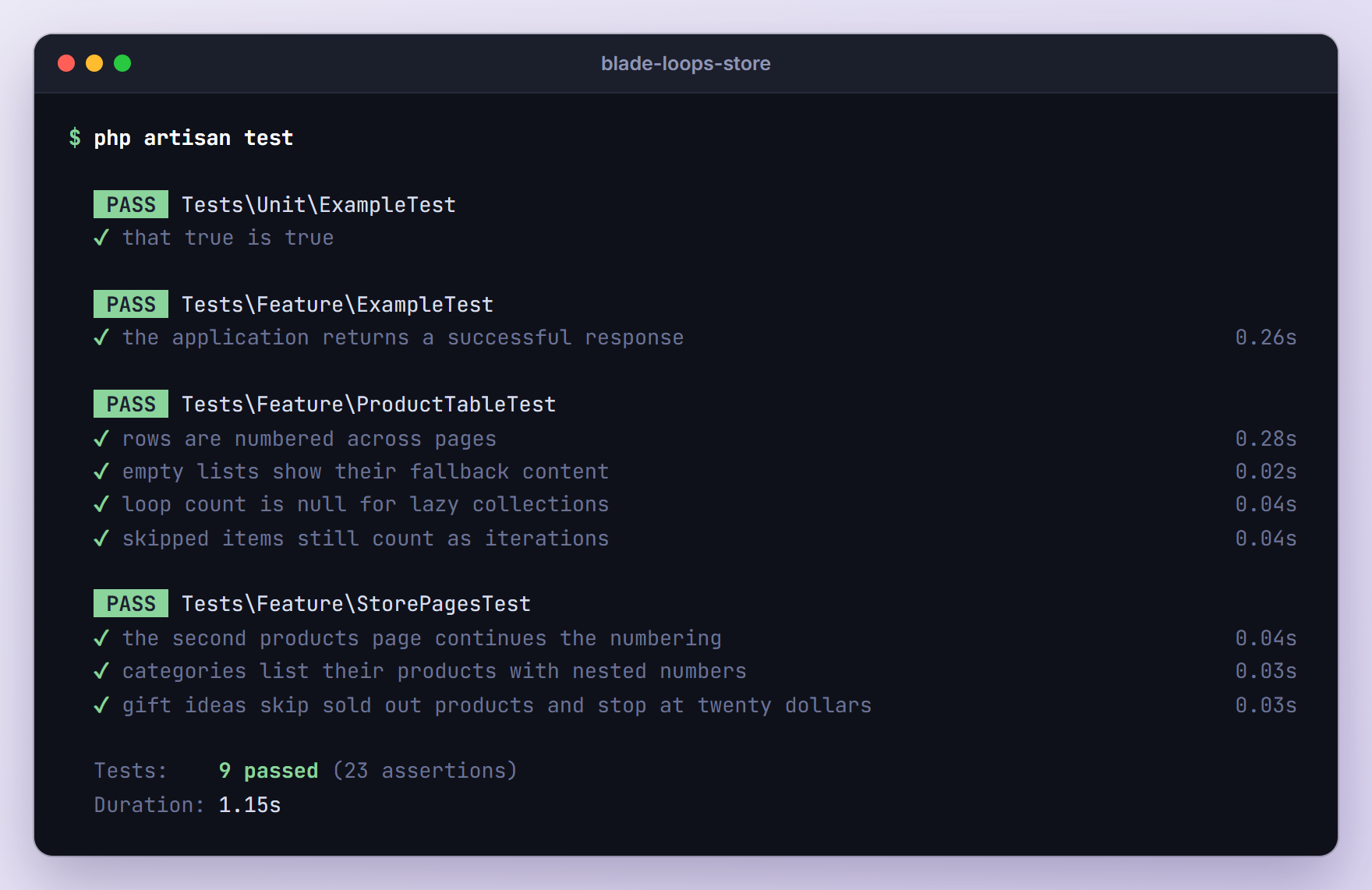
Laravel can render a view in a test without an HTTP request. $this->view() renders a view by name and $this->blade() renders a Blade string. Both return an Illuminate\Testing\TestView with assertions such as assertSee(), assertSeeInOrder(), assertDontSee() and assertSeeHtmlInOrder(), as described in the view testing docs. Generate two feature tests:
php artisan make:test ProductTableTest
php artisan make:test StorePagesTest
Replace the contents of tests/Feature/ProductTableTest.php, which tests the views directly:
<?php

namespace Tests\Feature;

use App\Models\Product;
use Database\Seeders\StoreSeeder;
use Illuminate\Foundation\Testing\RefreshDatabase;
use Tests\TestCase;

class ProductTableTest extends TestCase
{
    use RefreshDatabase;

    public function test_rows_are_numbered_across_pages(): void
    {
        $this->seed(StoreSeeder::class);

        $view = $this->view('products.index', [
            'products' => Product::with('category')->orderBy('name')->paginate(5, page: 3),
            'lowStock' => collect(),
        ]);

        $view->assertSeeHtmlInOrder([
            '<td>11</td>', 'Pour-Over Dripper', 'First',
            '<td>12</td>', 'Travel Tumbler 500ml', 'Last',
        ]);
        $view->assertSee('Showing 11 to 12 of 12');
    }

    public function test_empty_lists_show_their_fallback_content(): void
    {
        $view = $this->view('products.index', [
            'products' => Product::paginate(5),
            'lowStock' => collect(),
        ]);

        $view->assertSee('No products found.');
        $view->assertSee('Every product is well stocked.');
        $view->assertDontSee('Showing');
    }

    public function test_loop_count_is_null_for_lazy_collections(): void
    {
        $this->seed(StoreSeeder::class);

        $template = '@foreach ($products as $product) [{{ $loop->iteration }} of {{ $loop->count ?? "unknown" }}] @endforeach';

        $this->blade($template, ['products' => Product::orderBy('name')->get()])
            ->assertSee('[1 of 12]')
            ->assertSee('[12 of 12]');

        $this->blade($template, ['products' => Product::orderBy('name')->cursor()])
            ->assertSee('[1 of unknown]')
            ->assertDontSee('of 12');
    }

    public function test_skipped_items_still_count_as_iterations(): void
    {
        $this->seed(StoreSeeder::class);

        $template = '@foreach ($products as $product) @continue($product->stock === 0) {{ $loop->iteration }}. {{ $product->name }} @endforeach';

        $this->blade($template, ['products' => Product::orderBy('price')->take(3)->get()])
            ->assertSeeInOrder(['2. Ethiopia Yirgacheffe 250g', '3. Kenya AA 250g'])
            ->assertDontSee('1. ');
    }
}
paginate(5, page: 3) builds the third page without a request. assertSee() escapes the text before searching, so HTML such as <td>11</td> goes through assertSeeHtmlInOrder(). The last two tests pin down earlier gotchas: cursor() leaves $loop->count empty, and a skipped item still uses up an iteration.
Replace the contents of tests/Feature/StorePagesTest.php, which requests the real pages:
<?php

namespace Tests\Feature;

use Database\Seeders\StoreSeeder;
use Illuminate\Foundation\Testing\RefreshDatabase;
use Illuminate\Support\Facades\DB;
use Tests\TestCase;

class StorePagesTest extends TestCase
{
    use RefreshDatabase;

    protected function setUp(): void
    {
        parent::setUp();

        $this->seed(StoreSeeder::class);
    }

    public function test_the_second_products_page_continues_the_numbering(): void
    {
        $response = $this->get('/products?page=2');

        $response->assertOk();
        $response->assertSeeHtmlInOrder([
            '<td>6</td>', 'Espresso Cup Set', 'First',
            '<td>10</td>', 'Kenya AA 250g', 'Last',
        ]);
        $response->assertSee('Showing 6 to 10 of 12');
        $response->assertSeeInOrder(['Colombia Supremo 250g: 0 left', 'Kenya AA 250g: 3 left']);
    }

    public function test_categories_list_their_products_with_nested_numbers(): void
    {
        DB::enableQueryLog();

        $response = $this->get('/categories');

        $response->assertOk();
        $response->assertSeeInOrder([
            '1. Brewing Gear', '1.1 Burr Grinder',
            '2. Coffee Beans', '2.3 Ethiopia Yirgacheffe 250g',
            '3. Mugs and Cups', '3.4 Travel Tumbler 500ml',
        ]);
        $this->assertCount(3, DB::getQueryLog());
    }

    public function test_gift_ideas_skip_sold_out_products_and_stop_at_twenty_dollars(): void
    {
        $response = $this->get('/categories');

        $response->assertSeeInOrder(['Ethiopia Yirgacheffe 250g, $12.90', 'Double-Wall Glass 250ml, $18.50']);
        $response->assertDontSee('Colombia Supremo 250g, $9.50');
        $response->assertDontSee('Pour-Over Dripper, $22.00');
    }
}
The query count assertion catches N+1 problems that preventLazyLoading() misses, such as a products()->count() call added to the view later. The default phpunit.xml uses an in-memory SQLite database and the array session driver, so the three queries are exactly the controller’s.
Run the suite:
php artisan test
Troubleshooting
Undefined variable $loop
$loop exists only inside @foreach and @forelse, and only in the view that contains the loop. You get this error before the first loop, inside a @for or @while that is not nested in a @foreach, and in views that do not inherit the parent’s variables: component templates, @each partials and @includeIsolated views. This component template, for example, fails as soon as it renders:
<td>{{ $loop->iteration }}</td>
Compute the value in the loop and pass it in, as we did with :number="$products->firstItem() + $loop->index".
Attempt to read property “iteration” on null
$loop->parent is null in a loop that is not nested, and $loop itself becomes null after the outermost loop ends. Reading a property of either throws this error. For markup that must work at both levels, the nullsafe operator prints nothing at the top level:
{{ $loop->parent?->iteration }}
@forelse Does Not Show the @empty Block
Blade decides emptiness with a flag, not by counting. The compiled @forelse sets $__empty_1 = true before the loop and $__empty_1 = false at the start of every iteration, before your code runs. If @continue skips every item, the loop still ran, so the page shows neither rows nor the @empty content. Filter before the loop instead:
@forelse ($products->where('stock', '>', 0) as $product)
A related trap: the standalone @empty($products) directive is PHP’s empty(), which is false for any object, an empty collection included. For collections, write @if ($products->isEmpty()).
foreach() argument must be of type array|object, null given
The value you loop over is null: a nullable JSON column cast to array, session('cart') before anything was added, or a variable the controller never filled. @forelse does not help, because it compiles to the same PHP foreach, which fails before @empty gets a chance. Fall back to an empty array:
@forelse ($cart ?? [] as $line)
Better still, fix it where the value comes from, for example with a default: session('cart', []).
$loop->last Is Never True With cursor() or lazy()
As the addLoop() code above shows, Blade does not count a LazyCollection or a generator, so count, remaining and last are null. A comma separated list shows the symptom:
@foreach ($products as $product)
    {{ $product->name }}@unless ($loop->last), @endunless
@endforeach
With get() this renders “Brazil Santos 1kg, Burr Grinder, Ceramic Mug 350ml”. With cursor() a comma follows the last name too, because @unless (null) always prints. Use get() when the list is small enough to load (a list you show on one page usually is), or build the text without a loop: {{ $products->pluck('name')->join(', ') }}.
Upgrading From Laravel 5.x
Loops from the Laravel 5 days still work: the directives and the eight original $loop properties behave the same in Laravel 13. What changed is how much you can do without workarounds:
$loop->evenand$loop->oddarrived in Laravel 5.8, replacing$loop->index % 2checks.@class(Laravel 8) and@style(Laravel 9) replace ternaries such asclass="{{ $loop->even ? 'row-even' : '' }}".<x-...>components (Laravel 7) are the modern alternative to@componentand@slot. Unlike@include, they do not inherit parent variables, so pass loop values as attributes. The:$productshorthand arrived in Laravel 9.@includeIsolated, documented since Laravel 12, gives includes the same isolation.- Lazy collections (Laravel 6) can be looped over but are not counted, so
count,remainingandlastarenullfor them.
Frequently Asked Questions
How Do I Get the Index in a Laravel Blade foreach Loop?
Use $loop->index for a position that starts at 0, or $loop->iteration for one that starts at 1. Neither is the array key: a filtered collection keeps its original keys, while $loop->index always counts 0, 1, 2. When you need the key, write @foreach ($items as $key => $item). To number rows across paginated pages, add $loop->index to $paginator->firstItem().
How Do I Check for the First or Last Item in a Blade foreach?
$loop->first is true on the first iteration and $loop->last on the final one, so @if ($loop->last) lets you skip a separator after the last item. With lazy collections, such as cursor() results, $loop->last is null because Blade does not count the items up front. Load a regular collection with get(), or handle the end of the list after the loop.
What Is the Difference Between @foreach and @forelse?
Both loop over the same data, but @forelse accepts an @empty block that renders when the loop does not run a single time, such as a “No products found.” row. With @foreach you would need a separate @if ($products->isEmpty()). Keep in mind that @forelse still fails when the value is null, so fall back to an empty array with ?? [].
Can I Use $loop Inside @for or @while?
No. Only @foreach and @forelse create $loop, because @for and @while compile to plain PHP loops. Inside an outer @foreach, $loop still describes that outer loop; otherwise it is undefined. If you want loop details for a simple count, loop over a range instead: @foreach (range(1, 5) as $star) gives you $loop->first, $loop->last and the rest.
Wrapping Up
We built a product table that numbers rows across pages, stripes them with @class and marks the first and last rows, a category page with nested loops, and a gift box that skips and stops with @continue and @break. Along the way we saw where $loop is available (@foreach, @forelse and included views) and where it is not (components, @each, @for and @while), and why lazy collections leave count and last empty.
The Blade loops documentation covers the directives in more detail. Next time you reach for a $i++ counter in a Laravel Blade foreach loop, check whether $loop already has the number.
Learn more about Laravel:
