


Sooner or later most Laravel apps need an API: a mobile app has to log users in, a partner wants to sync products, or a script needs read access to your data. Laravel Sanctum API authentication covers all of these with very little code. A user trades an email and password for a token, the client sends it in an Authorization: Bearer header, and Laravel knows who is calling.
We will build a small store API from an empty project: register, login, logout and “current user” endpoints, plus a Product CRUD where every user sees only their own products. On top of that come read-only tokens, token expiration, login throttling and clean JSON errors, all tested with real curl requests and PHPUnit.
We will use Laravel 13 (version 13.38 at the time of writing) with PHP 8.4 and Sanctum 4.3. Everything here works on PHP 8.3 or newer.
If you followed our Laravel Passport REST API tutorial or the JWT authentication tutorial for Laravel 5.6, the endpoints will look familiar. The setup is much shorter now: one Artisan command installs Sanctum, there is no Kernel.php to edit, and a first-party API does not need an OAuth2 server.
Table of Contents
What You Will Build
| Method | URI | Purpose | Token ability |
|---|---|---|---|
| POST | /api/register | Create an account, get a token | none |
| POST | /api/login | Get a token (throttled) | none |
| GET | /api/user | Current user | any |
| POST | /api/logout | Revoke the current token | any |
| GET | /api/products | List your products | products:read or products:write |
| POST | /api/products | Create a product | products:write |
| GET | /api/products/{product} | Show a product | products:read or products:write |
| PUT/PATCH | /api/products/{product} | Update a product | products:write |
| DELETE | /api/products/{product} | Delete a product | products:write |
Prerequisites
- PHP 8.3 or newer and Composer
- Basic Laravel knowledge (routes, controllers, Eloquent)
- A bash-compatible terminal with curl (macOS, Linux, WSL or Git Bash)
- No database server: new Laravel 13 apps use SQLite
How Laravel Sanctum API Authentication Works
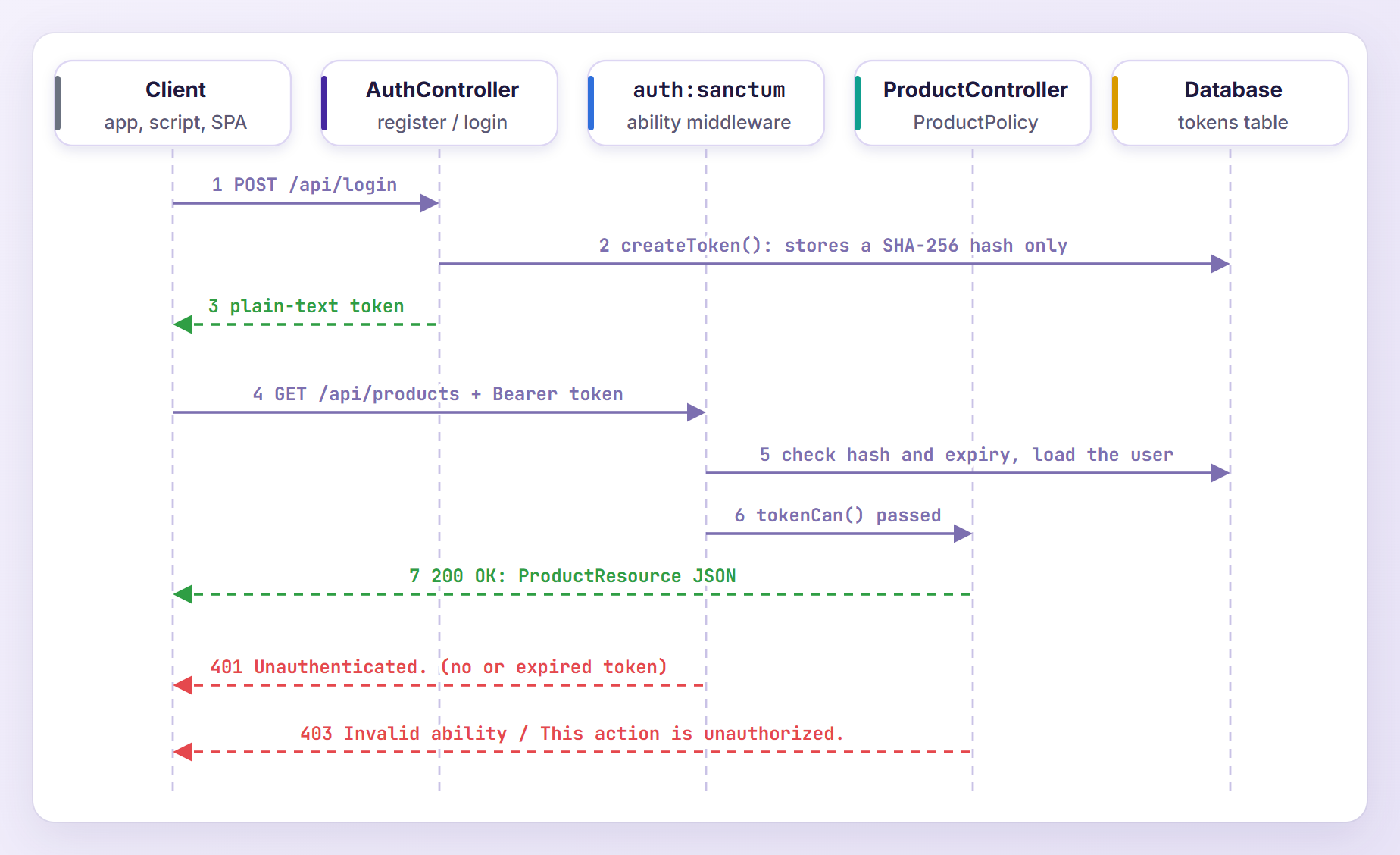
The client posts credentials to /api/login. We check them and call createToken(), which saves a SHA-256 hash of a random string in the personal_access_tokens table and returns the plain-text token once. The client sends it back as Authorization: Bearer <token> on every request.
The auth:sanctum middleware splits the token into its database ID and secret, compares the hash, checks the expiry and loads the user, so controllers can call $request->user(). Sanctum also accepts session cookies, which is how it authenticates single page apps (more on that near the end).
Step 1: Create a New Laravel 13 Project
composer create-project laravel/laravel sanctum-api
cd sanctum-api
With the Laravel installer, laravel new sanctum-api works too. The project already uses SQLite and runs its first migrations during installation.
Step 2: Install Sanctum With install:api
A fresh Laravel 13 application has no routes/api.php file. The install:api command creates it and installs Sanctum:
php artisan install:api
Here is the output, trimmed:
./composer.json has been updated
Running composer update laravel/sanctum --with-all-dependencies
...
  - Installing laravel/sanctum (v4.3.3): Extracting archive
...
   INFO  Published API routes file.

 One new database migration has been published. Would you like to run all pending database migrations? (yes/no) [yes]:
 >
   INFO  Running migrations.

  2026_10_25_070009_create_personal_access_tokens_table ............................. 31.28ms DONE


   INFO  API scaffolding installed. Please add the [Laravel\Sanctum\HasApiTokens] trait to your User model.
That one command:
- Required
laravel/sanctumwith the^4.0constraint (v4.3.3 here). - Published config/sanctum.php and the
create_personal_access_tokens_tablemigration. - Created routes/api.php with a sample
/userroute behindauth:sanctum. - Added
api: __DIR__.'/../routes/api.php'towithRouting()in bootstrap/app.php, which gives those routes the/apiprefix and theapimiddleware group. - Offered to run the migration for the
personal_access_tokenstable.
Useful options: --without-migration-prompt skips the question in scripts, --force overwrites an existing routes/api.php, and --passport installs Laravel Passport instead.
Step 3: Add HasApiTokens to the User Model
Open app/Models/User.php, add the HasApiTokens trait and a products() relationship:
<?php

namespace App\Models;

// use Illuminate\Contracts\Auth\MustVerifyEmail;
use Database\Factories\UserFactory;
use Illuminate\Database\Eloquent\Attributes\Fillable;
use Illuminate\Database\Eloquent\Attributes\Hidden;
use Illuminate\Database\Eloquent\Factories\HasFactory;
use Illuminate\Database\Eloquent\Relations\HasMany;
use Illuminate\Foundation\Auth\User as Authenticatable;
use Illuminate\Notifications\Notifiable;
use Laravel\Sanctum\HasApiTokens;

#[Fillable(['name', 'email', 'password'])]
#[Hidden(['password', 'remember_token'])]
class User extends Authenticatable
{
    /** @use HasFactory<UserFactory> */
    use HasApiTokens, HasFactory, Notifiable;

    /**
     * Get the attributes that should be cast.
     *
     * @return array<string, string>
     */
    protected function casts(): array
    {
        return [
            'email_verified_at' => 'datetime',
            'password' => 'hashed',
        ];
    }

    /**
     * The products that belong to the user.
     */
    public function products(): HasMany
    {
        return $this->hasMany(Product::class);
    }
}
HasApiTokens adds createToken(), tokens(), currentAccessToken() and tokenCan(). The hashed cast hashes passwords automatically, so our controller never calls Hash::make().
Step 4: Create the Product Model, Migration and Factory
php artisan make:model Product -mf
The -m flag adds a migration and -f a factory. Open the new file in database/migrations (it ends with _create_products_table.php) and replace the up() method:
public function up(): void
{
    Schema::create('products', function (Blueprint $table) {
        $table->id();
        $table->foreignId('user_id')->constrained()->cascadeOnDelete();
        $table->string('name');
        $table->decimal('price', 10, 2);
        $table->unsignedInteger('quantity')->default(0);
        $table->timestamps();
    });
}
Every product belongs to a user, and cascadeOnDelete() removes a user’s products when the account is deleted. Now replace app/Models/Product.php:
<?php

namespace App\Models;

use Database\Factories\ProductFactory;
use Illuminate\Database\Eloquent\Attributes\Fillable;
use Illuminate\Database\Eloquent\Factories\HasFactory;
use Illuminate\Database\Eloquent\Model;
use Illuminate\Database\Eloquent\Relations\BelongsTo;

#[Fillable(['name', 'price', 'quantity'])]
class Product extends Model
{
    /** @use HasFactory<ProductFactory> */
    use HasFactory;

    /**
     * Get the attributes that should be cast.
     *
     * @return array<string, string>
     */
    protected function casts(): array
    {
        return [
            'price' => 'decimal:2',
            'quantity' => 'integer',
        ];
    }

    /**
     * The user who owns the product.
     */
    public function user(): BelongsTo
    {
        return $this->belongsTo(User::class);
    }
}
user_id is not fillable on purpose: we create products through $user->products()->create(), which sets the owner, so a client cannot assign a product to someone else. The decimal:2 cast returns prices as strings such as "89.99".
Then fill in database/factories/ProductFactory.php for the tests (new to factories? see our model factories guide):
<?php

namespace Database\Factories;

use App\Models\Product;
use App\Models\User;
use Illuminate\Database\Eloquent\Factories\Factory;

/**
 * @extends Factory<Product>
 */
class ProductFactory extends Factory
{
    /**
     * Define the model's default state.
     *
     * @return array<string, mixed>
     */
    public function definition(): array
    {
        return [
            'user_id' => User::factory(),
            'name' => fake()->words(3, true),
            'price' => fake()->randomFloat(2, 5, 500),
            'quantity' => fake()->numberBetween(0, 100),
        ];
    }
}
User::factory() creates an owner whenever a test does not pass one with for($user). Run the migration:
php artisan migrate
Step 5: Build the Register, Login and Logout Endpoints
php artisan make:controller Api/AuthController
php artisan make:resource UserResource
API resources decide which fields leave your app. Replace app/Http/Resources/UserResource.php:
<?php

namespace App\Http\Resources;

use Illuminate\Http\Request;
use Illuminate\Http\Resources\Json\JsonResource;

class UserResource extends JsonResource
{
    /**
     * Transform the resource into an array.
     *
     * @return array<string, mixed>
     */
    public function toArray(Request $request): array
    {
        return [
            'id' => $this->id,
            'name' => $this->name,
            'email' => $this->email,
            'created_at' => $this->created_at,
        ];
    }
}
Now replace app/Http/Controllers/Api/AuthController.php:
<?php

namespace App\Http\Controllers\Api;

use App\Http\Controllers\Controller;
use App\Http\Resources\UserResource;
use App\Models\User;
use Illuminate\Http\JsonResponse;
use Illuminate\Http\Request;
use Illuminate\Http\Response;
use Illuminate\Support\Facades\Hash;
use Illuminate\Validation\Rule;
use Illuminate\Validation\Rules\Password;
use Illuminate\Validation\ValidationException;
use Laravel\Sanctum\NewAccessToken;

class AuthController extends Controller
{
    /**
     * The abilities a token can be granted.
     */
    private const ABILITIES = ['products:read', 'products:write'];

    /**
     * Create a new account and return its first API token.
     */
    public function register(Request $request): JsonResponse
    {
        $validated = $request->validate([
            'name' => ['required', 'string', 'max:255'],
            'email' => ['required', 'string', 'email', 'max:255', 'unique:users'],
            'password' => ['required', 'confirmed', Password::defaults()],
            'device_name' => ['required', 'string', 'max:255'],
        ]);

        $user = User::create([
            'name' => $validated['name'],
            'email' => $validated['email'],
            'password' => $validated['password'],
        ]);

        $token = $user->createToken($validated['device_name'], self::ABILITIES, now()->addDays(30));

        return $this->tokenResponse($token, $user, 201);
    }

    /**
     * Exchange an email and password for an API token.
     */
    public function login(Request $request): JsonResponse
    {
        $validated = $request->validate([
            'email' => ['required', 'string', 'email'],
            'password' => ['required', 'string'],
            'device_name' => ['required', 'string', 'max:255'],
            'abilities' => ['sometimes', 'array'],
            'abilities.*' => ['string', Rule::in(self::ABILITIES)],
        ]);

        $user = User::where('email', $validated['email'])->first();

        if (! $user || ! Hash::check($validated['password'], $user->password)) {
            throw ValidationException::withMessages([
                'email' => [__('auth.failed')],
            ]);
        }

        $token = $user->createToken(
            $validated['device_name'],
            $validated['abilities'] ?? self::ABILITIES,
            now()->addDays(30),
        );

        return $this->tokenResponse($token, $user);
    }

    /**
     * Return the authenticated user.
     */
    public function user(Request $request): UserResource
    {
        return new UserResource($request->user());
    }

    /**
     * Revoke the token that was used for this request.
     */
    public function logout(Request $request): Response
    {
        $request->user()->currentAccessToken()->delete();

        return response()->noContent();
    }

    /**
     * Build the JSON response that carries a new token.
     */
    private function tokenResponse(NewAccessToken $token, User $user, int $status = 200): JsonResponse
    {
        return response()->json([
            'token' => $token->plainTextToken,
            'token_type' => 'Bearer',
            'abilities' => $token->accessToken->abilities,
            'expires_at' => $token->accessToken->expires_at,
            'user' => new UserResource($user),
        ], $status);
    }
}
Let me explain the important parts.
ABILITIES lists what a token may be allowed to do. Registration grants both abilities, while login lets the client ask for less, such as a read-only token for a reporting script. Rule::in() rejects anything else.
Login verifies the password with Hash::check(). On failure it throws a ValidationException, so bad credentials return a normal 422 with an email error, the same approach the Sanctum docs use. __('auth.failed') is Laravel’s built-in “These credentials do not match our records.” message.
createToken() takes a name, the abilities and an optional expiry date. We name each token after the client’s device_name and let it expire after 30 days. The result holds the database record in accessToken and the real token in plainTextToken, which exists only in this response because Sanctum stores just its hash.
logout() deletes only the token that made the request, so other devices stay logged in.
Step 6: Add the Product Policy, Resource and Controller
php artisan make:policy ProductPolicy --model=Product
php artisan make:resource ProductResource
php artisan make:controller Api/ProductController --api --model=Product
The generated policy has seven methods. We need three, so replace app/Policies/ProductPolicy.php:
<?php

namespace App\Policies;

use App\Models\Product;
use App\Models\User;

class ProductPolicy
{
    /**
     * Determine whether the user can view the product.
     */
    public function view(User $user, Product $product): bool
    {
        return $user->id === $product->user_id;
    }

    /**
     * Determine whether the user can update the product.
     */
    public function update(User $user, Product $product): bool
    {
        return $user->id === $product->user_id;
    }

    /**
     * Determine whether the user can delete the product.
     */
    public function delete(User $user, Product $product): bool
    {
        return $user->id === $product->user_id;
    }
}
Laravel discovers it automatically because App\Policies\ProductPolicy matches App\Models\Product. Next, replace app/Http/Resources/ProductResource.php:
<?php

namespace App\Http\Resources;

use Illuminate\Http\Request;
use Illuminate\Http\Resources\Json\JsonResource;

class ProductResource extends JsonResource
{
    /**
     * Transform the resource into an array.
     *
     * @return array<string, mixed>
     */
    public function toArray(Request $request): array
    {
        return [
            'id' => $this->id,
            'name' => $this->name,
            'price' => $this->price,
            'quantity' => $this->quantity,
            'created_at' => $this->created_at,
            'updated_at' => $this->updated_at,
        ];
    }
}
And fill in app/Http/Controllers/Api/ProductController.php:
<?php

namespace App\Http\Controllers\Api;

use App\Http\Controllers\Controller;
use App\Http\Resources\ProductResource;
use App\Models\Product;
use Illuminate\Http\Request;
use Illuminate\Http\Resources\Json\AnonymousResourceCollection;
use Illuminate\Http\Response;
use Illuminate\Support\Facades\Gate;

class ProductController extends Controller
{
    /**
     * List the authenticated user's products.
     */
    public function index(Request $request): AnonymousResourceCollection
    {
        $products = $request->user()->products()->latest('id')->paginate(10);

        return ProductResource::collection($products);
    }

    /**
     * Create a product owned by the authenticated user.
     */
    public function store(Request $request): ProductResource
    {
        $validated = $request->validate([
            'name' => ['required', 'string', 'max:255'],
            'price' => ['required', 'numeric', 'min:0'],
            'quantity' => ['required', 'integer', 'min:0'],
        ]);

        $product = $request->user()->products()->create($validated);

        return new ProductResource($product);
    }

    /**
     * Show a single product.
     */
    public function show(Product $product): ProductResource
    {
        Gate::authorize('view', $product);

        return new ProductResource($product);
    }

    /**
     * Update a product.
     */
    public function update(Request $request, Product $product): ProductResource
    {
        Gate::authorize('update', $product);

        $validated = $request->validate([
            'name' => ['sometimes', 'required', 'string', 'max:255'],
            'price' => ['sometimes', 'required', 'numeric', 'min:0'],
            'quantity' => ['sometimes', 'required', 'integer', 'min:0'],
        ]);

        $product->update($validated);

        return new ProductResource($product);
    }

    /**
     * Delete a product.
     */
    public function destroy(Product $product): Response
    {
        Gate::authorize('delete', $product);

        $product->delete();

        return response()->noContent();
    }
}
A few things to notice:
index()andstore()go through$request->user()->products(), so the list only contains the user’s products and new products get the rightuser_id.show(),update()anddestroy()use route model binding, which loads any product by ID.Gate::authorize()runs the matching policy method and throws anAuthorizationException(a 403 response) when the product belongs to someone else.- Passing a paginator to
ProductResource::collection()addslinksandmetakeys, and a resource that wraps a freshly created model returns 201 automatically. - The
sometimesrules let clients send only the fields they want to change.
Note: Laravel 13 also accepts the check as a method attribute, #[Authorize('update', 'product')] from Illuminate\Routing\Attributes\Controllers\Authorize. I tested it and it behaves the same, but Gate::authorize() keeps the flow easy to read.
Step 7: Define the API Routes
Replace the sample route in routes/api.php:
<?php

use App\Http\Controllers\Api\AuthController;
use App\Http\Controllers\Api\ProductController;
use Illuminate\Support\Facades\Route;

Route::post('/register', [AuthController::class, 'register']);
Route::post('/login', [AuthController::class, 'login'])->middleware('throttle:login');

Route::middleware('auth:sanctum')->group(function () {
    Route::get('/user', [AuthController::class, 'user']);
    Route::post('/logout', [AuthController::class, 'logout']);

    Route::apiResource('products', ProductController::class)
        ->middlewareFor(['index', 'show'], 'ability:products:read,products:write')
        ->middlewareFor(['store', 'update', 'destroy'], 'abilities:products:write');
});
Laravel adds the /api prefix to this file for us. Register and login are public (login gets the throttle:login limiter from Step 9), and everything else needs auth:sanctum. middlewareFor() adds an ability check per resource action: reading accepts either ability, while writing requires products:write.
Step 8: Register the Sanctum Ability Middleware
Sanctum ships the CheckAbilities and CheckForAnyAbility middleware, but neither Sanctum 4.3 nor Laravel 13 registers aliases for them. Without aliases, product requests fail with “Target class [ability] does not exist.” Open bootstrap/app.php and add them in withMiddleware():
<?php

use Illuminate\Foundation\Application;
use Illuminate\Foundation\Configuration\Exceptions;
use Illuminate\Foundation\Configuration\Middleware;
use Illuminate\Http\Request;
use Laravel\Sanctum\Http\Middleware\CheckAbilities;
use Laravel\Sanctum\Http\Middleware\CheckForAnyAbility;

return Application::configure(basePath: dirname(__DIR__))
    ->withRouting(
        web: __DIR__.'/../routes/web.php',
        api: __DIR__.'/../routes/api.php',
        commands: __DIR__.'/../routes/console.php',
        health: '/up',
    )
    ->withMiddleware(function (Middleware $middleware): void {
        $middleware->alias([
            'abilities' => CheckAbilities::class,
            'ability' => CheckForAnyAbility::class,
        ]);
    })
    ->withExceptions(function (Exceptions $exceptions): void {
        $exceptions->shouldRenderJsonWhen(
            fn (Request $request) => $request->is('api/*') || $request->expectsJson(),
        );
    })->create();
abilities passes only when the token has every listed ability, and ability when it has at least one. Both call tokenCan() under the hood, which you can also use directly, for example $user->tokenCan('products:write') inside a policy method. A token created with ['*'] passes every check.
Confirm the nine routes:
php artisan route:list --path=api
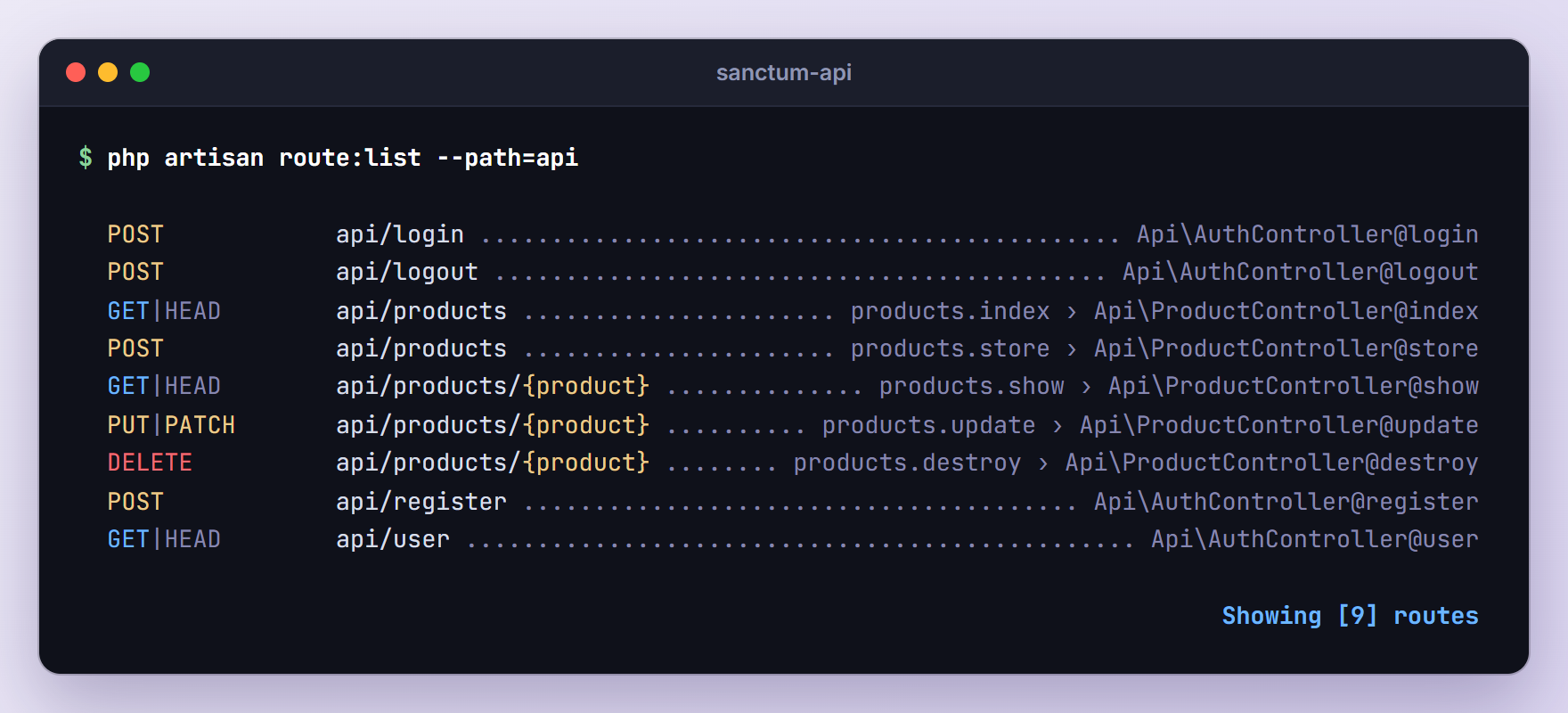
Add -v to see the middleware on each route.
Step 9: Throttle Login Attempts
Login endpoints attract password guessing, and the Laravel 13 api middleware group has no rate limiter by default. Define a named limiter in app/Providers/AppServiceProvider.php:
<?php

namespace App\Providers;

use Illuminate\Cache\RateLimiting\Limit;
use Illuminate\Http\Request;
use Illuminate\Support\Facades\RateLimiter;
use Illuminate\Support\ServiceProvider;

class AppServiceProvider extends ServiceProvider
{
    /**
     * Register any application services.
     */
    public function register(): void
    {
        //
    }

    /**
     * Bootstrap any application services.
     */
    public function boot(): void
    {
        RateLimiter::for('login', function (Request $request) {
            return Limit::perMinute(5)->by($request->string('email')->lower().'|'.$request->ip());
        });
    }
}
This allows five login requests per minute for each email and IP pair, successful or not. The sixth gets 429 Too Many Requests with a Retry-After header. The rate limiting docs cover more options.
Step 10: Set Token Expiration and Prune Old Tokens
Sanctum tokens never expire by default. Our app limits them in two ways. Per token, the third argument of createToken() (now()->addDays(30) in the AuthController) fills the expires_at column. Globally, the expiration option in config/sanctum.php sets a lifetime in minutes:
'expiration' => 60 * 24 * 365,
This caps every token at one year, even if you forget the third argument somewhere. Sanctum checks both values on every request and rejects a token as soon as either one has passed.
Expired tokens stay in the database, so schedule Sanctum’s sanctum:prune-expired command at the bottom of routes/console.php:
<?php

use Illuminate\Foundation\Inspiring;
use Illuminate\Support\Facades\Artisan;
use Illuminate\Support\Facades\Schedule;

Artisan::command('inspire', function () {
    $this->comment(Inspiring::quote());
})->purpose('Display an inspiring quote');

Schedule::command('sanctum:prune-expired --hours=24')->daily();
--hours=24 only deletes tokens that expired more than a day ago. Check the schedule and run the command once by hand:
php artisan schedule:list
php artisan sanctum:prune-expired --hours=24
  0 0 * * *  php artisan sanctum:prune-expired --hours=24 ............ Next Due: 16 hours from now

  Pruning tokens with expired expires_at timestamps ................................. 18.68ms DONE
  Pruning tokens with expired expiration value based on configuration file ........... 0.48ms DONE

   INFO  Tokens expired for more than [24 hours] pruned successfully.
The scheduler needs a cron entry that runs php artisan schedule:run every minute; our Laravel 13 task scheduling guide shows the setup.
Step 11: Test the API With curl
Start the development server in a second terminal:
php artisan serve
Save the base URL in a shell variable:
API=http://127.0.0.1:8000/api
In the outputs below I formatted the JSON and removed unrelated headers such as Date. I also captured them with APP_DEBUG=false; with debug mode on, errors also include exception, file, line and trace keys.
Register and Log In
curl -s -i -X POST $API/register \
  -H "Accept: application/json" \
  -H "Content-Type: application/json" \
  -d '{"name":"Hamza","email":"hamza@example.com","password":"password123","password_confirmation":"password123","device_name":"curl"}'
That returns 201 Created and a first token. Logging in from a new device works like this:
curl -s -i -X POST $API/login \
  -H "Accept: application/json" \
  -H "Content-Type: application/json" \
  -d '{"email":"hamza@example.com","password":"password123","device_name":"curl"}'
HTTP/1.1 200 OK
Content-Type: application/json
X-RateLimit-Limit: 5
X-RateLimit-Remaining: 4

{
    "token": "2|toSGArQgb1p2yRgatacy6Hv0NFMdKNGXQePFCrrjbfa59e79",
    "token_type": "Bearer",
    "abilities": [
        "products:read",
        "products:write"
    ],
    "expires_at": "2026-11-24T07:13:36.000000Z",
    "user": {
        "id": 1,
        "name": "Hamza",
        "email": "hamza@example.com",
        "created_at": "2026-10-25T07:13:35.000000Z"
    }
}
The 2| prefix is the token’s database ID, and the X-RateLimit-* headers come from our limiter. Store the token:
TOKEN="paste-the-token-from-the-login-response"
Create and List Products
curl -s -i -X POST $API/products \
  -H "Accept: application/json" \
  -H "Content-Type: application/json" \
  -H "Authorization: Bearer $TOKEN" \
  -d '{"name":"Mechanical Keyboard","price":89.99,"quantity":25}'
HTTP/1.1 201 Created
Content-Type: application/json

{
    "data": {
        "id": 1,
        "name": "Mechanical Keyboard",
        "price": "89.99",
        "quantity": 25,
        "created_at": "2026-10-25T07:13:36.000000Z",
        "updated_at": "2026-10-25T07:13:36.000000Z"
    }
}
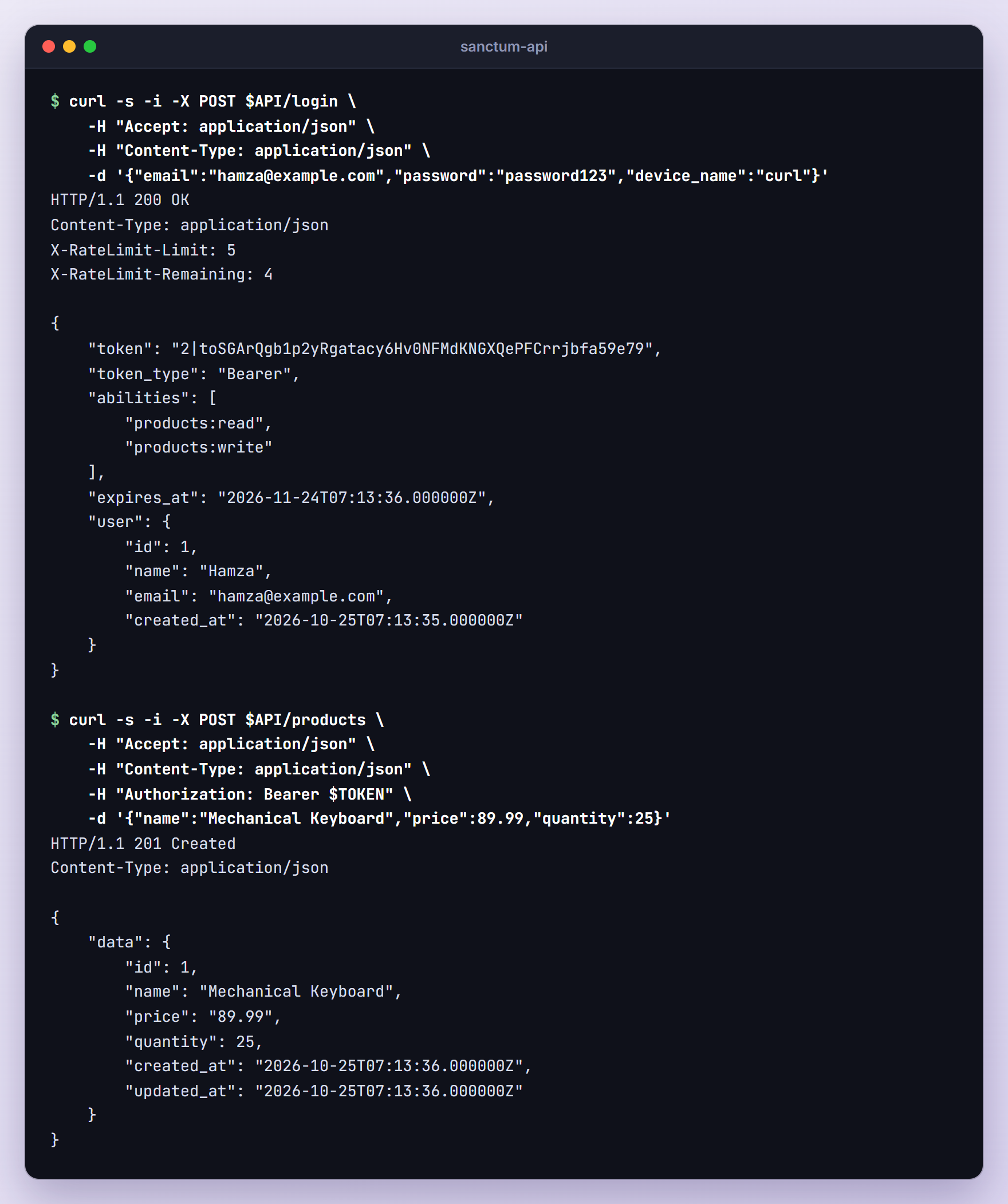
After adding a USB-C Hub the same way, list the products:
curl -s -i $API/products -H "Accept: application/json" -H "Authorization: Bearer $TOKEN"
HTTP/1.1 200 OK
Content-Type: application/json

{
    "data": [
        {
            "id": 2,
            "name": "USB-C Hub",
            "price": "34.50",
            "quantity": 40,
            "created_at": "2026-10-25T07:13:36.000000Z",
            "updated_at": "2026-10-25T07:13:36.000000Z"
        },
        {
            "id": 1,
            "name": "Mechanical Keyboard",
            "price": "89.99",
            "quantity": 25,
            "created_at": "2026-10-25T07:13:36.000000Z",
            "updated_at": "2026-10-25T07:13:36.000000Z"
        }
    ],
    "links": {
        "first": "http://127.0.0.1:8000/api/products?page=1",
        "last": "http://127.0.0.1:8000/api/products?page=1",
        "prev": null,
        "next": null
    },
    "meta": {
        "current_page": 1,
        "from": 1,
        "last_page": 1,
        "links": [
            ...
        ],
        "path": "http://127.0.0.1:8000/api/products",
        "per_page": 10,
        "to": 2,
        "total": 2
    }
}
That is the paginated resource format: products in data, page URLs in links, counts in meta. A PATCH to $API/products/1 with {"quantity":20} returns the updated product, and a DELETE returns 204 No Content.
Requests That Should Fail
No token:
curl -s -i $API/products -H "Accept: application/json"
HTTP/1.1 401 Unauthorized
Content-Type: application/json

{
    "message": "Unauthenticated."
}
Sending the token without the Bearer prefix gives the same 401.
Now a read-only token. Log in again and request only products:read:
curl -s -i -X POST $API/login \
  -H "Accept: application/json" \
  -H "Content-Type: application/json" \
  -d '{"email":"hamza@example.com","password":"password123","device_name":"stock-report","abilities":["products:read"]}'
The response lists only "products:read". Save that token as READ_TOKEN. Listing products works with it, but creating one fails:
curl -s -i -X POST $API/products \
  -H "Accept: application/json" \
  -H "Content-Type: application/json" \
  -H "Authorization: Bearer $READ_TOKEN" \
  -d '{"name":"Monitor Arm","price":59,"quantity":10}'
HTTP/1.1 403 Forbidden
Content-Type: application/json

{
    "message": "Invalid ability provided."
}
Next, the policy. I registered a second user, Sara, saved her token as SARA_TOKEN and requested Hamza’s product:
curl -s -i $API/products/1 -H "Accept: application/json" -H "Authorization: Bearer $SARA_TOKEN"
HTTP/1.1 403 Forbidden
Content-Type: application/json

{
    "message": "This action is unauthorized."
}
Then the throttle. Six logins with a wrong password, printing only the status codes:
for i in 1 2 3 4 5 6; do curl -s -o /dev/null -w "%{http_code}\n" -X POST $API/login -H "Accept: application/json" -H "Content-Type: application/json" -d '{"email":"sara@example.com","password":"not-my-password","device_name":"curl"}'; done
422
422
422
422
422
429
Even the correct password is blocked until the minute is over:
curl -s -i -X POST $API/login \
  -H "Accept: application/json" \
  -H "Content-Type: application/json" \
  -d '{"email":"sara@example.com","password":"password123","device_name":"curl"}'
HTTP/1.1 429 Too Many Requests
X-RateLimit-Limit: 5
X-RateLimit-Remaining: 0
Retry-After: 58
X-RateLimit-Reset: 1792912478
Content-Type: application/json

{
    "message": "Too Many Attempts."
}
Finally, log out and reuse the token:
curl -s -i -X POST $API/logout -H "Accept: application/json" -H "Authorization: Bearer $TOKEN"
curl -s -i $API/user -H "Accept: application/json" -H "Authorization: Bearer $TOKEN"
The logout returns 204 No Content and the next request gets the 401 Unauthenticated. response, because the token row is gone.
Step 12: Return JSON Errors Even Without an Accept Header
Every command above sends Accept: application/json, but real clients forget it. The shouldRenderJsonWhen() call you saw in bootstrap/app.php ships with the Laravel 13 skeleton and renders exceptions on api/* URLs as JSON anyway. Validation errors behave well without the header:
curl -s -i -X POST $API/login -H "Content-Type: application/json" -d '{"email":"not-an-email"}'
HTTP/1.1 422 Unprocessable Content
Content-Type: application/json
X-RateLimit-Limit: 5
X-RateLimit-Remaining: 4

{
    "message": "The email field must be a valid email address. (and 2 more errors)",
    "errors": {
        "email": [
            "The email field must be a valid email address."
        ],
        "password": [
            "The password field is required."
        ],
        "device_name": [
            "The device name field is required."
        ]
    }
}
Authentication errors do not. Here is a guest request without the header, before the fix below (debug mode on):
curl -s -i $API/user
HTTP/1.1 500 Internal Server Error
Content-Type: application/json

{
    "message": "Route [login] not defined.",
    "exception": "Symfony\\Component\\Routing\\Exception\\RouteNotFoundException",
    ...
}
In production the client only sees {"message": "Server Error"}. When a guest request does not ask for JSON, the auth middleware builds a redirect to the route named login before the exception handler can answer with JSON, and an API-only app has no such route.
The fix goes in bootstrap/app.php. Add this below the alias() call inside withMiddleware():
$middleware->redirectGuestsTo(
    fn (Request $request) => $request->is('api/*') ? null : route('login'),
);
null means “do not redirect”, so API guests get JSON while web routes still redirect to login once you add one. The same request now returns:
HTTP/1.1 401 Unauthorized
Content-Type: application/json

{
    "message": "Unauthenticated."
}
Clients should still send the header. If you also serve HTML pages, our Laravel 13 custom error pages guide covers the browser side of error handling.
Step 13: Write Feature Tests
The curl requests prove the API works today; feature tests keep it working. Generate two classes:
php artisan make:test AuthTest
php artisan make:test ProductTest
Replace tests/Feature/AuthTest.php:
<?php

namespace Tests\Feature;

use App\Models\User;
use Illuminate\Foundation\Testing\RefreshDatabase;
use Tests\TestCase;

class AuthTest extends TestCase
{
    use RefreshDatabase;

    public function test_a_user_can_register_and_receives_a_token(): void
    {
        $response = $this->postJson('/api/register', [
            'name' => 'Hamza',
            'email' => 'hamza@example.com',
            'password' => 'password123',
            'password_confirmation' => 'password123',
            'device_name' => 'phpunit',
        ]);

        $response->assertCreated()
            ->assertJsonStructure(['token', 'token_type', 'abilities', 'expires_at', 'user' => ['id', 'name', 'email']]);

        $this->assertDatabaseHas('users', ['email' => 'hamza@example.com']);
        $this->assertDatabaseCount('personal_access_tokens', 1);
    }

    public function test_a_user_can_log_in_and_receives_a_token(): void
    {
        $user = User::factory()->create();

        $this->postJson('/api/login', [
            'email' => $user->email,
            'password' => 'password',
            'device_name' => 'phpunit',
        ])->assertOk()
            ->assertJsonPath('token_type', 'Bearer')
            ->assertJsonPath('abilities', ['products:read', 'products:write']);
    }

    public function test_login_fails_with_a_wrong_password(): void
    {
        $user = User::factory()->create();

        $this->postJson('/api/login', [
            'email' => $user->email,
            'password' => 'wrong-password',
            'device_name' => 'phpunit',
        ])->assertUnprocessable()
            ->assertJsonValidationErrors('email');
    }

    public function test_requests_without_a_token_are_rejected(): void
    {
        $this->getJson('/api/user')
            ->assertUnauthorized()
            ->assertJson(['message' => 'Unauthenticated.']);
    }

    public function test_logout_revokes_the_current_token(): void
    {
        $user = User::factory()->create();
        $token = $user->createToken('phpunit')->plainTextToken;

        $this->withToken($token)->getJson('/api/user')->assertOk();
        $this->withToken($token)->postJson('/api/logout')->assertNoContent();

        $this->assertDatabaseCount('personal_access_tokens', 0);

        // The auth guard caches the user between requests in one test.
        $this->app['auth']->forgetGuards();

        $this->withToken($token)->getJson('/api/user')->assertUnauthorized();
    }

    public function test_expired_tokens_are_rejected(): void
    {
        $user = User::factory()->create();
        $token = $user->createToken('phpunit', ['*'], now()->addDay())->plainTextToken;

        $this->travel(2)->days();

        $this->withToken($token)->getJson('/api/user')->assertUnauthorized();
    }

    public function test_login_is_rate_limited(): void
    {
        $user = User::factory()->create();

        for ($i = 0; $i < 5; $i++) {
            $this->postJson('/api/login', [
                'email' => $user->email,
                'password' => 'wrong-password',
                'device_name' => 'phpunit',
            ])->assertUnprocessable();
        }

        $this->postJson('/api/login', [
            'email' => $user->email,
            'password' => 'password',
            'device_name' => 'phpunit',
        ])->assertTooManyRequests();
    }
}
The token tests send real tokens: withToken() adds the Bearer header, so the hash lookup and expiry check run, and travel() moves the clock forward. The default UserFactory password is password. One subtle line: Laravel reuses the application for every request inside a test, and the auth guard remembers the user it resolved. Without forgetGuards(), the request after logout still returned 200 when I tried it.
Replace tests/Feature/ProductTest.php:
<?php

namespace Tests\Feature;

use App\Models\Product;
use App\Models\User;
use Illuminate\Foundation\Testing\RefreshDatabase;
use Laravel\Sanctum\Sanctum;
use Tests\TestCase;

class ProductTest extends TestCase
{
    use RefreshDatabase;

    public function test_users_only_see_their_own_products(): void
    {
        $user = User::factory()->create();
        Product::factory()->count(3)->for($user)->create();
        Product::factory()->count(2)->create();

        Sanctum::actingAs($user, ['products:read']);

        $this->getJson('/api/products')
            ->assertOk()
            ->assertJsonCount(3, 'data')
            ->assertJsonPath('meta.total', 3);
    }

    public function test_a_user_can_create_a_product(): void
    {
        $user = Sanctum::actingAs(User::factory()->create(), ['products:write']);

        $this->postJson('/api/products', [
            'name' => 'Mechanical Keyboard',
            'price' => 89.99,
            'quantity' => 25,
        ])->assertCreated()
            ->assertJsonPath('data.price', '89.99');

        $this->assertDatabaseHas('products', [
            'user_id' => $user->id,
            'name' => 'Mechanical Keyboard',
        ]);
    }

    public function test_a_read_only_token_cannot_create_products(): void
    {
        $user = User::factory()->create();
        $token = $user->createToken('stock-report', ['products:read'])->plainTextToken;

        $this->withToken($token)->getJson('/api/products')->assertOk();

        $this->withToken($token)
            ->postJson('/api/products', ['name' => 'Desk', 'price' => 150, 'quantity' => 1])
            ->assertForbidden()
            ->assertJson(['message' => 'Invalid ability provided.']);
    }

    public function test_users_cannot_touch_another_users_product(): void
    {
        $product = Product::factory()->create();

        Sanctum::actingAs(User::factory()->create(), ['*']);

        $this->getJson("/api/products/{$product->id}")->assertForbidden();
        $this->patchJson("/api/products/{$product->id}", ['quantity' => 0])->assertForbidden();
        $this->deleteJson("/api/products/{$product->id}")->assertForbidden();
    }

    public function test_a_user_can_update_and_delete_their_product(): void
    {
        $user = User::factory()->create();
        $product = Product::factory()->for($user)->create();

        Sanctum::actingAs($user, ['*']);

        $this->patchJson("/api/products/{$product->id}", ['quantity' => 5])
            ->assertOk()
            ->assertJsonPath('data.quantity', 5);

        $this->deleteJson("/api/products/{$product->id}")->assertNoContent();

        $this->assertModelMissing($product);
    }

    public function test_product_input_is_validated(): void
    {
        Sanctum::actingAs(User::factory()->create(), ['products:write']);

        $this->postJson('/api/products', ['name' => '', 'price' => -5])
            ->assertUnprocessable()
            ->assertJsonValidationErrors(['name', 'price', 'quantity']);
    }
}
Sanctum::actingAs($user, $abilities) logs a user in with the abilities you list and skips token creation, which keeps authorization tests short. The token it attaches is a fake object, though, so currentAccessToken()->delete() does nothing with it. That is why the logout test uses a real token, and the read-only test does too, so the ability check runs against a stored token. Run the suite:
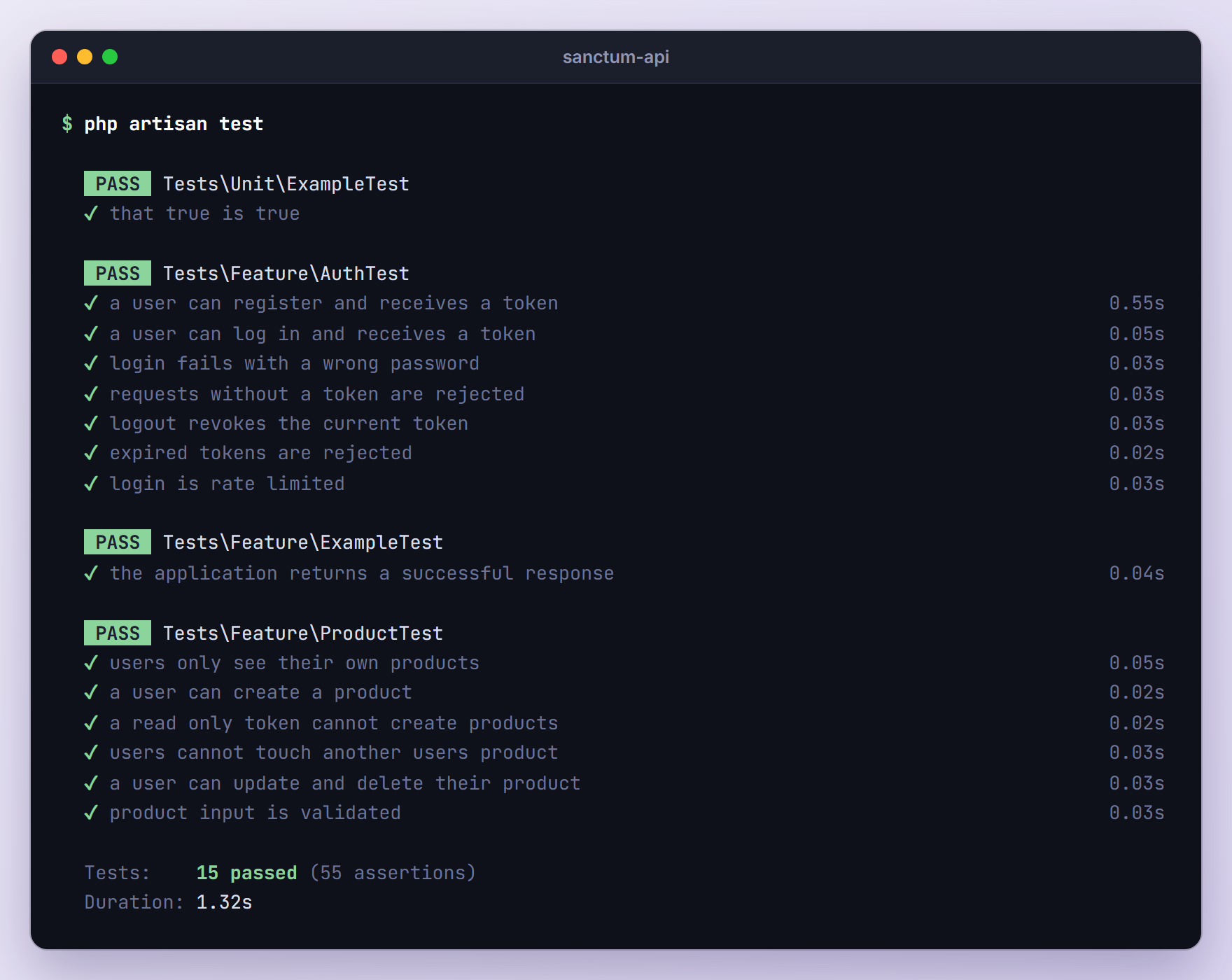
php artisan test
SPA Cookie Authentication vs API Tokens
API tokens suit mobile apps, CLI tools, other servers and third-party integrations. For your own single page app (Vue, React, Nuxt or Next.js) on the same top-level domain, the Sanctum docs recommend session cookies instead, which add CSRF protection and keep the credentials away from XSS.
In short, you call $middleware->statefulApi() in bootstrap/app.php, list your frontend domains in the stateful option of config/sanctum.php, request /sanctum/csrf-cookie, then log in through a normal session route. auth:sanctum accepts both kinds of requests, and tokenCan() always returns true for cookie-authenticated ones, so our routes keep working. Read the SPA authentication section of the Sanctum docs next.
Troubleshooting
“Route [login] not defined.”
You get this 500 error when a guest request without Accept: application/json reaches an auth:sanctum route; plain curl, for example, sends Accept: */*. Add the redirectGuestsTo() callback from Step 12 and send the header from your clients. Web routes that use the auth middleware still need a route named login.
401 “Unauthenticated.” Although You Send a Token
The header must be Authorization: Bearer <token> with the complete token exactly as the API returned it. Expired tokens and tokens deleted on logout also return 401.
If the token works with php artisan serve but not on Apache, the server may not pass the Authorization header to PHP. Laravel’s default public/.htaccess contains a rule for this:
# Handle Authorization Header
RewriteCond %{HTTP:Authorization} .
RewriteRule .* - [E=HTTP_AUTHORIZATION:%{HTTP:Authorization}]
Check that the rule survived if you replaced the file, and that Apache reads .htaccess files for your site (mod_rewrite enabled, overrides allowed).
“Target class [ability] does not exist.”
The ability middleware aliases are missing. Laravel 13 has no Kernel.php and Sanctum does not register them, so add abilities and ability with $middleware->alias() in bootstrap/app.php as in Step 8.
CORS Errors From a Browser Frontend
The global HandleCors middleware uses a built-in config that allows any origin, method and header on api/*, so a frontend that sends Bearer tokens from another port works out of the box. A preflight from http://localhost:5173 returned:
HTTP/1.0 204 No Content
Access-Control-Allow-Origin: *
Access-Control-Allow-Methods: GET
Access-Control-Allow-Headers: authorization
New projects have no config/cors.php. To restrict allowed_origins or enable supports_credentials for cookie-based SPAs, publish it:
php artisan config:publish cors
When you enable credentials, replace * in allowed_origins with your exact frontend URLs.
The Plain-Text Token Is Only Shown Once
That is by design. The token column holds a 64-character SHA-256 hash, so the original cannot be recovered. The client must log in again; delete the old token with $user->tokens()->where('id', $tokenId)->delete() or let it expire.
403 Instead of 404 for Another User’s Product
A denied policy check returns 403 “This action is unauthorized.”, while a missing ID returns 404 “No query results for model [App\Models\Product] 999”. To avoid confirming that an ID exists, import Illuminate\Auth\Access\Response in the policy and deny with a 404:
use Illuminate\Auth\Access\Response;

public function view(User $user, Product $product): Response
{
    return $user->id === $product->user_id
        ? Response::allow()
        : Response::denyAsNotFound();
}
Sara’s request then returns 404 with {"message": "Not Found"}. Change update() and delete() the same way for consistent answers.
Upgrading From Laravel 5.x Passport or JWT Tutorials
Moving a Laravel 5.6 API like the ones in our old tutorials to Laravel 13? Watch for these changes:
- There is no
app/Http/Kernel.php. Middleware aliases go inwithMiddleware()in bootstrap/app.php. - New projects have no API routes. Run
php artisan install:api, orphp artisan install:api --passportif you still need Passport. - There is no
AuthServiceProvider. Policies are discovered by name or registered withGate::policy()inAppServiceProvider. - The base
Controlleris empty, so$this->authorize()needs theIlluminate\Foundation\Auth\Access\AuthorizesRequeststrait.Gate::authorize()works everywhere. - The
hashedcast replacesbcrypt($request->password)in controllers. - Sanctum tokens are not JWTs. Existing
tymon/jwt-authtokens stop working, so clients log in once more. TheAuthorization: Bearerheader stays the same.
Frequently Asked Questions
When should I use Laravel Passport instead of Sanctum?
Use Passport when you need a real OAuth2 server, for example when other companies’ apps should let your users sign in with your service and get scoped access, or when you need OAuth2 grants such as authorization code with PKCE, client credentials or device authorization. For your own mobile app, SPA, scripts or simple integrations, Sanctum is simpler, and the Passport docs recommend it for those cases.
Is a Sanctum token a JWT?
No. It is a random string with the database ID in front, like 2|toSG..., and it carries no data or signature. Sanctum looks it up in personal_access_tokens on every request. That costs a query but lets you revoke a token instantly by deleting its row, while a JWT stays valid until it expires unless you build a blocklist.
How do I log a user out of every device?
Delete all of their tokens instead of the current one: $request->user()->tokens()->delete(). The tokens() relationship comes from HasApiTokens. Offer it as a “log out everywhere” endpoint, or run it when a user changes their password so stolen tokens stop working at once.
How can users see which devices are logged in?
Every token row stores the name passed to createToken() (our device_name), its abilities, expires_at and last_used_at, which Sanctum updates on each authenticated request. Return $request->user()->tokens through an API resource to build a “your devices” screen, with a button that deletes a single token by ID.
Wrapping Up
We added Laravel Sanctum API authentication to a Laravel 13 store API: token registration and login, logout, a per-user Product CRUD guarded by a policy, read-only abilities, expiring tokens with scheduled pruning, login throttling, JSON errors that do not depend on the Accept header, and tests with real tokens.
Next, add an endpoint that lists and revokes tokens, move validation into Form Requests (php artisan make:request) as the API grows, and read the SPA section of the Sanctum docs if a browser frontend is coming.
Learn more about Laravel:
