


A Laravel file upload looks like a one-liner: $request->file('photo')->store('photos'). That line works, but a real feature also has to check what actually arrived, decide who may see it, give it a name nobody can abuse, clean it up when the record is deleted, and prove all of that with tests.
In this tutorial we will build a small media library for a blog: public photos in a gallery, private documents that only their owner can download, and a feature test suite that covers both. We will use Laravel 13 (version 13.38 at the time of writing) with PHP 8.4. Everything here works on PHP 8.3 or newer.
This guide replaces two older TutsForWeb posts: the Laravel 5.5 Dropzone image upload tutorial and our post on testing file uploads. The Dropzone version moved files straight into public/images and resized them with Intervention Image. Today files go through storage disks, validation has a fluent File rule, private files get signed temporary URLs, and Laravel has its own image API for resizing.
Table of Contents
Prerequisites
- PHP 8.3 or newer with the
fileinfoextension (a Laravel requirement) andgd(fake images in tests need it) - Composer
- Basic Laravel knowledge: routes, controllers, Blade and migrations
Creating the Project
Create a fresh application and move into it (laravel new uploads-demo with no starter kit works too):
composer create-project laravel/laravel uploads-demo
cd uploads-demo
The new app uses SQLite and has already run its migrations. Seed the default test user, because we will sign in as test@example.com with the password password:
php artisan db:seed
Creating the Uploads Table and Model
Every stored file gets a database row, so we always know where it lives and who owns it. Generate the model and its migration:
php artisan make:model Upload -m
Open the new migration in database/migrations and replace the Schema::create() call inside up():
Schema::create('uploads', function (Blueprint $table) {
    $table->id();
    $table->foreignId('user_id')->constrained();
    $table->string('album')->nullable();
    $table->string('disk');
    $table->string('path');
    $table->string('original_name');
    $table->string('mime_type');
    $table->unsignedBigInteger('size');
    $table->timestamps();
});
disk and path are all we need to find a file again, whichever disk it ended up on. original_name is only for display and downloads, while mime_type and size come from the server’s own inspection of the file, not from the browser. Only photos use album.
Next, replace the contents of app/Models/Upload.php:
<?php

namespace App\Models;

use Illuminate\Database\Eloquent\Attributes\Fillable;
use Illuminate\Database\Eloquent\Model;
use Illuminate\Database\Eloquent\Relations\BelongsTo;

#[Fillable(['album', 'disk', 'path', 'original_name', 'mime_type', 'size'])]
class Upload extends Model
{
    public function user(): BelongsTo
    {
        return $this->belongsTo(User::class);
    }
}
The #[Fillable] attribute declares the mass assignable columns, the same style the default User model uses in Laravel 13. Open app/Models/User.php, import Illuminate\Database\Eloquent\Relations\HasMany and add the other side of the relationship:
public function uploads(): HasMany
{
    return $this->hasMany(Upload::class);
}
Run the migration:
php artisan migrate
Defining the Routes and the Policy
Replace routes/web.php with the following:
<?php

use App\Http\Controllers\UploadController;
use Illuminate\Support\Facades\Route;

Route::get('/', function () {
    return view('welcome');
});

// auth.basic keeps the demo free of a login page. Use 'auth' if your app has one.
Route::middleware('auth.basic')->group(function () {
    Route::get('/uploads', [UploadController::class, 'index'])->name('uploads.index');
    Route::post('/uploads/photos', [UploadController::class, 'storePhotos'])->name('uploads.photos');
    Route::post('/uploads/documents', [UploadController::class, 'storeDocument'])->name('uploads.documents');
    Route::get('/uploads/{upload}/download', [UploadController::class, 'download'])
        ->name('uploads.download')
        ->can('view', 'upload');
    Route::delete('/uploads/{upload}', [UploadController::class, 'destroy'])
        ->name('uploads.destroy')
        ->can('delete', 'upload');
});
Uploads belong to users, so every route requires a signed-in user. auth.basic is Laravel’s built-in HTTP Basic authentication: the browser shows a login prompt and Laravel checks the credentials against the users table. It keeps this tutorial independent of any starter kit. If your app already has a login page, use auth instead; only the guest test changes, because guests are then redirected to your login page.
The can() calls run a policy check before the controller and answer 403 Forbidden to anyone who is not the owner. Generate the policy:
php artisan make:policy UploadPolicy --model=Upload
Replace the generated stubs in app/Policies/UploadPolicy.php with two rules:
<?php

namespace App\Policies;

use App\Models\Upload;
use App\Models\User;

class UploadPolicy
{
    /**
     * Only the owner may download a file.
     */
    public function view(User $user, Upload $upload): bool
    {
        return $user->id === $upload->user_id;
    }

    /**
     * Only the owner may delete a file.
     */
    public function delete(User $user, Upload $upload): bool
    {
        return $user->id === $upload->user_id;
    }
}
Laravel discovers this policy automatically because App\Policies\UploadPolicy follows the naming convention for App\Models\Upload.
Building the Upload Form
Create resources/views/uploads/index.blade.php:
<!DOCTYPE html>
<html lang="en">
<head>
    <meta charset="utf-8">
    <title>Media Library</title>
    <style>
        * { box-sizing: border-box; }
        body { font-family: system-ui, sans-serif; max-width: 960px; margin: 2rem auto; padding: 0 1rem; color: #1f2937; }
        .card { border: 1px solid #e5e7eb; border-radius: 8px; padding: 1rem; margin: 0 0 1rem; }
        .card h2 { margin-top: 0; }
        label, input[type=file] { display: block; }
        label { font-weight: 600; margin: .75rem 0 .25rem; }
        input[type=text] { width: 100%; padding: .5rem; border: 1px solid #d1d5db; border-radius: 6px; }
        button { margin-top: .5rem; padding: .4rem .9rem; border: 0; border-radius: 6px; background: #4f46e5; color: #fff; }
        .error { color: #b91c1c; margin: .25rem 0; }
        .status { background: #ecfdf5; color: #065f46; padding: .75rem 1rem; border-radius: 6px; }
        .gallery { display: grid; grid-template-columns: repeat(auto-fill, minmax(200px, 1fr)); gap: 1rem; }
        .gallery img { width: 100%; height: 150px; object-fit: cover; border-radius: 6px; }
        small { color: #6b7280; }
    </style>
</head>
<body>
    <h1>Media Library</h1>

    @if (session('status'))
        <p class="status">{{ session('status') }}</p>
    @endif

    <form class="card" method="POST" action="{{ route('uploads.photos') }}" enctype="multipart/form-data">
        @csrf
        <h2>Upload Photos (Public)</h2>

        <label for="album">Album</label>
        <input type="text" id="album" name="album" value="{{ old('album') }}">
        @error('album') <p class="error">{{ $message }}</p> @enderror

        <label for="photos">Photos (up to 5 images, 5 MB each)</label>
        <input type="file" id="photos" name="photos[]" accept="image/*" multiple>
        @error('photos') <p class="error">{{ $message }}</p> @enderror
        @foreach ($errors->get('photos.*') as $messages)
            <p class="error">{{ $messages[0] }}</p>
        @endforeach

        <button type="submit">Upload photos</button>
    </form>

    <form class="card" method="POST" action="{{ route('uploads.documents') }}" enctype="multipart/form-data">
        @csrf
        <h2>Upload a Private Document</h2>

        <label for="document">PDF or Word file (10 MB max)</label>
        <input type="file" id="document" name="document" accept=".pdf,.docx">
        @error('document') <p class="error">{{ $message }}</p> @enderror

        <button type="submit">Upload document</button>
    </form>

    <h2>Photos</h2>
    <div class="gallery">
        @forelse ($photos as $photo)
            <div class="card">
                <img src="{{ Storage::disk($photo->disk)->url($photo->path) }}" alt="{{ $photo->original_name }}">
                <p>{{ $photo->album }}<br><small>{{ $photo->original_name }} ({{ round($photo->size / 1024) }} KB)</small></p>
                <form method="POST" action="{{ route('uploads.destroy', $photo) }}">
                    @csrf
                    @method('DELETE')
                    <button type="submit">Delete</button>
                </form>
            </div>
        @empty
            <p>No photos yet.</p>
        @endforelse
    </div>

    <h2>Private Documents</h2>
    @forelse ($documents as $document)
        <div class="card">
            {{ $document->original_name }} <small>({{ round($document->size / 1024) }} KB)</small><br>
            <a href="{{ route('uploads.download', $document) }}">Download</a> |
            <a href="{{ Storage::disk($document->disk)->temporaryUrl($document->path, now()->plus(minutes: 10)) }}">Share link (valid 10 minutes)</a>
            <form method="POST" action="{{ route('uploads.destroy', $document) }}">
                @csrf
                @method('DELETE')
                <button type="submit">Delete</button>
            </form>
        </div>
    @empty
        <p>No documents yet.</p>
    @endforelse
</body>
</html>
A few things to notice:
enctype="multipart/form-data"is required. Without it the browser sends only the file names as text, and validation fails with “The photo #1 field must be a file.”@csrfadds the hidden token. A form without it gets a 419 response.name="photos[]"plusmultiplesends an array of files.old('album')refills the album after a failed validation. File inputs cannot be refilled because browsers never let a page set their value, so users pick the files again.- Errors for individual files are stored under keys like
photos.1, so$errors->get('photos.*')collects them and we print the first message for each file.
Writing the Upload Controller
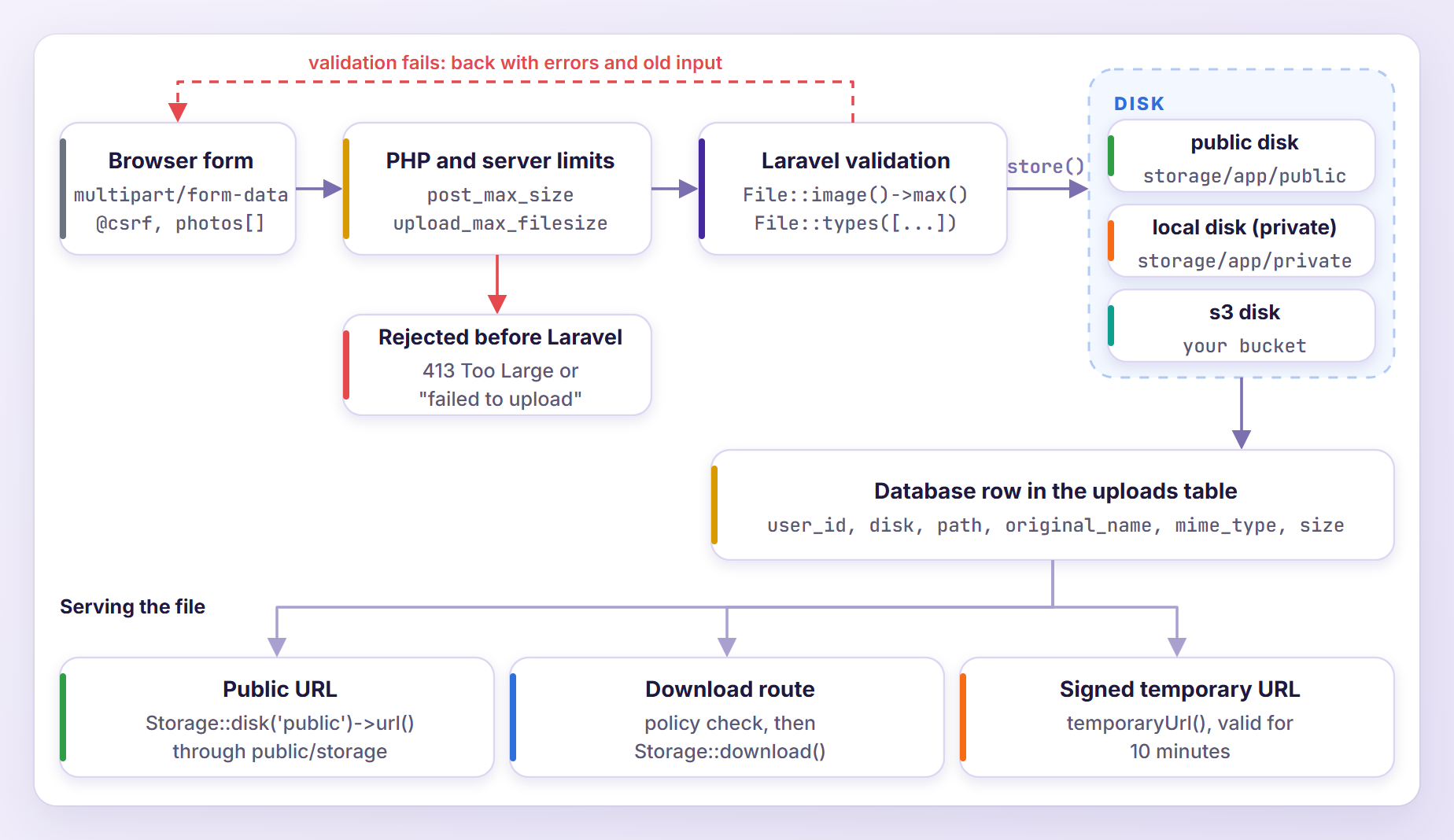
Every upload takes the same path through the app:
Generate the controller:
php artisan make:controller UploadController
Open app/Http/Controllers/UploadController.php and replace its contents with the first two actions:
<?php

namespace App\Http\Controllers;

use Illuminate\Http\RedirectResponse;
use Illuminate\Http\Request;
use Illuminate\Support\Str;
use Illuminate\Validation\Rule;
use Illuminate\Validation\Rules\File;
use Illuminate\View\View;

class UploadController extends Controller
{
    public function index(Request $request): View
    {
        $uploads = $request->user()->uploads()->latest()->get();

        return view('uploads.index', [
            'photos' => $uploads->where('disk', 'public'),
            'documents' => $uploads->where('disk', '!=', 'public'),
        ]);
    }

    public function storePhotos(Request $request): RedirectResponse
    {
        $validated = $request->validate([
            'album' => ['required', 'string', 'max:100'],
            'photos' => ['required', 'array', 'max:5'],
            'photos.*' => [
                File::image()
                    ->max('5mb')
                    ->dimensions(Rule::dimensions()->maxWidth(4000)->maxHeight(4000)),
            ],
        ], [], [
            'photos.*' => 'photo #:position',
        ]);

        $folder = 'photos/'.(Str::slug($validated['album']) ?: 'unsorted');

        foreach ($request->file('photos') as $photo) {
            $request->user()->uploads()->create([
                'album' => $validated['album'],
                'disk' => 'public',
                'path' => $photo->store($folder, 'public'),
                'original_name' => $photo->getClientOriginalName(),
                'mime_type' => $photo->getMimeType(),
                'size' => $photo->getSize(),
            ]);
        }

        return back()->with('status', 'Photos uploaded.');
    }
}
index() loads the user’s uploads once and splits them: photos live on the public disk, and everything else is a private document. storePhotos() validates the request, then stores and records each file.
Validating Uploads With the File Rule
The photos rules check the array itself (required, at most five items), while photos.* applies to every file inside it. File::image() accepts jpg, jpeg, png, gif, bmp, webp, avif, heic and heif. It rejects SVG unless you call File::image(allowSvg: true), because an SVG file can carry JavaScript. max('5mb') caps each file, and dimensions() rejects anything wider or taller than 4,000 pixels.
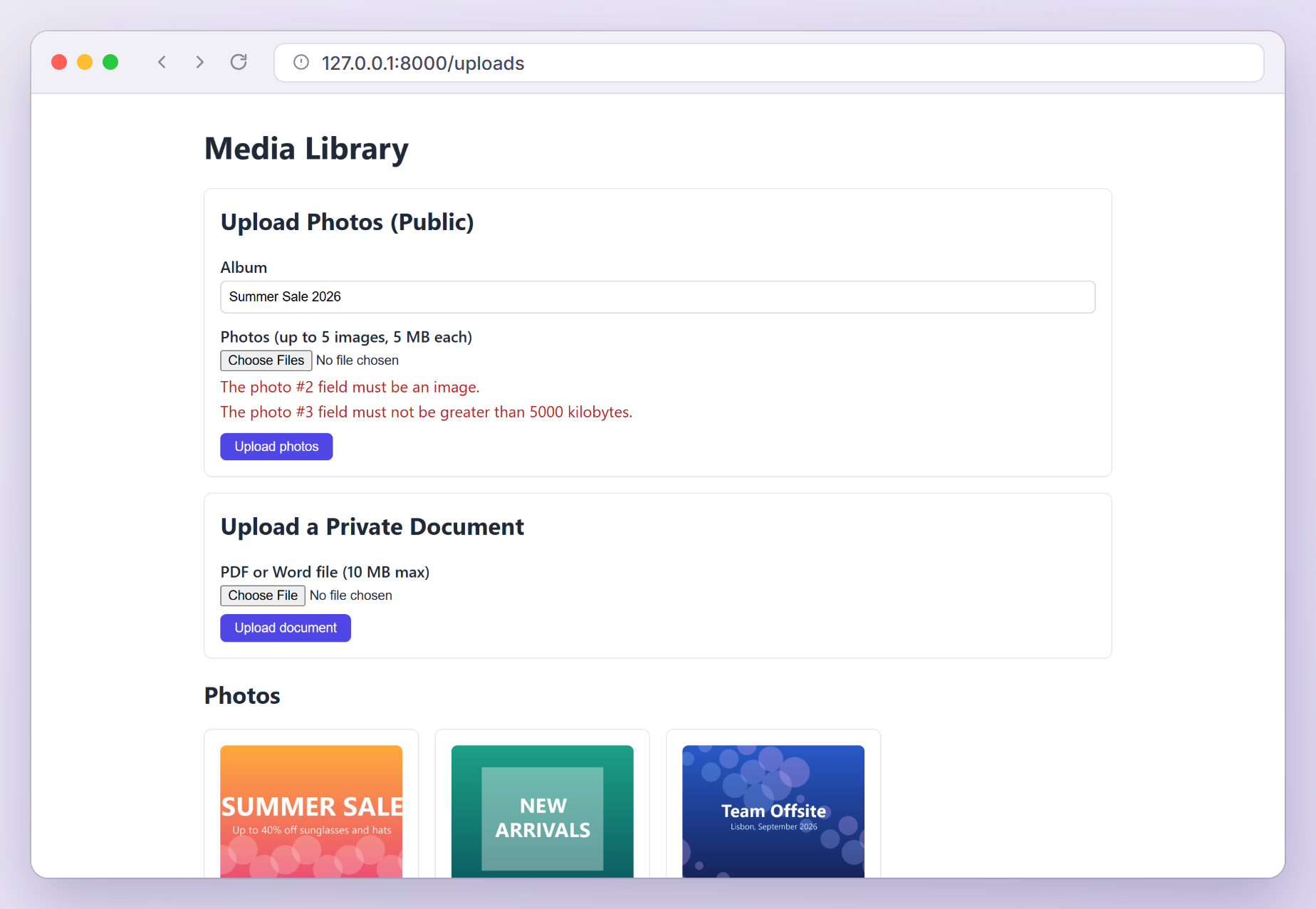
Laravel does not trust the file name here. The image and type rules detect the MIME type from the file’s content, so a PDF renamed to holiday.jpg still fails with “must be an image”.
The third argument of validate() renames attributes, and the :position placeholder turns photos.1 into “photo #2”. Note that size suffixes in the File rule are decimal: '5mb' means 5,000 kilobytes, the number the error message shows.
If you prefer the classic string rules, this line performs the same checks and produces the same messages (max is measured in kilobytes for files):
'photos.*' => ['image', 'max:5000', 'dimensions:max_width=4000,max_height=4000'],
Here is the form after submitting a valid banner, a PDF and a 14 MB JPEG together. The album keeps its value and each bad file gets its own message. Validation is all or nothing, so the valid banner was not stored either:
Storing Photos With Safe File Names
store($folder, 'public') writes the file to the public disk and returns its path, for example photos/summer-sale-2026/4a9OLBymeji6UH2NqxviOVhqaMmznNIrS04qshnt.jpg. The name comes from hashName(): 40 random characters plus an extension that Laravel guesses from the file’s content.
That matters because getClientOriginalName() and getClientOriginalExtension() return whatever the browser sent. The Laravel docs warn that a name such as shell.php could be executed as PHP if it ends up web accessible. So the original name goes into the database for display and downloads, never into the path.
The album name goes through Str::slug(), which keeps only lowercase letters, numbers and dashes, so it is safe as a folder name. If nothing usable is left, the folder falls back to unsorted. When you need a specific file name, use storeAs() with a name you generate yourself:
$path = $photo->storeAs($folder, Str::uuid().'.'.$photo->extension(), 'public');
One more setting is worth changing. Both disks ship with 'throw' => false, which makes store() quietly return false when a write fails. I set 'throw' => true on the local and public disks in config/filesystems.php, so a failed write throws League\Flysystem\UnableToWriteFile instead of saving a row with a broken path.
Linking the Public Disk With storage:link
The public disk keeps its files in storage/app/public, which the web server cannot reach. Create the link that exposes that folder as public/storage:
php artisan storage:link
Laravel confirms that the public/storage link has been connected to storage/app/public. Run the command once on every machine that serves the app, production included.
The view builds image URLs with Storage::disk($photo->disk)->url($photo->path). For the public disk that is your APP_URL followed by /storage/ and the path. Be careful with the shorter Storage::url(): it asks the default disk, which is the private local disk in a fresh app, and returns a host-less /storage/... path. Always ask the disk that holds the file.
Start the server with php artisan serve, open http://127.0.0.1:8000/uploads, sign in and upload a few photos.
Keeping Private Files Private
Photos are meant to be public. Contracts and invoices are not. Add these two methods to UploadController, and import App\Models\Upload, Illuminate\Support\Facades\Storage and Symfony\Component\HttpFoundation\StreamedResponse at the top:
public function storeDocument(Request $request): RedirectResponse
{
    $request->validate([
        'document' => ['required', File::types(['pdf', 'docx'])->max('10mb')],
    ]);

    $document = $request->file('document');

    $request->user()->uploads()->create([
        'disk' => config('filesystems.default'),
        'path' => $document->store('documents'),
        'original_name' => $document->getClientOriginalName(),
        'mime_type' => $document->getMimeType(),
        'size' => $document->getSize(),
    ]);

    return back()->with('status', 'Document uploaded.');
}

public function download(Upload $upload): StreamedResponse
{
    return Storage::disk($upload->disk)->download($upload->path, $upload->original_name);
}
File::types(['pdf', 'docx']) looks like a list of extensions, but it validates the detected MIME type, just like image(). store('documents') has no disk argument, so it uses the default disk from FILESYSTEM_DISK, which is local. That disk lives in storage/app/private, so these files are only reachable through your code or a signed URL. Recording the disk name pays off when we switch to S3.
Downloading Through a Controller
download() streams the file with a Content-Disposition: attachment; filename=invoice-1042.pdf header and the Content-Type detected from the stored file. The browser saves it under its original name instead of rendering it. The can('view', 'upload') middleware on the route has already turned away everyone but the owner, so the method can stay this short.
Sharing Temporary URLs
Sometimes you want a link that works without logging in, for example in an email. The view’s “Share link” calls temporaryUrl(), which works on the local disk because of the serve option that Laravel 13 enables in config/filesystems.php:
'local' => [
    'driver' => 'local',
    'root' => storage_path('app/private'),
    'serve' => true,
    'throw' => true,
    'report' => false,
],
With serve enabled, Laravel registers a GET /storage/{path} route for the disk and checks the expires and signature query parameters on every request. An expired or edited link gets a 403 locally and a 404 in production, and valid responses carry Cache-Control: no-store plus a sandboxed Content-Security-Policy header. Anyone holding the link can open the file until it expires, so keep the controller route for cases where every request must be authorized.
Note: If temporaryUrl() throws “This driver does not support creating temporary URLs.” in an app that started on an older Laravel version, add 'serve' => true to your local disk.
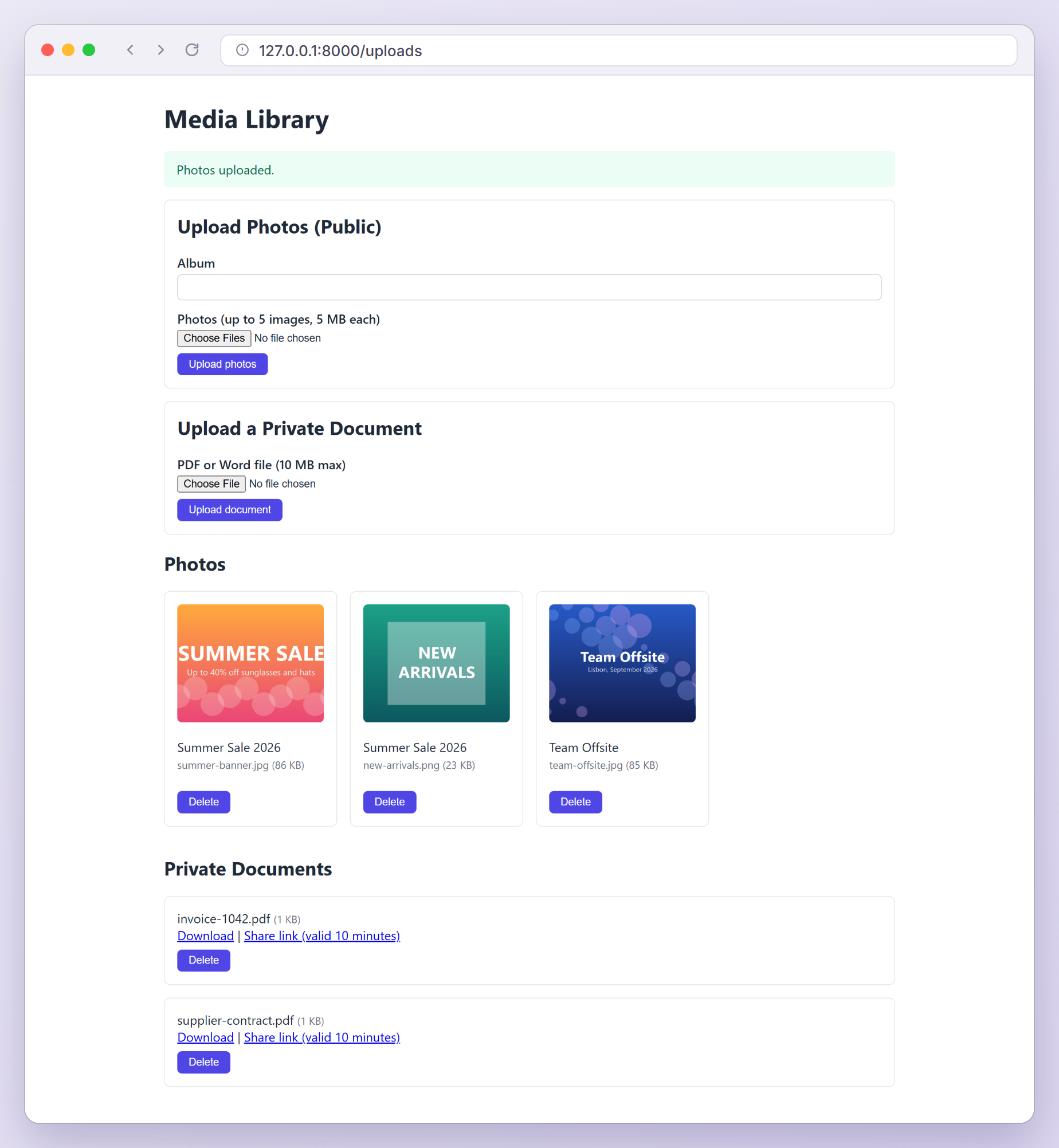
Here is the media library after uploading three photos and two documents:
Deleting Files With Their Database Records
Deleting a row should delete its file, otherwise your disk slowly fills with orphans. Add a booted() method to the Upload model and import Illuminate\Support\Facades\Storage:
protected static function booted(): void
{
    // Remove the stored file whenever the database row is deleted.
    static::deleted(function (Upload $upload) {
        Storage::disk($upload->disk)->delete($upload->path);
    });
}
Then add the last action to the controller:
public function destroy(Upload $upload): RedirectResponse
{
    $upload->delete();

    return back()->with('status', 'File deleted.');
}
Because the cleanup lives in the model, it runs wherever an upload is deleted through Eloquent, not only in this controller. Mass deletes such as Upload::where(...)->delete() skip model events, so load the models and delete them one by one when files are involved. The same reasoning is why the migration does not cascade deletes from users: a database cascade would remove the rows and leave the files behind.
Switching to Amazon S3
Install the Flysystem S3 adapter:
composer require league/flysystem-aws-s3-v3 "^3.0" --with-all-dependencies
Then point the default disk at S3 in .env. The s3 disk in config/filesystems.php already reads these variables:
FILESYSTEM_DISK=s3
AWS_ACCESS_KEY_ID=<your-key-id>
AWS_SECRET_ACCESS_KEY=<your-secret-access-key>
AWS_DEFAULT_REGION=us-east-1
AWS_BUCKET=<your-bucket-name>
That is the whole change for documents. store('documents') now writes to the bucket, download() streams from it, and temporaryUrl() returns a pre-signed S3 URL. Older rows still say local, so their files keep working. For S3 compatible services such as Cloudflare R2 or DigitalOcean Spaces, also set AWS_ENDPOINT.
Photos name their disk explicitly. To move them, use s3 in storePhotos() and store them with public visibility:
'disk' => 's3',
'path' => $photo->storePublicly($folder, 's3'),
storePublicly() and storePubliclyAs() store the file with public visibility, which on S3 is what lets visitors open the address returned by url().
PHP and Web Server Upload Limits
Before Laravel sees a single byte, PHP and the web server apply their own limits. Here is what happens when each one is exceeded:
| Limit | Default | What happens |
|---|---|---|
upload_max_filesize (php.ini) | 2M | The request arrives, but the file is marked as failed: “The photo #1 failed to upload.” |
post_max_size (php.ini) | 8M | PHP drops the whole body and Laravel throws PostTooLargeException (HTTP 413) |
max_file_uploads (php.ini) | 20 | Files beyond the limit are silently dropped |
client_max_body_size (nginx) | 1m | nginx answers “413 Request Entity Too Large” and Laravel never runs |
In this app the largest single file is 10 MB and one request can carry five 5 MB photos, so I would use:
upload_max_filesize = 10M
post_max_size = 30M
And in the nginx server block:
client_max_body_size 30m;
post_max_size must be larger than upload_max_filesize, and neither can be changed with ini_set() at runtime. php --ini shows the php.ini used on the command line, but PHP-FPM or Apache often load a different file, so edit that one and restart the service. Keep your validation limits below the server limits so users get friendly messages instead.
Laravel File Upload Security Checklist
Most upload vulnerabilities come from trusting the browser. Before you ship, check that:
- Every upload is validated on the server with content-based rules (
File::image(),File::types(),mimes).getClientMimeType()andgetClientOriginalExtension()are whatever the client sent. - Stored names are generated by your code (
store(),hashName(), a UUID), and the original name lives only in the database. - Private files sit on the private
localdisk or a private bucket, never underpublic/. - Downloads go through an authorized route or a short-lived signed URL, using
download()so the browser saves the file instead of rendering it. - SVG stays out of image uploads unless you really need it.
- The web server never executes PHP from upload folders. Laravel’s docs recommend denying it, and their sample nginx config only passes
index.phpto PHP.
Testing File Uploads
Storage::fake() swaps a disk for a temporary folder, and UploadedFile::fake() builds fake files, so tests never touch your real storage. Generate a test class:
php artisan make:test UploadTest
Replace tests/Feature/UploadTest.php with:
<?php

namespace Tests\Feature;

use App\Models\Upload;
use App\Models\User;
use Illuminate\Foundation\Testing\RefreshDatabase;
use Illuminate\Http\UploadedFile;
use Illuminate\Support\Facades\Storage;
use Tests\TestCase;

class UploadTest extends TestCase
{
    use RefreshDatabase;

    public function test_photos_are_stored_on_the_public_disk(): void
    {
        Storage::fake('public');
        $user = User::factory()->create();

        $this->actingAs($user)->post('/uploads/photos', [
            'album' => 'Summer Sale',
            'photos' => [
                UploadedFile::fake()->image('banner.jpg', 1200, 600),
                UploadedFile::fake()->image('hero.png', 800, 800),
            ],
        ])->assertRedirect()->assertSessionHasNoErrors();

        $this->assertDatabaseHas('uploads', [
            'user_id' => $user->id,
            'disk' => 'public',
            'original_name' => 'banner.jpg',
            'mime_type' => 'image/jpeg',
        ]);
        Storage::disk('public')->assertCount('photos/summer-sale', 2);
        Storage::disk('public')->assertExists(Upload::first()->path);
    }

    public function test_invalid_photos_are_rejected(): void
    {
        Storage::fake('public');

        $this->actingAs(User::factory()->create())->post('/uploads/photos', [
            'album' => 'Summer Sale',
            'photos' => [
                UploadedFile::fake()->image('ok.jpg'),
                UploadedFile::fake()->create('notes.pdf', 100, 'application/pdf'),
                UploadedFile::fake()->image('huge.jpg')->size(6000),
            ],
        ])->assertSessionHasErrors([
            'photos.1' => 'The photo #2 field must be an image.',
            'photos.2' => 'The photo #3 field must not be greater than 5000 kilobytes.',
        ]);

        $this->assertDatabaseCount('uploads', 0);
        Storage::disk('public')->assertDirectoryEmpty('/');
    }

    public function test_only_the_owner_can_download_a_private_document(): void
    {
        Storage::fake(); // Documents go to the default disk (FILESYSTEM_DISK).
        $owner = User::factory()->create();

        $this->actingAs($owner)->post('/uploads/documents', [
            'document' => UploadedFile::fake()->create('contract.pdf', 200, 'application/pdf'),
        ]);

        $upload = Upload::first();
        Storage::disk($upload->disk)->assertExists($upload->path);

        $this->actingAs(User::factory()->create())
            ->get("/uploads/{$upload->id}/download")
            ->assertForbidden();

        $this->actingAs($owner)
            ->get("/uploads/{$upload->id}/download")
            ->assertOk()
            ->assertDownload('contract.pdf');
    }

    public function test_deleting_an_upload_removes_the_file(): void
    {
        Storage::fake('public');
        $user = User::factory()->create();

        $this->actingAs($user)->post('/uploads/photos', [
            'album' => 'Team',
            'photos' => [UploadedFile::fake()->image('team.jpg')],
        ]);

        $upload = Upload::first();

        $this->actingAs($user)->delete("/uploads/{$upload->id}")->assertRedirect();

        $this->assertModelMissing($upload);
        Storage::disk('public')->assertMissing($upload->path);
    }

    public function test_a_file_rejected_by_php_shows_the_failed_to_upload_message(): void
    {
        // PHP reports UPLOAD_ERR_INI_SIZE when a file is bigger than upload_max_filesize.
        $rejected = new UploadedFile('', 'huge.jpg', 'image/jpeg', UPLOAD_ERR_INI_SIZE, true);

        $this->actingAs(User::factory()->create())->post('/uploads/photos', [
            'album' => 'Summer Sale',
            'photos' => [$rejected],
        ])->assertSessionHasErrors(['photos.0' => 'The photo #1 failed to upload.']);
    }

    public function test_guests_are_asked_to_log_in(): void
    {
        $this->get('/uploads')->assertUnauthorized();
    }
}
Let me explain the less obvious parts:
UploadedFile::fake()->image()draws a real image with GD, whilecreate()makes a file with any name, size and MIME type.size(6000)reports 6,000 kilobytes without writing 6 MB.- Each test fakes the disk the code writes to:
publicfor photos, and the default disk (no argument) for documents. assertDirectoryEmpty('/')proves nothing was stored when validation failed, andassertDownload()checks theContent-Dispositionfile name.- The fifth test builds an
UploadedFilewithUPLOAD_ERR_INI_SIZE, the error PHP sets when a file exceedsupload_max_filesize, so we can test that path without a huge file. - Guests get a 401 response from
auth.basic.
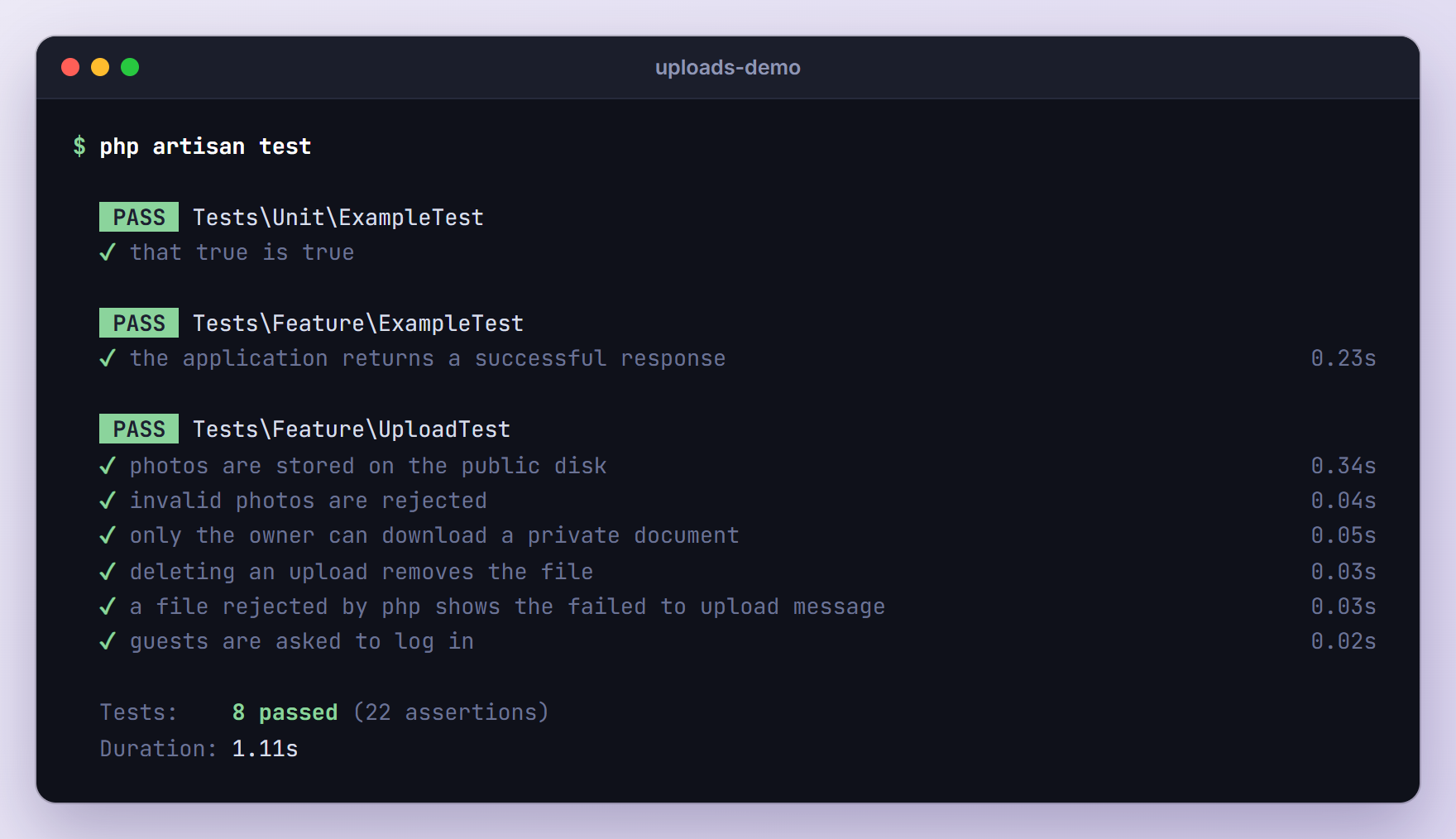
Run the suite:
php artisan test
Troubleshooting
“The photo #1 failed to upload.”
The file was bigger than PHP’s upload_max_filesize, so PHP refused it before Laravel ran (the generic message is “The :attribute failed to upload.”). Raise upload_max_filesize and post_max_size in the php.ini your web server uses and restart PHP-FPM or Apache. UploadedFile::getMaxFilesize() returns the effective limit in bytes if you want to show it next to the input.
Uploaded Images Return 403 or 404
Without public/storage, requests for /storage/... fall through to the signed route of the local disk, which answers 403 locally and 404 in production. Run php artisan storage:link. If the link exists, compare the image URLs with APP_URL, because a wrong host or port in .env produces wrong URLs, and run php artisan config:clear if you cache your configuration.
PostTooLargeException With a 413 Status
The whole request exceeded post_max_size. PHP logs a warning such as “POST Content-Length of 14243263 bytes exceeds the limit of 8388608 bytes” and discards the body. Laravel’s global ValidatePostSize middleware compares the request’s Content-Length with the same limit and throws Illuminate\Http\Exceptions\PostTooLargeException before CSRF checks or validation run. Raise post_max_size (and client_max_body_size on nginx).
Laravel ships no 413 view, so production users see a bare “Oops! An Error Occurred” page. Add resources/views/errors/413.blade.php as shown in our custom error pages tutorial.
Files Are Missing but Database Rows Exist
The PHP process could not write to storage. Laravel needs write access to storage and bootstrap/cache, so give the user PHP runs as (often www-data) write permission on both. With the default 'throw' => false, store() silently returns false, which is why we switched throw on.
The storage:link Command on Windows
On Windows, Laravel creates the link as a directory junction (mklink /J), which needs no administrator rights. PHP does not report junctions as links, so storage:link --force and storage:unlink leave an existing junction alone. If you moved the project and images broke, run rmdir public\storage in Command Prompt (it removes only the link, not your files) and then php artisan storage:link again.
Test Fails With “Unable to find a file or directory at path”
The test faked a different disk than the code writes to. Storage::fake() without an argument fakes only the default disk, so photos written to public land in the real storage/app/public folder while the assertion checks the fake. Fake the exact disk your code uses, as in Storage::fake('public'), and delete any files that leaked into real storage.
Upgrading From Older Laravel Versions
If you are moving code from the old Laravel 5.5 Dropzone tutorial forward:
- Replace
move()calls that copy files intopublic/imageswithstore()on a disk. Files outsidepublic/can be private, faked in tests and moved to S3 later. - Add server-side validation. The old version relied on Dropzone’s client-side size check.
- Find records by ID with route model binding and a policy, not by original file name.
- Expect the
localdisk root atstorage/app/private(it used to bestorage/app). Since Laravel 12 theimagerule rejects SVG unless you allow it. - Use the built-in image API instead of calling Intervention Image directly. It still uses Intervention under the hood, so install it with
composer require intervention/image:^4.0, then:
use Illuminate\Support\Facades\Image;

$thumbnail = Image::fromUpload($photo)
    ->scale(width: 400)
    ->toWebp()
    ->store('thumbnails', 'public');
That turns our 1600 x 1067 team photo into a 400 x 267 WebP file. Resizing is CPU heavy, so for larger batches store the original first and resize it in a queued job, as described in our Laravel 13 queues tutorial. Image instances cannot be serialized, so pass the stored path to the job, not the image.
Frequently Asked Questions
How do I upload multiple files in Laravel?
Give the input a name with brackets and the multiple attribute (name="photos[]"), keep enctype="multipart/form-data" on the form, and validate the array and its items separately: 'photos' => ['required', 'array', 'max:5'] and 'photos.*' => [File::image()]. Then loop over $request->file('photos') and call store() on each file. Keep the item limit below PHP’s max_file_uploads, which defaults to 20.
Where does Laravel store uploaded files?
Wherever you tell it to. Files stored on the local disk go to storage/app/private, files on the public disk go to storage/app/public (served through the public/storage link), and files on the s3 disk go to your bucket. store() returns the path relative to the disk root, and that path is what you save in the database.
How do I increase the maximum upload size in Laravel?
Laravel has no global upload limit of its own. Raise upload_max_filesize and post_max_size in php.ini, raise client_max_body_size if you use nginx, restart PHP and the web server, and then adjust the max value in your validation rules. Changing only the validation rule never helps when PHP has already rejected the file.
Should I store uploaded files in the database?
Usually not. Store the file on a disk and keep its disk, path, original name, MIME type and size in a table, as we did here. The database stays small, the files can move to S3 without a schema change, and Laravel’s storage, URL and download helpers all work with a disk and a path.
Wrapping Up
We built a complete upload flow in Laravel 13: a Blade form with per-file errors, validation with the File rule, public photos behind storage:link, private documents behind a policy and signed URLs, automatic file cleanup, an S3 switch driven by .env, and tests for every path. The same pieces cover almost any Laravel file upload, from avatars to invoices.
For every option we skipped, see the file storage documentation and the file validation rules.
Learn more about Laravel:
