


Most Laravel code works with lists: orders from a query, products from an API, rows from a CSV file. Laravel collection methods replace the usual foreach loops and temporary arrays with a chain you can read from top to bottom. This tutorial covers 20 of them, each with an online store example and the exact output it produced when I ran it.
My older collections post was written for Laravel 5.6 and covers basics like filter(), map() and pluck(). This one picks a different set, including methods such as sole(), sliding(), percentage() and ensure() that did not exist back then, plus lazy collections, Eloquent collection extras and the gotchas behind most collection bugs.
We will use Laravel 13 (version 13.38 at the time of writing) with PHP 8.4. Everything here works on PHP 8.3 or newer.
Table of Contents
Prerequisites
- PHP 8.3 or newer and Composer
- Basic knowledge of Laravel routes, Artisan commands and Eloquent models
- The
pdo_sqliteandintlPHP extensions (SQLite is the default database of a new Laravel 13 app, andintlpowersNumber::currency())
Setting Up the Store Dataset
Creating the Project
Create a new project and move into it:
composer create-project laravel/laravel store-collections
cd store-collections
laravel new store-collections works too if you use the Laravel installer. New apps use SQLite out of the box (DB_CONNECTION=sqlite in .env), so there is no database to configure.
Adding the Store Data
Create app/Support/StoreData.php with five customers, six products and ten orders:
<?php

namespace App\Support;

class StoreData
{
    public static function customers(): array
    {
        return [
            ['id' => 1, 'name' => 'Ava Patel', 'email' => 'ava@gmail.com', 'country' => 'GB'],
            ['id' => 2, 'name' => 'Liam Chen', 'email' => 'liam@outlook.com', 'country' => 'US'],
            ['id' => 3, 'name' => 'Sofia Rossi', 'email' => 'sofia@gmail.com', 'country' => 'IT'],
            ['id' => 4, 'name' => 'Noah Kim', 'email' => 'noah@yahoo.com', 'country' => 'US'],
            ['id' => 5, 'name' => 'Emma Weber', 'email' => 'emma@gmail.com', 'country' => 'DE'],
        ];
    }

    public static function products(): array
    {
        return [
            ['sku' => 'KB-101', 'name' => 'Mechanical Keyboard', 'category' => 'peripherals', 'price' => 89.0, 'stock' => 14],
            ['sku' => 'MS-102', 'name' => 'Wireless Mouse', 'category' => 'peripherals', 'price' => 29.5, 'stock' => 0],
            ['sku' => 'MN-201', 'name' => '27-inch Monitor', 'category' => 'displays', 'price' => 249.0, 'stock' => 4],
            ['sku' => 'HB-301', 'name' => 'USB-C Hub', 'category' => 'accessories', 'price' => 39.75, 'stock' => 22],
            ['sku' => 'LS-302', 'name' => 'Laptop Stand', 'category' => 'accessories', 'price' => 45.0, 'stock' => 2],
            ['sku' => 'WC-401', 'name' => 'HD Webcam', 'category' => 'video', 'price' => 59.25, 'stock' => 9],
        ];
    }

    public static function orders(): array
    {
        return [
            self::order('ORD-1001', 1, 'Ava Patel', 'paid', '2026-10-01', [['KB-101', 1, 89.0], ['MS-102', 1, 29.5]]),
            self::order('ORD-1002', 2, 'Liam Chen', 'paid', '2026-10-01', [['MN-201', 1, 249.0]]),
            self::order('ORD-1003', 3, 'Sofia Rossi', 'pending', '2026-10-02', [['HB-301', 2, 39.75]]),
            self::order('ORD-1004', 1, 'Ava Patel', 'paid', '2026-10-03', [['WC-401', 1, 59.25], ['LS-302', 1, 45.0]]),
            self::order('ORD-1005', 4, 'Noah Kim', 'refunded', '2026-10-03', [['MS-102', 2, 29.5]]),
            self::order('ORD-1006', 5, 'Emma Weber', 'paid', '2026-10-05', [['KB-101', 1, 89.0], ['HB-301', 1, 39.75]]),
            self::order('ORD-1007', 2, 'Liam Chen', 'paid', '2026-10-06', [['LS-302', 2, 45.0]]),
            self::order('ORD-1008', 3, 'Sofia Rossi', 'paid', '2026-10-06', [['MN-201', 1, 249.0], ['HB-301', 1, 39.75]]),
            self::order('ORD-1009', 4, 'Noah Kim', 'pending', '2026-10-09', [['WC-401', 1, 59.25]]),
            self::order('ORD-1010', 5, 'Emma Weber', 'cancelled', '2026-10-09', [['KB-101', 1, 89.0]]),
        ];
    }

    private static function order(string $number, int $customerId, string $customer, string $status, string $placedOn, array $lines): array
    {
        $items = array_map(fn (array $line) => ['sku' => $line[0], 'qty' => $line[1], 'price' => $line[2]], $lines);

        return [
            'number' => $number,
            'customer_id' => $customerId,
            'customer' => $customer,
            'status' => $status,
            'total' => array_sum(array_map(fn (array $item) => $item['qty'] * $item['price'], $items)),
            'placed_on' => $placedOn,
            'items' => $items,
        ];
    }
}
Each order is a plain array with nested line items, like a JSON API would return. The order() helper calculates each total from its items.
Running the Examples in Tinker
Start Tinker, Laravel’s interactive shell:
php artisan tinker
Then load the collections. Many closures below type-hint Collection, so import it too:
use App\Support\StoreData;
use Illuminate\Support\Collection;

$products = collect(StoreData::products());
$orders = collect(StoreData::orders());
Each result appears as a PHP comment under the line that produced it. Here is the first order, so you know the shape we are working with:
$orders->count();
// 10

$orders->first();
/*
    [
        'number' => 'ORD-1001',
        'customer_id' => 1,
        'customer' => 'Ava Patel',
        'status' => 'paid',
        'total' => 118.5,
        'placed_on' => '2026-10-01',
        'items' => [
            ['sku' => 'KB-101', 'qty' => 1, 'price' => 89.0],
            ['sku' => 'MS-102', 'qty' => 1, 'price' => 29.5],
        ],
    ]
*/
Chaining Methods Into a Pipeline
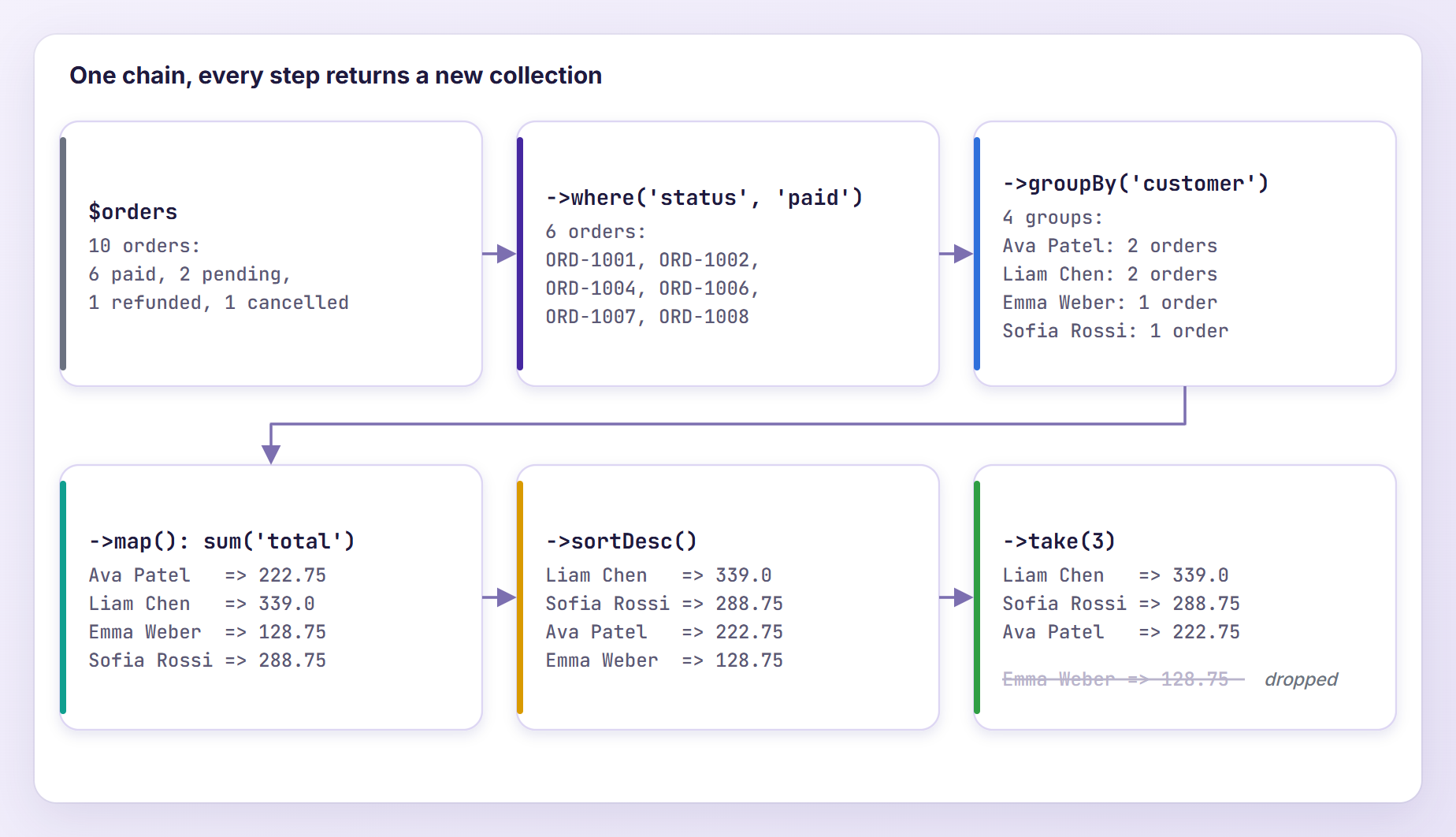
Here is why collections are worth learning. The store owner wants the three customers who spent the most on paid orders:
$topCustomers = $orders
    ->where('status', 'paid')
    ->groupBy('customer')
    ->map(fn (Collection $customerOrders) => $customerOrders->sum('total'))
    ->sortDesc()
    ->take(3);

$topCustomers->all();
// ['Liam Chen' => 339.0, 'Sofia Rossi' => 288.75, 'Ava Patel' => 222.75]
Keep the paid orders, group them by customer, sum each group, sort from highest to lowest and keep three. Each step returns a new collection, so $orders never changes and you can stop anywhere to inspect the data.
Let’s make it an Artisan command. Open routes/console.php, add the three imports below the existing use lines and the command at the bottom of the file:
use App\Support\StoreData;
use Illuminate\Support\Collection;
use Illuminate\Support\Number;

// ...

Artisan::command('store:top-customers {--limit=3}', function () {
    $topCustomers = collect(StoreData::orders())
        ->where('status', 'paid')
        ->groupBy('customer')
        ->map(fn (Collection $customerOrders) => $customerOrders->sum('total'))
        ->sortDesc()
        ->take((int) $this->option('limit'));

    $this->table(
        ['Customer', 'Paid revenue'],
        $topCustomers->map(fn (float $total, string $customer) => [$customer, Number::currency($total)]),
    );
})->purpose('Show the customers with the highest paid revenue');
Run it:
php artisan store:top-customers
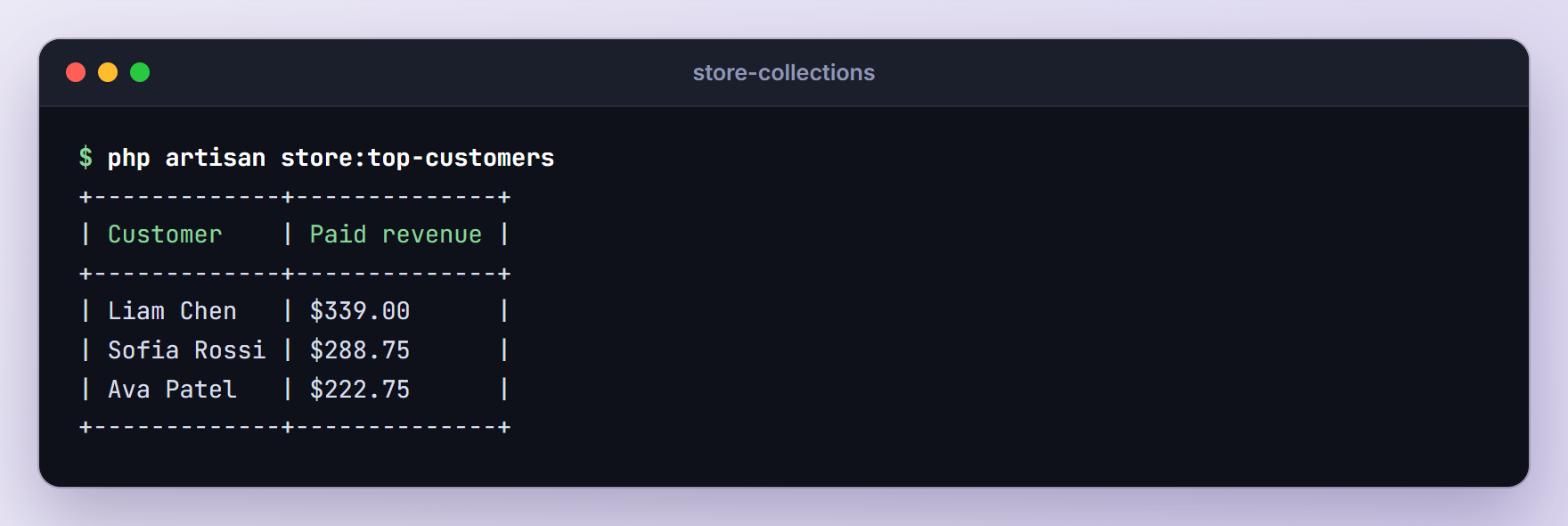
Number::currency() formats the totals. With --limit=5 you get four rows, because Noah Kim has no paid orders.
Lookups and Grouping
1. keyBy(): Build a Lookup Table
keyBy() re-keys a collection by one of its fields, turning repeated searches into direct lookups. Here it adds product names to order lines:
$catalog = $products->keyBy('sku');

$catalog->keys()->all();
// ['KB-101', 'MS-102', 'MN-201', 'HB-301', 'LS-302', 'WC-401']

$catalog['MN-201']['name'];
// '27-inch Monitor'

$lines = collect($orders->first()['items'])
    ->map(fn (array $item) => $catalog[$item['sku']]['name'].' x '.$item['qty']);

$lines->all();
// ['Mechanical Keyboard x 1', 'Wireless Mouse x 1']
If two items share a key, the last one wins.
2. mapWithKeys(): Create Your Own Keys
mapWithKeys() lets the callback return a [key => value] pair, so both sides can be computed, which is what a select box needs:
$options = $products->mapWithKeys(fn (array $product) => [
    $product['sku'] => $product['name'].' ($'.number_format($product['price'], 2).')',
]);

$options->all();
/*
    [
        'KB-101' => 'Mechanical Keyboard ($89.00)',
        'MS-102' => 'Wireless Mouse ($29.50)',
        'MN-201' => '27-inch Monitor ($249.00)',
        'HB-301' => 'USB-C Hub ($39.75)',
        'LS-302' => 'Laptop Stand ($45.00)',
        'WC-401' => 'HD Webcam ($59.25)',
    ]
*/

$products->pluck('name', 'sku')->all();
/*
    [
        'KB-101' => 'Mechanical Keyboard',
        'MS-102' => 'Wireless Mouse',
        'MN-201' => '27-inch Monitor',
        'HB-301' => 'USB-C Hub',
        'LS-302' => 'Laptop Stand',
        'WC-401' => 'HD Webcam',
    ]
*/
For a single field, pluck() with a second argument does the same job, as the last line shows.
3. groupBy(): Group by One or More Keys
groupBy() collects items that share a value into sub-collections. Pass an array of keys to nest the groups:
$grouped = $orders->groupBy(['status', 'customer']);

$grouped->map->keys()->toArray();
/*
    [
        'paid' => ['Ava Patel', 'Liam Chen', 'Emma Weber', 'Sofia Rossi'],
        'pending' => ['Sofia Rossi', 'Noah Kim'],
        'refunded' => ['Noah Kim'],
        'cancelled' => ['Emma Weber'],
    ]
*/

$grouped['paid']['Ava Patel']->pluck('number')->all();
// ['ORD-1001', 'ORD-1004']
$grouped->map->keys() is a higher order message (more on those later). groupBy() also accepts a closure for computed groups, such as the month of placed_on.
4. countBy(): Count Items per Value
countBy() counts items per value. Pass a key, or a closure that returns a bucket name:
$orders->countBy('status')->all();
// ['paid' => 6, 'pending' => 2, 'refunded' => 1, 'cancelled' => 1]

$bySize = $orders->countBy(fn (array $order) => match (true) {
    $order['total'] < 100 => 'under 100',
    $order['total'] < 200 => '100 to 199',
    default => '200 and up',
});

$bySize->all();
// ['100 to 199' => 3, '200 and up' => 2, 'under 100' => 5]
Buckets appear in the order they are first found, so sort the result before you display it.
5. partition(): Split Items Into Two Groups
partition() splits a collection into the items that pass a test and the items that fail it. Array destructuring names the two halves:
[$paid, $unpaid] = $orders->partition(fn (array $order) => $order['status'] === 'paid');

$paid->count();
// 6

$unpaid->pluck('status', 'number')->all();
/*
    [
        'ORD-1003' => 'pending',
        'ORD-1005' => 'refunded',
        'ORD-1009' => 'pending',
        'ORD-1010' => 'cancelled',
    ]
*/
Both halves keep their original keys, so read the first troubleshooting tip before you send them to JavaScript.
Aggregates, Sorting and Duplicates
6. sum() and avg(): Aggregate With a Callback
Both sum() and avg() accept a closure, so you can aggregate values that are not stored on the item, such as units sold across line items:
$unitsSold = $orders
    ->where('status', 'paid')
    ->sum(fn (array $order) => collect($order['items'])->sum('qty'));

$unitsSold;
// 11

$orders->avg(fn (array $order) => count($order['items']));
// 1.4

round($orders->where('status', 'paid')->avg('total'), 2);
// 163.21
Round money averages before you show them, as in the last line.
7. percentage(): Get the Share of Matching Items
percentage() returns the share of items that pass a test, rounded to two decimals unless you pass precision:
$orders->percentage(fn (array $order) => $order['status'] === 'paid');
// 60.0

$products->percentage(fn (array $product) => $product['stock'] > 0);
// 83.33

$products->percentage(fn (array $product) => $product['stock'] > 0, precision: 1);
// 83.3
On an empty collection it returns null instead of dividing by zero.
8. sortBy(): Sort by Multiple Columns
Give sortBy() an array of [column, direction] pairs and it applies each rule in turn. Here the newest orders come first, and the biggest order first within each day:
$sorted = $orders->sortBy([
    ['placed_on', 'desc'],
    ['total', 'desc'],
]);

$rows = $sorted->map(fn (array $order) => "{$order['placed_on']}  {$order['number']}  {$order['total']}");

$rows->values()->all();
/*
    [
        '2026-10-09  ORD-1010  89',
        '2026-10-09  ORD-1009  59.25',
        '2026-10-06  ORD-1008  288.75',
        '2026-10-06  ORD-1007  90',
        '2026-10-05  ORD-1006  128.75',
        '2026-10-03  ORD-1004  104.25',
        '2026-10-03  ORD-1005  59',
        '2026-10-02  ORD-1003  79.5',
        '2026-10-01  ORD-1002  249',
        '2026-10-01  ORD-1001  118.5',
    ]
*/
On October 9, ORD-1010 (89) comes before ORD-1009 (59.25) because of the second rule. sortBy() keeps the original keys, so I call values() before reading the result. Closures also work in place of column names.
9. unique(): Remove Duplicates by Key
unique() accepts a key or a closure that defines a duplicate, and it keeps the first item it sees. Sort first and you get each customer’s first order:
$firstOrders = $orders->sortBy('placed_on')->unique('customer_id');

$firstOrders->pluck('number', 'customer')->all();
/*
    [
        'Ava Patel' => 'ORD-1001',
        'Liam Chen' => 'ORD-1002',
        'Sofia Rossi' => 'ORD-1003',
        'Noah Kim' => 'ORD-1005',
        'Emma Weber' => 'ORD-1006',
    ]
*/
It compares loosely, so '1' and 1 count as the same value. Use uniqueStrict() when they should not.
Finding a Single Item
10. firstWhere(): Find the First Match
firstWhere() returns the first item where a key matches a value, with an optional comparison operator in the middle:
$products->firstWhere('stock', 0);
/*
    [
        'sku' => 'MS-102',
        'name' => 'Wireless Mouse',
        'category' => 'peripherals',
        'price' => 29.5,
        'stock' => 0,
    ]
*/

$orders->firstWhere('total', '>', 200)['number'];
// 'ORD-1002'
It returns null when nothing matches, so check the result before you read keys from it.
11. sole() and firstOrFail(): Fail When the Data Is Wrong
sole() returns the only matching item and throws when there are none or several. firstOrFail() only throws when nothing matches:
use Illuminate\Support\ItemNotFoundException;
use Illuminate\Support\MultipleItemsFoundException;

$orders->sole('status', 'refunded')['number'];
// 'ORD-1005'

try {
    $orders->sole('status', 'pending');
} catch (MultipleItemsFoundException $e) {
    $e->getMessage();
    // '2 items were found.'
}

try {
    $orders->firstOrFail('status', 'shipped');
} catch (ItemNotFoundException $e) {
    $e::class;
    // 'Illuminate\Support\ItemNotFoundException'
}

$orders->hasSole('status', 'refunded');
// true

$orders->hasMany('status', 'pending');
// true
Use sole() when the data says there must be exactly one match, such as the single refunded order you are reconciling. For a yes or no answer, hasSole() and hasMany() return booleans instead, as the last two lines show.
Slicing, Chunking and Sliding Windows
12. takeUntil() and takeWhile(): Stop at a Condition
takeUntil() returns items until the callback returns true, and takeWhile() returns them while it does. Unlike filter(), both stop at the first item that breaks the rule, so use them on sorted data:
$recent = $orders
    ->sortByDesc('placed_on')
    ->takeUntil(fn (array $order) => $order['placed_on'] < '2026-10-05');

$recent->pluck('number')->all();
// ['ORD-1009', 'ORD-1010', 'ORD-1007', 'ORD-1008', 'ORD-1006']

$lowStock = $products
    ->sortBy('stock')
    ->takeWhile(fn (array $product) => $product['stock'] < 5);

$lowStock->pluck('stock', 'name')->all();
// ['Wireless Mouse' => 0, 'Laptop Stand' => 2, '27-inch Monitor' => 4]
The first chain builds a recent orders feed back to October 5, the second a low stock list. On a lazy collection, stopping early also means the remaining items are never created.
13. chunkWhile(): Group Consecutive Items
chunkWhile() starts a new chunk whenever the callback returns false. The callback receives the chunk being built, so you can compare each item with the previous one. Here we find streaks of consecutive selling days:
use Illuminate\Support\Carbon;

$days = $orders->pluck('placed_on')->unique()->values();

$streaks = $days->chunkWhile(function (string $day, int $key, Collection $chunk) {
    return Carbon::parse($chunk->last())->addDay()->toDateString() === $day;
});

$ranges = $streaks->map(fn (Collection $streak) => $streak->first().' to '.$streak->last());

$ranges->all();
/*
    [
        '2026-10-01 to 2026-10-03',
        '2026-10-05 to 2026-10-06',
        '2026-10-09 to 2026-10-09',
    ]
*/

$orders->chunkBy('placed_on')->map->pluck('number')->all();
/*
    [
        ['ORD-1001', 'ORD-1002'],
        ['ORD-1003'],
        ['ORD-1004', 'ORD-1005'],
        ['ORD-1006'],
        ['ORD-1007', 'ORD-1008'],
        ['ORD-1009', 'ORD-1010'],
    ]
*/
To group neighbors that share a value, chunkBy() is a shortcut, as the last example shows. Unlike groupBy(), it keeps equal values that are not next to each other in separate chunks.
14. sliding(): Work With Overlapping Windows
sliding() returns overlapping windows of a fixed size, ideal for moving averages or for comparing each value with the previous one. Here we compare each day’s paid revenue with the day before:
$daily = $orders
    ->where('status', 'paid')
    ->groupBy('placed_on')
    ->map(fn (Collection $day) => $day->sum('total'));

$daily->all();
/*
    [
        '2026-10-01' => 367.5,
        '2026-10-03' => 104.25,
        '2026-10-05' => 128.75,
        '2026-10-06' => 378.75,
    ]
*/

$changes = $daily->sliding(2)->mapWithKeys(fn (Collection $pair) => [
    $pair->keys()->last() => $pair->last() - $pair->first(),
]);

$changes->all();
// ['2026-10-03' => -263.25, '2026-10-05' => 24.5, '2026-10-06' => 250.0]
Windows keep the original keys, so $pair->keys()->last() is the later date. A second argument sets the step, as in sliding(3, step: 2).
These three methods are easy to mix up, so here they are on the same list of day numbers:
$days = collect([1, 2, 3, 5, 6, 9]);

$days->chunk(2)->map->values()->all();
// [[1, 2], [3, 5], [6, 9]]

$days->chunkWhile(fn (int $day, int $key, $chunk) => $chunk->last() + 1 === $day)->map->values()->all();
// [[1, 2, 3], [5, 6], [9]]

$days->sliding(2)->map->values()->all();
// [[1, 2], [2, 3], [3, 5], [5, 6], [6, 9]]
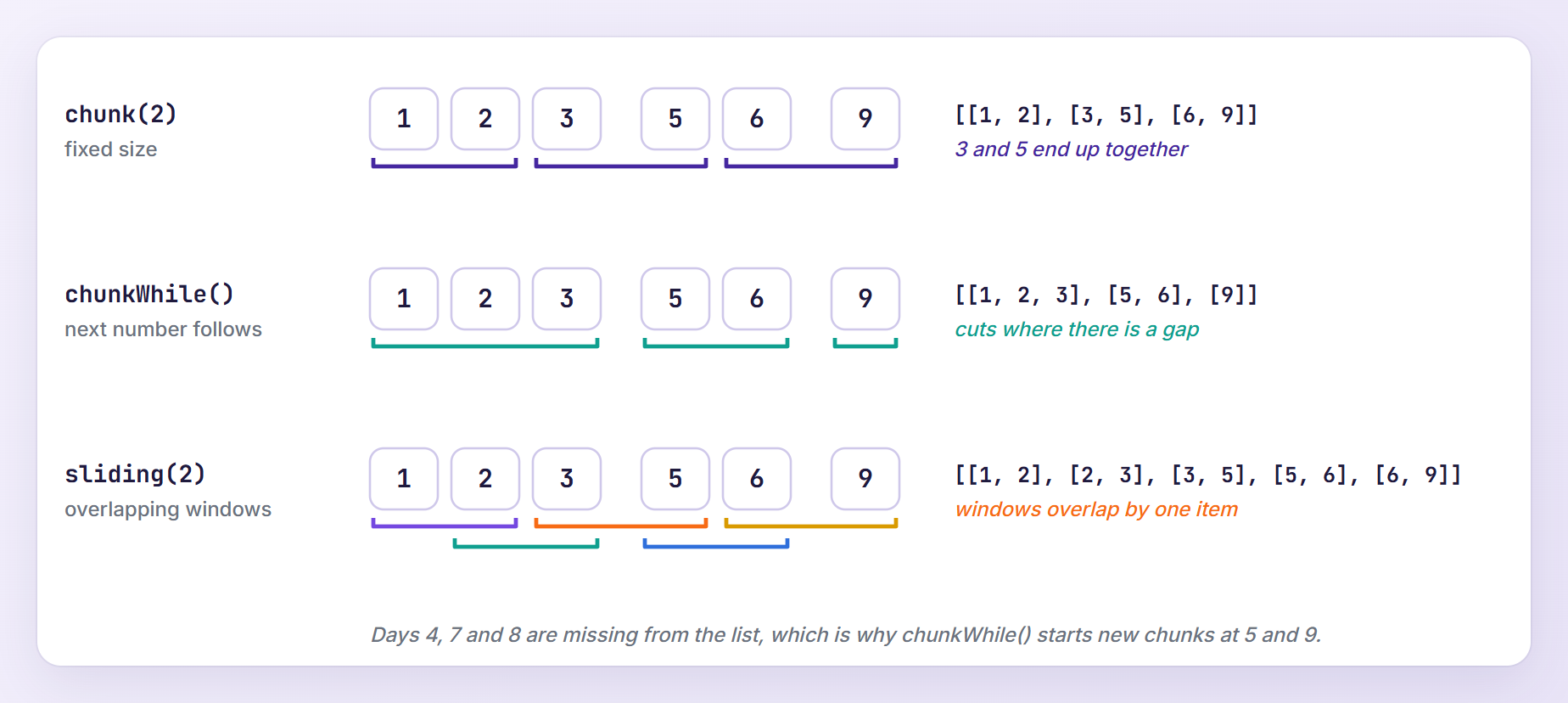
The map->values() call only resets the keys for printing.
Reshaping Data
15. flatMap(): Map and Flatten in One Step
flatMap() maps each item and flattens the result by one level, the cleanest way into nested arrays such as line items. Here it feeds a best sellers report:
$bestSellers = $orders
    ->where('status', 'paid')
    ->flatMap(fn (array $order) => $order['items'])
    ->groupBy('sku')
    ->map(fn (Collection $items) => $items->sum('qty'))
    ->sortDesc();

$bestSellers->all();
/*
    [
        'LS-302' => 3,
        'KB-101' => 2,
        'MN-201' => 2,
        'HB-301' => 2,
        'MS-102' => 1,
        'WC-401' => 1,
    ]
*/
After flatMap() the chain works on line items instead of orders, so groupBy('sku') and sum('qty') finish the job.
16. select(): Keep Only the Fields You Need
select() works like an SQL SELECT on every item and keeps only the keys you list. It is handy for trimming API responses:
$orders->select(['number', 'customer', 'total'])->take(2)->all();
/*
    [
        ['number' => 'ORD-1001', 'customer' => 'Ava Patel', 'total' => 118.5],
        ['number' => 'ORD-1002', 'customer' => 'Liam Chen', 'total' => 249.0],
    ]
*/
17. diffKeys() and intersectByKeys(): Compare by Key
These two compare collections by key and ignore the values. With the catalog keyed by SKU from method 1, you can split a cart into unknown and valid lines:
$catalog = $products->keyBy('sku');
$cart = collect(['KB-101' => 1, 'XX-999' => 2, 'HB-301' => 3]);

$cart->diffKeys($catalog)->all();
// ['XX-999' => 2]

$cart->intersectByKeys($catalog)->all();
// ['KB-101' => 1, 'HB-301' => 3]
To compare values instead of keys, use diff() and intersect().
Conditionals, Pipes and Type Checks
18. when() and unless(): Add Conditional Steps
when() runs its callback only when the first argument is truthy and passes that value along; unless() does the opposite. They replace the if blocks around optional filters from a request:
$status = 'pending'; // for example, $request->query('status')
$includeCancelled = false;

$filtered = $orders
    ->when($status, fn (Collection $orders, string $status) => $orders->where('status', $status))
    ->unless($includeCancelled, fn (Collection $orders) => $orders->where('status', '!=', 'cancelled'));

$filtered->pluck('number')->all();
// ['ORD-1003', 'ORD-1009']
With $status set to null, the when() step is skipped and you get every order except the cancelled one. The callback must return the new collection, which arrow functions do automatically.
19. pipeThrough() and pipeInto(): Hand the Collection Over
pipe(), covered in the old post, passes the collection to one callback. pipeThrough() passes it through a list of callbacks, and pipeInto() hands it to a class constructor, which is a tidy way to move a growing chain into its own class. Create app/Support/SalesReport.php:
<?php

namespace App\Support;

use Illuminate\Support\Collection;

class SalesReport
{
    public function __construct(private Collection $orders) {}

    public function paid(): Collection
    {
        return $this->orders->where('status', 'paid');
    }

    public function revenue(): float
    {
        return $this->paid()->sum('total');
    }

    public function topCustomers(int $limit = 3): Collection
    {
        return $this->paid()
            ->groupBy('customer')
            ->map(fn (Collection $orders) => $orders->sum('total'))
            ->sortDesc()
            ->take($limit);
    }
}
Now both methods in action:
use App\Support\SalesReport;

$paidRevenue = $orders->pipeThrough([
    fn (Collection $orders) => $orders->where('status', 'paid'),
    fn (Collection $orders) => $orders->sum('total'),
]);

$paidRevenue;
// 979.25

$report = $orders->pipeInto(SalesReport::class);

$report->revenue();
// 979.25

$report->topCustomers(2)->all();
// ['Liam Chen' => 339.0, 'Sofia Rossi' => 288.75]
For a side effect in the middle of a chain, use tap(), which I covered in Tap in Laravel.
20. ensure(): Check Item Types
ensure() throws an UnexpectedValueException when an item is not of the given type or class, which makes it a good guard right after an import:
$orders->pluck('total')->ensure('float')->count();
// 10

$imported = collect([118.5, '249.00', 79.5]); // the second value came from a CSV file

try {
    $imported->ensure('float');
} catch (UnexpectedValueException $e) {
    $e->getMessage();
    // "Collection should only include [float] items, but 'string' found at position 1."
}
It accepts 'int', 'float', 'string', 'bool', 'array', 'null', class names or an array of them. It only checks the current items; nothing stops other types from being added later.
Working With Eloquent Collections
Everything above works on Eloquent results too, because Illuminate\Database\Eloquent\Collection extends the base class and adds methods that understand models. Let’s move the store into SQLite.
Creating the Models and Tables
Generate the models, each with a migration and a factory:
php artisan make:model Customer -mf
php artisan make:model Product -mf
php artisan make:model Order -mf
php artisan make:model OrderItem -mf
Replace the Schema::create() call in the up() method of each new migration in database/migrations:
// database/migrations/xxxx_xx_xx_xxxxxx_create_customers_table.php
Schema::create('customers', function (Blueprint $table) {
    $table->id();
    $table->string('name');
    $table->string('email')->unique();
    $table->string('country', 2);
    $table->timestamps();
});

// database/migrations/xxxx_xx_xx_xxxxxx_create_products_table.php
Schema::create('products', function (Blueprint $table) {
    $table->id();
    $table->string('sku')->unique();
    $table->string('name');
    $table->string('category');
    $table->decimal('price', 8, 2);
    $table->unsignedInteger('stock');
    $table->timestamps();
});

// database/migrations/xxxx_xx_xx_xxxxxx_create_orders_table.php
Schema::create('orders', function (Blueprint $table) {
    $table->id();
    $table->string('number')->unique();
    $table->foreignId('customer_id')->constrained();
    $table->string('status');
    $table->decimal('total', 10, 2);
    $table->date('placed_on');
    $table->timestamp('shipped_at')->nullable();
    $table->timestamps();
});

// database/migrations/xxxx_xx_xx_xxxxxx_create_order_items_table.php
Schema::create('order_items', function (Blueprint $table) {
    $table->id();
    $table->foreignId('order_id')->constrained()->cascadeOnDelete();
    $table->foreignId('product_id')->constrained();
    $table->unsignedInteger('quantity');
    $table->decimal('unit_price', 8, 2);
    $table->timestamps();
});
Laravel 13 models declare fillable fields with the #[Fillable] attribute. Here is app/Models/Order.php:
<?php

namespace App\Models;

use Illuminate\Database\Eloquent\Attributes\Fillable;
use Illuminate\Database\Eloquent\Factories\HasFactory;
use Illuminate\Database\Eloquent\Model;
use Illuminate\Database\Eloquent\Relations\BelongsTo;
use Illuminate\Database\Eloquent\Relations\HasMany;

#[Fillable(['number', 'customer_id', 'status', 'total', 'placed_on', 'shipped_at'])]
class Order extends Model
{
    use HasFactory;

    protected function casts(): array
    {
        return [
            'total' => 'float',
            'placed_on' => 'date',
            'shipped_at' => 'datetime',
        ];
    }

    public function customer(): BelongsTo
    {
        return $this->belongsTo(Customer::class);
    }

    public function items(): HasMany
    {
        return $this->hasMany(OrderItem::class);
    }

    public function markAsShipped(): void
    {
        $this->update(['status' => 'shipped', 'shipped_at' => now()]);
    }
}
The float cast keeps total identical to the plain arrays. The other three models use the same imports:
// app/Models/Customer.php
#[Fillable(['name', 'email', 'country'])]
class Customer extends Model
{
    use HasFactory;

    public function orders(): HasMany
    {
        return $this->hasMany(Order::class);
    }
}

// app/Models/Product.php
#[Fillable(['sku', 'name', 'category', 'price', 'stock'])]
class Product extends Model
{
    use HasFactory;

    protected function casts(): array
    {
        return [
            'price' => 'float',
            'stock' => 'integer',
        ];
    }
}

// app/Models/OrderItem.php
#[Fillable(['order_id', 'product_id', 'quantity', 'unit_price'])]
class OrderItem extends Model
{
    use HasFactory;

    protected function casts(): array
    {
        return [
            'quantity' => 'integer',
            'unit_price' => 'float',
        ];
    }

    public function order(): BelongsTo
    {
        return $this->belongsTo(Order::class);
    }

    public function product(): BelongsTo
    {
        return $this->belongsTo(Product::class);
    }
}
Seeding the Store
Create database/seeders/StoreSeeder.php:
<?php

namespace Database\Seeders;

use App\Models\Customer;
use App\Models\Order;
use App\Models\Product;
use App\Support\StoreData;
use Illuminate\Database\Seeder;
use Illuminate\Support\Arr;

class StoreSeeder extends Seeder
{
    /**
     * Seed the store with the same data as StoreData.
     */
    public function run(): void
    {
        collect(StoreData::customers())->each(fn (array $customer) => Customer::forceCreate($customer));

        $products = collect(StoreData::products())
            ->map(fn (array $product) => Product::create($product))
            ->keyBy('sku');

        foreach (StoreData::orders() as $data) {
            $order = Order::create(Arr::except($data, ['customer', 'items']));

            foreach ($data['items'] as $item) {
                $order->items()->create([
                    'product_id' => $products[$item['sku']]->id,
                    'quantity' => $item['qty'],
                    'unit_price' => $item['price'],
                ]);
            }
        }
    }
}
keyBy('sku') turns the new products into a lookup for the line items, and forceCreate() keeps the customer IDs because id is not fillable. Replace the body of the run() method in database/seeders/DatabaseSeeder.php with:
$this->call(StoreSeeder::class);
Then rebuild the database:
php artisan migrate:fresh --seed
Note: Every Eloquent output below comes from a freshly seeded database. The examples that call markAsShipped() or update() change orders, so run php artisan migrate:fresh --seed after each of them to keep getting the same results.
Higher Order Messages
Higher order messages call a method or read a property on every item without writing a closure. They work with each, map, sum, filter and the other methods listed in the documentation:
use App\Models\Order;

$paidOrders = Order::where('status', 'paid')->whereNull('shipped_at')->get();

$paidOrders->sum->total;
// 979.25

$paidOrders->map->number->all();
// ['ORD-1001', 'ORD-1002', 'ORD-1004', 'ORD-1006', 'ORD-1007', 'ORD-1008']

$paidOrders->each->markAsShipped();

Order::where('status', 'shipped')->count();
// 6
sum->total reads the total of every model, and each->markAsShipped() calls our method on all six paid orders.
load(), loadMissing(), modelKeys() and toQuery()
load() eager loads relationships on a collection you already have, and loadMissing() skips the ones that are already loaded:
use App\Models\Order;
use Illuminate\Support\Facades\DB;

$paidOrders = Order::where('status', 'paid')->get();

DB::enableQueryLog();
DB::flushQueryLog();

$paidOrders->load('customer');
$paidOrders->loadMissing('customer');
$paidOrders->loadMissing('items.product');

count(DB::getQueryLog());
// 3

$paidOrders->first()->customer->name;
// 'Ava Patel'

$paidOrders->first()->items->map->product->pluck('name')->all();
// ['Mechanical Keyboard', 'Wireless Mouse']
That is three queries: one for the customers, none for the repeated call, and two for the items and their products.
modelKeys() returns the primary keys, and toQuery() turns the collection back into a query limited to those keys, so one UPDATE replaces a loop of saves:
use App\Models\Order;

$pending = Order::where('status', 'pending')->get();

$pending->modelKeys();
// [3, 9]

$pending->toQuery()->toRawSql();
// 'select * from "orders" where "orders"."id" in (3, 9)'

$pending->toQuery()->update(['status' => 'cancelled']);
// 2

Order::where('status', 'cancelled')->count();
// 3
toQuery()->update() is a mass update, so model events and observers do not fire. If you rely on them (see Laravel 13 Model Observers), update the models one at a time.
Collections vs Database Queries
Collection methods run in PHP after the rows are loaded. Filter, sort, aggregate and limit in SQL when you can, and use collections to shape data that is already in memory. These two lines return the same number, but compare their queries:
use App\Models\Order;
use Illuminate\Support\Facades\DB;

DB::enableQueryLog();
DB::flushQueryLog();

Order::where('status', 'paid')->sum('total');
// 979.25

Order::all()->where('status', 'paid')->sum('total');
// 979.25

collect(DB::getQueryLog())->pluck('query')->all();
/*
    [
        'select sum("total") as "aggregate" from "orders" where "status" = ?',
        'select * from "orders"',
    ]
*/
The first query returns one number. The second builds ten models to keep six, which you will feel once the table has a few hundred thousand rows.
The other classic problem is N+1 queries: touching a relationship inside a loop runs one query per model. Eager loading with with() fixes it:
use App\Models\Order;
use Illuminate\Support\Facades\DB;

DB::enableQueryLog();
DB::flushQueryLog();

foreach (Order::all() as $order) {
    $order->customer->name;
}

count(DB::getQueryLog());
// 11

DB::flushQueryLog();

foreach (Order::with('customer')->get() as $order) {
    $order->customer->name;
}

count(DB::getQueryLog());
// 2
Eleven queries become two. To catch the slow version during development, prevent lazy loading outside production in app/Providers/AppServiceProvider.php:
use Illuminate\Database\Eloquent\Model;

// ...

public function boot(): void
{
    Model::preventLazyLoading(! $this->app->isProduction());
}
The first loop then throws a LazyLoadingViolationException:
Attempted to lazy load [customer] on model [App\Models\Order] but lazy loading is disabled.
Alternatively, Model::automaticallyEagerLoadRelationships() loads a relationship for the whole collection the first time you touch it. In my test the same loop ran two queries. The eager loading documentation covers both options.
Lazy Collections for Large Tables
A regular collection holds every item in memory. A LazyCollection uses PHP generators to produce one item at a time, and nearly every method in this post works on it unchanged.
Streaming a File With LazyCollection::make()
LazyCollection::make() takes a generator function. Save some stock levels in storage/app/stock.csv:
sku,stock
KB-101,14
MS-102,0
MN-201,4
HB-301,22
LS-302,2
WC-401,9
Then stream the file and keep the low stock SKUs:
use Illuminate\Support\LazyCollection;

$rows = LazyCollection::make(function () {
    $handle = fopen(storage_path('app/stock.csv'), 'r');

    while (($row = fgetcsv($handle, escape: '')) !== false) {
        yield $row;
    }

    fclose($handle);
});

$lowStock = $rows
    ->skip(1)
    ->filter(fn (array $row) => (int) $row[1] < 5)
    ->map(fn (array $row) => $row[0]);

$lowStock->values()->all();
// ['MS-102', 'MN-201', 'LS-302']
Only the current row is in memory while filter() and map() run, however long the file is. Passing escape: '' to fgetcsv() avoids a deprecation notice on PHP 8.4.
lazy() and cursor() on Eloquent Queries
On a query, lazy() fetches rows in chunks of 1,000 by default, and cursor() runs one query and hydrates one model at a time. Both return a LazyCollection. When you update the column you filter on, use lazyById() so that each chunk continues after the last ID:
use App\Models\Order;

Order::where('status', 'paid')
    ->lazyById(200)
    ->each(fn (Order $order) => $order->markAsShipped());

Order::where('status', 'shipped')->count();
// 6

get_class(Order::lazy());
// 'Illuminate\Support\LazyCollection'

get_class(Order::cursor());
// 'Illuminate\Support\LazyCollection'
To measure the difference, fill in the definition() method of database/factories/OrderFactory.php (and import App\Models\Customer):
public function definition(): array
{
    return [
        'number' => fake()->unique()->numerify('ORD-######'),
        'customer_id' => Customer::factory(),
        'status' => fake()->randomElement(['paid', 'paid', 'paid', 'pending', 'refunded', 'cancelled']),
        'total' => fake()->randomFloat(2, 10, 500),
        'placed_on' => fake()->dateTimeBetween('-1 year'),
    ];
}
Then create database/seeders/LargeOrderSeeder.php:
<?php

namespace Database\Seeders;

use App\Models\Customer;
use App\Models\Order;
use Illuminate\Database\Seeder;
use Illuminate\Support\Facades\DB;

class LargeOrderSeeder extends Seeder
{
    /**
     * Add 20,000 random orders to test memory usage.
     */
    public function run(): void
    {
        $customers = Customer::all();

        DB::transaction(fn () => Order::factory()->count(20_000)->recycle($customers)->create());
    }
}
recycle() attaches the new orders to the existing customers instead of creating 20,000 new ones. Seed the orders:
php artisan db:seed --class=LargeOrderSeeder
Add a measuring command at the bottom of routes/console.php, plus a use App\Models\Order; import:
Artisan::command('store:memory {method}', function (string $method) {
    $orders = match ($method) {
        'get' => Order::all(),
        'lazy' => Order::lazy(),
        'cursor' => Order::cursor(),
    };

    $paid = $orders->where('status', 'paid')->count();

    $this->line(sprintf(
        '%-6s %d paid orders, peak memory %.1f MB',
        $method,
        $paid,
        memory_get_peak_usage() / 1024 / 1024,
    ));
})->purpose('Compare the memory used by get(), lazy() and cursor()');
Run it once per method, each in its own process:
php artisan store:memory get
php artisan store:memory lazy
php artisan store:memory cursor
With 20,010 orders I got:
get    9991 paid orders, peak memory 70.2 MB
lazy   9991 paid orders, peak memory 29.1 MB
cursor 9991 paid orders, peak memory 27.0 MB
get(), which Order::all() uses, needed about 43 MB more because every model existed at once. With only ten orders the same command peaked at 27.0 MB, so lazy() and cursor() added almost nothing. Two caveats from the documentation: cursor() cannot eager load relationships, and PDO may still buffer very large result sets, so lazy() is the safer default.
Run php artisan migrate:fresh --seed afterwards to get the ten orders back.
Testing the Examples
Collections are plain PHP, so they are easy to test. Generate a unit test and a feature test:
php artisan make:test StoreCollectionTest --unit
php artisan make:test EloquentCollectionTest
The unit test checks the plain array examples and extends PHPUnit’s own TestCase, because it does not need the framework:
<?php

namespace Tests\Unit;

use App\Support\SalesReport;
use App\Support\StoreData;
use Illuminate\Support\Collection;
use Illuminate\Support\MultipleItemsFoundException;
use PHPUnit\Framework\TestCase;

class StoreCollectionTest extends TestCase
{
    private Collection $orders;

    protected function setUp(): void
    {
        parent::setUp();

        $this->orders = collect(StoreData::orders());
    }

    public function test_top_customers_are_ranked_by_paid_revenue(): void
    {
        $report = $this->orders->pipeInto(SalesReport::class);

        $this->assertSame(979.25, $report->revenue());
        $this->assertSame(
            ['Liam Chen' => 339.0, 'Sofia Rossi' => 288.75, 'Ava Patel' => 222.75],
            $report->topCustomers()->all(),
        );
    }

    public function test_orders_are_counted_by_status(): void
    {
        $this->assertSame(
            ['paid' => 6, 'pending' => 2, 'refunded' => 1, 'cancelled' => 1],
            $this->orders->countBy('status')->all(),
        );
    }

    public function test_sole_throws_when_more_than_one_order_matches(): void
    {
        $this->assertSame('ORD-1005', $this->orders->sole('status', 'refunded')['number']);

        $this->expectException(MultipleItemsFoundException::class);

        $this->orders->sole('status', 'pending');
    }

    public function test_sliding_windows_give_day_over_day_changes(): void
    {
        $daily = $this->orders
            ->where('status', 'paid')
            ->groupBy('placed_on')
            ->map(fn (Collection $day) => $day->sum('total'));

        $changes = $daily->sliding(2)->mapWithKeys(fn (Collection $pair) => [
            $pair->keys()->last() => $pair->last() - $pair->first(),
        ]);

        $this->assertSame(
            ['2026-10-03' => -263.25, '2026-10-05' => 24.5, '2026-10-06' => 250.0],
            $changes->all(),
        );
    }

    public function test_filtered_collections_keep_their_original_keys(): void
    {
        $pending = $this->orders->where('status', 'pending');

        $this->assertSame([2, 8], $pending->keys()->all());
        $this->assertSame([0, 1], $pending->values()->keys()->all());
    }
}
The feature test seeds the store into the in-memory SQLite database that the default phpunit.xml configures:
<?php

namespace Tests\Feature;

use App\Models\Order;
use Database\Seeders\StoreSeeder;
use Illuminate\Foundation\Testing\RefreshDatabase;
use Illuminate\Support\Facades\DB;
use Tests\TestCase;

class EloquentCollectionTest extends TestCase
{
    use RefreshDatabase;

    protected function setUp(): void
    {
        parent::setUp();

        $this->seed(StoreSeeder::class);
    }

    public function test_higher_order_messages_ship_every_paid_order(): void
    {
        $orders = Order::where('status', 'paid')->whereNull('shipped_at')->get();

        $this->assertSame(979.25, $orders->sum->total);

        $orders->each->markAsShipped();

        $this->assertSame(6, Order::where('status', 'shipped')->whereNotNull('shipped_at')->count());
    }

    public function test_load_missing_skips_relations_that_are_already_loaded(): void
    {
        $orders = Order::where('status', 'paid')->get();

        DB::enableQueryLog();

        $orders->load('customer');
        $orders->loadMissing('customer');
        $orders->loadMissing('items.product');

        $this->assertCount(3, DB::getQueryLog());
        $this->assertSame('Ava Patel', $orders->first()->customer->name);
    }

    public function test_to_query_updates_only_the_collected_orders(): void
    {
        $pending = Order::where('status', 'pending')->get();

        $this->assertSame([3, 9], $pending->modelKeys());
        $this->assertSame(2, $pending->toQuery()->update(['status' => 'cancelled']));
        $this->assertSame(3, Order::where('status', 'cancelled')->count());
    }
}
Run both:
php artisan test --filter=CollectionTest
   PASS  Tests\Unit\StoreCollectionTest
  ✓ top customers are ranked by paid revenue                                                 0.01s
  ✓ orders are counted by status
  ✓ sole throws when more than one order matches
  ✓ sliding windows give day over day changes
  ✓ filtered collections keep their original keys

   PASS  Tests\Feature\EloquentCollectionTest
  ✓ higher order messages ship every paid order                                              0.45s
  ✓ load missing skips relations that are already loaded                                     0.03s
  ✓ to query updates only the collected orders                                               0.03s

  Tests:    8 passed (15 assertions)
  Duration: 0.91s
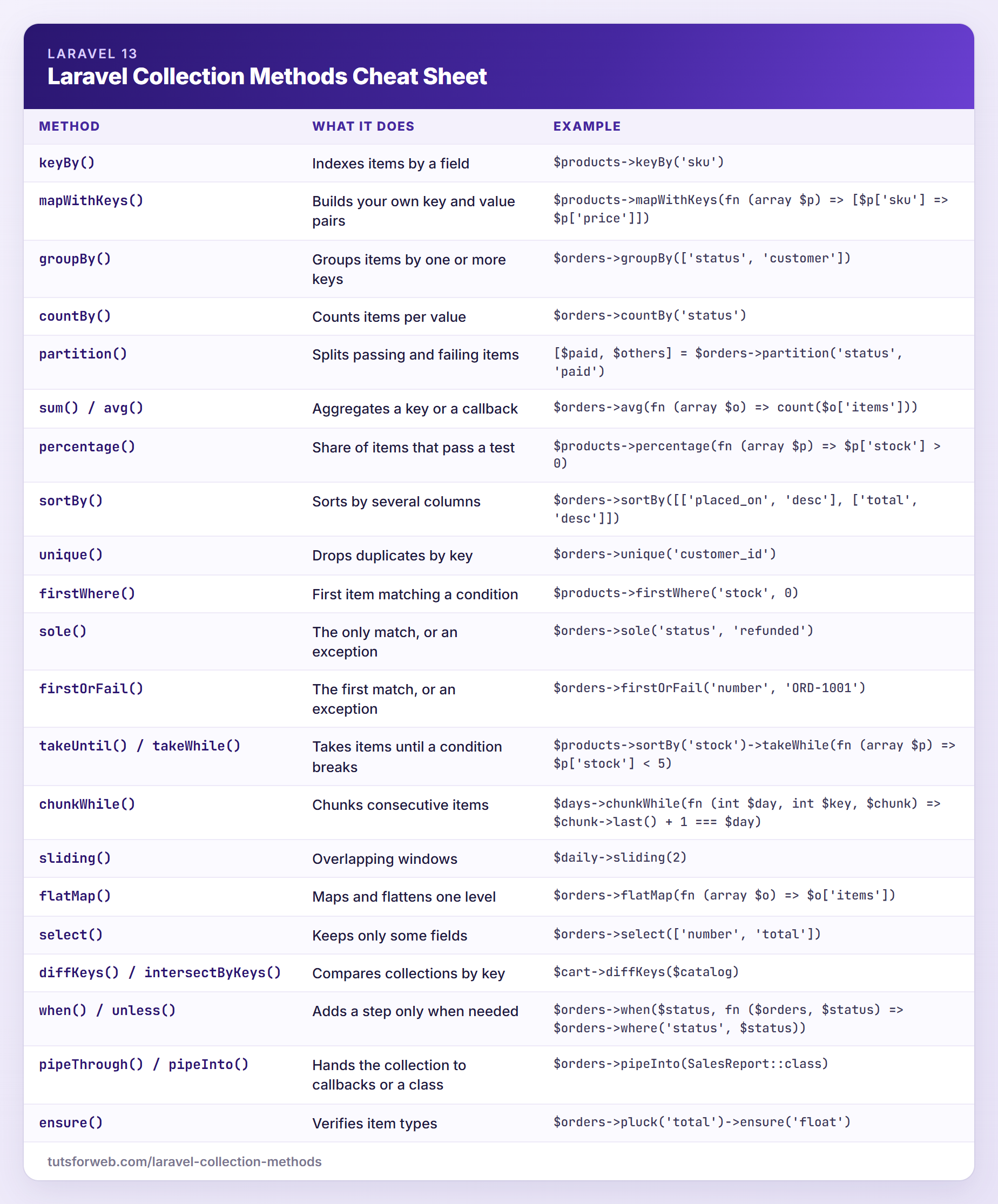
Laravel Collection Methods Quick Reference
Here is everything from the 20 sections in one table, using the same variables as the examples:
| Method | What it does | Example |
|---|---|---|
keyBy() | Indexes items by a field | $products->keyBy('sku') |
mapWithKeys() | Builds your own key and value pairs | $products->mapWithKeys(fn (array $p) => [$p['sku'] => $p['price']]) |
groupBy() | Groups items by one or more keys | $orders->groupBy(['status', 'customer']) |
countBy() | Counts items per value | $orders->countBy('status') |
partition() | Splits passing and failing items | [$paid, $others] = $orders->partition('status', 'paid') |
sum() / avg() | Aggregates a key or a callback | $orders->avg(fn (array $o) => count($o['items'])) |
percentage() | Share of items that pass a test | $products->percentage(fn (array $p) => $p['stock'] > 0) |
sortBy() | Sorts by several columns | $orders->sortBy([['placed_on', 'desc'], ['total', 'desc']]) |
unique() | Drops duplicates by key | $orders->unique('customer_id') |
firstWhere() | First item matching a condition | $products->firstWhere('stock', 0) |
sole() | The only match, or an exception | $orders->sole('status', 'refunded') |
firstOrFail() | The first match, or an exception | $orders->firstOrFail('number', 'ORD-1001') |
takeUntil() / takeWhile() | Takes items until a condition breaks | $products->sortBy('stock')->takeWhile(fn (array $p) => $p['stock'] < 5) |
chunkWhile() | Chunks consecutive items | $days->chunkWhile(fn (int $day, int $key, $chunk) => $chunk->last() + 1 === $day) |
sliding() | Overlapping windows | $daily->sliding(2) |
flatMap() | Maps and flattens one level | $orders->flatMap(fn (array $o) => $o['items']) |
select() | Keeps only some fields | $orders->select(['number', 'total']) |
diffKeys() / intersectByKeys() | Compares collections by key | $cart->diffKeys($catalog) |
when() / unless() | Adds a step only when needed | $orders->when($status, fn ($orders, $status) => $orders->where('status', $status)) |
pipeThrough() / pipeInto() | Hands the collection to callbacks or a class | $orders->pipeInto(SalesReport::class) |
ensure() | Verifies item types | $orders->pluck('total')->ensure('float') |
Troubleshooting
Keys Are Not 0, 1, 2 After filter() or where()
Filtering methods keep the original keys. Once the result is JSON encoded, which happens when a route returns a collection, JavaScript receives an object instead of an array:
$pending = $orders->where('status', 'pending')->map(fn (array $order) => $order['number']);

$pending->all();
// [2 => 'ORD-1003', 8 => 'ORD-1009']

json_encode($pending);
// '{"2":"ORD-1003","8":"ORD-1009"}'

json_encode($pending->values());
// '["ORD-1003","ORD-1009"]'
Call values() before you return a filtered collection or read items by position.
where() Matches Values It Should Not
where(), contains() and unique() compare loosely (==). That helps with string IDs from a query string, but it also makes null match 0:
$customerId = '2'; // values from the query string are always strings

$orders->where('customer_id', $customerId)->count();
// 2

$orders->whereStrict('customer_id', $customerId)->count();
// 0

$orders->pluck('customer_id')->contains($customerId);
// true

$orders->pluck('customer_id')->containsStrict($customerId);
// false

$products->where('stock', null)->pluck('name')->all();
// ['Wireless Mouse']

$products->whereNull('stock')->pluck('name')->all();
// []
When types matter, use whereStrict(), containsStrict(), uniqueStrict() or whereNull(), or cast request input before you compare.
sole() or firstOrFail() Returns a 500 Instead of a 404
On a collection, sole() and firstOrFail() throw Illuminate\Support\ItemNotFoundException, and sole() also throws MultipleItemsFoundException. Laravel renders Eloquent’s ModelNotFoundException as a 404, but it has no such rule for these. With this route in routes/web.php, /orders/ORD-9999 returned a 500 and logged the exception in storage/logs/laravel.log:
use App\Support\StoreData;

// ...

Route::get('/orders/{number}', function (string $number) {
    return collect(StoreData::orders())->firstOrFail('number', $number);
});
If a missing item should mean “not found”, map the exception in bootstrap/app.php:
use Illuminate\Support\ItemNotFoundException;
use Symfony\Component\HttpKernel\Exception\NotFoundHttpException;

// ...

    ->withExceptions(function (Exceptions $exceptions): void {
        $exceptions->map(fn (ItemNotFoundException $e) => new NotFoundHttpException('Not found.', $e));

        $exceptions->shouldRenderJsonWhen(
            fn (Request $request) => $request->is('api/*') || $request->expectsJson(),
        );
    })->create();
Now the same URL returns a 404 and nothing is logged. Eloquent’s query method sole() is different: it throws ModelNotFoundException or MultipleRecordsFoundException.
Allowed Memory Size Exhausted on a Large Table
Loading a big table with all() or get() can hit the memory limit. Running php -d memory_limit=64M artisan store:memory get on the 20,010 orders exited with code 255 and printed nothing, because Laravel turns off display_errors outside tests. PHP’s error log showed the reason:
PHP Fatal error: Allowed memory size of 67108864 bytes exhausted (tried to allocate 20480 bytes)
Raising memory_limit only hides the problem. Switch to lazy(), cursor() or chunk(), or let the database do the aggregation.
transform() Changed the Original Collection
Most methods return a new collection, but transform() changes the collection in place, just like push(), put(), pull(), pop(), shift(), prepend() and forget():
$skus = collect(['kb-101', 'ms-102']);

$upper = $skus->map(fn (string $sku) => strtoupper($sku));

$skus->all();
// ['kb-101', 'ms-102']

$upper->all();
// ['KB-101', 'MS-102']

$skus->transform(fn (string $sku) => strtoupper($sku));

$skus->all();
// ['KB-101', 'MS-102']
Use map() whenever other code still needs the original values.
when() Ignores the Filter
when() uses the return value of your callback. A full closure without return returns null, so when() falls back to the unfiltered collection:
$filtered = $orders->when(true, function (Collection $orders) {
    $orders->where('status', 'paid');
});

$filtered->count();
// 10

$filtered = $orders->when(true, function (Collection $orders) {
    return $orders->where('status', 'paid');
});

$filtered->count();
// 6
Arrow functions return their expression automatically, which is why the earlier examples use them.
Frequently Asked Questions
What Is the Difference Between a Collection and an Array in Laravel?
A PHP array is a plain data structure that you change with functions like array_map() and array_filter(). A Laravel collection wraps an array in an object with more than a hundred chainable methods, so multi-step transformations read as one pipeline. You can still loop over a collection with foreach, read items with array syntax, and get the array back with all() or toArray().
Are Laravel Collections Immutable?
Mostly. Methods such as map(), filter(), sortBy() and groupBy() return a new collection and leave the original untouched. A handful of methods change the collection itself, including transform(), push(), put(), pull(), pop(), shift(), prepend(), forget() and splice(). If other code still needs the original values, stick to the methods that return a new collection.
What Is the Difference Between all() and toArray()?
all() returns the underlying array exactly as it is, so nested collections and Eloquent models stay objects. toArray() also converts every item that implements Arrayable, such as models and nested collections, into a plain array. For a collection of plain arrays, like the store orders in this post, both return the same thing.
When Should I Use a Lazy Collection Instead of a Regular One?
Use a regular collection when the data fits comfortably in memory, which covers most web requests. Switch to a lazy collection for large tables, big files or long API results, usually inside queued jobs or Artisan commands. On Eloquent queries, lazy() is a safe default, while cursor() uses the least memory but cannot eager load relationships.
Wrapping Up
These 20 Laravel collection methods replace a lot of loop code: keyBy() for lookups, groupBy(), countBy() and sliding() for reports, sole() and ensure() for safety, and when() and pipeInto() for tidy pipelines. On the Eloquent side, eager loading and toQuery() keep the heavy work in the database, and lazy collections keep memory low on big tables.
The collections documentation lists every method, and the Eloquent collections page covers the model-specific ones. Pick one method from this post and try it on the next loop you write.
Learn more about Laravel:
