


Some work does not belong in a web request. When a customer places an order, the order must be saved before the thank-you page appears, but the confirmation email and the invoice can wait a few seconds. Laravel queues hand that slow work to a background worker, so the customer gets a fast response and a flaky mail server no longer breaks your checkout.
We will build that flow for a small store: an order queues one job that writes an invoice and one that emails a confirmation. Along the way we will break the mail server to watch retries, then route, chain and batch jobs, prepare the workers for production and write tests.
We will use Laravel 13 (version 13.38 at the time of writing) with PHP 8.4. Everything here works on PHP 8.3 or newer. Queues pair well with our Laravel 13 task scheduling guide: the scheduler decides when work starts, queues decide where it runs.
Table of Contents
Prerequisites
- PHP 8.3 or newer and Composer
- Basic Laravel knowledge (routes, controllers, Eloquent, migrations)
- Two terminal windows: one for the web server, one for the worker
You will not need Redis or any other service.
How Laravel Queues Work
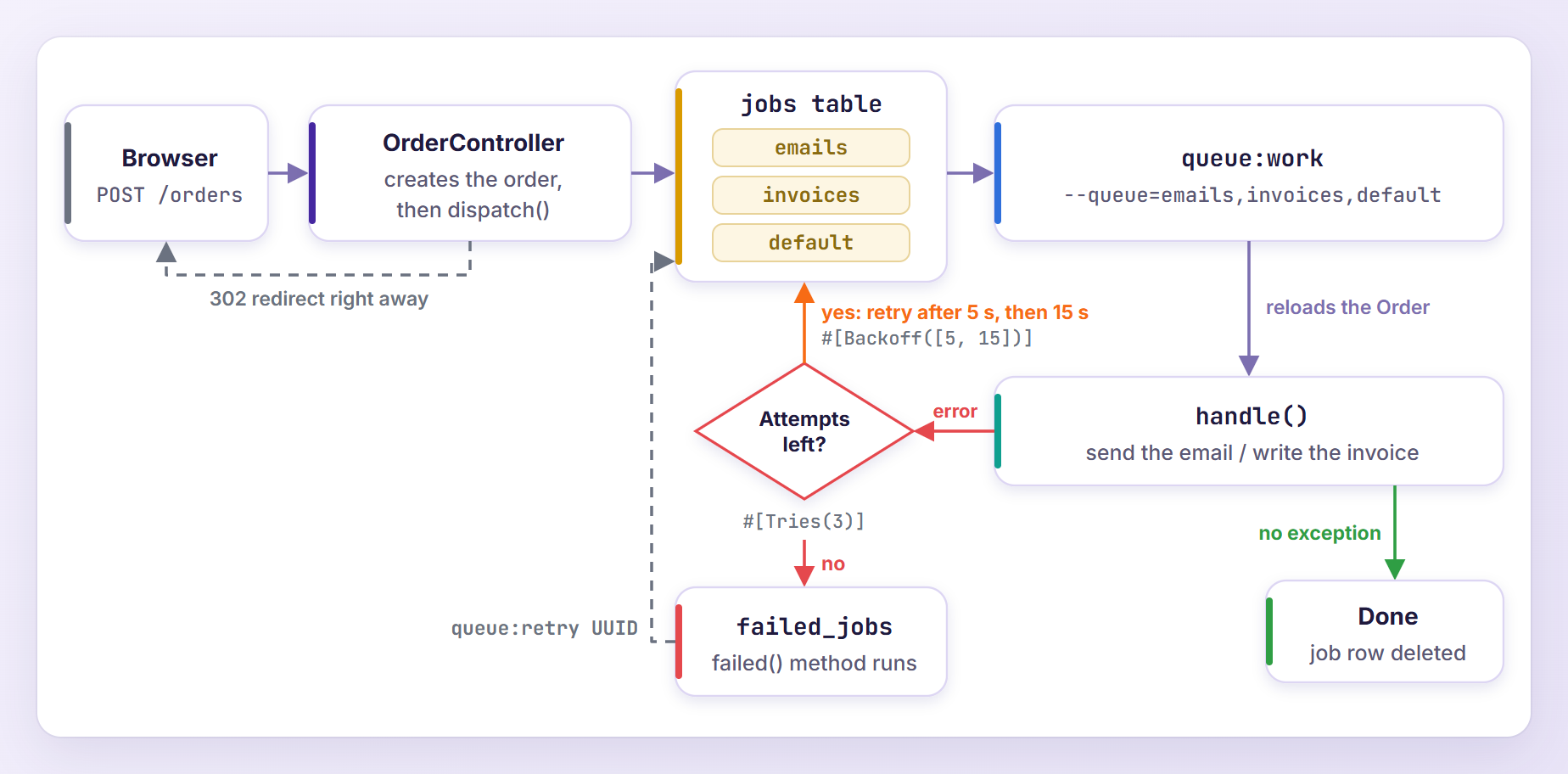
A job is a class with a handle() method that does one piece of work. Dispatching a job serializes it and stores it on a queue, a named list of waiting jobs such as default or emails. Queues live on a connection (a database table, Redis, Amazon SQS). A worker (php artisan queue:work) is a long-running process that runs the queued jobs. When handle() throws an exception, the job goes back on the queue for another attempt; once it is out of attempts, it moves to the failed_jobs table.
Setting Up the Project
Create the app (or run laravel new queue-store with the Laravel installer):
composer create-project laravel/laravel queue-store
cd queue-store
create-project creates an SQLite database and runs the default migrations, so the queue tables already exist.
The Queue Tables and Configuration
Two lines in .env matter here:
QUEUE_CONNECTION=database

MAIL_MAILER=log
New apps use the database queue connection by default, and the log mailer writes emails to storage/logs/laravel.log instead of sending them.
The default migration database/migrations/0001_01_01_000002_create_jobs_table.php creates three tables:
| Table | What it stores |
|---|---|
jobs | Waiting jobs with their queue, attempts and payload |
job_batches | The progress of job batches |
failed_jobs | Jobs that ran out of attempts, with the exception |
Connections live in config/queue.php:
'default' => env('QUEUE_CONNECTION', 'database'),

'connections' => [

    'sync' => [
        'driver' => 'sync',
    ],

    'database' => [
        'driver' => 'database',
        'connection' => env('DB_QUEUE_CONNECTION'),
        'table' => env('DB_QUEUE_TABLE', 'jobs'),
        'queue' => env('DB_QUEUE', 'default'),
        'retry_after' => (int) env('DB_QUEUE_RETRY_AFTER', 90),
        'after_commit' => false,
    ],

    // ...
],
The database connection keeps jobs in the jobs table on the default queue (we will meet retry_after again in production). The sync driver runs jobs immediately inside the request, which helps when debugging and is what phpunit.xml uses for tests.
Building the Store
The Order Model
Generate the model with a migration and a factory:
php artisan make:model Order -mf
In the new migration, define the columns:
Schema::create('orders', function (Blueprint $table) {
    $table->id();
    $table->string('customer_name');
    $table->string('customer_email');
    $table->decimal('total', 10, 2);
    $table->string('invoice_path')->nullable();
    $table->timestamps();
});
Update app/Models/Order.php:
<?php

namespace App\Models;

use Illuminate\Database\Eloquent\Attributes\Fillable;
use Illuminate\Database\Eloquent\Factories\HasFactory;
use Illuminate\Database\Eloquent\Model;

#[Fillable(['customer_name', 'customer_email', 'total', 'invoice_path'])]
class Order extends Model
{
    /** @use HasFactory<\Database\Factories\OrderFactory> */
    use HasFactory;

    /**
     * Get the attributes that should be cast.
     *
     * @return array<string, string>
     */
    protected function casts(): array
    {
        return [
            'total' => 'decimal:2',
        ];
    }
}
Fill in definition() in database/factories/OrderFactory.php for the tests:
public function definition(): array
{
    return [
        'customer_name' => fake()->name(),
        'customer_email' => fake()->safeEmail(),
        'total' => fake()->randomFloat(2, 10, 300),
    ];
}
Then run the migration:
php artisan migrate
The Confirmation Email
Create a Markdown mailable:
php artisan make:mail OrderConfirmed --markdown=mail.orders.confirmed
Replace app/Mail/OrderConfirmed.php with this:
<?php

namespace App\Mail;

use App\Models\Order;
use Illuminate\Bus\Queueable;
use Illuminate\Mail\Mailable;
use Illuminate\Mail\Mailables\Attachment;
use Illuminate\Mail\Mailables\Content;
use Illuminate\Mail\Mailables\Envelope;
use Illuminate\Queue\SerializesModels;

class OrderConfirmed extends Mailable
{
    use Queueable, SerializesModels;

    /**
     * Create a new message instance.
     */
    public function __construct(
        public Order $order,
    ) {}

    /**
     * Get the message envelope.
     */
    public function envelope(): Envelope
    {
        return new Envelope(
            subject: "Order #{$this->order->id} confirmed",
        );
    }

    /**
     * Get the message content definition.
     */
    public function content(): Content
    {
        return new Content(
            markdown: 'mail.orders.confirmed',
        );
    }

    /**
     * Get the attachments for the message.
     *
     * @return array<int, Attachment>
     */
    public function attachments(): array
    {
        if (! $this->order->invoice_path) {
            return [];
        }

        return [
            Attachment::fromStorage($this->order->invoice_path),
        ];
    }
}
And resources/views/mail/orders/confirmed.blade.php:
<x-mail::message>
# Thanks for your order, {{ $order->customer_name }}

We received order **#{{ $order->id }}** for **${{ $order->total }}**.
We will let you know as soon as it ships.

Thanks,<br>
{{ config('app.name') }}
</x-mail::message>
attachments() only adds the invoice if it already exists when the email is sent, so the order of the jobs matters.
Creating Your First Job
Generate the email job:
php artisan make:job SendOrderConfirmation
Laravel 13 creates app/Jobs/SendOrderConfirmation.php from this stub:
<?php

namespace App\Jobs;

use Illuminate\Contracts\Queue\ShouldQueue;
use Illuminate\Foundation\Queue\Queueable;

class SendOrderConfirmation implements ShouldQueue
{
    use Queueable;

    /**
     * Create a new job instance.
     */
    public function __construct()
    {
        //
    }

    /**
     * Execute the job.
     */
    public function handle(): void
    {
        //
    }
}
The ShouldQueue interface tells Laravel to queue the job instead of running it right away. The Queueable trait from Illuminate\Foundation\Queue bundles the four traits older versions listed separately: Dispatchable, InteractsWithQueue, the bus Queueable (for onQueue() and delay()) and SerializesModels. Fill in the job:
<?php

namespace App\Jobs;

use App\Mail\OrderConfirmed;
use App\Models\Order;
use Illuminate\Contracts\Queue\ShouldQueue;
use Illuminate\Foundation\Queue\Queueable;
use Illuminate\Support\Facades\Mail;

class SendOrderConfirmation implements ShouldQueue
{
    use Queueable;

    /**
     * Create a new job instance.
     */
    public function __construct(
        public Order $order,
    ) {}

    /**
     * Execute the job.
     */
    public function handle(): void
    {
        Mail::to($this->order->customer_email)
            ->send(new OrderConfirmed($this->order));
    }
}
Then generate the invoice job and fill it in:
php artisan make:job GenerateInvoice
<?php

namespace App\Jobs;

use App\Models\Order;
use Illuminate\Contracts\Queue\ShouldQueue;
use Illuminate\Foundation\Queue\Queueable;
use Illuminate\Support\Facades\Storage;

class GenerateInvoice implements ShouldQueue
{
    use Queueable;

    /**
     * Create a new job instance.
     */
    public function __construct(
        public Order $order,
    ) {}

    /**
     * Execute the job.
     */
    public function handle(): void
    {
        $path = "invoices/invoice-{$this->order->id}.txt";

        Storage::put($path, implode(PHP_EOL, [
            "INVOICE #{$this->order->id}",
            'Date: '.$this->order->created_at->toDateString(),
            "Bill to: {$this->order->customer_name} <{$this->order->customer_email}>",
            "Total: \${$this->order->total}",
        ]));

        $this->order->update(['invoice_path' => $path]);
    }
}
The invoice is a plain text file on the local disk (storage/app/private) to avoid extra packages; a real store would render a PDF here.
How Models Travel Through the Queue
Both jobs receive the order through constructor property promotion, yet SerializesModels stores only a reference. Here is the serialized job from a real row in the jobs table:
O:30:"App\Jobs\SendOrderConfirmation":1:{s:5:"order";O:45:"Illuminate\Contracts\Database\ModelIdentifier":5:{s:5:"class";s:16:"App\Models\Order";s:2:"id";i:1;s:9:"relations";a:0:{}s:10:"connection";s:6:"sqlite";s:15:"collectionClass";N;}}
Only the model class and ID travel. When the worker runs the job, Laravel loads a fresh copy of order #1, so payloads stay small and the job always sees current data.
Dispatching Jobs From a Controller
Create the controller:
php artisan make:controller OrderController
Fill in app/Http/Controllers/OrderController.php:
<?php

namespace App\Http\Controllers;

use App\Jobs\GenerateInvoice;
use App\Jobs\SendOrderConfirmation;
use App\Models\Order;
use Illuminate\Http\RedirectResponse;
use Illuminate\Http\Request;
use Illuminate\View\View;

class OrderController extends Controller
{
    /**
     * Show the checkout form.
     */
    public function create(): View
    {
        return view('checkout');
    }

    /**
     * Place a new order.
     */
    public function store(Request $request): RedirectResponse
    {
        $validated = $request->validate([
            'customer_name' => ['required', 'string', 'max:255'],
            'customer_email' => ['required', 'email'],
            'total' => ['required', 'numeric', 'min:0'],
        ]);

        $order = Order::create($validated);

        SendOrderConfirmation::dispatch($order);
        GenerateInvoice::dispatch($order);

        return redirect()
            ->route('checkout')
            ->with('status', "Order #{$order->id} placed. Check your inbox for the confirmation.");
    }
}
Add the routes to routes/web.php:
use App\Http\Controllers\OrderController;

Route::get('/checkout', [OrderController::class, 'create'])->name('checkout');
Route::post('/orders', [OrderController::class, 'store'])->name('orders.store');
And a minimal form in resources/views/checkout.blade.php:
<!DOCTYPE html>
<html lang="en">
<head>
    <meta charset="utf-8">
    <title>Checkout</title>
</head>
<body>
    <h1>Checkout</h1>

    @if (session('status'))
        <p>{{ session('status') }}</p>
    @endif

    <form method="POST" action="{{ route('orders.store') }}">
        @csrf
        <p><label>Name <input name="customer_name" required></label></p>
        <p><label>Email <input name="customer_email" type="email" required></label></p>
        <p><label>Total <input name="total" type="number" step="0.01" value="49.99" required></label></p>
        <button type="submit">Place order</button>
    </form>
</body>
</html>
Each dispatch() call serializes a job, inserts a row into the jobs table and returns, so the redirect comes back right away. (In a real store, the total would come from the cart.)
To measure the difference, I pointed the mailer at a stopped SMTP server and placed an order. With QUEUE_CONNECTION=sync, the checkout took 5.9 seconds and ended on a 500 error page, although the order was saved. With the database queue, it redirected in 0.6 seconds while the email waited in the queue.
Other Ways to Dispatch a Job
Other dispatch methods you will use:
// Wait at least 10 minutes before running it
GenerateInvoice::dispatch($order)->delay(now()->plus(minutes: 10));

// Put it on a specific queue
SendOrderConfirmation::dispatch($order)->onQueue('emails');

// Run it right now, in this process, without a worker
GenerateInvoice::dispatchSync($order);

// Run it in this process, after the response has been sent
SendOrderConfirmation::dispatchAfterResponse($order);

// Only queue it when the condition is true (no invoice for free orders)
GenerateInvoice::dispatchIf($order->total > 0, $order);
A delayed job waits in the jobs table until its available_at time. dispatchSync() skips the queue entirely. dispatchAfterResponse() needs no worker either: with PHP-FPM the browser gets the page first and the job runs afterwards in the same process, so keep it for jobs that take about a second. The Laravel 13 docs describe the same idea as the deferred connection (->onConnection('deferred')).
Running the Queue Worker
Start the app, then the worker in a second terminal:
php artisan serve
php artisan queue:work
Open http://127.0.0.1:8000/checkout, place an order, and watch the worker:
  2026-10-25 07:02:31 App\Jobs\SendOrderConfirmation ..................................... RUNNING
  2026-10-25 07:02:31 App\Jobs\SendOrderConfirmation ............................... 199.34ms DONE
  2026-10-25 07:02:31 App\Jobs\GenerateInvoice ........................................... RUNNING
  2026-10-25 07:02:31 App\Jobs\GenerateInvoice ...................................... 26.84ms DONE
Each job prints RUNNING when it starts and DONE with its run time. The email is in storage/logs/laravel.log (Subject: Order #1 confirmed) and the invoice in storage/app/private/invoices/invoice-1.txt:
INVOICE #1
Date: 2026-10-25
Bill to: Sarah Khan <sarah@example.com>
Total: $49.99
Notice the order, though: the email ran before the invoice existed, so it went out without the attachment. A chain will fix that.
The worker boots Laravel once and keeps your code in memory: fast, but blind to code changes until restarted. While developing, php artisan queue:listen starts a fresh process per job (it runs queue:work --once), so it always runs your latest code, only slower. In production, use queue:work.
Retries, Backoff and Failed Jobs
By default a job gets one attempt, so a single mail server hiccup sends it straight to failed_jobs. Laravel 13 lets you configure retries with PHP attributes. Update app/Jobs/SendOrderConfirmation.php (the constructor and handle() stay as they are):
use Illuminate\Queue\Attributes\Backoff;
use Illuminate\Queue\Attributes\Timeout;
use Illuminate\Queue\Attributes\Tries;
use Illuminate\Support\Facades\Log;
use Throwable;

#[Tries(3)]
#[Backoff([5, 15])]
#[Timeout(30)]
class SendOrderConfirmation implements ShouldQueue
{
    // ...

    /**
     * Handle a job failure.
     */
    public function failed(?Throwable $exception): void
    {
        Log::error("Order #{$this->order->id}: confirmation email was not sent.", [
            'error' => $exception?->getMessage(),
        ]);
    }
}
#[Tries(3)]allows three attempts and overrides the worker’s--triesoption, which defaults to 1.#[Backoff([5, 15])]waits 5 seconds before the second attempt and 15 before the third (#[Backoff(10)]would always wait 10). Production values are usually longer.#[Timeout(30)]caps one attempt at 30 seconds.failed()runs once, after the last attempt. Laravel calls it on a fresh job instance, so anything you set duringhandle()is gone.
The attributes are new in Laravel 13. The classic properties still work and produce the same job payload:
public $tries = 3;

public $backoff = [5, 15];

public $timeout = 30;
Watching a Job Fail and Retry
Let’s break the mail server. The default MAIL_HOST and MAIL_PORT point at 127.0.0.1:2525, where usually nothing listens, so switch the mailer in .env:
MAIL_MAILER=smtp
Restart the worker so it reads the change, then place an order:
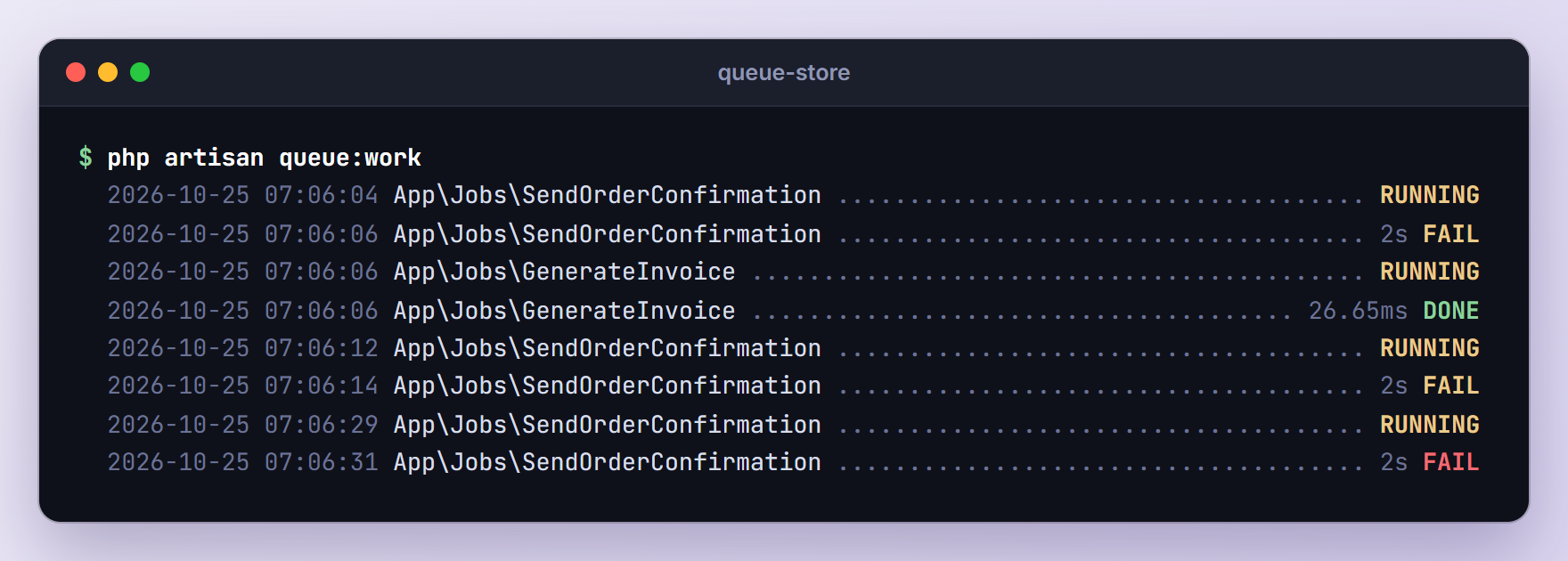
Each attempt took two seconds, the time Windows needed to refuse the connection. A yellow FAIL means the job was released for another try (the invoice job ran in between). The two retries started 6 and 15 seconds after the previous failure: the backoff plus the worker’s polling. The red FAIL means no attempts are left, so the job moved to failed_jobs and failed() logged:
[2026-10-25 07:06:31] local.ERROR: Order #5: confirmation email was not sent. {"error":"Connection could not be established with host \"127.0.0.1:2525\": stream_socket_client(): Unable to connect to 127.0.0.1:2525 (No connection could be made because the target machine actively refused it)"}
Inspecting and Retrying Failed Jobs
List the failed jobs:
php artisan queue:failed
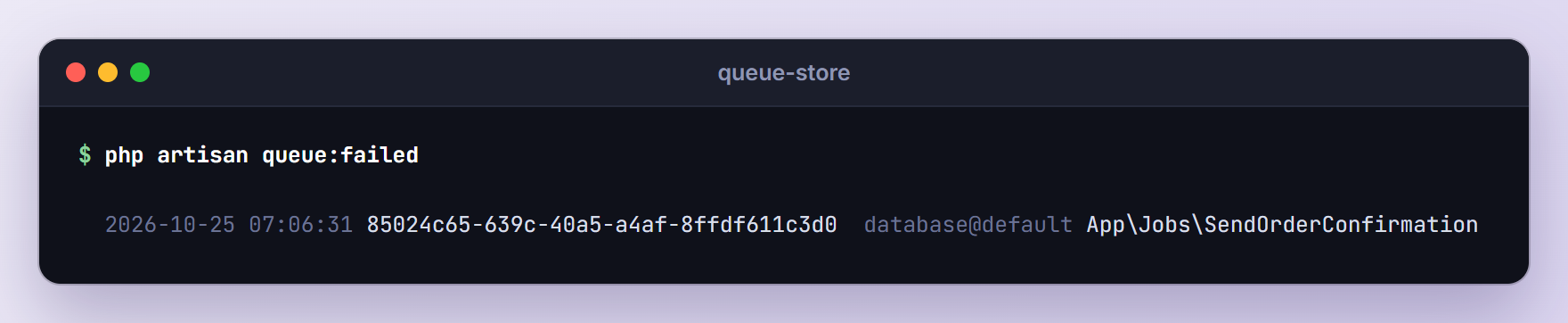
You get the failure time, the UUID, connection@queue and the job class. The full exception is stored in the failed_jobs table.
Set MAIL_MAILER=log again and restart the worker before retrying. I skipped the restart on purpose at first: the running worker still used SMTP, and the retried job failed three more times. After a restart, it went through:
php artisan queue:retry 85024c65-639c-40a5-a4af-8ffdf611c3d0
   INFO  Pushing failed queue jobs back onto the queue.

  85024c65-639c-40a5-a4af-8ffdf611c3d0 .............................................. 34.17ms DONE
The other failed-job commands (use the UUIDs from your own list):
# Retry every failed job
php artisan queue:retry all

# Delete one failed job
php artisan queue:forget 85024c65-639c-40a5-a4af-8ffdf611c3d0

# Delete all failed jobs
php artisan queue:flush
Failing Fast on Timeouts
A timeout in the invoice job means something is stuck, and retrying will not help. Add both attributes, imported from Illuminate\Queue\Attributes, above the GenerateInvoice class:
#[Timeout(60)]
#[FailOnTimeout]
class GenerateInvoice implements ShouldQueue
A timed-out attempt is normally retried if attempts remain. With #[FailOnTimeout], the job fails on its first timeout.
Note: Timeouts need the pcntl PHP extension, which does not work on Windows, so the worker cannot enforce #[Timeout] or --timeout there. Test timeout behavior on Linux or macOS.
Routing Jobs to Their Own Queues
Separate queues let you prioritize and scale each kind of job. Instead of adding ->onQueue() to every dispatch, Laravel 13 lets you route a job class to a queue once, in the boot() method of app/Providers/AppServiceProvider.php:
use App\Jobs\GenerateInvoice;
use App\Jobs\SendOrderConfirmation;
use Illuminate\Support\Facades\Queue;

public function boot(): void
{
    Queue::route(SendOrderConfirmation::class, queue: 'emails');
    Queue::route(GenerateInvoice::class, queue: 'invoices');
}
New jobs now land on the emails and invoices queues, and a per-dispatch onQueue() still wins. Stick to named arguments: positionally, the second argument is the queue and the third the connection.
You can pin a connection too:
Queue::route(GenerateInvoice::class, connection: 'database', queue: 'invoices');
A pinned connection overrides QUEUE_CONNECTION: with sync, the email ran inside the request but the invoice still went to the jobs table. That helps for jobs that must always use Redis, but it can surprise you while debugging with sync.
Processing Queues by Priority
A plain php artisan queue:work only watches the default queue, so list the queues in priority order:
php artisan queue:work --queue=emails,invoices,default
The worker always takes the next job from the first queue that has one. With three orders waiting, all three emails ran before any invoice (RUNNING lines removed):
  2026-10-25 07:12:07 App\Jobs\SendOrderConfirmation ............................... 138.10ms DONE
  2026-10-25 07:12:07 App\Jobs\SendOrderConfirmation ................................ 19.37ms DONE
  2026-10-25 07:12:07 App\Jobs\SendOrderConfirmation ................................ 17.30ms DONE
  2026-10-25 07:12:07 App\Jobs\GenerateInvoice ...................................... 26.74ms DONE
  2026-10-25 07:12:07 App\Jobs\GenerateInvoice ...................................... 15.47ms DONE
  2026-10-25 07:12:07 App\Jobs\GenerateInvoice ...................................... 14.79ms DONE
To keep a busy queue from starving the others, run one worker per queue.
Chaining Jobs
The email must wait until the invoice exists. A chain runs jobs in sequence and stops if one fails. In app/Http/Controllers/OrderController.php, import Illuminate\Support\Facades\Bus and replace the two dispatch lines:
Bus::chain([
    new GenerateInvoice($order),
    new SendOrderConfirmation($order),
])->dispatch();
Only the first job is queued. When it finishes, Laravel dispatches the next one, still following our routes:
  2026-10-25 07:12:51 App\Jobs\GenerateInvoice ........................................... RUNNING
  2026-10-25 07:12:51 App\Jobs\GenerateInvoice ...................................... 67.25ms DONE
  2026-10-25 07:12:51 App\Jobs\SendOrderConfirmation ..................................... RUNNING
  2026-10-25 07:12:51 App\Jobs\SendOrderConfirmation ............................... 129.14ms DONE
This time the logged email contains Content-Disposition: attachment; name=invoice-12.txt; filename=invoice-12.txt, because the email job reloaded the order and saw the saved invoice_path. A catch() callback on the chain handles failures.
Batching Jobs With Progress Tracking
Batches run many independent jobs and report when all of them are done, for example to regenerate every invoice after a redesign. Add the Illuminate\Bus\Batchable trait to GenerateInvoice and skip the work if the batch was cancelled:
use Batchable, Queueable;

// ...

public function handle(): void
{
    if ($this->batch()?->cancelled()) {
        return;
    }

    // ... write the invoice as before
}
The nullsafe ?-> is needed because the job also runs outside batches, where batch() returns null.
Add the imports at the top of routes/console.php and the command at the bottom:
use App\Jobs\GenerateInvoice;
use App\Models\Order;
use Illuminate\Bus\Batch;
use Illuminate\Support\Facades\Bus;
use Illuminate\Support\Facades\Log;

Artisan::command('invoices:regenerate', function () {
    $jobs = Order::all()->map(fn (Order $order) => new GenerateInvoice($order));

    $batch = Bus::batch($jobs)
        ->name('Regenerate invoices')
        ->onQueue('invoices')
        ->then(fn (Batch $batch) => Log::info("All {$batch->totalJobs} invoices were regenerated."))
        ->catch(fn (Batch $batch, Throwable $e) => Log::error("Invoice batch failed: {$e->getMessage()}"))
        ->finally(fn (Batch $batch) => Log::info("Invoice batch {$batch->id} finished."))
        ->dispatch();

    $this->info("Batch {$batch->id} queued with {$batch->totalJobs} jobs.");
})->purpose('Regenerate the invoice of every order in one batch');
then() runs when every job succeeded, catch() on the first failure, and finally() when the batch is done either way. The callbacks are serialized and run later by a worker, so never use $this inside them. onQueue('invoices') is required because queue routes do not apply to batched jobs; without it, my batch went to default.
Run it:
php artisan invoices:regenerate
Batch a3107f0d-09d3-4b70-8d75-a3c9016c9b59 queued with 10 jobs.
To check the progress, add a route to routes/web.php (protect it with authentication in a real app):
use Illuminate\Support\Facades\Bus;

Route::get('/batches/{batchId}', function (string $batchId) {
    return Bus::findBatch($batchId);
});
Before the worker ran, /batches/a3107f0d-09d3-4b70-8d75-a3c9016c9b59 showed "progress":0. Afterwards it returned:
{
    "id": "a3107f0d-09d3-4b70-8d75-a3c9016c9b59",
    "name": "Regenerate invoices",
    "totalJobs": 10,
    "pendingJobs": 0,
    "processedJobs": 10,
    "progress": 100,
    "failedJobs": 0,
    "options": {
        "queue": "invoices",
        "then": [
            {}
        ],
        "catch": [
            {}
        ],
        "finally": [
            {}
        ]
    },
    "createdAt": "2026-10-25T07:14:23.000000Z",
    "cancelledAt": null,
    "finishedAt": "2026-10-25T07:14:36.000000Z"
}
The then() and finally() callbacks logged:
[2026-10-25 07:14:36] local.INFO: All 10 invoices were regenerated.
[2026-10-25 07:14:36] local.INFO: Invoice batch a3107f0d-09d3-4b70-8d75-a3c9016c9b59 finished.
One failure cancels the batch by default. When I broke one order’s data, catch() and finally() fired, then() did not, and the remaining jobs returned early. Call allowFailures() on the batch if one bad record should not stop the rest.
Unique Jobs and Job Middleware
Unique Jobs
A “Resend confirmation” button will get clicked five times. ShouldBeUnique stops duplicate jobs from being queued. Add the interface, a #[UniqueFor(600)] attribute (from Illuminate\Queue\Attributes) and a uniqueId() method to app/Jobs/SendOrderConfirmation.php:
use Illuminate\Contracts\Queue\ShouldBeUnique;

class SendOrderConfirmation implements ShouldBeUnique, ShouldQueue
{
    // ...

    /**
     * Get the unique ID for the job.
     */
    public function uniqueId(): string
    {
        return (string) $this->order->id;
    }
}
Dispatching takes a cache lock named after the class and uniqueId(), so while it exists the same order cannot be queued again (two dispatches for order #2 and one for order #3 gave exactly two jobs). The lock goes away when the job finishes or finally fails, or after the 600 seconds of #[UniqueFor].
Job Middleware
Job middleware wraps handle() the way route middleware wraps a controller. WithoutOverlapping stops two workers (say, a new order and the batch) from writing the same invoice at once. Add this method to GenerateInvoice and import Illuminate\Queue\Middleware\WithoutOverlapping:
/**
 * Get the middleware the job should pass through.
 *
 * @return array<int, object>
 */
public function middleware(): array
{
    return [
        (new WithoutOverlapping($this->order->id))->dontRelease()->expireAfter(120),
    ];
}
The lock is keyed by the order ID: dontRelease() drops an overlapping copy instead of re-queuing it, and expireAfter(120) frees the lock if a worker dies. With the lock held by hand, the job finished without touching the file.
Running Queues in Production
Keeping Workers Alive With Supervisor
In production, workers must run all the time and come back when they stop. On Linux, use Supervisor (sudo apt-get install supervisor on Ubuntu). This config, adapted from the Laravel queue docs, goes in /etc/supervisor/conf.d/queue-store-worker.conf:
[program:queue-store-worker]
process_name=%(program_name)s_%(process_num)02d
command=php /var/www/queue-store/artisan queue:work --queue=emails,invoices,default --sleep=3 --tries=3 --max-time=3600
autostart=true
autorestart=true
stopasgroup=true
killasgroup=true
user=www-data
numprocs=2
redirect_stderr=true
stdout_logfile=/var/www/queue-store/storage/logs/worker.log
stopwaitsecs=3600
Load it and start the workers:
sudo supervisorctl reread
sudo supervisorctl update
sudo supervisorctl start "queue-store-worker:*"
numprocs=2 runs two workers. Keep stopwaitsecs above the run time of your slowest job.
Restarting Workers on Every Deploy
Workers keep the old code in memory, so end every deploy with:
php artisan queue:restart
The restart signal is stored in the cache. Each worker finishes its current job, prints Worker STOPPED Received restart signal and exits, and Supervisor starts a fresh one.
Worker Options and retry_after
| Option | Default | What it does |
|---|---|---|
--tries | 1 | Attempts per job, unless the job sets #[Tries] |
--timeout | 60 | Seconds one attempt may run (needs pcntl) |
--memory | 128 | Megabytes before the worker exits |
--max-jobs | 0 (off) | Jobs to process before exiting |
--max-time | 0 (off) | Seconds to run before exiting |
retry_after (90 seconds for the database connection) is how long a job may stay reserved before the queue hands it to another worker. Keep every timeout a few seconds below it: with DB_QUEUE_RETRY_AFTER=3, two workers and an 8 second job, both workers ran the same job.
Redis and Horizon
For high volume, switch to Redis (configure it in config/database.php, then set QUEUE_CONNECTION=redis) and consider Laravel Horizon, a dashboard and configuration system for Redis queues.
Testing Queued Jobs
Fakes let you assert what was dispatched without running anything, and calling handle() directly tests what a job does. Create a feature test:
php artisan make:test OrderQueueTest
Replace the contents of tests/Feature/OrderQueueTest.php:
<?php

namespace Tests\Feature;

use App\Jobs\GenerateInvoice;
use App\Jobs\SendOrderConfirmation;
use App\Mail\OrderConfirmed;
use App\Models\Order;
use Illuminate\Bus\PendingBatch;
use Illuminate\Foundation\Testing\RefreshDatabase;
use Illuminate\Support\Facades\Bus;
use Illuminate\Support\Facades\Mail;
use Illuminate\Support\Facades\Queue;
use Illuminate\Support\Facades\Storage;
use Tests\TestCase;

class OrderQueueTest extends TestCase
{
    use RefreshDatabase;

    public function test_placing_an_order_chains_the_invoice_and_the_email(): void
    {
        Bus::fake();

        $this->post('/orders', [
            'customer_name' => 'Sarah Khan',
            'customer_email' => 'sarah@example.com',
            'total' => 49.99,
        ])->assertRedirect('/checkout');

        Bus::assertChained([
            GenerateInvoice::class,
            SendOrderConfirmation::class,
        ]);
    }

    public function test_the_invoice_job_is_routed_to_the_invoices_queue(): void
    {
        Queue::fake();

        $this->post('/orders', [
            'customer_name' => 'Sarah Khan',
            'customer_email' => 'sarah@example.com',
            'total' => 49.99,
        ]);

        Queue::assertPushedOn('invoices', GenerateInvoice::class);
    }

    public function test_only_one_confirmation_is_queued_per_order(): void
    {
        Queue::fake();

        $order = Order::factory()->create();

        SendOrderConfirmation::dispatch($order);
        SendOrderConfirmation::dispatch($order);

        Queue::assertPushedOn('emails', SendOrderConfirmation::class);
        Queue::assertPushedTimes(SendOrderConfirmation::class, 1);
    }

    public function test_the_invoice_is_written_to_storage(): void
    {
        Storage::fake();

        $order = Order::factory()->create();

        (new GenerateInvoice($order))->handle();

        Storage::assertExists("invoices/invoice-{$order->id}.txt");
        $this->assertSame("invoices/invoice-{$order->id}.txt", $order->fresh()->invoice_path);
    }

    public function test_the_confirmation_email_is_sent_to_the_customer(): void
    {
        Mail::fake();

        $order = Order::factory()->create();

        (new SendOrderConfirmation($order))->handle();

        Mail::assertSent(OrderConfirmed::class, function (OrderConfirmed $mail) use ($order) {
            return $mail->hasTo($order->customer_email);
        });
    }

    public function test_regenerating_invoices_dispatches_a_batch(): void
    {
        Bus::fake();

        Order::factory()->count(3)->create();

        $this->artisan('invoices:regenerate')->assertSuccessful();

        Bus::assertBatched(function (PendingBatch $batch) {
            return $batch->name === 'Regenerate invoices'
                && $batch->jobs->count() === 3;
        });
    }
}
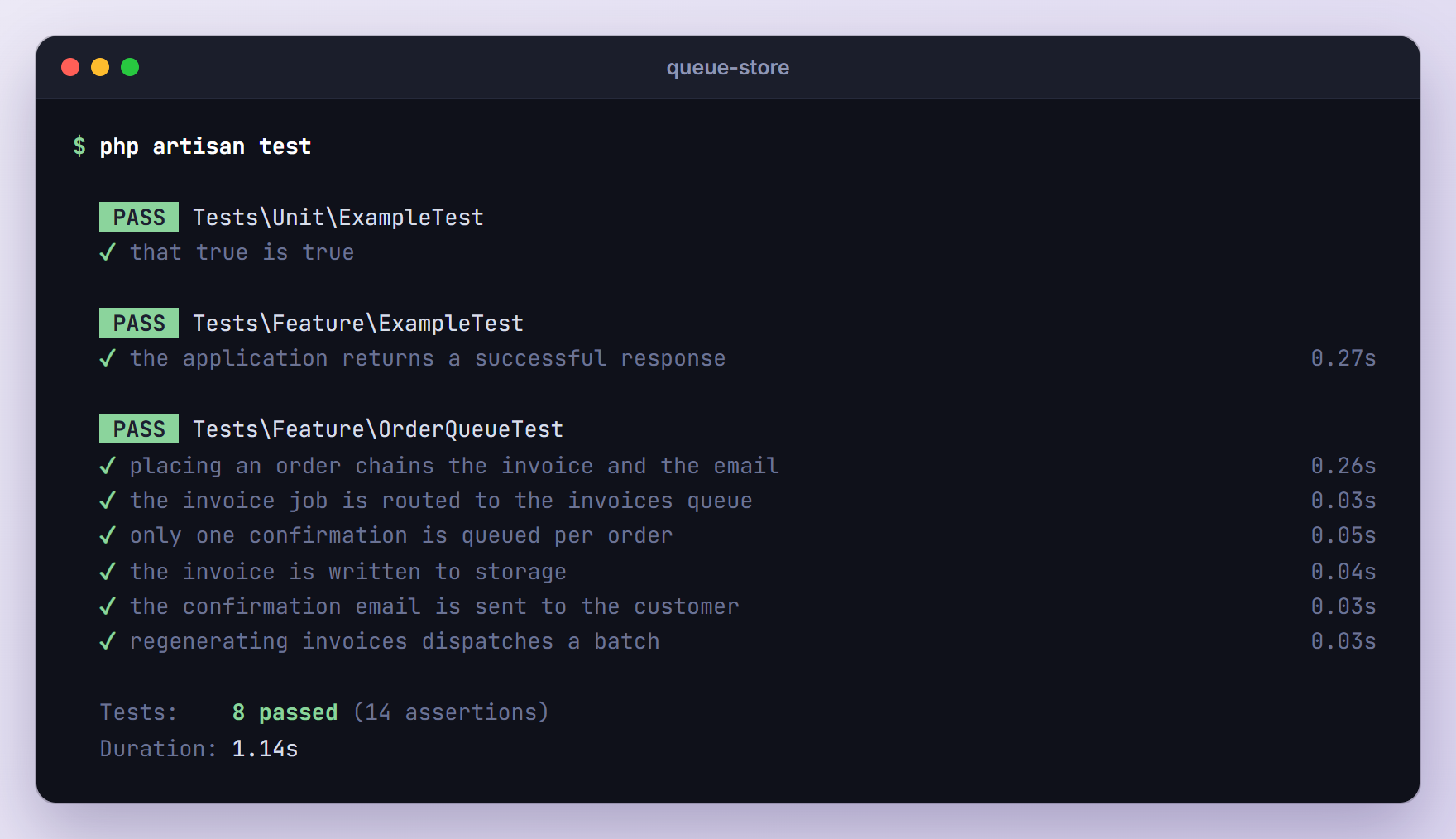
Bus::fake() records dispatches for assertChained() and assertBatched(). Queue::fake() works at the queue level: assertPushedOn() proves the routes and assertPushedTimes() the unique lock. Storage::fake() and Mail::fake() keep the handle() tests off the real disk and mailer. Run the suite:
php artisan test
Troubleshooting
Jobs Pile Up in the Database and Never Run
No worker is running, or it listens to the wrong queues. Without --queue, a worker only processes default; with our routes in place, php artisan queue:work --stop-when-empty printed Worker STOPPED Queue empty while two jobs waited. List every queue in --queue.
Jobs Run Instantly and Nothing Is Queued
QUEUE_CONNECTION is set to sync. Change it to database. If editing .env changes nothing, your configuration is cached; run php artisan config:clear.
The Worker Ignores Your Code or .env Changes
Workers keep the code and configuration they booted with, which is why our retried email failed again. Run php artisan queue:restart after every change, or use queue:listen while developing.
No Query Results for Model [App\Models\Order]
The model was deleted after the job was queued, so the worker cannot load it and the job fails at once, without retries. queue:retry throws the same error, so remove such jobs with queue:forget. If a missing model means there is nothing left to do, add #[DeleteWhenMissingModels] to the job: after I deleted an order, the email job failed but the invoice job, which had the attribute, was quietly discarded.
The same error appears when a worker picks up a job dispatched inside a transaction that has not committed yet. Chain ->afterCommit() onto the dispatch.
A Job Runs Twice or Fails With “Has Been Attempted Too Many Times”
The job ran longer than retry_after, so the queue gave it to a second worker. With several tries it runs twice; with one try, the second worker fails it with MaxAttemptsExceededException while the first one finishes it. Set retry_after above your longest job and --timeout below it.
The Worker’s Memory Keeps Growing
Workers do not reboot Laravel between jobs, so leaks add up. Besides --memory (128 MB by default), use --max-jobs or --max-time so Supervisor regularly starts a fresh process. With --max-jobs=2, my worker stopped with Worker STOPPED Maximum jobs exceeded.
Upgrading From Older Laravel Versions
If you learned queues on Laravel 5.x to 10:
- Jobs use one trait. Since Laravel 11,
make:jobgeneratesuse Queueable;fromIlluminate\Foundation\Queueinstead ofuse Dispatchable, InteractsWithQueue, Queueable, SerializesModels;, which still works. - New apps default to the database driver and ship all three queue tables, while Laravel 10 defaulted to
syncand shipped onlyfailed_jobs.queue:tableis nowmake:queue-table(the old name still works), alongsidemake:queue-failed-tableandmake:queue-batches-table. - Laravel 13 adds the queue attributes and
Queue::route(). The$tries,$backoffand$timeoutproperties keep working. - Without app/Console/Kernel.php, schedule housekeeping such as
queue:prune-batchesin routes/console.php.
Frequently Asked Questions
Do I Need Redis to Use Laravel Queues?
No. The database driver that new apps use by default handles a good amount of work and needs nothing beyond the database you already have. Move to Redis when you process many jobs per second or want Horizon’s dashboard. Your job classes stay the same; only QUEUE_CONNECTION, the Redis settings and the worker commands change.
Should I Queue the Mailable or Wrap It in a Job?
Both work. Mail::to($order->customer_email)->queue(new OrderConfirmed($order)), or a mailable that implements ShouldQueue, queues the email without a job class. A dedicated job is better when sending is one step of a bigger flow, like our chain, or when you want retries and a failed() handler in one place. Notifications, like those in our Telegram notifications tutorial, can be queued with ShouldQueue too.
Can I Run Queue Workers on Shared Hosting Without Supervisor?
Yes, if you can add a cron entry. In routes/console.php, start a worker from the scheduler every minute and let it exit when the queues are empty:
use Illuminate\Support\Facades\Schedule;

Schedule::command('queue:work --queue=emails,invoices,default --stop-when-empty')
    ->everyMinute()
    ->withoutOverlapping();
Then add the scheduler’s cron entry as shown in our task scheduling guide. Keep the --queue list: my first attempt without it left the invoice job untouched.
What Happens to a Job if the Worker Crashes?
The job stays reserved in the jobs table until retry_after (90 seconds by default) has passed; then another worker picks it up and counts a new attempt. Make jobs safe to run twice: rewriting an invoice file is harmless, charging a card twice is not, so check whether the work is already done first.
Wrapping Up
We moved the slow part of a checkout into Laravel queues, with retries, a failed() handler, a queue per job, a chain, a batch with progress tracking, tests, and Supervisor workers that queue:restart reloads on every deploy.
Next, move one slow request from your own app into a job. The Laravel 13 queue documentation covers the rest, such as encrypted jobs and rate limiting.
Learn more about Laravel:
